
1. บทนำ
ขอบคุณสำหรับการซื้อasing the radius SOUND BUMP SP-S15BTW Portable Bluetooth Speaker. This manual provides essential information for setting up, operating, and maintaining your speaker. Please read it thoroughly before use to ensure optimal performance and safety.
The SOUND BUMP SP-S15BTW is a compact, versatile portable speaker designed for various audio needs. It features Bluetooth connectivity, microSD card playback, Wide FM radio, and IPX5 water resistance, making it suitable for both indoor and outdoor use.
2. สินค้าหมดview
2.1 เนื้อหาบรรจุภัณฑ์
- radius SOUND BUMP SP-S15BTW Speaker
- สายชาร์จ USB
- สายรัด
- คู่มือการใช้งาน
2.2 ส่วนประกอบและปุ่มควบคุมลำโพง
Familiarize yourself with the speaker's layout:

Image: Side panel with ports (microSD, AUX-IN, USB-C)
- ปุ่มเปิด/ปิด: กดค้างไว้เพื่อเปิดหรือปิดลำโพง
- ปุ่มโหมด (M): Press to switch between Bluetooth, microSD, FM Radio, and AUX modes.
- ปุ่มเล่น/หยุดชั่วคราว (►▮▮): กดเพื่อเล่นหรือหยุดเสียงชั่วคราว ในโหมดการโทร ให้กดเพื่อรับ/วางสาย
- ปุ่มเพิ่มเสียง / ปุ่มเล่นเพลงถัดไป (+): กดสั้นเพื่อเพิ่มระดับเสียง กดยาวเพื่อข้ามไปยังเพลงถัดไป
- ปุ่มลดเสียง / ปุ่มเล่นเพลงก่อนหน้า (-): กดสั้นเพื่อลดระดับเสียง กดยาวเพื่อไปยังเพลงก่อนหน้า
- ช่องเสียบการ์ด microSD: Insert a microSD card for local music playback.
- พอร์ต AUX-IN: เชื่อมต่ออุปกรณ์เสียงภายนอกผ่านสายสัญญาณเสียงขนาด 3.5 มม.
- พอร์ตชาร์จ USB-C: เสียบสาย USB เพื่อชาร์จไฟ
- ไฟแสดงสถานะ LED: แสดงสถานะพลังงาน สถานะการชาร์จ และสถานะการจับคู่บลูทูธ
- การส่องสว่างด้วยไฟ LED: Located on the side, provides visual effects.
3. การตั้งค่า
3.1 การชาร์จเริ่มต้น
Before first use, fully charge the speaker. Connect the provided USB charging cable to the speaker's USB-C port and the other end to a USB power adapter (not included) or a computer's USB port. The LED indicator will show charging status (e.g., red while charging, off when fully charged).
3.2 การเปิด/ปิดเครื่อง
- การเปิดเครื่อง: กดปุ่มเปิด/ปิดค้างไว้ประมาณ 3 วินาที จนกระทั่งไฟแสดงสถานะ LED ติดสว่างและคุณจะได้ยินเสียงเปิดเครื่อง
- วิธีปิดเครื่อง: กดปุ่มเปิด/ปิดค้างไว้ประมาณ 3 วินาที จนกระทั่งไฟ LED ดับลงและคุณจะได้ยินเสียงปิดเครื่อง
4. คู่มือการใช้งาน
4.1 การจับคู่บลูทูธ
- เปิดลำโพง ลำโพงจะเข้าสู่โหมดจับคู่บลูทูธโดยอัตโนมัติ ซึ่งจะแสดงด้วยไฟ LED สีฟ้ากะพริบ
- บนอุปกรณ์ของคุณ (สมาร์ทโฟน แท็บเล็ต ฯลฯ) เปิดใช้งานบลูทูธและค้นหาอุปกรณ์ที่มีอยู่
- Select "SOUND BUMP SP-S15BTW" from the list.
- เมื่อจับคู่เสร็จแล้ว ไฟ LED จะสว่างเป็นสีน้ำเงิน และคุณจะได้ยินเสียงยืนยัน
- หากการจับคู่ล้มเหลว ให้ปิดลำโพงและบลูทูธของอุปกรณ์ จากนั้นทำตามขั้นตอนซ้ำอีกครั้ง
4.2 microSD Card Playback
- Insert a microSD card (up to 128GB, formatted with MP3/WAV files) into the microSD card slot.
- Press the Mode (M) button until the speaker enters microSD mode.
- Music playback will start automatically. Use the Play/Pause, Volume Up/Next Track, and Volume Down/Previous Track buttons to control playback.
4.3 Wide FM Radio

Image: Speaker in an indoor setting, suitable for FM radio
- Press the Mode (M) button until the speaker enters FM Radio mode.
- การสแกนสถานีอัตโนมัติ: Long press the Play/Pause button to automatically scan and save available FM stations. The speaker will then play the first saved station.
- การปรับด้วยตนเอง: กดปุ่มเพิ่มเสียง (+) หรือปุ่มลดเสียง (-) สั้นๆ เพื่อสลับระหว่างสถานีที่บันทึกไว้
Note: As the speaker does not have an external antenna, FM reception may vary depending on location and environment.
4.4 โหมด AUX-IN
- Connect one end of a 3.5mm audio cable (not included) to the speaker's AUX-IN port and the other end to the audio output of your external device.
- Press the Mode (M) button until the speaker enters AUX mode.
- ควบคุมการเล่นและระดับเสียงได้โดยตรงจากอุปกรณ์ภายนอกที่เชื่อมต่ออยู่
ไฟ LED ส่องสว่าง 4.5 ดวง
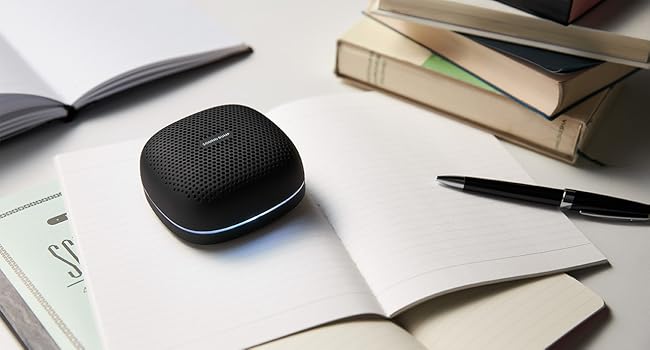
Image: Speakers displaying LED illumination
The speaker features LED illumination with 7 colors and various modes. To change the illumination mode or color, refer to the specific instructions in the full product manual (if available). Typically, a dedicated button or a combination of existing buttons controls this feature.
5. การชาร์จไฟ
When the battery is low, the speaker will indicate this (e.g., flashing red LED, audible prompt). Connect the USB charging cable to the speaker's USB-C port and a power source. The LED indicator will show red during charging and turn off when fully charged. A full charge provides up to 20 hours of continuous playback.

Image: Speaker used outdoors, highlighting long battery life
6. การบำรุงรักษา
- การทำความสะอาด: เช็ดลำโพงด้วยผ้าแห้งนุ่มๆ ห้ามใช้สารทำความสะอาดที่มีฤทธิ์กัดกร่อนหรือตัวทำละลาย
- การกันน้ำ (IPX5): The speaker is IPX5 splash-proof, meaning it can withstand water splashes from any direction. However, it is not designed for submersion. Do not use it in the bath or submerge it in water. Ensure the port cover is securely closed to maintain water resistance.
- พื้นที่จัดเก็บ: เก็บลำโพงไว้ในที่แห้งและเย็น หลีกเลี่ยงแสงแดดโดยตรงและอุณหภูมิที่สูงหรือต่ำเกินไป
- การดูแลแบตเตอรี่ To prolong battery life, charge the speaker periodically even if not in use for extended periods.

Image: Speaker with water droplets, illustrating IPX5 water resistance
7 การแก้ไขปัญหา
| ปัญหา | สาเหตุที่เป็นไปได้ | สารละลาย |
|---|---|---|
| ลําโพงไม่เปิดขึ้น | แบตเตอรี่หมด | ชาร์จลำโพงให้เต็ม |
| ไม่มีเสียง. | ระดับเสียงเบาเกินไป; อุปกรณ์ไม่ได้เชื่อมต่อ; โหมดไม่ถูกต้อง | Increase volume on speaker and connected device. Ensure proper Bluetooth pairing or AUX cable connection. Switch to correct mode (Bluetooth, microSD, AUX, FM). |
| การจับคู่บลูทูธล้มเหลว | ลำโพงไม่ได้อยู่ในโหมดจับคู่; บลูทูธของอุปกรณ์ปิดอยู่; อยู่ห่างจากอุปกรณ์มากเกินไป | Ensure speaker is in pairing mode (flashing blue LED). Turn on Bluetooth on your device. Move speaker closer to your device (within 10 meters). |
| การรับสัญญาณวิทยุ FM ไม่ดี | Environmental interference; weak signal. | Move the speaker to a different location. Perform an automatic station scan again. |
| Audio/video synchronization issues (Bluetooth). | Bluetooth latency. | Bluetooth audio can have latency. For critical synchronization, use the AUX-IN connection if your device supports it. Some apps may offer audio delay compensation. |
8. ข้อมูลจำเพาะ
- แบบอย่าง: SP-S15BTW
- ยี่ห้อ: รัศมี
- การเชื่อมต่อ: Bluetooth, USB (for charging), AUX-IN (3.5mm), microSD
- เทคโนโลยีไร้สาย: บลูทูธ
- ประเภทลำโพง: Outdoor / Portable
- เส้นผ่านศูนย์กลางวูฟเฟอร์: 66 มม.
- ความต้านทานน้ำ: IPX5 (กันน้ำกระเด็น)
- เวลาเล่นต่อเนื่อง: นานถึง 20 ชั่วโมง
- microSD Card Support: Up to 128GB (MP3/WAV files)
- ขนาด (ยาว x กว้าง x สูง): ขนาดประมาณ 9 x 9 x 4 ซม
- แหล่งพลังงาน: แบตเตอรี่(ชาร์จไฟได้)
- คำแนะนำการใช้: เครื่องเล่นเพลง
9. ข้อมูลด้านความปลอดภัย
- ห้ามให้ลำโพงสัมผัสกับอุณหภูมิที่สูงหรือต่ำเกินไป แสงแดดโดยตรง หรือความชื้นสูง
- หลีกเลี่ยงการทำตกหรือให้ลำโพงได้รับแรงกระแทกรุนแรง
- อย่าพยายามถอดประกอบ ซ่อมแซม หรือดัดแปลงลำโพงด้วยตัวเอง โปรดติดต่อเจ้าหน้าที่บริการที่มีคุณสมบัติเหมาะสมเพื่อขอความช่วยเหลือ
- ควรเก็บลำโพงให้ห่างจากอุปกรณ์ทางการแพทย์ เนื่องจากมีแม่เหล็กอยู่ภายใน
- ทิ้งแบตเตอรี่ตามระเบียบข้อบังคับของท้องถิ่น ห้ามทิ้งลงในกองไฟ
- คำเตือน: Despite IPX5 rating, this product is not designed for use while submerged or in environments like a bath where it could be fully immersed.
10. การรับประกันและการสนับสนุน
This radius product is covered by a warranty. For warranty service, please ensure your purchase was made from an authorized radius retailer. Products purchased from unauthorized sellers may not be eligible for warranty support.
For detailed warranty terms, product registration, and technical support, please visit the official radius webหรือติดต่อฝ่ายบริการลูกค้า โปรดเก็บหลักฐานการซื้อไว้เพื่อใช้ในการเคลมประกัน