
1. บทนำ
This manual provides essential information for the proper use and maintenance of your DCU TECNOLOGIC Curved Glass Pro Smartwatch. Please read it carefully before using the device to ensure optimal performance and longevity.

ภาพที่ 1.1: ด้านหน้า view of the DCU TECNOLOGIC Curved Glass Pro Smartwatch, showing its curved display and health tracking interface.
2. สินค้าหมดview
The DCU TECNOLOGIC Curved Glass Pro Smartwatch features a 1.83-inch high-definition touch screen with a curved glass design for an immersive visual experience and improved ergonomics. It is designed to adapt comfortably to your wrist.
คุณสมบัติหลัก:
- แสดง: 1.83-inch High-Definition Touch Screen, customizable with various designs or personal photos.
- การเชื่อมต่อ: Bluetooth for calls and notifications.
- การติดตามสุขภาพ: Heart rate, blood oxygen, blood pressure, step counter, calorie tracking, sleep control, sedentary lifestyle alarm, water and medication reminders.
- โหมดกีฬา: 123 integrated sports modes, including walking, running, cycling, yoga, jumping rope, rowing, and spinning.
- ความต้านทานน้ำ: IP67 rating, submersible up to 1 meter for 30 minutes in fresh water.
- ฟังก์ชั่นเพิ่มเติม: App notifications, Bluetooth call function with 8 favorite contacts, voice assistant, remote photo control, music player control, weather information, alarm clock, timer, and do not disturb mode.
- ความเข้ากันได้: iOS 9.0 or above and Android 5.0 or higher devices. Compatible with Google Fit and Apple Health.

Image 2.1: The smartwatch showcasing its 1.83-inch high-definition touch screen with a customizable watch face.
3. การตั้งค่า
3.1 การชาร์จสมาร์ทวอทช์
Before initial use, fully charge your smartwatch. Connect the charging cable to the charging port on the back of the watch and to a standard USB power adapter (not included). A full charge typically provides 5-7 days of active use or 10-15 days in standby mode. Charging time is approximately 1 day.

Image 3.1: The smartwatch connected to a charger, illustrating the charging process.
3.2 การจับคู่กับสมาร์ทโฟนของคุณ
- ตรวจสอบให้แน่ใจว่าได้เปิดใช้งานบลูทูธของสมาร์ทโฟนของคุณแล้ว
- Download the official companion app for the DCU TECNOLOGIC Curved Glass Pro Smartwatch from your device's app store (compatible with iOS 9.0+ and Android 5.0+).
- Open the app and follow the on-screen instructions to search for and connect to your smartwatch.
- ยืนยันคำขอจับคู่บนสมาร์ทโฟนและสมาร์ทวอทช์ของคุณทั้งคู่
Once paired, the smartwatch will synchronize data and allow access to features like notifications and call functions.

Image 3.2: The smartwatch displaying its compatibility with Google Fit and Apple Health applications.
4. คู่มือการใช้งาน
4.1 การนำทางพื้นฐาน
The smartwatch features a full touch screen. Swipe left, right, up, or down to navigate through menus and access different functions. Tap to select an option or open an application.
4.2 การแจ้งเตือนและการโทร
- การแจ้งเตือน: Once paired, the smartwatch will display notifications from your connected smartphone apps.
- ฟังก์ชั่นการโทร: Use the Bluetooth call function to make and receive calls directly from your watch. You can store up to 8 favorite contacts for quick dialing.
4.3 การตรวจติดตามสุขภาพ
สมาร์ทวอทช์จะตรวจสอบตัวชี้วัดสุขภาพต่างๆ อย่างต่อเนื่อง:
- Heart Rate, Blood Oxygen, Blood Pressure: Access these measurements through the dedicated health apps on the watch.
- Step Counter & Calories: Tracks your daily activity and estimated calorie burn.
- Sleep Control: Monitors your sleep patterns.
- Sedentary Alarm: เตือนให้คุณเคลื่อนไหวหลังจากช่วงเวลาที่ไม่ได้ใช้งาน
- คำเตือน: Set reminders to drink water or take medication.
โหมดกีฬา 4.4 โหมด
Select from 123 sports modes to track your workouts accurately. Common modes include walking, running, cycling, yoga, jumping rope, rowing, and spinning. The watch will record relevant data for your chosen activity.
4.5 Customization and Additional Functions
- การปรับแต่งหน้าปัดนาฬิกา: Personalize your watch face with multiple designs or upload personal photos from your gallery via the companion app.
- ผู้ช่วยเสียง: เข้าถึงผู้ช่วยเสียงของสมาร์ทโฟนได้โดยตรงจากนาฬิกา
- รีโมทคอนโทรล: Control your smartphone's camera for remote photo taking and manage music playback.
- สาธารณูปโภค : Access weather information, set alarms, use the timer, and stopwatch.
- โหมดห้ามรบกวน: ปิดเสียงการแจ้งเตือนในช่วงเวลาที่กำหนด
- เกม: The smartwatch includes 4 pre-installed games.
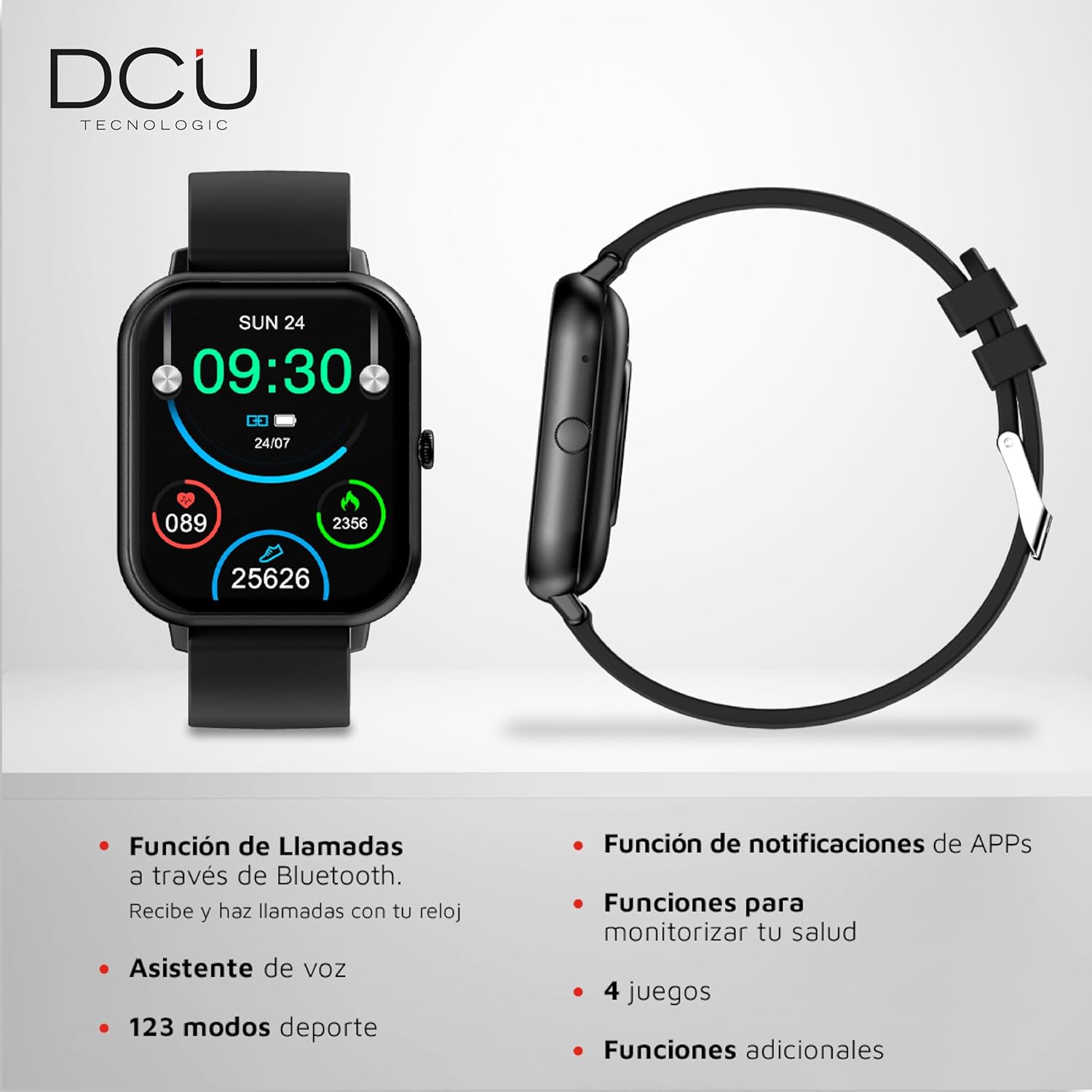
Image 4.1: The smartwatch interface showing icons for calls, notifications, health monitoring, and sports modes.
5. การบำรุงรักษา
5.1 การทำความสะอาด
To clean your smartwatch, gently wipe the screen and body with a soft, dry, lint-free cloth. For stubborn smudges, slightly dampชุบผ้าให้เปียกน้ำ หลีกเลี่ยงการใช้สารเคมีรุนแรง วัสดุขัดถู หรือน้ำยาทำความสะอาดที่มีฤทธิ์กัดกร่อน
5.2 ความต้านทานต่อน้ำ
The smartwatch has an IP67 water resistance rating, meaning it is protected against dust and can withstand immersion in fresh water up to 1 meter for a maximum of 30 minutes. It is suitable for daily use and splashes, but it is not recommended for use in salt water, hot water, saunas, or during diving activities, as this may compromise its water resistance over time.

ภาพที่ 5.1: ด้านหลัง view of the smartwatch, highlighting the sensors and the anti-static silicone strap.
6 การแก้ไขปัญหา
หากคุณพบปัญหาเกี่ยวกับสมาร์ทวอทช์ โปรดดูวิธีแก้ไขปัญหาทั่วไปต่อไปนี้:
- อุปกรณ์ไม่เปิด: Ensure the smartwatch is fully charged. Connect it to the charger and wait a few minutes before attempting to power it on again.
- ไม่สามารถจับคู่กับสมาร์ทโฟนได้: Check that Bluetooth is enabled on your phone and the smartwatch is within range. Restart both devices and try pairing again. Ensure the companion app is updated to the latest version.
- ข้อมูลสุขภาพที่ไม่ถูกต้อง: ตรวจสอบให้แน่ใจว่าสวมนาฬิกาให้กระชับพอดีข้อมือ ไม่แน่นหรือหลวมเกินไป ทำความสะอาดเซ็นเซอร์ที่ด้านหลังนาฬิกา
- การแจ้งเตือนไม่ปรากฏ: Verify that app notifications are enabled in your smartphone's settings and within the smartwatch's companion app. Ensure the smartwatch is properly connected via Bluetooth.
- หน้าจอไม่ตอบสนอง: ลองรีสตาร์ทสมาร์ทวอทช์ดู หากปัญหายังคงอยู่ โปรดตรวจสอบให้แน่ใจว่าหน้าจอสะอาดและแห้ง
สำหรับปัญหาที่ยังคงอยู่ โปรดดูที่ส่วนการสนับสนุน
7. ข้อมูลจำเพาะ
| ยี่ห้อ | ดีซียู เทคโนโลจิค |
| หมายเลขรุ่น | 34157025 |
| ระบบปฏิบัติการ | แอสโตรโดรมิโนโอเอส |
| ขนาดหน้าจอ | 1.83 นิ้ว |
| ประเภทจอภาพ | Digital, Touchscreen |
| การเชื่อมต่อ | บลูทู ธ Wi-Fi |
| ประเภทแบตเตอรี่ | ลิเธียมโพลีเมอร์ |
| ความจุของแบตเตอรี่ | 1000 มิลลิแอมป์ |
| อายุการใช้งานแบตเตอรี่ (โดยประมาณ) | ใช้งานได้ 5-7 วัน (ขณะใช้งาน), สแตนด์บาย 10-15 วัน |
| ความต้านทานต่อน้ำ | IP67 (up to 1m for 30 mins in fresh water) |
| อุปกรณ์ที่รองรับ | Smartphone, Tablet (iOS 9.0+, Android 5.0+) |
| คุณสมบัติพิเศษ | Curved Glass Screen, Customizable HD Touch Screen, Multi-Health Monitoring, 123 Sports Modes |
| ขนาดแพ็คเกจ | 21.5 x 14.9 x 3.9 ซม. |
| น้ำหนัก | 160 กรัม |
8. การรับประกัน
The DCU TECNOLOGIC Curved Glass Pro Smartwatch comes with a รับประกัน 3 ปี from the date of purchase. This warranty covers manufacturing defects under normal use. It does not cover damage caused by misuse, accidents, unauthorized modifications, or failure to follow the instructions in this manual. Please retain your proof of purchase for warranty claims.
9. การสนับสนุน
For further assistance, technical support, or warranty inquiries, please contact DCU TECNOLOGIC customer service. Refer to the official DCU TECNOLOGIC webเว็บไซต์หรือเอกสารการซื้อของคุณสำหรับรายละเอียดการติดต่อ