
1. บทนำ
Welcome to the Amazfit GTR Mini Smart Watch user manual. This guide provides essential information for setting up, operating, and maintaining your device. The Amazfit GTR Mini is designed to enhance your daily life with advanced health and fitness tracking capabilities, long battery life, and a sleek design.
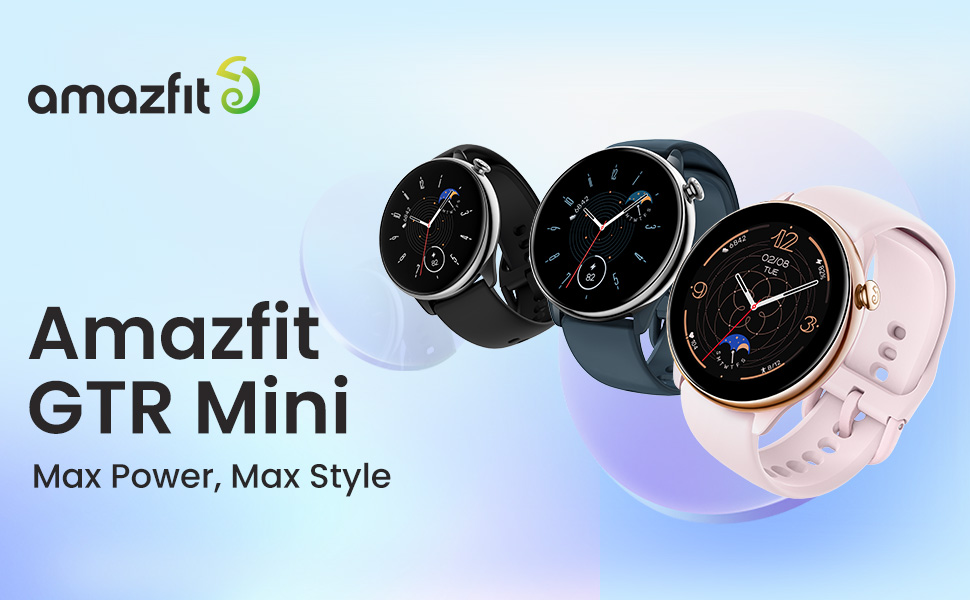
Image: Amazfit GTR Mini Smart Watch overview.
2. การตั้งค่า
2.1 การชาร์จอุปกรณ์
Before initial use, fully charge your Amazfit GTR Mini. Connect the magnetic charging cable to the charging contacts on the back of the watch and plug the USB end into a power adapter (not included) or a computer's USB port. The watch display will indicate charging status.
2.2 การจับคู่กับสมาร์ทโฟนของคุณ
- ดาวน์โหลดแอป Zepp จาก App Store (iOS) หรือ Google Play Store (Android)
- เปิดแอป Zepp แล้วสร้างบัญชีหรือเข้าสู่ระบบ
- Tap the '+' icon in the app to add a new device and select 'Watch' > 'Watch with QR code'.
- Scan the QR code displayed on your Amazfit GTR Mini screen using your phone's camera.
- ทำตามคำแนะนำบนหน้าจอทั้งบนนาฬิกาและโทรศัพท์ของคุณเพื่อทำการจับคู่ให้เสร็จสมบูรณ์

Image: Amazfit GTR Mini Smart Watch on a wrist.
3. คู่มือการใช้งาน
3.1 อายุการใช้งานแบตเตอรี่
The Amazfit GTR Mini features an ultra-long battery life, providing up to 14 days of typical usage and extending to 20 days in battery saver mode. This ensures continuous tracking of your daily activities without frequent charging.

Image: Ultra-long battery life of the Amazfit GTR Mini.
3.2 การตรวจติดตามสุขภาพ
Monitor your well-being with 24/7 heart rate tracking, blood-oxygen level measurement (SpO₂), and stress level monitoring. The watch provides alerts for unusual health changes and offers a one-tap measuring function for quick health metric checks.

Image: 24/7 Heart Rate, SpO₂, and Stress Monitoring.
การติดตามการนอนหลับ
The Amazfit GTR Mini offers enhanced sleep tracking, exploring in-depth sleep stages and quality analytics. Activate Sleep Mode to minimize interruptions for a restful, rejuvenating sleep. It tracks sleep quality, including nap times and sleep stagใช่

Image: Sleep Phases tracking on the Amazfit GTR Mini.
3.3 การติดตามฟิตเนส
This fitness watch offers over 120 sports modes with smart recognition. It automatically detects seven sports and provides comprehensive reports on calories, steps, and performance. Experience precision with its GPS technology, backed by support for five satellite systems, ideal for outdoor activities.

Image: 5 Satellite Positioning Systems for accurate GPS tracking.

Image: 120+ Sports Modes with Smart Recognition.
3.4 คุณสมบัติของโทรศัพท์
Stay connected with notification support that keeps you informed of important updates and messages right on your wrist. The watch supports eSIM and Bluetooth connectivity for seamless integration with your digital lifestyle. Note: The Amazfit GTR Mini does not support Bluetooth phone calls directly, but it can send Phone Call Notifications. Quick Reply SMS feature is only supported by Android devices with Zepp App version 6.10.0 or higher.
3.5 Design & Display
The Amazfit GTR Mini features a vibrant 1.28-inch HD AMOLED display with 326 PPI high resolution. Its super slim 9.25mm thickness and lightweight 24.6g construction, crafted with premium stainless steel, ensure comfortable all-day wear. The skin-friendly silicone strap adds to its comfort.

Image: Vibrant 1.28" HD AMOLED Display.

Image: Super Slim & Light Design with Stainless Steel.
3.6 Zepp OS 2.0
The watch runs on the health-centered Zepp OS 2.0, providing a smooth user experience and access to various health and utility applications.

Image: Health-centered Zepp OS 2.0 interface.
4. การบำรุงรักษา
- การทำความสะอาด: ทำความสะอาดนาฬิกาและสายนาฬิกาของคุณเป็นประจำด้วยผ้านุ่มๆamp ผ้า. หลีกเลี่ยงสารเคมีที่รุนแรง
- ความต้านทานน้ำ: The watch has a 5 ATM water resistance rating, suitable for swimming and showering. Avoid hot water, saunas, or high-velocity water activities.
- พื้นที่จัดเก็บ: ควรเก็บนาฬิกาไว้ในที่แห้งและเย็นเมื่อไม่ได้ใช้งาน
5 การแก้ไขปัญหา
- นาฬิกาไม่เปิด: Ensure the watch is fully charged. If it still doesn't turn on, try restarting it by pressing and holding the side button.
- ปัญหาการจับคู่: Ensure Bluetooth is enabled on your phone and the watch is within range. Try restarting both devices and the Zepp App.
- ข้อมูลไม่ถูกต้อง: ตรวจสอบให้แน่ใจว่าสวมนาฬิกาให้กระชับพอดีข้อมือ สำหรับ GPS โปรดตรวจสอบว่าคุณอยู่ในพื้นที่เปิดโล่งที่มีอากาศถ่ายเทสะดวก view ของท้องฟ้า
- การแจ้งเตือนไม่ทำงาน: Check app permissions on your phone and ensure notifications are enabled for the Zepp App and specific applications.
6. ข้อมูลจำเพาะ
| คุณสมบัติ | ข้อมูลจำเพาะ |
|---|---|
| ระบบปฏิบัติการ | เซปป์ โอเอส |
| เทคโนโลยีการเชื่อมต่อ | บลูทูธ |
| จีพีเอส | Built-in GPS (5 Satellite Positioning Systems) |
| ขนาดหน้าจอ | 1.28 นิ้ว |
| ประเภทจอภาพ | อโมเลด |
| ปณิธาน | 240 x 280 |
| อายุการใช้งานแบตเตอรี่ (ทั่วไป) | 14 วัน |
| ระดับความต้านทานต่อน้ำ | 5 ATM (50 เมตร) |
| ประเภทวัสดุตัวเรือน | สแตนเลส |
| ประเภทวัสดุของสาย | ซิลิโคน |
| ขนาดรายการ | 1.69 x 1.69 x 0.35 นิ้ว |
| เมตริกที่วัด | Accelerometer, Optical Heart Rate Sensor, Blood-Oxygen Sensor |
| อุปกรณ์ที่รองรับ | สมาร์ทโฟน (แอนดรอยด์และไอโอเอส) |
7. วิดีโอผลิตภัณฑ์อย่างเป็นทางการ
Video: Amazfit GTR Mini Smart Watch overview by Amazon Videos. This video highlights key features and design aspects of the watch.
8. การรับประกันและการสนับสนุน
The Amazfit GTR Mini comes with a 1-Year Limited Warranty. For detailed warranty information and support, please refer to the official Amazfit website or contact their customer service. Your privacy is important; personal information is handled responsibly and in accordance with applicable law.
หมายเหตุสำคัญ:
- The Amazfit GTR Mini does not support Bluetooth phone calls; it can send Phone Call Notifications.
- The battery life may vary according to settings, operation conditions, and other factors.
- Indoor positioning services are not supported. Positioning speed and accuracy may be affected by the surrounding environment.
- This product and the Zepp App are not medical devices and cannot be used for medical purposes or as a basis for diagnosis of any medical condition. Detection results are provided for reference only. Please consult professional medical institutions if you feel unwell.