
1. บทนำ
This manual provides essential instructions for the proper use and maintenance of your TopMade Magnetic Wallet Stand CB111. This product is designed to securely attach to compatible iPhone models and MagSafe-enabled cases, offering card storage and an adjustable stand function. Please read this manual thoroughly before use.

Image 1.1: TopMade Magnetic Wallet Stand in use, demonstrating card storage and stand functionality.
2. ข้อมูลด้านความปลอดภัย
- Keep the product away from strong magnetic fields that are not related to its intended use, as this may affect magnetic sensitive items.
- อย่าให้ผลิตภัณฑ์สัมผัสกับอุณหภูมิที่สูงหรือถูกแสงแดดโดยตรงเป็นเวลานาน
- Avoid contact with sharp objects to prevent damage to the vegan leather material.
- Ensure the wallet is securely attached to your device before relying on its magnetic hold.
3. เนื้อหาบรรจุภัณฑ์
The TopMade Magnetic Wallet Stand CB111 package typically includes:
- 1 x TopMade Magnetic Wallet Stand CB111
- 1 x คู่มือผู้ใช้ (เอกสารนี้)
4. การตั้งค่า
4.1 ความเข้ากันได้
The TopMade Magnetic Wallet Stand CB111 is compatible with:
- iPhone 17, iPhone 17 Air, iPhone 17 Pro, iPhone 17 Pro Max
- ไอโฟน 16, ไอโฟน 16 โปร, ไอโฟน 16 โปรแม็กซ์, ไอโฟน 16 พลัส
- ไอโฟน 15, ไอโฟน 15 โปร, ไอโฟน 15 โปรแม็กซ์, ไอโฟน 15 พลัส
- ไอโฟน 14, ไอโฟน 14 โปร, ไอโฟน 14 โปรแม็กซ์, ไอโฟน 14 พลัส
- ไอโฟน 13, ไอโฟน 13 โปร, ไอโฟน 13 โปร แม็กซ์
- ไอโฟน 12, ไอโฟน 12 โปร, ไอโฟน 12 โปร แม็กซ์
- MagSafe-compatible cases for the above iPhone models.
- Other smartphones when used with a magnetic metal ring (not included) attached to a normal case.
ไม่เข้ากันได้กับ: iPhone 12 Mini, iPhone 13 Mini, non-magnetic cases, or thick leather cases.
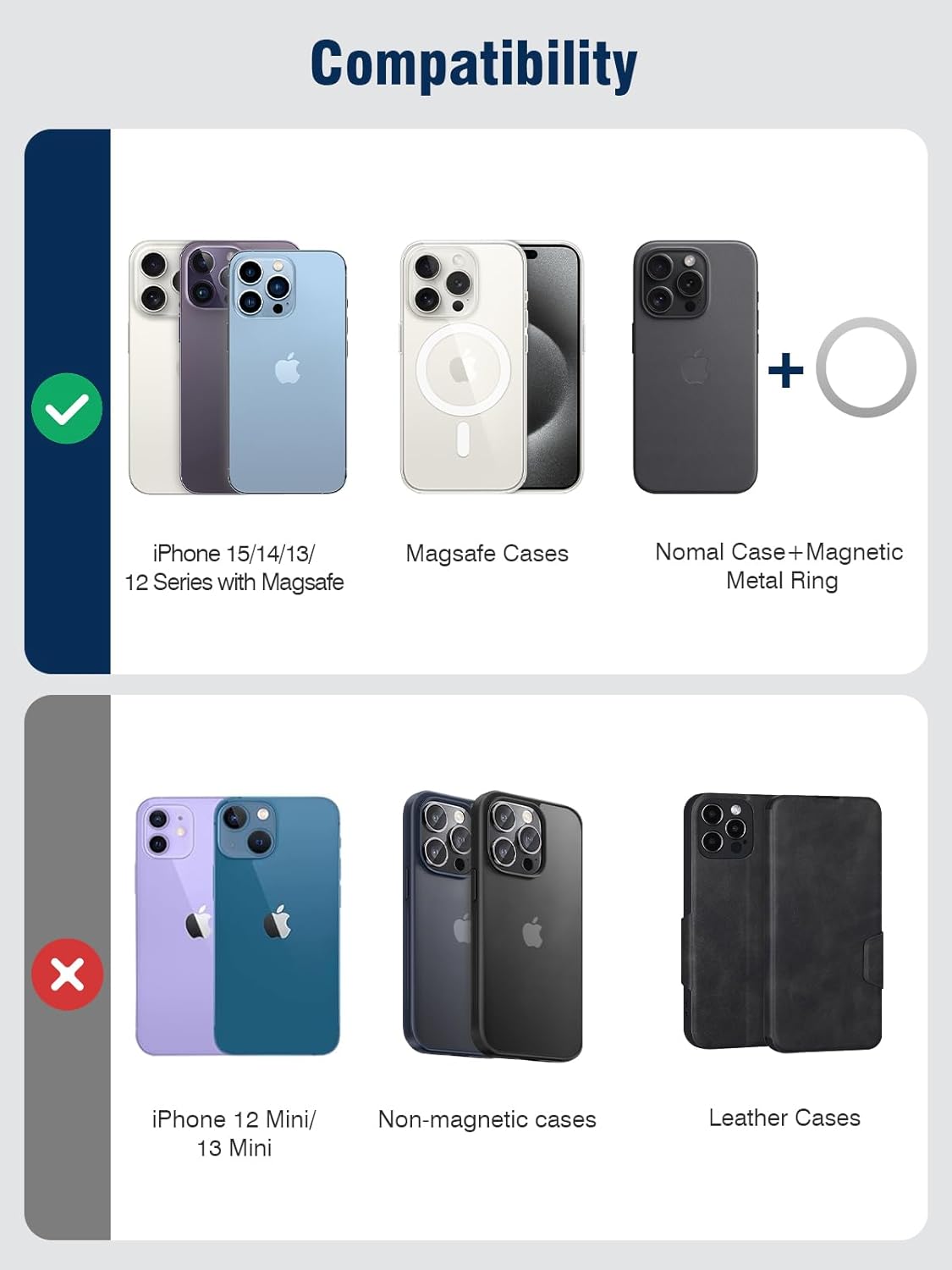
Image 4.1: Visual guide to device compatibility for the magnetic wallet stand.
4.2 Attaching the Wallet Stand
- Ensure your iPhone or MagSafe-compatible case is clean and free of debris.
- Align the TopMade Magnetic Wallet Stand with the MagSafe area on the back of your iPhone or case.
- The strong magnets will automatically snap the wallet into place, providing a secure attachment.

Image 4.2: Illustration of the magnetic attachment mechanism.
4.3 การใส่บัตร
The wallet stand features multiple card slots:
- It can hold up to 5 cards or a combination of cards and cash.
- An open ID window is provided for easy display of identification cards.
- Gently slide your cards into the designated slots. Do not force cards, as this may damage the material or the cards.

Image 4.3: Demonstrating the ID window and card storage capacity.
5. คู่มือการใช้งาน
5.1 Using the Adjustable Phone Stand
The integrated adjustable hinge allows for versatile viewอิงมุม:
- To activate the stand, gently unfold the wallet portion away from your phone.
- Adjust the angle between 0 and 180 degrees to achieve your desired viewตำแหน่งการวางตำแหน่ง
- The stand supports horizontal (landscape), vertical (portrait), and suspension modes for various activities such as watching videos, video calls, or following recipes.

ภาพที่ 5.1: อดีตamples of the wallet stand in use for hands-free viewการไอเอ็นจี

Image 5.2: iPhone in vertical stand mode on a desk.
5.2 RFID/NFC Protection
The wallet stand is equipped with advanced RFID blocking technology to safeguard your credit cards and other sensitive information from unauthorized scanning. It also provides degauss protection to prevent demagnetization of your cards.
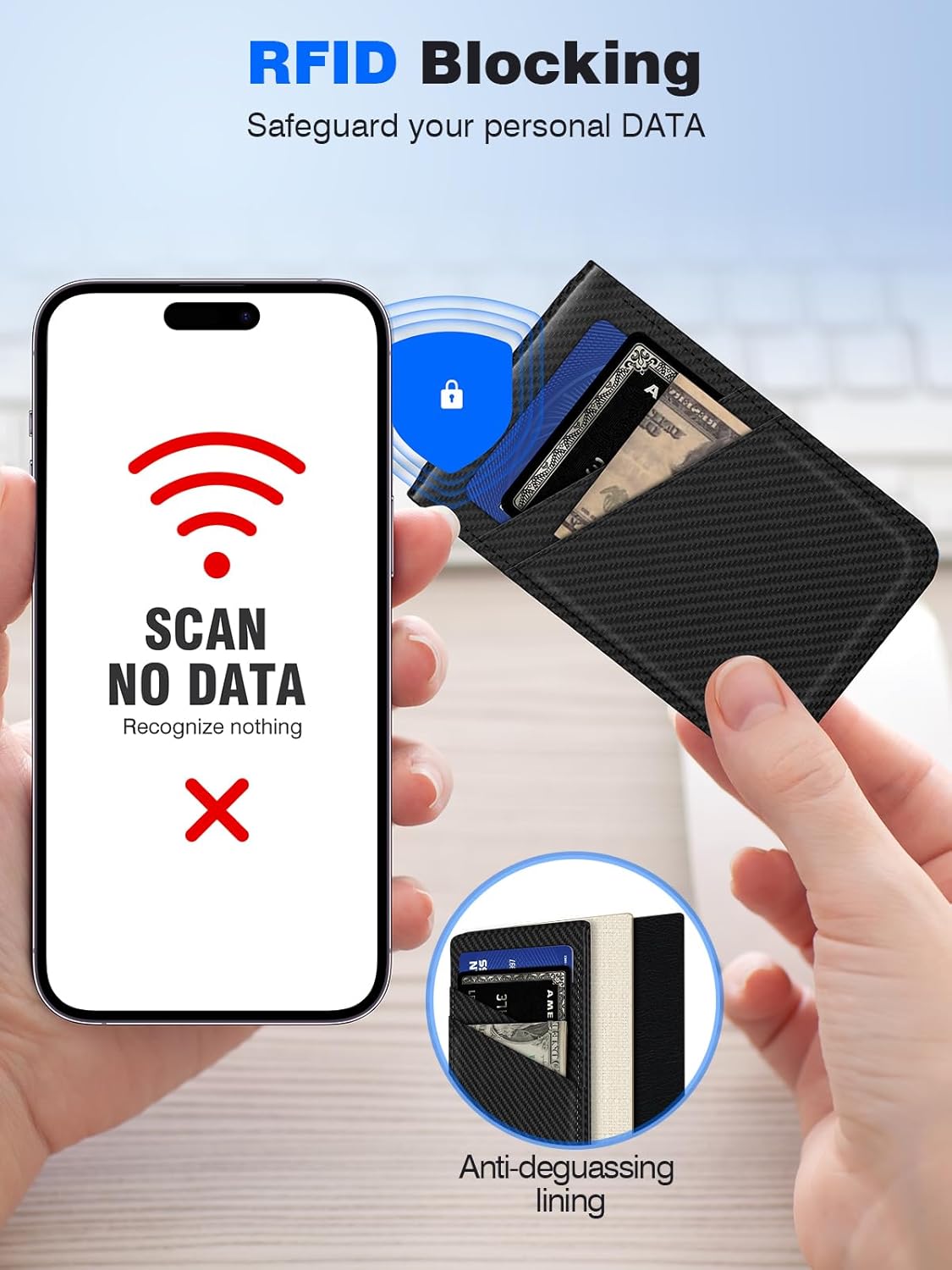
Image 5.3: Visual representation of RFID blocking functionality.
5.3 Unobstructed Camera Access
The design of the wallet stand ensures that it does not obstruct your phone's camera, allowing for full photographic functionality while attached.

Image 5.4: Wallet stand attached without obstructing the phone camera.
6. การบำรุงรักษา
- To clean the vegan leather, gently wipe with a soft, damp ผ้า หลีกเลี่ยงสารเคมีรุนแรงหรือน้ำยาทำความสะอาดที่มีฤทธิ์กัดกร่อน
- Ensure the product is completely dry before reattaching to your device or storing cards.
- Periodically check the magnetic connection for any debris that might interfere with its strength.
7 การแก้ไขปัญหา
7.1 Wallet Not Attaching Securely
- ตรวจสอบความเข้ากันได้: Ensure your phone model or case is MagSafe compatible. Refer to Section 4.1.
- กำจัดสิ่งกีดขวาง: Make sure there is no dust, dirt, or other material between the wallet and your phone/case that could weaken the magnetic connection.
- ประเภทตัวเรือน: If using a case, ensure it is a MagSafe-compatible case. Non-magnetic or thick leather cases may interfere with the magnetic strength.
7.2 Cards Difficult to Insert or Remove
- การตรวจสอบความจุ: Ensure you are not exceeding the recommended capacity of 5 cards. Overstuffing can stretch the material and make card access difficult.
- การจัดตำแหน่งที่เหมาะสม: Ensure cards are inserted straight into the slots.
7.3 Stand Not Holding Position
- ความเสถียรของพื้นผิว: Ensure the surface on which the phone is placed is flat and stable.
- การปรับมุม: Adjust the hinge to a stable angle. The hinge is designed for smooth rotation and reliable positioning.
8. ข้อมูลจำเพาะ
| คุณสมบัติ | ข้อมูลจำเพาะ |
|---|---|
| หมายเลขรุ่น | CB111 |
| ยี่ห้อ | ท็อปเมด |
| วัสดุ | หนังวีแกน |
| ขนาด | 4.7 x 2.6 x 0.4 นิ้ว |
| น้ำหนักสินค้า | 2.89 ออนซ์ |
| แรงแม่เหล็ก | Up to 3800 Gauss |
| ความจุของการ์ด | สูงสุด 5 ใบ |
| คุณสมบัติพิเศษ | Adjustable Phone Stand, Credit Card Holder, Magnetic Attachment, RFID Blocking, Slim Fit |
9. การรับประกันและการสนับสนุน
TopMade products are manufactured with quality and customer satisfaction in mind. For specific warranty details and customer support inquiries, please refer to the official TopMade webหรือติดต่อผู้ค้าปลีกของคุณ โปรดเก็บหลักฐานการซื้อไว้เพื่อใช้ในการเรียกร้องการรับประกัน