
1. บทนำ
The SATLINK SP-2100 is a DVB-S/S2 and MPEG-2/4 H.264 compliant handheld digital satellite finder meter. Designed for ease of use, this compact and lightweight device provides essential functions for the installation and verification of digital satellite TV services. It is suitable for both residential homes and multi-dwelling units, offering signal measurement, channel management, and system configuration capabilities.
2. ข้อมูลด้านความปลอดภัย
- แหล่งจ่ายไฟ: Use only the provided DC12V/1.5A power adapter. Using an incorrect adapter may damage the device or cause fire.
- การดูแลแบตเตอรี่ The device contains a Li-Ion battery. Do not expose it to extreme temperatures, puncture, or disassemble. Dispose of batteries according to local regulations.
- ความชื้น: เก็บอุปกรณ์ให้ห่างจากน้ำและความชื้นสูง ห้ามใช้งานขณะมือเปียก
- การระบายอากาศ : ต้องแน่ใจว่ามีการระบายอากาศที่เหมาะสมเพื่อป้องกันความร้อนสูงเกินไป อย่าปิดกั้นช่องระบายอากาศ
- LNB Short Protection: The device features LNB short protection. If a short circuit is detected, disconnect the LNB immediately.
- การทำความสะอาด: ถอดปลั๊กไฟก่อนทำความสะอาด ใช้ผ้าแห้งนุ่มๆ เช็ดทำความสะอาด ห้ามใช้น้ำยาทำความสะอาดหรือสเปรย์กระป๋อง
3. สินค้าหมดview
3.1 แผงด้านหน้าและการควบคุม
The front panel features a 3.5-inch TFT LCD screen for displaying menus and signal information, along with various control buttons and indicator lights.

ภาพที่ 3.1: ด้านหน้า view of the SP-2100, highlighting the display and control interface.
- หน้าจอ LCD: 3.5-inch High Definition TFT LCD (320x240 RGB) for menu navigation and signal display.
- ตัวบ่งชี้: Power (red), 13V/18V (green for LNB power), Lock (signal lock), Charge (battery charging status).
- ปุ่มนำทาง: MENU, OK, Directional Arrows (Up, Down, Left, Right), EXIT.
- ปุ่มฟังก์ชัน: F1, F2, F3, F4 (context-sensitive functions).
- ปุ่มกดตัวเลข: 0-9 for data entry.
- ปุ่มฟังก์ชั่นพิเศษ: MUTE, SCAN, SAT, BACK, PAUSE, INFO, TV/R.
3.2 แผงด้านหลัง
The rear panel includes product information and the integrated speaker.

ภาพที่ 3.2: หลัง view of the SP-2100, indicating the speaker and product label.
3.3 Side and Top Ports
Various input and output ports are located on the sides and top of the device.
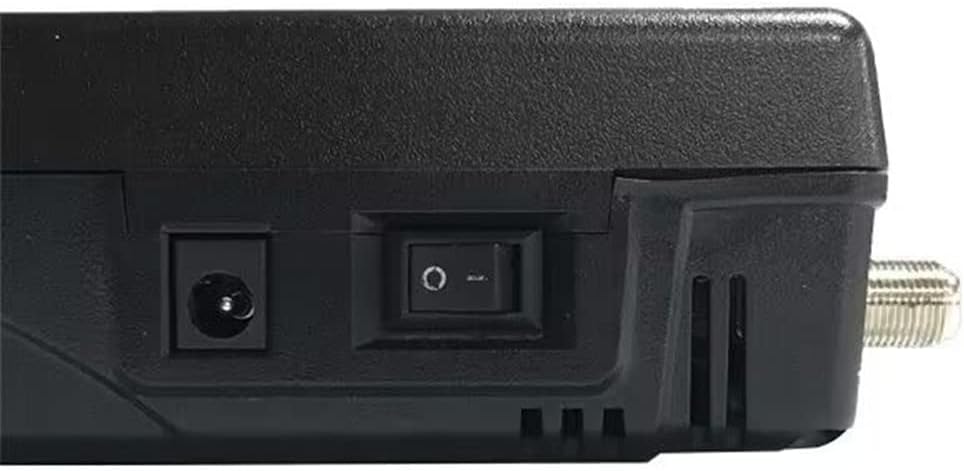
ภาพที่ 3.3: ด้านข้าง view with HDMI, AV OUT, and AV IN ports.
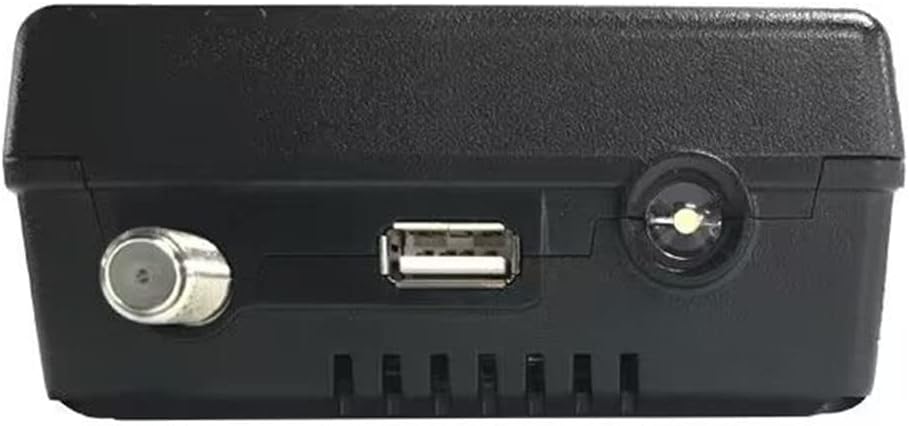
ภาพที่ 3.4: สูงสุด view with F-connector, USB Type A, and DC power input.
- F-Male Connector: Satellite input (950-2150 MHz).
- ยูเอสบีประเภทเอ: For software upgrades and file transfer (USB 2.0).
- DC IN: Power adapter input (DC12V/1.5A).
- สวิตช์ไฟ: สวิตช์เปิด/ปิดสำหรับอุปกรณ์
- HD-MI OUT: HD-MI 1.3a output for connecting to an external display.
- AV ออก: 3.5mm jack for composite video (CVBS) and stereo audio (L/R) output.
- AV ใน: 3.5mm jack for composite video (CVBS) and stereo audio (L/R) input.
4. การตั้งค่า
4.1 การชาร์จแบตเตอรี่
Before first use, fully charge the internal Li-Ion battery. Connect the provided DC12V/1.5A power adapter to the DC IN port on the device and plug it into a power outlet. The 'Charge' indicator light will illuminate during charging. A full charge typically takes several hours and provides approximately 3 hours of operation time.
4.2 การเปิด/ปิดเครื่อง
Locate the power switch on the side of the device. Toggle the switch to the 'ON' position to power on the meter. The 'Power' indicator light will turn red. To power off, toggle the switch to the 'OFF' position.
4.3 Connecting to LNB
Connect the satellite cable from your LNB (Low Noise Block) to the F-Male connector on the top of the SP-2100. Ensure the connection is secure. The device will supply 13V or 18V to the LNB, indicated by the green '13V/18V' light.

ภาพที่ 4.1: Connection diagram showing LNB, power, and AV/HDMI connections.
5. คู่มือการใช้งาน
5.1 การนำทางเมนู
ใช้ เมนู button to access the main menu. Navigate through options using the directional arrow buttons (Up, ลง, ซ้าย, ขวา). กด OK to confirm a selection or enter a submenu. Press EXIT เพื่อกลับไปยังหน้าจอก่อนหน้าหรือออกจากเมนู
5.2 ฟังก์ชั่นเมนูหลัก
- การติดตั้ง: This section is used for satellite dish alignment and signal acquisition.
- Select a satellite from the predefined list or add a new one.
- Configure LNB type, frequency, and DiSEqC settings (1.0 / 1.1 / 1.2 and 22 kHz Tone supported).
- Perform signal measurement to view signal strength and quality. Adjust the dish until optimal signal levels are achieved. The 'Lock' indicator will illuminate when a signal is acquired.
- Supports Auto, Manual, and NIT Scan modes for channel searching.
- แก้ไขช่อง: Manage TV and radio channels. You can move, delete, or lock channels.
- การตั้งค่าระบบ: Configure device settings such as OSD language, time, display brightness, and factory reset options.
- คุณประโยชน์: Access additional tools or features.
- ศูนย์สื่อ: เล่นมัลติมีเดีย files (wma, mp3, mp4, avi, jpg, jpeg, bmp, img) from a USB storage device connected to the USB Type A port.
- เกี่ยวกับ: Displays device information, including software version and hardware details.
5.3 Signal Measurement
In the 'Installation' menu, after selecting the satellite and transponder, the screen will display real-time signal strength and quality bars. Adjust your satellite dish azimuth and elevation slowly while observing these values. The goal is to maximize both strength and quality. The device will emit an audible tone and the 'Lock' LED will light up when a signal is successfully locked.
5.4 AV In/Out and HD-MI Output
- AV ใน: Connect an external video source (e.g., CCTV camera) to the AV IN port to display its output on the SP-2100's screen.
- AV OUT / HD-MI OUT: Connect the SP-2100 to an external display (TV, monitor) using the AV OUT or HD-MI OUT ports to view the meter's screen on a larger display.
6. การบำรุงรักษา
6.1 การทำความสะอาด
Ensure the device is powered off and disconnected from all cables before cleaning. Use a soft, dry, lint-free cloth to wipe the screen and casing. Do not use abrasive cleaners, solvents, or spray directly onto the device.
6.2 การดูแลแบตเตอรี่
To prolong battery life, avoid fully discharging the battery frequently. If storing the device for an extended period, charge the battery to approximately 50% and store it in a cool, dry place. Recharge every few months to prevent deep discharge.
6.3 การอัพเกรดซอฟต์แวร์
Software upgrades can be performed via the USB Type A port. Download the latest firmware from the official Satlink webงาน. คัดลอกเฟิร์มแวร์ file to a USB flash drive, insert it into the SP-2100, and follow the on-screen instructions in the 'System Setting' or 'Utility' menu to initiate the upgrade process. Do not power off the device during an upgrade.
7 การแก้ไขปัญหา
- ไม่มีไฟฟ้า:
- ตรวจสอบว่าสวิตช์ไฟอยู่ในตำแหน่ง "เปิด" หรือไม่
- Ensure the battery is charged. Connect the power adapter and check the 'Charge' indicator.
- Verify the power adapter is correctly connected and functioning.
- No Signal / Low Signal Quality:
- Ensure the LNB cable is securely connected to the F-connector.
- Check LNB settings (type, frequency) in the 'Installation' menu.
- Verify DiSEqC settings if using multiple LNBs or a DiSEqC switch.
- Adjust the satellite dish alignment (azimuth, elevation, LNB skew) slowly and observe signal readings.
- Check for any obstructions between the dish and the satellite.
- No Picture/Sound on External Display:
- Ensure the AV or HD-MI cable is correctly connected to both the SP-2100 and the external display.
- Select the correct input source on your external display (e.g., HDMI 1, AV).
- อุปกรณ์ USB ไม่ได้รับการตรวจพบ:
- Ensure the USB device is formatted to NTFS, FAT32, or FAT16.
- Try a different USB device.
8. ข้อมูลจำเพาะ
| คุณสมบัติ | ข้อมูลจำเพาะ |
|---|---|
| มาตรฐานการส่งข้อมูล | DVB-S/S2, MPEG-2, MPEG-4, H.264 |
| Connector Type (Satellite Input) | F Male |
| ความถี่อินพุต | 950 ถึง 2150 เมกะเฮิรตซ์ |
| ระดับสัญญาณเข้า | -65 ถึง -25 dBm |
| การควบคุมสวิทช์วงดนตรี | 22กิโลเฮิรตซ์ |
| แอลเอ็นบี ซัพพลาย | 13V/18V, ไอสูงสุด 400mA |
| ประเภท demodulation | คิวพีเอสเค, 8พีเอสเค, 16เอพีเอสเค, 32เอพีเอสเค |
| อัตราสัญลักษณ์ | 2 Msps to 45 Msps |
| ประเภทจอแอลซีดี | ตัวส่ง TFT |
| จำนวนจุด | 320x240 (RGB) |
| Active Area (WxH) | 70.0 x 52.5 มม. |
| AV Output Connector | 3.5mm jack (CVBS Video, Stereo L/R Audio) |
| ช่องต่ออินพุต AV | 3.5mm jack (CVBS Video, Stereo L/R Audio) |
| HD-MI Output Format | HD-MI 1.3a |
| อินเทอร์เฟซ USB | USB Type A (USB2.0) |
| File ระบบบริหารจัดการ | NTFS, FAT32, FAT16 |
| รองรับ File รูปแบบ | wma, mp3, mp4, avi, jpg, jpeg, bmp, img |
| แบตเตอรี่ Li-ion | 7.4V/2600mAh |
| เอาท์พุตอะแดปเตอร์ | กระแสตรง12โวลต์/1.5แอมป์ |
| อินพุตอะแด็ปเตอร์ | 100-240VAC, 50/60เฮิรตซ์ |
| การใช้พลังงาน | สูงสุด 10W |
| ขนาด | 86 x 150 x 40 มม. |
| น้ำหนักสุทธิ | 0.37 กก. |
9. เนื้อหาบรรจุภัณฑ์
The SATLINK SP-2100 package includes the following items:
- 1x SP-2100 Digital Satellite Meter
- สายเคเบิล AV 1x
- 1x Power Adapter (DC12V/1.5A)
- 1x กระเป๋าถือ
- 1x คู่มือผู้ใช้ภาษาอังกฤษ (เอกสารนี้)
10. การรับประกันและการสนับสนุน
For warranty information and technical support, please refer to the documentation provided with your purchase or contact your local dealer. Keep your purchase receipt as proof of purchase for warranty claims. Software updates and additional resources may be available on the official Satlink webเว็บไซต์.