
การแนะนำ
This manual provides comprehensive instructions for the safe and efficient operation of your QWORK WD10229 Foldable Digital Floor Scale. Please read this manual thoroughly before use and retain it for future reference.
ข้อมูลด้านความปลอดภัย
- ตรวจสอบให้แน่ใจว่าได้วางเครื่องชั่งบนพื้นผิวที่มั่นคงและเรียบเสมอกัน
- ห้ามเกินขีดจำกัดน้ำหนักสูงสุดที่สามารถรองรับได้ 660 ปอนด์ (300 กก.)
- Avoid dropping or subjecting the scale to severe shocks.
- ควรเก็บเครื่องชั่งให้ห่างจากน้ำและอุณหภูมิที่สูงจัด
- ใช้เฉพาะอะแดปเตอร์ที่ให้มาเท่านั้น
- อย่าพยายามถอดประกอบหรือซ่อมแซมเครื่องชั่งด้วยตนเอง โปรดติดต่อเจ้าหน้าที่ผู้เชี่ยวชาญเพื่อขอรับบริการ
เนื้อหาแพ็คเกจ
ตรวจสอบว่ามีรายการทั้งหมดอยู่ในแพ็คเกจ:
- QWORK WD10229 Digital Floor Scale Platform
- Digital Display Unit with Keypad
- Connecting Pole/Stand
- อะแดปเตอร์แปลงไฟ
- คู่มือการใช้งาน (เอกสารนี้)
คำแนะนำการตั้งค่า
การแกะกล่อง: นำส่วนประกอบทั้งหมดออกจากบรรจุภัณฑ์อย่างระมัดระวัง
ตำแหน่งแพลตฟอร์ม: Place the scale platform on a firm, level surface. Ensure all four adjustable non-slip feet are in contact with the ground and the platform is stable.

ภาพ: ด้านหน้า view of the QWORK WD10229 Digital Floor Scale, showing the platform and display unit.
ประกอบขาตั้งจอแสดงผล: Attach the connecting pole to the scale platform and secure it. Then, mount the digital display unit onto the top of the pole. Ensure all connections are firm.

Image: The scale platform separated from its frame, illustrating the internal structure and connection points for assembly.

ภาพ: ระยะใกล้ views of the scale's internal wiring connector, load cell, adjustment knob for the display stand, and power switch.
การเชื่อมต่อไฟฟ้า: Connect the power adapter to the display unit and plug it into a suitable power outlet. The scale can also operate on its internal rechargeable battery.

Image: The QWORK WD10229 Digital Floor Scale with its display unit, platform, and the included power adapter.
เปิดเครื่องครั้งแรก: Turn on the scale using the power switch, usually located on the display unit or near the power input. The display will perform a self-test and then show "0.00".
คำแนะนำการใช้งาน
การชั่งน้ำหนักพื้นฐาน
เปิดเครื่อง: Ensure the scale is powered on and displays "0.00".
รายการสถานที่: Carefully place the item to be weighed onto the center of the scale platform.

Image: The digital floor scale in use, showing packages and a crate of produce being weighed on the platform.
อ่านน้ำหนัก: The weight will be displayed on the digital screen. Wait for the reading to stabilize.
ลบรายการ: Remove the item from the platform. The display should return to "0.00" or a negative value if tare was used.
การแปลงหน่วย (กก./ปอนด์)
The scale supports weighing in both kilograms (KG) and pounds (LB).
Locate Unit Button: On the display unit, press the "UNIT" or "KG/LB" button to switch between units.

Image: Close-up of the scale's digital display, illustrating the unit conversion function between kilograms (KG) and pounds (LB).
Verify Unit: The active unit (KG or LB) will be indicated on the display.
ฟังก์ชัน Tare
The tare function allows you to subtract the weight of a container, so only the contents are weighed.
Place Empty Container: Place the empty container onto the scale platform.
Press TARE: Wait for the weight to stabilize, then press the "TARE" button on the display unit. The display will reset to "0.00".
Add Contents: Place the items to be weighed into the container. The display will show only the net weight of the contents.
ถอดคอนเทนเนอร์: After weighing, remove both the container and its contents. The display will show a negative value equal to the container's weight. Press "TARE" again to clear the tare and return to "0.00".
ฟังก์ชันศูนย์
If the display does not show "0.00" when the platform is empty, use the Zero function.
Empty Platform: Ensure nothing is on the scale platform.
กด ZERO: Press the "ZERO" button on the display unit. The display should reset to "0.00".
การซ่อมบำรุง
- การทำความสะอาด: เช็ดแท่นชั่งและหน้าจอแสดงผลด้วยผ้าเนื้อนุ่มและแห้งamp ผ้า ห้ามใช้น้ำยาทำความสะอาดที่มีฤทธิ์กัดกร่อนหรือจุ่มตัวเครื่องลงในน้ำ
- พื้นที่จัดเก็บ: When not in use, store the scale in a dry, clean environment. The scale is foldable for convenient storage.
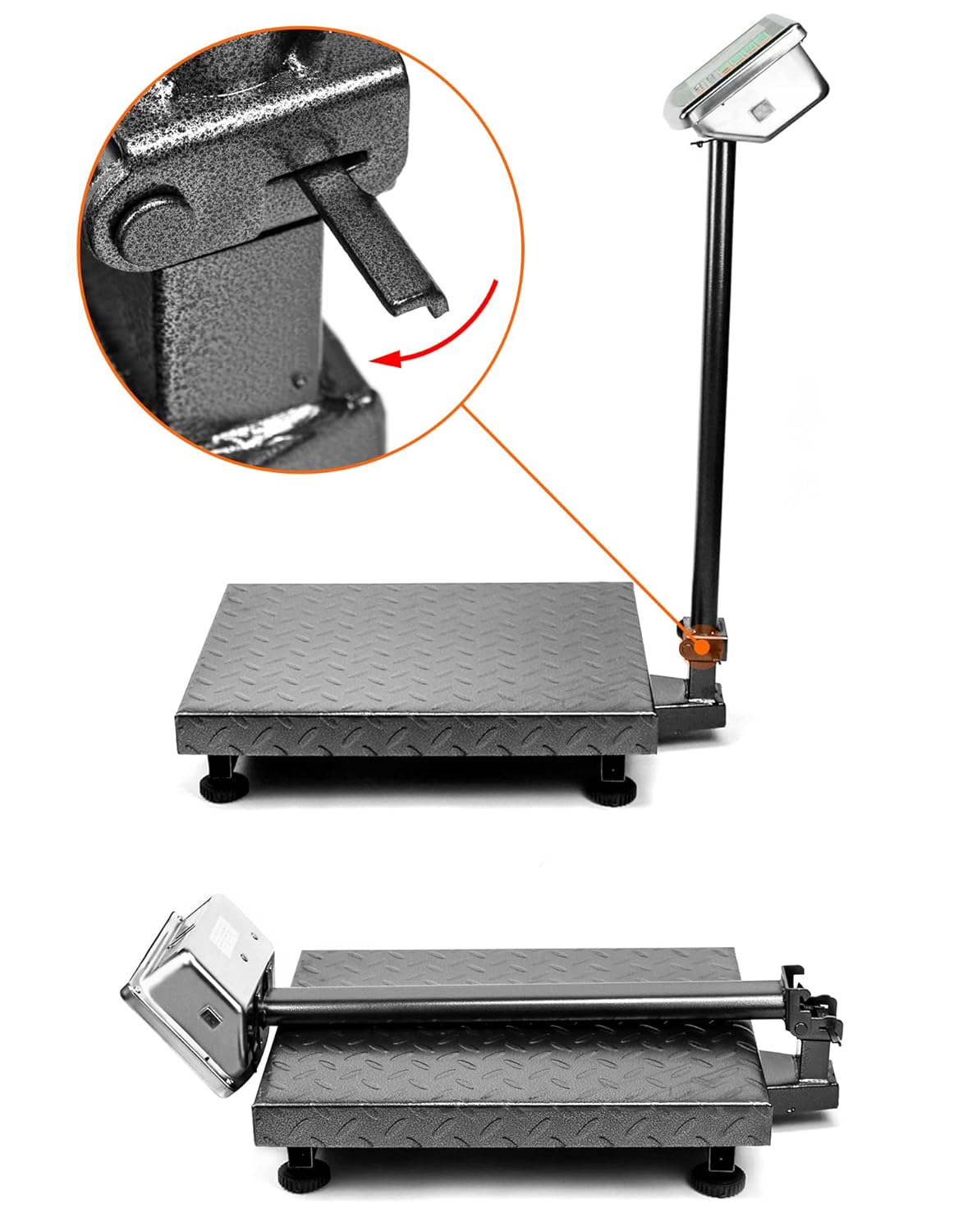
Image: The folding mechanism of the QWORK WD10229 Digital Floor Scale, showing how the display stand can be lowered for compact storage.
- การชาร์จแบตเตอรี่: If the scale is battery-powered, ensure it is charged regularly to maintain optimal performance.
การแก้ไขปัญหา
Display shows "Lo" or "Battery Low": The internal battery is low. Connect the scale to the power adapter for charging.
Display shows "O_Ld" or "Err": The scale is overloaded. Remove the item immediately to prevent damage. Ensure the weight does not exceed 660 lbs (300 kg).
การอ่านค่าที่ไม่ถูกต้อง:
- ตรวจสอบให้แน่ใจว่าเครื่องชั่งอยู่บนพื้นผิวที่ได้ระดับและมั่นคง
- Check that nothing is touching the platform or interfering with its movement.
- Perform a Zero operation before weighing.
- Avoid strong vibrations or air currents during weighing.
ไม่มีจอแสดงผล:
- ตรวจสอบว่าอะแดปเตอร์ไฟฟ้าเชื่อมต่ออย่างแน่นหนาและเต้ารับไฟฟ้าใช้งานได้
- ตรวจสอบให้แน่ใจว่าสวิตช์ไฟอยู่ในตำแหน่ง "เปิด"
- หากใช้พลังงานแบตเตอรี่ โปรดตรวจสอบว่าแบตเตอรี่ชาร์จเต็มแล้ว
ข้อมูลจำเพาะ
| คุณสมบัติ | รายละเอียด |
|---|---|
| ยี่ห้อ | คิวเวิร์ค |
| หมายเลขรุ่น | WD10229 |
| ความจุน้ำหนัก | Minimum: 0.050 lb, Maximum: 660 lb (300 kg) |
| มิติของแพลตฟอร์ม | 19.8" x 15.75" (500 มม. x 400 มม.) Image: Diagram illustrating the dimensions of the QWORK WD10229 Digital Floor Scale platform and overall height. |
| ประเภทจอภาพ | LCD/LED with Backlit Display |
| วัสดุ | เหล็กอัลลอยด์ |
| ฟอร์มแฟกเตอร์ | พับได้ |
| น้ำหนักสินค้า | 9.44 กิโลกรัม |
| การใช้ที่แนะนำ | Packages, Envelopes, Warehouse, Shipping, Postal |
การรับประกันและการสนับสนุน
For warranty information or technical support, please refer to the contact details provided with your purchase or visit the official QWORK webไซต์ โปรดเก็บใบเสร็จรับเงินไว้เป็นหลักฐานการซื้อ