
การแนะนำ
Thank you for choosing the sonoro Primus Internet Radio with Bluetooth. This manual provides essential information for setting up, operating, and maintaining your device to ensure optimal performance and longevity. Please read it thoroughly before use.
คำแนะนำด้านความปลอดภัยที่สำคัญ
- แหล่งพลังงาน: ใช้เฉพาะอะแดปเตอร์ไฟฟ้าที่ระบุเท่านั้น ตรวจสอบให้แน่ใจว่าระดับเสียงtage ตรงกับแหล่งจ่ายไฟในพื้นที่ของคุณ
- การระบายอากาศ : อย่าปิดกั้นช่องระบายอากาศใดๆ เว้นระยะห่างที่เหมาะสมรอบๆ เครื่องเพื่อให้มีการไหลเวียนของอากาศที่ดี
- น้ำและความชื้น: Do not expose the unit to rain, moisture, dripping, or splashing. Keep liquids away from the device.
- ความร้อน: ห้ามติดตั้งใกล้แหล่งความร้อน เช่น หม้อน้ำ เครื่องทำความร้อน เตา หรืออุปกรณ์อื่น ๆ (รวมถึง ampเครื่องให้ความร้อน) ที่ผลิตความร้อน
- การทำความสะอาด: Unplug the unit before cleaning. Use a dry cloth only.
- การบริการ: อย่าพยายามให้บริการผลิตภัณฑ์นี้ด้วยตนเอง ส่งต่อการบริการทั้งหมดไปยังช่างบริการที่ผ่านการรับรอง
- ผลิตภัณฑ์เลเซอร์: This product contains a Class 1 laser. Do not open the casing.
เนื้อหาแพ็คเกจ
โปรดตรวจสอบว่ามีสิ่งของครบถ้วนหรือไม่:
- sonoro Primus Internet Radio Unit
- อะแดปเตอร์แปลงไฟ
- รีโมทคอนโทรล (พร้อมแบตเตอรี่)
- คู่มือการใช้งาน (เอกสารนี้)
การตั้งค่า
1. การแกะกล่องและการจัดวาง
Carefully remove the unit from its packaging. Place the sonoro Primus on a stable, flat surface, ensuring adequate ventilation around the device. Avoid placing it near strong magnetic fields or direct sunlight.
2. การเชื่อมต่อพลังงาน
Connect the provided power adapter to the AC IN port on the rear of the unit. Plug the other end into a suitable wall outlet. The unit will enter standby mode.
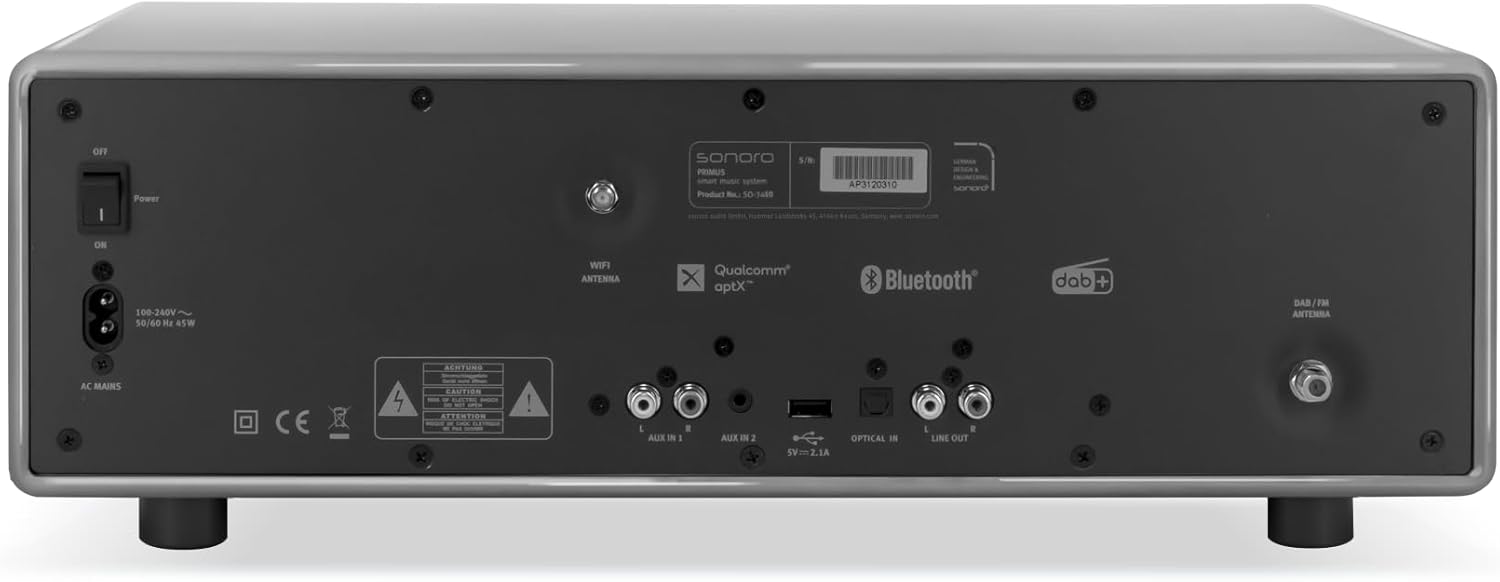
ภาพ: Rear panel of the sonoro Primus, highlighting the power input and other connectivity options like AUX-in, Optical-in, and antenna connections.
3. การเชื่อมต่อเสาอากาศ
For optimal FM and DAB+ reception, connect the included antenna to the appropriate antenna input on the rear panel. Extend the antenna fully for best signal quality.
4. เปิดเครื่องครั้งแรก
Press the Power button on the front panel or the remote control to turn on the unit. Follow the on-screen instructions for initial setup, including language selection and network configuration.

ภาพ: ด้านหน้า view of the sonoro Primus, displaying the central screen, control knobs, and various buttons for media playback and source selection.
คำแนะนำการใช้งาน
การควบคุมพื้นฐาน
The sonoro Primus features intuitive controls on the front panel and a comprehensive remote control. Key controls include:
- ปุ่มเปิด/ปิด: Turns the unit on/off or into standby mode.
- ปุ่มปรับระดับเสียง: ปรับระดับเสียงหลัก
- ปุ่มปรับจูน/เลือก: นำทางเมนูและเลือกตัวเลือก
- ปุ่มที่มา: Selects input sources (Internet Radio, DAB+, FM, Bluetooth, CD, AUX-in, Optical-in).
- การควบคุมการเล่น: Play/Pause, Skip Forward/Backward for CD and streaming.
Internet Radio and Podcasts
Access over 25,000 internet radio stations and numerous podcasts worldwide. Ensure your device is connected to a stable Wi-Fi network. Navigate through the menu using the Tune/Select knob to find and save your favorite stations.
DAB+ และวิทยุ FM
Switch to DAB+ or FM mode using the source buttons. The unit will automatically scan for available stations. You can manually tune or save presets for quick access to your preferred channels.
การเชื่อมต่อบลูทูธ
To connect a Bluetooth device (smartphone, tablet, laptop):
- Select the Bluetooth source on the sonoro Primus.
- เปิดใช้งาน Bluetooth บนอุปกรณ์ภายนอกของคุณ
- ค้นหา "sonoro Primus" in your device's Bluetooth settings and pair.
- เมื่อเชื่อมต่อแล้ว คุณสามารถสตรีมเสียงแบบไร้สายไปยังเครื่องได้
การเล่นซีดี
Insert an audio CD into the CD slot. The unit will automatically detect and begin playback. Use the playback controls to manage your music.
Streaming Services (Spotify Connect, Amazon Music, Deezer)
The sonoro Primus supports various streaming services. To use Spotify Connect, Amazon Music, or Deezer, ensure your device is connected to Wi-Fi and you have an active subscription to the respective service. Follow the instructions within the service's app to connect to your sonoro Primus.
AUX-in and Optical-in
Connect external audio devices using the AUX-in (3.5mm jack) or Optical-in ports on the rear panel. Select the corresponding source on the unit to play audio from these inputs.
การซ่อมบำรุง
การทำความสะอาดตัวเครื่อง
To clean the exterior of the unit, unplug it from the power source. Use a soft, dry, lint-free cloth. Do not use abrasive cleaners, waxes, or solvents as they may damage the finish.
การดูแลเครื่องเล่นซีดี
Handle CDs by their edges to avoid fingerprints. If a CD is dirty, wipe it gently with a soft, dry cloth from the center outwards. Do not use solvents or abrasive cleaners on CDs.
การอัพเดตซอฟต์แวร์
Periodically check for software updates via the unit's menu (if available). Updates can improve performance and add new features. Ensure a stable internet connection during updates.
การแก้ไขปัญหา
| ปัญหา | สาเหตุที่เป็นไปได้ | สารละลาย |
|---|---|---|
| ไม่มีไฟฟ้า | สายไฟไม่ได้เชื่อมต่อ เต้าเสียบไฟฟ้าชำรุด | ตรวจสอบการเชื่อมต่อสายไฟ ลองใช้เต้ารับอื่น |
| ไม่มีเสียง | Volume too low; wrong input source selected; mute activated. | Increase volume; select correct input source; deactivate mute. |
| การรับสัญญาณวิทยุไม่ดี | เสาอากาศไม่ได้เชื่อมต่อหรือต่ออย่างถูกต้อง ทำให้เกิดสัญญาณรบกวน | ปรับตำแหน่งเสาอากาศ และย้ายเครื่องให้ห่างจากอุปกรณ์อิเล็กทรอนิกส์อื่นๆ |
| การจับคู่บลูทูธล้มเหลว | Device too far; Bluetooth not enabled on external device; unit not in pairing mode. | Ensure devices are close; enable Bluetooth; put sonoro Primus in pairing mode. |
| ซีดีไม่เล่น | CD inserted incorrectly; CD is dirty or scratched; unsupported disc format. | Reinsert CD correctly; clean or replace CD; ensure it's an audio CD. |
| ปัญหาการเชื่อมต่อ Wi-Fi | รหัสผ่านไม่ถูกต้อง; เราเตอร์อยู่ไกลเกินไป; สัญญาณรบกวนเครือข่าย | ตรวจสอบรหัสผ่าน Wi-Fi ย้ายอุปกรณ์เข้าใกล้เราเตอร์มากขึ้น รีสตาร์ทเราเตอร์ |
หากปัญหายังคงมีอยู่ โปรดติดต่อฝ่ายสนับสนุนลูกค้า
ข้อมูลจำเพาะ
- ยี่ห้อ: โซโนโร
- แบบอย่าง: e60a53a9-4d44-4a55-b129-3386e8f3e186
- เทคโนโลยีจูนเนอร์: เอฟเอ็ม, ดีเอบี+
- โหมดเอาต์พุตเสียง: สเตอริโอ
- รูปแบบเสียงที่รองรับ: MP3, AAC, WAV
- การกำหนดค่าลำโพง: 2.1 (Two coaxial speakers and a powerful 5.25 inch subwoofer)
- การเชื่อมต่อ: Optical, Auxiliary, Bluetooth, WLAN
- อุปกรณ์ที่รองรับ: Laptop, MP3 player, Smartphone, Tablet
- แหล่งพลังงาน: สายไฟ
- ประเภทจอภาพ: LCD หรือ LED
- ส่วนประกอบที่รวมอยู่: Power adapter, Remote control (with Lithium-metal batteries)
- ขนาด (แพ็คเกจ): 52.6 x 33.2 x 27.4 ซม.
- น้ำหนัก (แพ็คเกจ): 9.45 กก.
- สี: Chalk Grey (Note: Other colors may be available for different models)
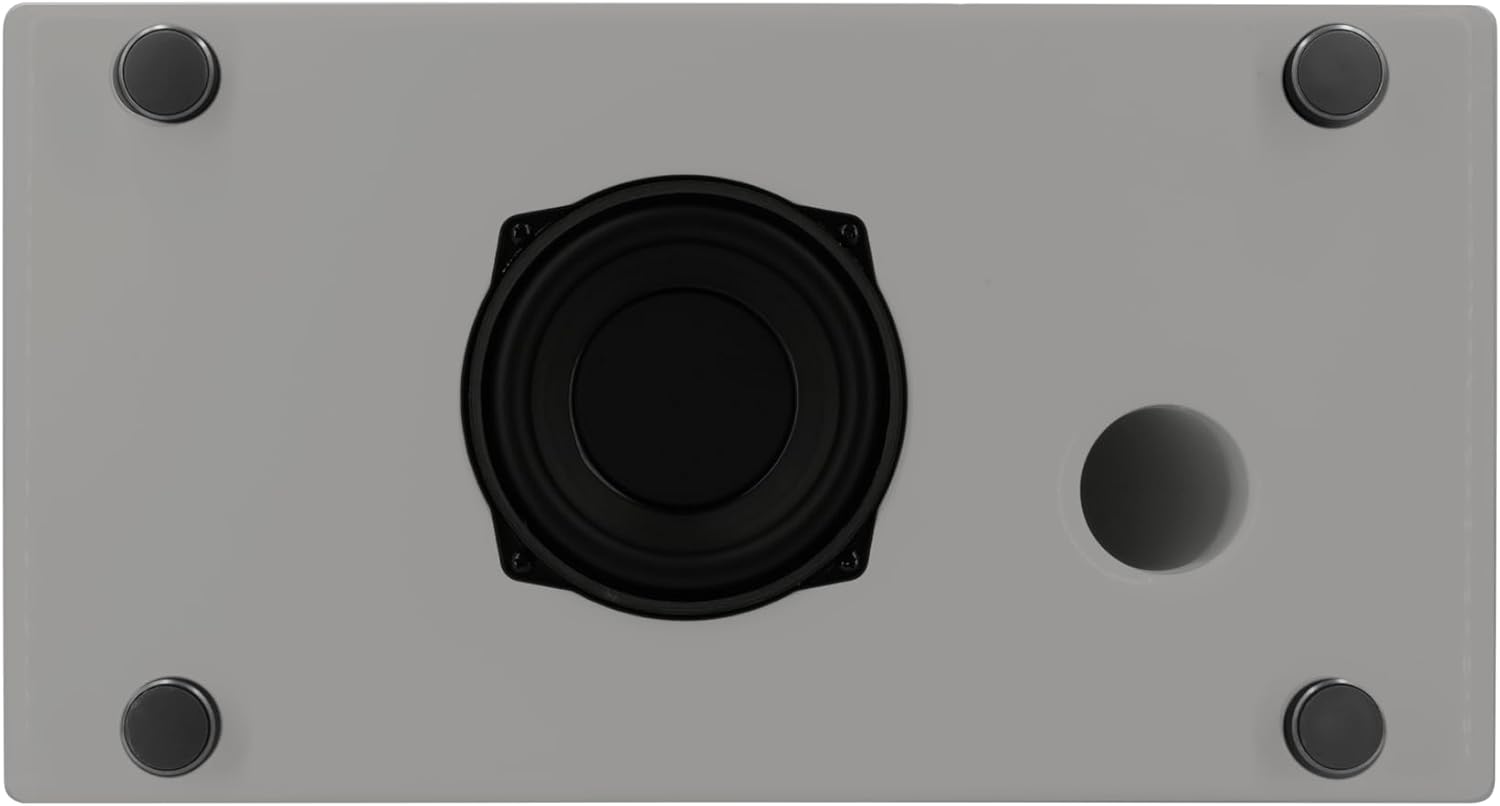
ภาพ: Underside of the sonoro Primus, revealing the integrated 5.25-inch subwoofer for enhanced bass performance.
การรับประกันและการสนับสนุน
The sonoro Primus comes with a standard manufacturer's warranty. Please refer to the warranty card included in your package for specific terms and conditions. For technical support, service, or warranty claims, please contact sonoro audio GmbH customer service through their official webเว็บไซต์หรือข้อมูลการติดต่อที่ให้มาพร้อมกับการซื้อของคุณ
ผู้ผลิต: โซโนโร ออดิโอ GmbH
วันที่พร้อมใช้งานครั้งแรก: 2 มกราคม 2023