
1. บทนำ
This manual provides detailed instructions for the proper use, setup, and maintenance of your Jectse BH M97 Single Ear Headset. Please read this manual thoroughly before using the product to ensure optimal performance and longevity. Keep this manual for future reference.
2. เนื้อหาบรรจุภัณฑ์
ตรวจสอบว่ารายการทั้งหมดที่ระบุไว้ด้านล่างมีอยู่ในบรรจุภัณฑ์ผลิตภัณฑ์ของคุณ:
- Jectse BH M97 Single Ear Headset
- ฐานชาร์จ
- สายชาร์จ
- คู่มือการใช้งาน (เอกสารนี้)
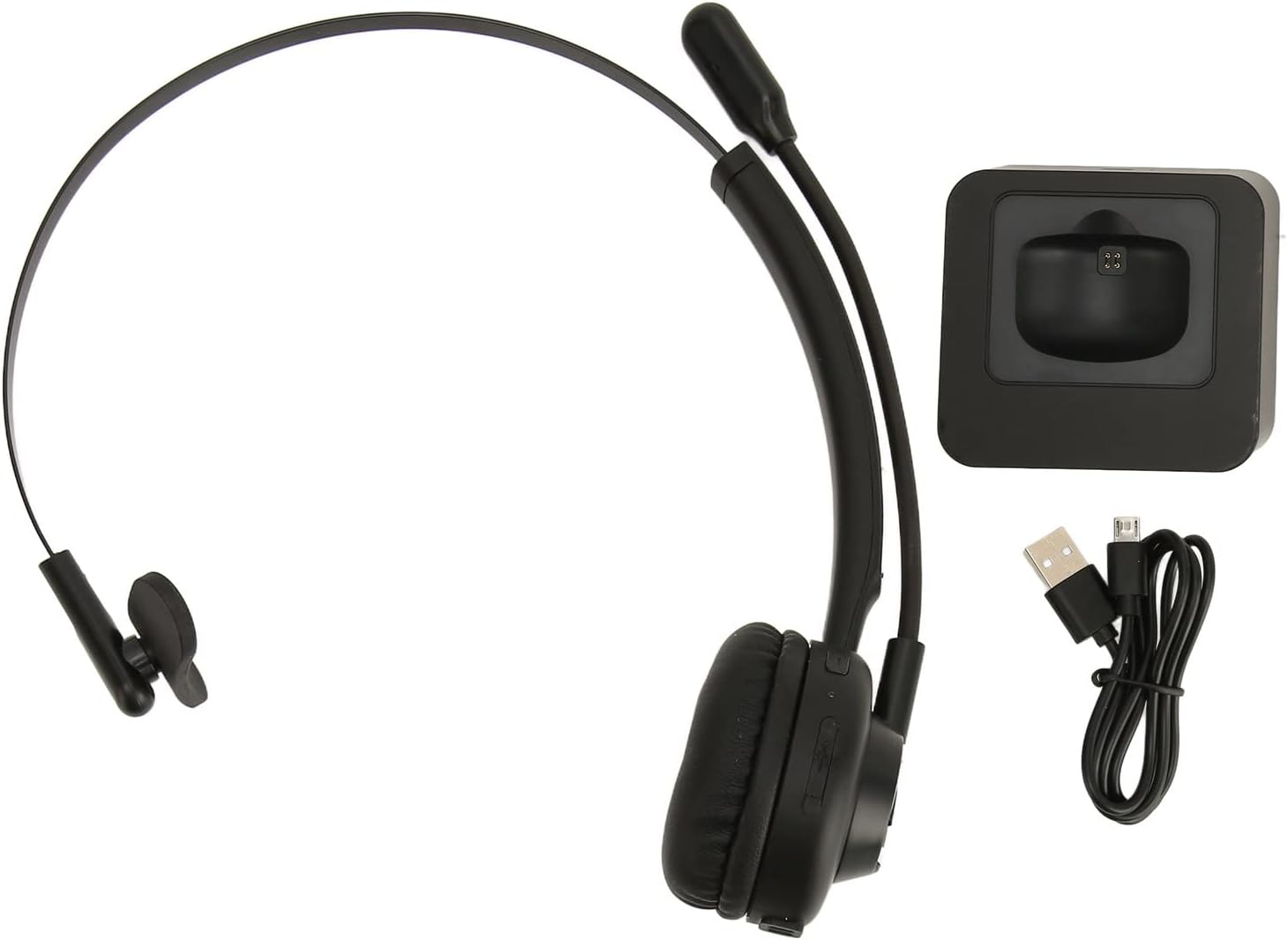
Image: The Jectse BH M97 headset, its dedicated charging base, and the USB charging cable.
3. สินค้าหมดview
The Jectse BH M97 is a single-ear Bluetooth headset designed for clear communication in various environments. It features a rotatable microphone and a comfortable on-ear design.
3.1 ส่วนประกอบของชุดหูฟัง
- เบาะรองหู: บุด้วยวัสดุที่นุ่มสบายขณะใช้งานเป็นเวลานาน
- แถบคาดศีรษะแบบยืดหยุ่น: สามารถปรับให้กระชับพอดีได้
- ไมโครโฟนแบบหมุนได้: Can be adjusted to accurately capture your voice and positioned on either side.
- ปุ่มควบคุม: (Specific button functions are typically detailed in the 'Operating Instructions' section.)
- หน้าสัมผัสการชาร์จ: Located on the earcup for use with the charging base.

Image: The Jectse BH M97 headset securely placed on its charging base.

ภาพ: รายละเอียด view of the headset's padded ear cushion and the charging contacts.
4. การตั้งค่า
4.1 การชาร์จชุดหูฟัง
- Connect the charging cable to the charging base and a USB power source (e.g., computer USB port, wall adapter).
- Place the headset onto the charging base, ensuring the charging contacts align.
- The headset's indicator light will typically show charging status (e.g., red for charging, blue/off for fully charged).
- A full charge takes approximately 2 hours. The headset provides up to 17 hours of talk time and 200 hours of standby time on a full charge.
4.2 การเปิด/ปิดเครื่อง
- การเปิดเครื่อง: Press and hold the Multi-function Button (MFB) for approximately 3-5 seconds until the indicator light flashes blue.
- วิธีปิดเครื่อง: Press and hold the MFB for approximately 3-5 seconds until the indicator light flashes red and then turns off.
4.3 การจับคู่บลูทูธ
The headset uses Bluetooth 5.0 for stable and efficient connection.
- ตรวจสอบว่าชุดหูฟังปิดอยู่
- Press and hold the MFB for approximately 5-7 seconds until the indicator light flashes red and blue alternately. This indicates pairing mode.
- บนอุปกรณ์ของคุณ (สมาร์ทโฟน, คอมพิวเตอร์, แท็บเล็ต) เปิดใช้งานบลูทูธและค้นหาอุปกรณ์ที่ใช้งานได้
- Select "BH M97" from the list of found devices.
- Once paired, the headset's indicator light will typically flash blue slowly or turn off.
- หากได้รับแจ้งให้ป้อนรหัสผ่าน ให้ป้อน "0000"

Image: The headset illustrating its rotatable microphone, comfortable design, and Bluetooth 5.0 capabilities for stable transmission.
5. คู่มือการใช้งาน
5.1 การสวมชุดหูฟัง
- Adjust the flexible headband to fit comfortably over your head.
- วางแผ่นรองหูฟังครอบหูข้างใดข้างหนึ่ง
- Rotate the microphone boom to bring the microphone close to your mouth for optimal voice capture. The microphone can be worn on either the left or right side.

Image: A user wearing the Jectse BH M97 headset, demonstrating its practical application in a professional environment.
5.2 การจัดการการโทร
- รับสาย: กดปุ่ม MFB สั้นๆ เมื่อมีสายเรียกเข้า
- วางสาย: กด MFB สั้นๆ ในระหว่างการโทร
- ปฏิเสธสาย: Press and hold the MFB for approximately 2 seconds when a call comes in.
- โทรซ้ำหมายเลขล่าสุด: กดปุ่ม MFB สองครั้งเมื่อไม่ได้อยู่ในระหว่างการสนทนา
5.3 การควบคุมระดับเสียง
Use the volume buttons (typically '+' and '-') on the headset to adjust the listening volume. Alternatively, adjust the volume directly on your connected device.
6. การบำรุงรักษา
การบำรุงรักษาอย่างถูกต้องจะช่วยให้ชุดหูฟังของคุณมีอายุการใช้งานยาวนานและมีประสิทธิภาพเหมาะสมที่สุด
- การทำความสะอาด: Use a soft, dry cloth to wipe the headset and charging base. Do not use abrasive cleaners or solvents.
- พื้นที่จัดเก็บ: เมื่อไม่ใช้งาน ควรเก็บชุดหูฟังไว้ในที่แห้งและเย็น หลีกเลี่ยงแสงแดดโดยตรงและอุณหภูมิที่สูงหรือต่ำเกินไป
- การดูแลแบตเตอรี่ ควรหลีกเลี่ยงการปล่อยให้แบตเตอรี่หมดเกลี้ยงบ่อยๆ ควรชาร์จหูฟังเป็นประจำ แม้ว่าจะไม่ได้ใช้งานตลอดเวลา เพื่อรักษาอายุการใช้งานของแบตเตอรี่
- หลีกเลี่ยงความชื้น: อย่าให้หูฟังโดนน้ำหรือความชื้นมากเกินไป
7 การแก้ไขปัญหา
If you encounter issues with your Jectse BH M97 headset, refer to the following common solutions:
- ชุดหูฟังจะไม่เปิด: Ensure the headset is fully charged. Connect it to the charging base and allow it to charge for at least 30 minutes before attempting to power on again.
- ไม่สามารถจับคู่กับอุปกรณ์:
- Ensure the headset is in pairing mode (flashing red and blue alternately).
- ตรวจสอบให้แน่ใจว่าได้เปิดใช้งานบลูทูธบนอุปกรณ์ของคุณแล้ว
- ย้ายชุดหูฟังให้เข้าใกล้อุปกรณ์ของคุณมากขึ้น (ภายในระยะ 10 เมตร)
- ปิดและเปิดบลูทูธของอุปกรณ์ของคุณ จากนั้นลองจับคู่ใหม่อีกครั้ง
- If previously paired, try deleting the headset from your device's Bluetooth list and re-pairing.
- ไม่มีเสียงหรือระดับเสียงต่ำ:
- ตรวจสอบระดับเสียงทั้งบนชุดหูฟังและอุปกรณ์ที่เชื่อมต่อของคุณ
- ตรวจสอบให้แน่ใจว่าชุดหูฟังเชื่อมต่อกับอุปกรณ์ของคุณอย่างถูกต้อง
- Verify that the correct audio output device is selected on your computer or phone.
- ไมโครโฟนไม่ทำงาน:
- ตรวจสอบให้แน่ใจว่าบูมไมโครโฟนอยู่ในตำแหน่งที่ถูกต้องใกล้กับปากของคุณ
- Check microphone settings on your connected device to ensure the headset is selected as the input device.
- Ensure the microphone is not muted (if a mute function is available on the headset or device).
If the issue persists after trying these steps, please refer to the warranty and support information.
8. ข้อมูลจำเพาะ
| คุณสมบัติ | ข้อมูลจำเพาะ |
|---|---|
| แบบอย่าง | BH M97 |
| การเชื่อมต่อ | บลูทูธ 5.0 (ไร้สาย) |
| ช่วงสาย | สูงถึง 10 เมตร (32.8 ฟุต) |
| ความจุของแบตเตอรี่ | แบตเตอรี่ลิเธียมในตัว 180mAh |
| เวลาสนทนา | นานถึง 17 ชั่วโมง |
| เวลาสแตนด์บาย | นานถึง 200 ชั่วโมง |
| เวลาในการชาร์จ | ประมาณ 2 ชั่วโมง |
| วัสดุ | เอบีเอส, พลาสติก |
| การวางตำแหน่งหู | On Ear (Single Ear) |
| ไมโครโฟน | Rotatable, Noise Canceling |
| อุปกรณ์ที่รองรับ | Cellphones, Tablets, Laptops, PCs |
| ขนาด (พัสดุ) | 18 x 17 x 6 ซม. |
| น้ำหนัก (พัสดุ) | 329 กรัม |
9. การรับประกันและการสนับสนุน
For warranty information and customer support, please refer to the documentation included with your purchase or visit the official Jectse webไซต์นี้ โปรดเก็บหลักฐานการซื้อไว้เพื่อใช้ยืนยันการรับประกัน