
การแนะนำ
This manual provides detailed instructions for the installation, operation, and maintenance of your EZoneTronics PCD001 Portable Wireless Car Stereo. Please read this manual thoroughly before using the device to ensure proper functionality and to prevent damage.
สินค้าเกินview
คุณสมบัติหลัก
- จอแสดงผลระบบสัมผัสขนาด 7 นิ้ว: Provides a clear and responsive interface for navigation and media control.
- Apple CarPlay และ Android Auto แบบไร้สาย: Seamlessly integrates with Apple and Android smartphones for navigation, music, and communication.
- FM Transmitter: Connects to your vehicle's original radio system via AUX Out or FM Out for audio output.
- การติดตั้งแบบพลักแอนด์เพลย์: Designed for easy setup without modifying existing car equipment.
- ตัวเลือกการติดตั้งที่หลากหลาย: Can be mounted on the dashboard or windshield using a suction cup holder.
- ฟังก์ชั่นเพิ่มเติม: Supports Bluetooth connectivity, hands-free calling, voice control (Siri/Google Assistant), video playback, and music streaming.
- ความเข้ากันได้ของสื่อ: Supports SD card and USB devices for media playback.
มีอะไรอยู่ในกล่อง
ตรวจสอบว่ามีส่วนประกอบทั้งหมดอยู่ครบเมื่อแกะกล่อง:
- 1 x EZoneTronics PCD001 Portable Wireless Car Stereo Unit
- 1 x Mounting Bracket (for dash or windshield)
- 1 x Car Charger (power adapter)
- 1 x Driving Recorder (if included in your package)
- 1 x SD Card (if included in your package)
- 1 เท่า Webcam (if included in your package)
Note: The inclusion of the Driving Recorder, SD Card, and Webcam may vary by package.
การติดตั้งและการตั้งค่า
การติดตั้งอุปกรณ์
The device can be mounted on your car's dashboard or windshield. Choose a location that does not obstruct your view หรือรบกวนการควบคุมรถ
- ทำความสะอาดพื้นผิว: Ensure the chosen mounting surface (dashboard or windshield) is clean and dry.
- ติดถ้วยดูด: Press the suction cup firmly onto the surface and engage the locking mechanism to secure it.
- ปรับมุม: Use the adjustable arm and swivel joint to position the screen for optimal viewing. The mount allows for 360-degree rotation and 180-degree angle adjustment.
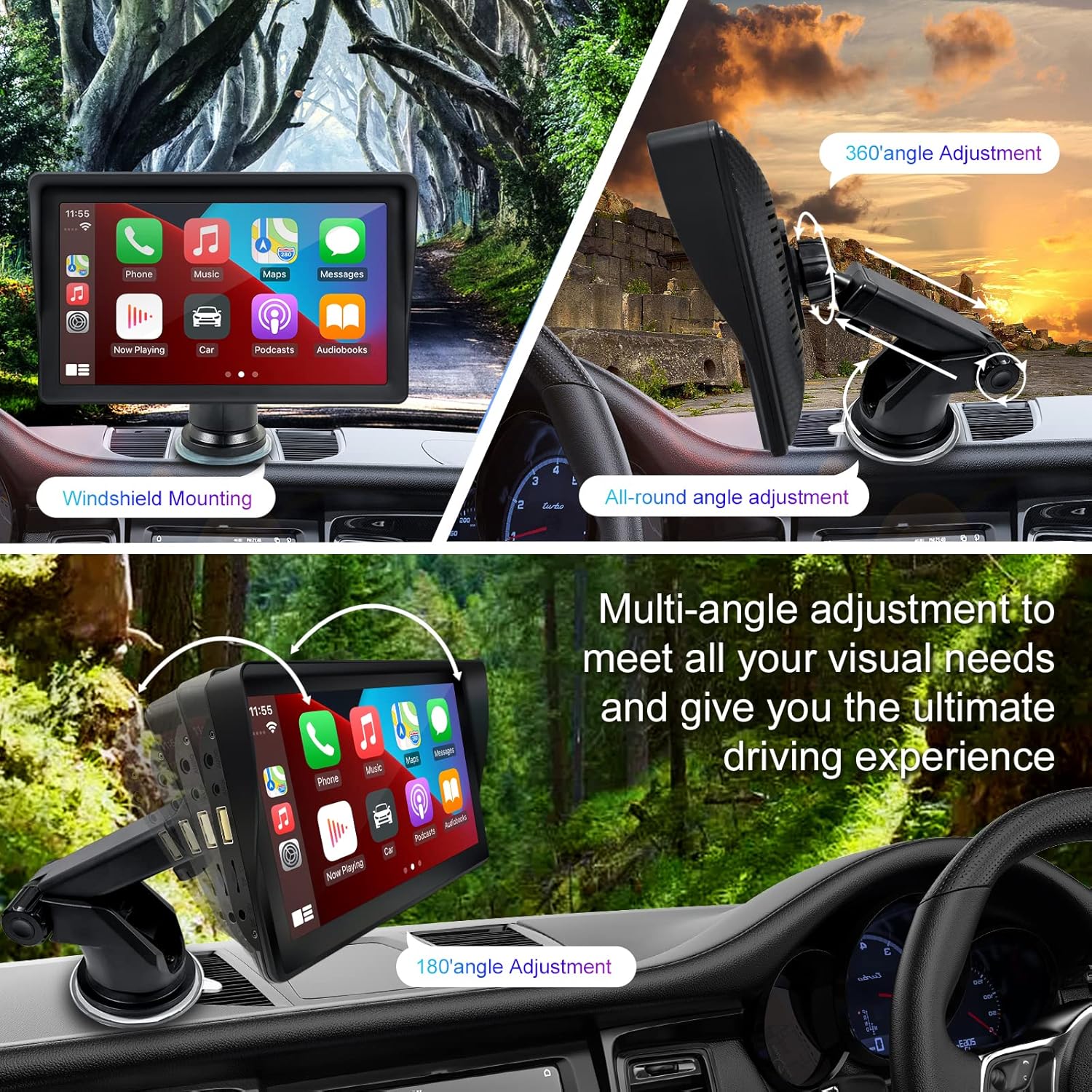
Figure 1: Mounting options and angle adjustments for the portable car stereo.
การเชื่อมต่อไฟฟ้า
Connect the provided car charger to the device's power input port and then into your vehicle's 12V power outlet (cigarette lighter socket). The device supports 12-24V power input.
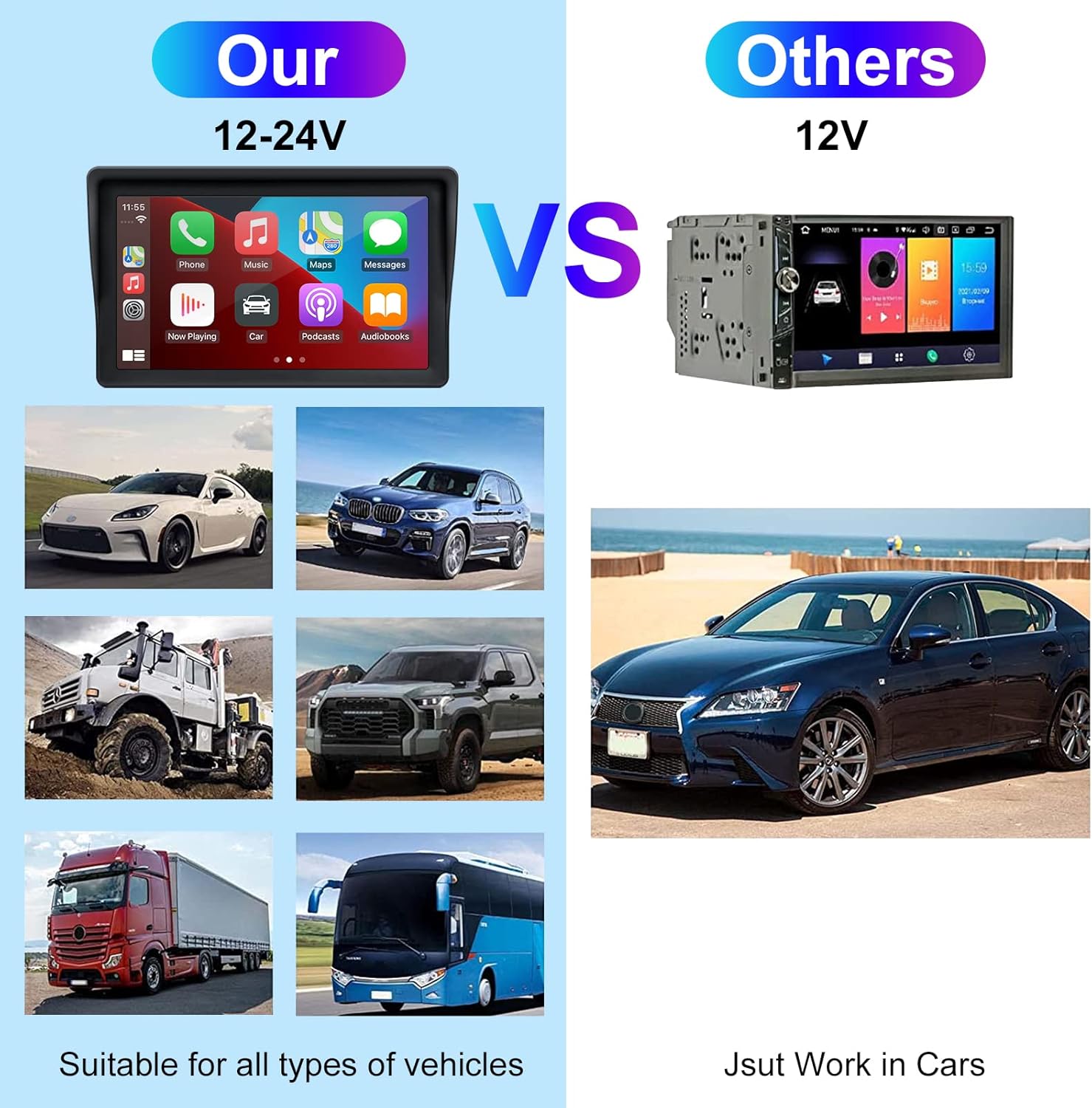
Figure 2: The EZoneTronics unit is compatible with 12-24V vehicle power systems.
คำแนะนำการใช้งาน
Initial Power On and Interface
Once powered, the device will boot up and display the main interface. This interface provides access to Apple CarPlay, Android Auto, and other functions.

Figure 3: Main interface displaying Apple CarPlay.
Connecting to Apple CarPlay or Android Auto
The device supports wireless connection for both Apple CarPlay and Android Auto.
- เปิดใช้งานบลูทูธและ Wi-Fi: บนสมาร์ทโฟนของคุณ โปรดตรวจสอบให้แน่ใจว่าได้เปิดใช้งานทั้งบลูทูธและ Wi-Fi แล้ว
- จับคู่อุปกรณ์: บนเครื่องเสียงรถยนต์ ให้เข้าไปที่การตั้งค่าบลูทูธและเชื่อมต่อกับสมาร์ทโฟนของคุณ
- การเชื่อมต่ออัตโนมัติ: Once paired, the device should automatically prompt you to connect to Apple CarPlay or Android Auto. Follow the on-screen instructions on both the car stereo and your phone to complete the setup.
- ลิงค์มิเรอร์: For devices not supporting CarPlay or Android Auto, or if you prefer, you can use the Mirror Link function to display your phone's screen on the unit.

Figure 4: Wireless connection for Apple CarPlay and Android Auto.
Audio Output (FM Transmitter / AUX Out)
To output audio from the car stereo to your vehicle's sound system, you have two primary options:
- FM Transmitter:
- On the EZoneTronics unit, select the FM Transmitter function.
- Choose an unused FM frequency.
- Tune your vehicle's FM radio to the same frequency. Audio from the portable stereo will now play through your car's speakers.
- AUX ออก:
- Connect an AUX cable from the AUX Out port on the EZoneTronics unit to your vehicle's AUX In port.
- Select AUX input on your vehicle's audio system.


Figure 5: FM Transmitter and other core functions.
Voice Control (Siri / Google Assistant)
Once connected to Apple CarPlay or Android Auto, you can activate your smartphone's voice assistant (Siri or Google Assistant) for hands-free control. This allows you to make calls, send messages, get directions, and play music using voice commands.
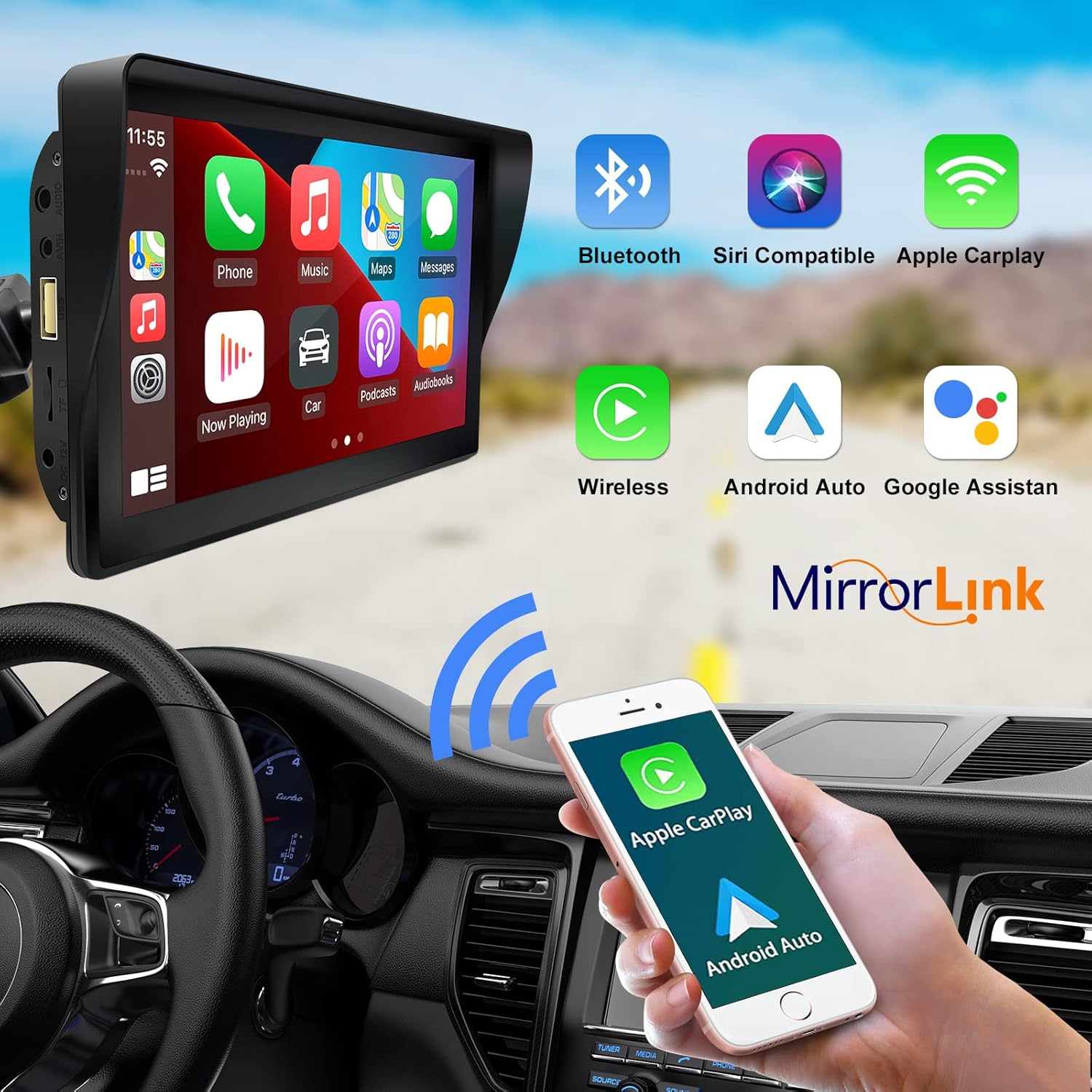
Figure 6: Voice control and connectivity features.
Media Playback (SD Card / USB)
The unit supports media playback from SD cards and USB devices.
- Insert an SD card into the designated slot or a USB drive into the USB port.
- Navigate to the media player application on the car stereo.
- Select the desired audio or video fileสำหรับการเล่น


Figure 7: USB and SD card media playback options.
การแก้ไขปัญหา
If you encounter issues with your EZoneTronics PCD001, refer to the following common problems and solutions:
| ปัญหา | สาเหตุที่เป็นไปได้ / วิธีแก้ไข |
|---|---|
| อุปกรณ์ไม่เปิดเครื่อง |
|
| Cannot connect to Apple CarPlay / Android Auto wirelessly. |
|
| No audio output from car speakers. |
|
| หน้าจอสัมผัสไม่ตอบสนอง |
|
| GPS navigation is inaccurate or not working. |
|
ข้อมูลจำเพาะ
| คุณสมบัติ | รายละเอียด |
|---|---|
| ชื่อรุ่น | PCD001 |
| ยี่ห้อ | EZoneTronics |
| ขนาดหน้าจอ | 7 นิ้ว |
| ประเภทจอภาพ | ไอพีเอส |
| ประเภทหน้าจอสัมผัส | ความจุ |
| ระบบปฏิบัติการ | Android (Internal OS for unit functions, supports CarPlay/Android Auto) |
| เทคโนโลยีการเชื่อมต่อ | Wireless CarPlay, Wireless Android Auto, Bluetooth, FM Transmitter, AUX Out |
| โหมดเอาต์พุตเสียง | ออซ, สเตอริโอ |
| รองรับระบบนำทางผ่านดาวเทียม | GPS (via connected smartphone) |
| ประเภทการติดตั้ง | ติดตั้งบนแผงหน้าปัด ติดตั้งบนกระจกหน้ารถ |
| อุปกรณ์ที่รองรับ | Smartphones (Apple iOS and Android) |
| ประเภทบริการยานพาหนะ | Car (Universal 12-24V compatibility) |
การซ่อมบำรุง
Proper maintenance ensures the longevity and optimal performance of your EZoneTronics PCD001.
- การทำความสะอาดหน้าจอ: ใช้ผ้านุ่มไม่เป็นขุยเช็ดหน้าจอเบาๆ สำหรับรอยเปื้อนฝังแน่น ให้เช็ดเบาๆampชุบผ้าด้วยน้ำหรือน้ำยาทำความสะอาดที่ปลอดภัยต่อหน้าจอ หลีกเลี่ยงสารเคมีรุนแรงหรือวัสดุที่มีฤทธิ์กัดกร่อน
- การจัดการสายเคเบิล: Ensure all cables are neatly routed and secured to prevent entanglement or damage.
- อุณหภูมิ: ควรหลีกเลี่ยงการนำอุปกรณ์ไปวางไว้ในที่ที่มีอุณหภูมิสูงหรือต่ำจัดเป็นเวลานาน
- การอัปเดตซอฟต์แวร์: ตรวจสอบผู้ผลิตเป็นระยะ website or device settings for any available software updates to improve performance and add features.
การรับประกันและการสนับสนุน
ข้อมูลการรับประกัน
The EZoneTronics PCD001 Portable Wireless Car Stereo comes with a รับประกันหนึ่งปี นับจากวันที่ซื้อสินค้า การรับประกันนี้ครอบคลุมถึงข้อบกพร่องจากการผลิตและการทำงานผิดปกติภายใต้การใช้งานปกติ ไม่ครอบคลุมถึงความเสียหายที่เกิดจากการใช้งานผิดวิธี อุบัติเหตุ การดัดแปลงโดยไม่ได้รับอนุญาต หรือการติดตั้งที่ไม่ถูกต้อง
โปรดเก็บหลักฐานการซื้อของคุณไว้เพื่อเรียกร้องการรับประกัน
การสนับสนุนลูกค้า
For technical assistance, warranty claims, or further inquiries, please contact EZoneTronics customer support:
- Webเว็บไซต์: www.ezonetronics.com
- อีเมล: support@ezonetronics.com
When contacting support, please provide your product model (PCD001) and a detailed description of the issue.