
1. สินค้าหมดview
The BearHoHo RFID Room Escape Prop is designed for interactive room escape games, allowing players to unlock a chamber by correctly matching IC cards to their corresponding sensors. This model features audio feedback and supports multiple IC card sensors for complex puzzle designs.
คุณสมบัติหลัก:
- Supports 2 sets of IC cards, allowing users to choose one for gameplay.
- Unlocking mechanism requires matching specific IC cards (e.g., A1-A1, A2-A2, A3-A3).
- Highly sensitive IC sensors with an effective distance of 3-4 cm.
- Quick unlocking time of approximately 2 seconds.
- Controls a 12V EM (Electromagnetic) Lock for opening and closing.
- Easy reset methods for quick game restarts.
2. เนื้อหาบรรจุภัณฑ์
ตรวจสอบว่าส่วนประกอบทั้งหมดที่ระบุไว้ด้านล่างนี้รวมอยู่ในแพ็คเกจของคุณ:
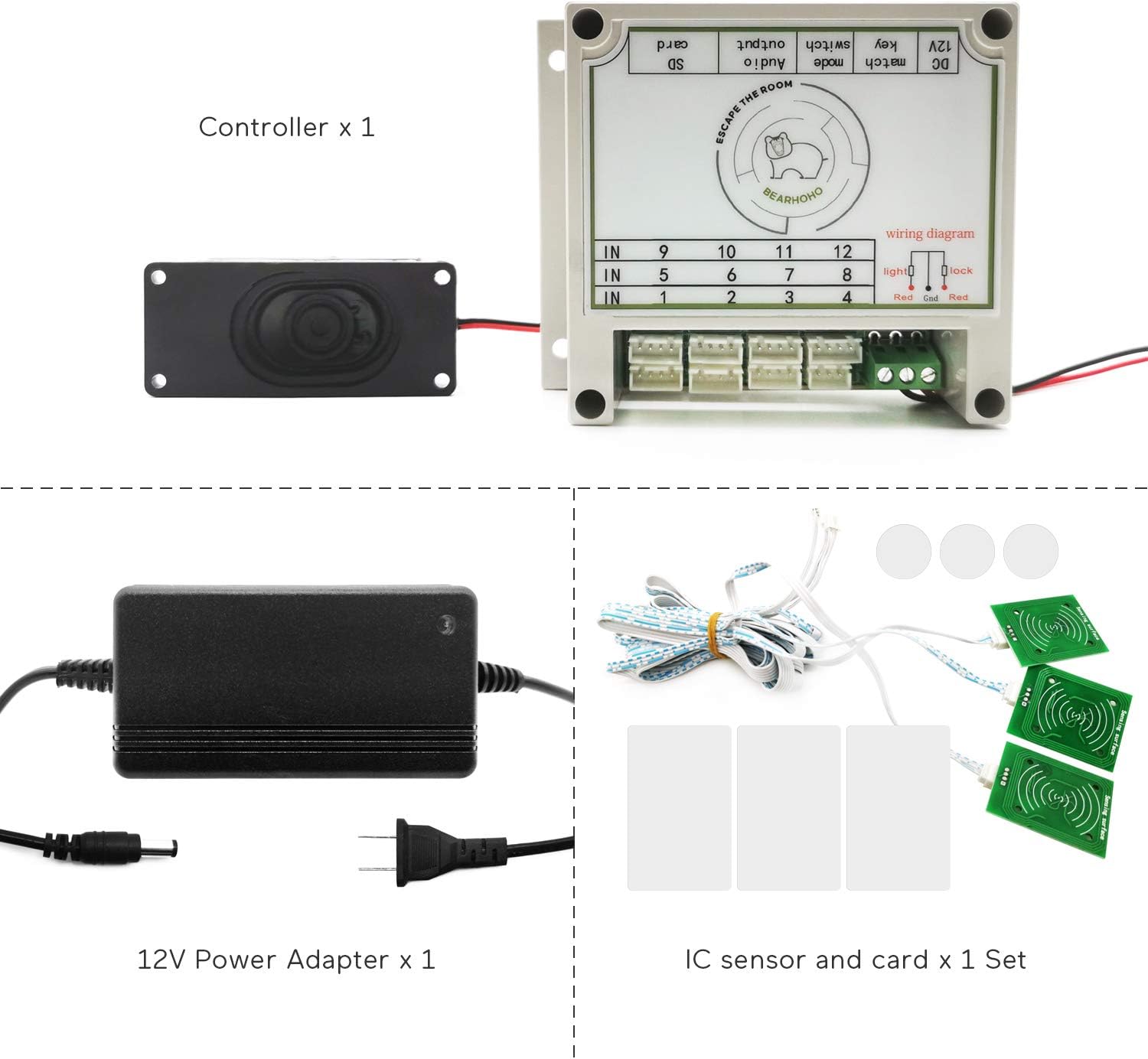
- 1 x ควบคุม
- อะแดปเตอร์แปลงไฟ 1 x 12V
- n x Set of IC Cards and Sensors (where 'n' corresponds to the number of sensors in your specific model, e.g., 5 for this model)
3. คำแนะนำในการตั้งค่า
Follow these steps to set up your RFID Room Escape Prop:
3.1 การเชื่อมต่อส่วนประกอบview
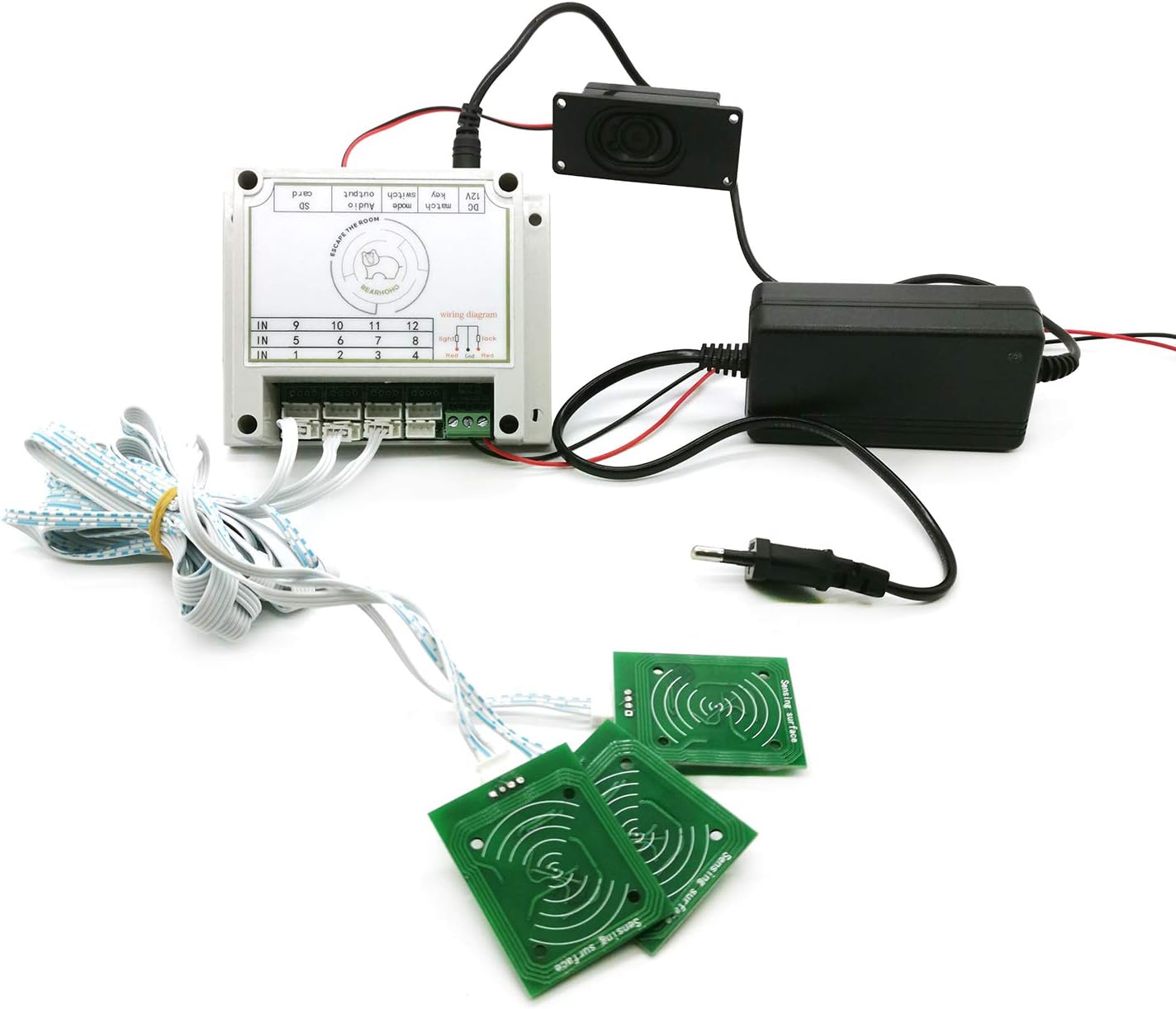
3.2 Controller and Port Identification

3.3 Wiring the EM Lock
Connect the EM lock to the controller's output wiring interface:
- เชื่อมต่อ สายสีดำ of the EM lock to the พอร์ต COM ของตัวควบคุม
- เชื่อมต่อ สายสีแดง of the EM lock to the NC port ของตัวควบคุม

3.4 การเชื่อมต่อสายไฟ
Connect the provided 12V power adapter to the DC 12V Power Port on the controller. Ensure the power source is stable.
3.5 Audio Version Selection (If Applicable)
This product comes in versions with or without an integrated speaker. If your model includes audio, ensure the speaker is connected to the designated port. The audio version supports changing audio content via a built-in TF card (MP3 format, max 128MB).

4. คู่มือการใช้งาน
To operate the RFID Room Escape Prop and unlock the EM lock:
- Ensure the controller is powered on and the EM lock is connected and engaged.
- Players must locate the IC card sensors hidden within the room.
- Players must then find the specific IC cards that correspond to each sensor. The system is designed for one-to-one matching (e.g., card A1 matches sensor A1, card A2 matches sensor A2, etc.).
- Place each correct IC card onto its corresponding sensor. The IC sensors are sensitive, with an effective range of 2-3 cm for small sensors and 4-5 cm for larger ones.
- Once all correct IC cards are placed on their respective sensors, wait approximately 2 seconds for the system to process the match.
- Upon successful matching, the connected EM lock will disengage, unlocking the chamber.

5. Resetting Instructions
There are three methods to reset the prop for a new game:
- รีเซ็ตอัตโนมัติ: After a successful unlock, the prop will automatically reset after 30 seconds.
- Manual Card Reset: Simply remove any one of the IC cards from its sensor to reset the prop immediately.
- Power Cycle Reset: Turn off the controller by disconnecting the power adapter, then reconnect it to restart the system.

6. การบำรุงรักษา
To ensure the longevity and proper functioning of your BearHoHo RFID Room Escape Prop:
- รักษาตัวควบคุมและเซ็นเซอร์ให้สะอาดและปราศจากฝุ่น ใช้ผ้าแห้งนุ่มๆ ในการทำความสะอาด
- หลีกเลี่ยงการให้อุปกรณ์สัมผัสกับความชื้นหรืออุณหภูมิที่สูงเกินไป
- Handle IC cards and sensors with care to prevent damage.
- ตรวจสอบให้แน่ใจว่าการเชื่อมต่อทั้งหมดแน่นหนาดีก่อนดำเนินการ
7 การแก้ไขปัญหา
If you encounter issues with your RFID Room Escape Prop, consider the following:
- Prop not responding: Check if the 12V power adapter is correctly connected and supplying power. Ensure all cables are securely plugged into their respective ports.
- EM Lock not unlocking: Verify that the EM lock is correctly wired to the controller's COM and NC ports as per Section 3.3. Confirm that all IC cards are placed on their correct corresponding sensors.
- IC sensors not detecting cards: Ensure the IC cards are placed directly over the sensing surface of the sensors. The effective sensing distance is 3-4 cm; avoid placing cards too far from the sensor.
- Audio issues (if applicable): Check speaker connection. If using a custom audio file, ensure it is in MP3 format and does not exceed 128MB on the TF card.
- Prop not resetting: Try all three reset methods described in Section 5. If automatic reset fails, manually remove a card or power cycle the device.
If problems persist, please contact BearHoHo customer support for further assistance.
8. ข้อมูลจำเพาะ
| ผู้ผลิต | แบร์โฮโฮ |
| หมายเลขรุ่น | DC-ERP011 |
| ขนาดสินค้า | 5 x 4.47 x 3.99 ซม. |
| ขนาด | พร้อมเครื่องเสียง |
| สี | 5 IC Card Sensors |
| ส่วนประกอบที่รวมอยู่ | อะแดปเตอร์แปลงไฟ |
| Requires Batteries? | เลขที่ |
| ASIN | B0BCFPFG6Q |
| วันที่พร้อมใช้งานครั้งแรก | วันที่ 30 สิงหาคม 2022 |
9. การรับประกันและการสนับสนุน
For warranty information or technical support, please refer to the documentation provided with your purchase or contact BearHoHo customer service directly. Contact details can typically be found on the manufacturer's official webเว็บไซต์หรือผ่านผู้ค้าปลีกของคุณ