
การแนะนำ
ขอบคุณสำหรับการซื้อasing the RCA 32V-type FHD Tunerless Smart TV, model RCA-32D1. This television is designed for seamless access to online streaming content without the need for traditional terrestrial broadcast tuners. It features a Full HD display, built-in Wi-Fi, Chromecast functionality, and voice control for an enhanced viewing experience. This manual provides essential information for setting up, operating, maintaining, and troubleshooting your new TV.

รูปที่ 1 : ด้านหน้า view of the RCA 32V-type FHD Tunerless Smart TV.
ข้อมูลด้านความปลอดภัย
โปรดอ่านคำแนะนำด้านความปลอดภัยทั้งหมดอย่างละเอียดก่อนใช้ผลิตภัณฑ์ เก็บคู่มือนี้ไว้เพื่อใช้อ้างอิงในอนาคต
- อย่านำโทรทัศน์ไปวางไว้กลางฝนหรือความชื้น เพื่อป้องกันไฟไหม้หรือไฟฟ้าช็อต
- ตรวจสอบให้แน่ใจว่ามีการระบายอากาศที่เหมาะสม อย่าปิดกั้นช่องระบายอากาศ
- ใช้เฉพาะสายไฟที่ให้มาพร้อมกับทีวีเท่านั้น
- อย่าเปิดทีวีasinก. ส่งต่อการบริการทั้งหมดให้กับบุคลากรที่มีคุณสมบัติเหมาะสม
- เก็บแบตเตอรี่ให้พ้นมือเด็ก และทิ้งแบตเตอรี่ที่ใช้แล้วอย่างถูกวิธี
- หลีกเลี่ยงการวางทีวีบนพื้นผิวที่ไม่มั่นคง
เนื้อหาแพ็คเกจ
ตรวจสอบว่ามีรายการทั้งหมดอยู่ในแพ็คเกจ:
- RCA 32V-type FHD Tunerless Smart TV Unit
- รีโมทคอนโทรล
- แบตเตอรี่ AAA (x2)
- ขาตั้งทีวี (ฐานและสกรู)
- สายไฟ
- คู่มือผู้ใช้ (เอกสารนี้)
การตั้งค่า
1. การตั้งค่าทางกายภาพ
Attach the TV stand or mount the TV to a wall. For wall mounting, ensure you use a VESA-compatible bracket (40 x 40mm) and appropriate screws (M6 10mm x 2 for upper two points, screws for lower two points are included with the TV). Always ensure the TV is securely mounted to prevent accidents.

Figure 2: TV dimensions and connection terminal layout.
2. การเชื่อมต่อ
Connect the power cable to the TV and then to a power outlet. This TV requires only a power connection and Wi-Fi for internet streaming.

Figure 3: Power and Wi-Fi connectivity for the tunerless TV.
สำหรับอุปกรณ์ภายนอก ให้ใช้พอร์ตที่มีอยู่:
- พอร์ต HDMI (x3): Connect game consoles, Blu-ray players, or other HDMI-compatible devices.
- พอร์ต USB 2.0 (x2): เชื่อมต่ออุปกรณ์จัดเก็บข้อมูล USB สำหรับการเล่นสื่อ
- พอร์ต LAN: For wired internet connection (optional, Wi-Fi is also available).
- เอาต์พุตเสียง: สำหรับเชื่อมต่อระบบเสียงภายนอก

Figure 4: Connecting external devices via HDMI ports.
3. เปิดเครื่องครั้งแรก
After connecting the power, press the power button on the remote control. Follow the on-screen instructions to complete the initial setup, including connecting to your Wi-Fi network and logging into your Google account to access smart TV features.
การดำเนินงาน
1. รีโมทคอนโทรล
The included remote control allows for easy navigation and features voice control capabilities. Dedicated buttons provide quick access to popular streaming services.
- การควบคุมด้วยเสียง: Press the voice assistant button and speak commands like "Play cat videos on YouTube" or "Increase volume."
- ปุ่มแอปเฉพาะ: Quickly launch NETFLIX, YouTube, and Prime Video with a single press.
- การนำทาง: ใช้ปุ่มควบคุมทิศทางและปุ่ม OK เพื่อเลื่อนดูเมนูและเลือกตัวเลือกต่างๆ
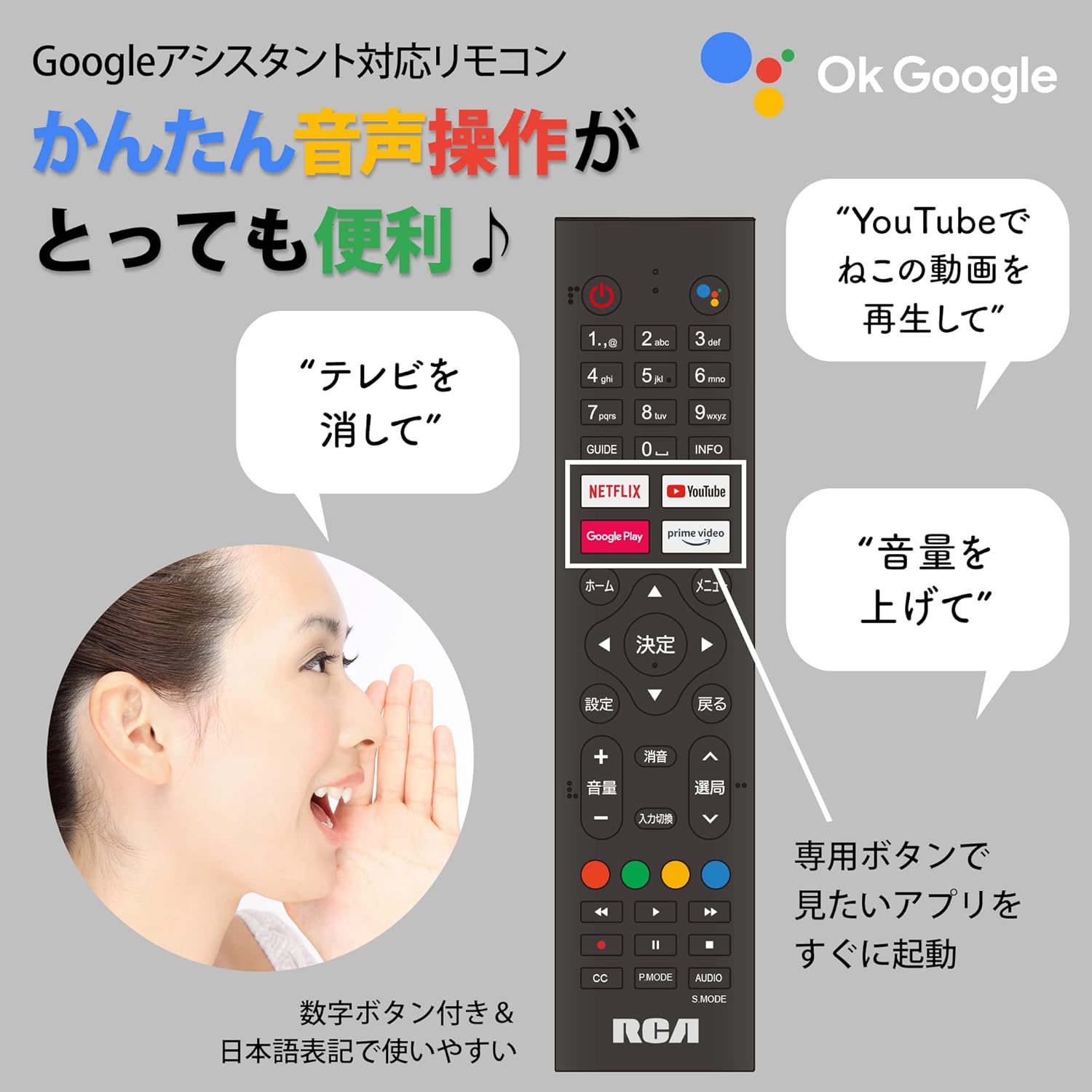
Figure 5: Remote control with voice command functionality and dedicated app buttons.
2. คุณสมบัติของสมาร์ททีวี
This tunerless TV provides access to a wide range of online video distribution services and features:
- บริการสตรีมมิ่ง: Enjoy content from NETFLIX, YouTube, Prime Video, Tver, U-NEXT, AbemaTV, and more.
- Chromecast ในตัว: Cast content directly from your smartphone or tablet to the TV screen.
- ระบบปฏิบัติการ Android: Access a variety of apps from the Google Play Store.

Figure 6: Using Chromecast to cast content from a smartphone to the TV.
Video 1: Demonstration of the Google TV interface and voice control for content discovery.
3. การดำเนินการพื้นฐาน
- เปิด/ปิดเครื่อง: กดปุ่มเปิด/ปิดบนรีโมทคอนโทรล
- การควบคุมระดับเสียง: ใช้ปุ่มเพิ่ม/ลดระดับเสียงบนรีโมท
- การเลือกอินพุต: Press the Input button to switch between HDMI and other connected sources.
การซ่อมบำรุง
1. การทำความสะอาด
ในการทำความสะอาดหน้าจอทีวี ให้เช็ดเบาๆ ด้วยผ้าเนื้อนุ่มที่ไม่เป็นขุย สำหรับคราบฝังแน่น ให้ใช้ผ้าชุบน้ำหมาดๆ เช็ดเบาๆampen the cloth with water or a screen-cleaning solution. Do not spray liquid directly onto the screen. Clean the TV casinก. ด้วยผ้าแห้งนุ่มๆ
2. การจัดเก็บ
If storing the TV for an extended period, disconnect it from the power outlet and store it in a cool, dry place away from direct sunlight and extreme temperatures.
การแก้ไขปัญหา
หากคุณประสบปัญหาเกี่ยวกับทีวี โปรดดูปัญหาทั่วไปและวิธีแก้ไขต่อไปนี้:
| ปัญหา | สารละลาย |
|---|---|
| ไม่มีไฟฟ้า | ตรวจสอบให้แน่ใจว่าสายไฟเชื่อมต่อกับทีวีและเต้ารับไฟฟ้าอย่างแน่นหนาแล้ว ลองเสียบเข้ากับเต้ารับอื่นดู |
| No picture/Sound but no picture | ตรวจสอบแหล่งสัญญาณเข้า ตรวจสอบให้แน่ใจว่าอุปกรณ์ภายนอกเปิดอยู่และเชื่อมต่ออย่างถูกต้อง |
| รีโมตคอนโทรลไม่ทำงาน | เปลี่ยนแบตเตอรี่ ตรวจสอบให้แน่ใจว่าไม่มีสิ่งกีดขวางระหว่างรีโมทและเซ็นเซอร์อินฟราเรดของทีวี |
| ไม่สามารถเชื่อมต่อ Wi-Fi ได้ | Check your router and internet connection. Re-enter the Wi-Fi password. Move the TV closer to the router. |
| App is slow or freezes | Restart the TV. Clear the app's cache in the TV settings. Ensure your internet connection is stable. |
หากปัญหายังคงมีอยู่ โปรดติดต่อฝ่ายสนับสนุนลูกค้า
ข้อมูลจำเพาะ
The following are the technical specifications for the RCA-32D1 Tunerless Smart TV:
| คุณสมบัติ | รายละเอียด |
|---|---|
| หมายเลขรุ่น | RCA-32D1 |
| ขนาดหน้าจอ | 31.5 inches (32V-type) |
| เทคโนโลยีการแสดงผล | LCD, VA Panel, LED Backlight |
| ปณิธาน | ฟูลเอชดี (1920 x 1080) |
| อัตราการรีเฟรช | 60 เฮิรตซ์ |
| อัตราส่วนคอนทราสต์ | 3000:1 น. |
| ระบบปฏิบัติการ | แอนดรอยด์ |
| การเชื่อมต่อ | Wi-Fi, HDMI (x3), USB 2.0 (x2), LAN, Audio Output |
| คุณสมบัติพิเศษ | Chromecast Built-in, Voice Control |
| บริการสตรีมมิ่งที่รองรับ | Netflix, YouTube, Prime Video, Tver, U-NEXT, AbemaTV |
| ขนาดสินค้า (ลึก x กว้าง x สูง) | 16.1 x 73.1 x 47 ซม. |
| น้ำหนักสินค้า | 4.9 กก. |
| มาตรฐาน VESA Mount | 40 x 40มม. |
| รวมแบตเตอรี่ | ถ่าน AAA จำนวน 2 ก้อน |

Figure 7: High-definition VA panel for vivid image quality.
การรับประกันและการสนับสนุน
This product is covered by the manufacturer's warranty. Please refer to the warranty card included in your package for specific terms and conditions.
การสนับสนุนลูกค้า
For technical assistance or inquiries, please contact the KEIYO Support Center:
- โทรศัพท์: 050-8880-2812
- เวลาทำการแผนกต้อนรับ: Weekdays 10:00-12:00, 13:00-17:00 (Excluding summer holidays, year-end/New Year holidays, Golden Week, and public holidays).