
แบล็คชาร์ค BR50
Black Shark FunCooler 5 Magnetic Phone Cooler User Manual
รุ่น : BR50
1. บทนำ
The Black Shark FunCooler 5 is a high-performance magnetic cell phone cooler designed to prevent overheating during intensive use such as gaming, streaming, or extended video watching. Utilizing advanced cooling technology, it significantly reduces device temperature, ensuring stable performance and extending the lifespan of your mobile device. This manual provides essential information for setting up, operating, maintaining, and troubleshooting your FunCooler 5.

The Black Shark FunCooler 5 attached to a smartphone, illustrating its cooling capabilities.
2. อะไรอยู่ในกล่อง
กรุณาตรวจสอบเนื้อหาแพ็คเกจเมื่อแกะกล่อง:
- Black Shark FunCooler 5 Magnetic Phone Cooler
- USB Type-C Power Cable (Note: Power adapter not included)
- 2 x Removable Retainers (for clip-type attachment)
3. ข้อมูลจำเพาะ
| คุณสมบัติ | รายละเอียด |
|---|---|
| ขนาดสินค้า | ยาว 2.36 นิ้ว x กว้าง 2.36 นิ้ว x สูง 1.06 นิ้ว |
| ยี่ห้อ | ฉลามดำ |
| ประเภทตัวเชื่อมต่อกระแสไฟ | ยูเอสบี ไทป์ ซี |
| เล่มที่tage | 5 โวลต์ (กระแสตรง) |
| วัดtage | 20 watts (for optimal performance) |
| วิธีการทำความเย็น | Air (Peltier element / TEC) |
| อุปกรณ์ที่รองรับ | Laptop, Smartphone, Tablet (iPhone Magnetic Series, Android, iPad, Switch) |
| ระดับเสียง | 30 Decibels (in silent mode) |
| วัสดุ | ทองแดง โลหะ พลาสติก |
| ความเร็วการหมุนสูงสุด | 6500 รอบต่อนาที |
| หมายเลขรุ่นสินค้า | BR50 |
| น้ำหนักสินค้า | 2.82 ออนซ์ |
4. การตั้งค่า
4.1 การเชื่อมต่อสายไฟ
Connect the provided USB Type-C cable to the cooler and a power source. For optimal cooling performance, ensure your power adapter provides at least 20W of power. The power adapter is not included.
4.2 Attaching the Cooler to Your Device
The FunCooler 5 offers two primary attachment methods:
- Magnetic Adsorption (for iPhone Magnetic Series and compatible devices):
Simply align the cooler with the magnetic area on the back of your device. The 12N strong magnetic force will securely hold the cooler in place. Ensure direct contact for best cooling results. - Clip-Type Attachment (for Android, Tablets, and other devices):
If your device is not MagSafe compatible or you prefer a clip attachment, use the two removable retainers included. - Take out the provided detachable handle/retainers.
- Pick up the magnetic cooling fan with the magnetic side facing down.
- Align the fixed ribs of the handle with the openings on the cooler in the middle of both side vents.
- Once aligned seamlessly, press the handle down vertically with force. When you hear a "click" sound, the installation is complete.
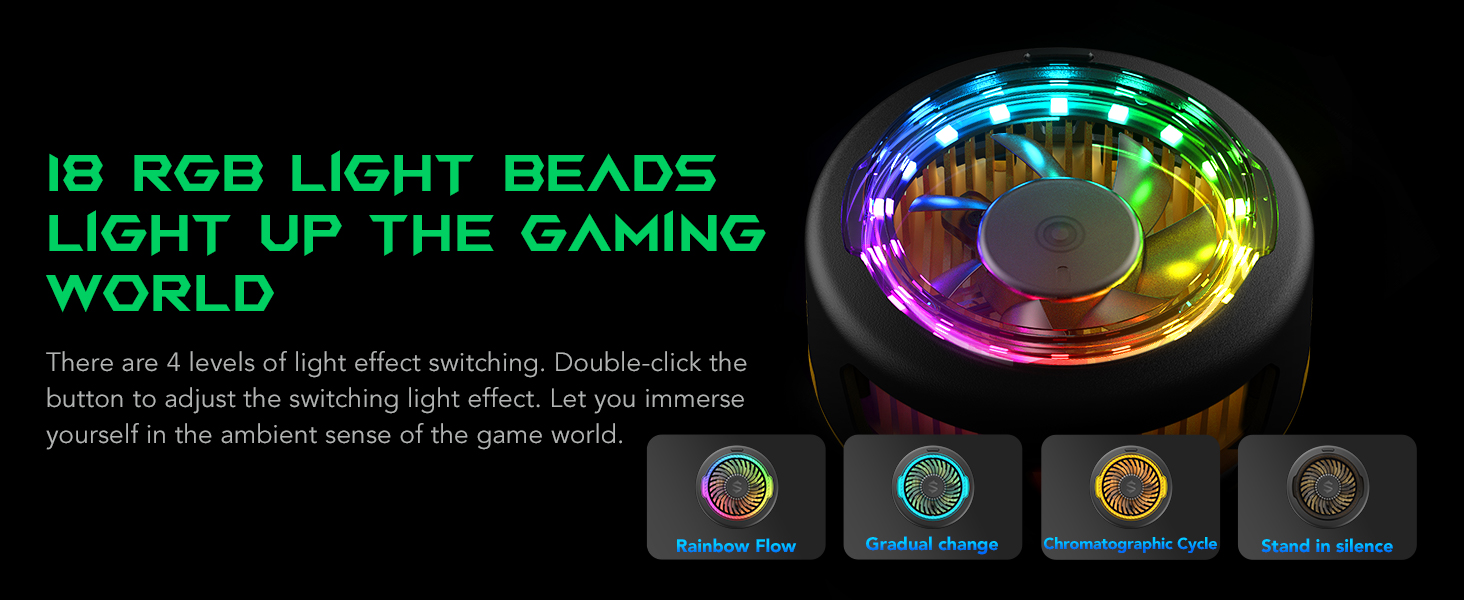
Illustration of the powerful 12N magnetic suction ensuring a secure attachment to your device.

Visual guide for attaching the detachable handle for clip-type usage.
Video demonstrating the process of attaching the grip to the FunCooler 5 Pro for secure device mounting.
5. คู่มือการใช้งาน
5.1 การเปิด/ปิดเครื่อง
The FunCooler 5 powers on automatically when connected to a power source and powers off when disconnected.
5.2 Switching Cooling Modes
The cooler features two operating modes: Overclocking Mode for maximum cooling and โหมดเงียบ for reduced noise. Press the button on the cooler once to switch between these modes. Silent mode operates at a low noise level of 30dB.
5.3 Adjusting RGB Lighting Effects
The FunCooler 5 includes dazzling RGB lighting effects. Double-click the button on the cooler to cycle through four different light effect levels, enhancing your gaming or viewอิงบรรยากาศ

The FunCooler 5 showcasing its 18 RGB light beads and four distinct lighting effects.
5.4 Optimal Airflow Design
The vertical air duct design ensures that hot air is directed away from your hands, providing a comfortable grip during extended use.

Visual representation of the vertical air duct design for efficient heat dissipation away from hands.
5.5 สถานการณ์การใช้งาน
The FunCooler 5 is adaptable for various scenarios, including:
- การเล่นเกม: Maintain peak performance during intense mobile gaming sessions.
- Binge-Watching: Keep your device cool during long video playback.
- Live Streaming/Video Recording: Use with the detachable grip and a tripod for stable and cool operation.

The FunCooler 5 adapts to various uses, from gaming to live streaming.
วิดีโอแสดงผลิตภัณฑ์อย่างเป็นทางการasing the Black Shark FunCooler 5 Magnetic Phone Cooler's features and cooling capabilities.
วิดีโอแสดงรายละเอียดasing the Black Shark FunCooler 5 Magnetic Cell Phone Cooler in action, highlighting its design and performance.
A quick look video demonstrating the Black Shark FunCooler 5 Magnetic Cell Phone Cooler's features and ease of use.
Video highlighting the fast phone cooling capabilities of Black Shark fans, including the FunCooler 5.
6. การบำรุงรักษา
To ensure the longevity and optimal performance of your Black Shark FunCooler 5, follow these maintenance guidelines:
- การทำความสะอาด: Regularly wipe the cooler's surface with a soft, dry cloth to remove dust and debris. Avoid using abrasive cleaners or solvents.
- ช่องระบายอากาศพัดลม: Ensure the fan vents are clear of obstructions to maintain proper airflow. Use a soft brush or compressed air to gently clean any dust accumulation.
- พื้นที่จัดเก็บ: เมื่อไม่ใช้งาน ควรเก็บกระติกน้ำแข็งไว้ในที่แห้งและเย็น หลีกเลี่ยงแสงแดดโดยตรงและอุณหภูมิที่สูงหรือต่ำเกินไป
- หลีกเลี่ยงน้ำ: ห้ามจุ่มกระติกน้ำแข็งลงในน้ำหรือวางไว้ในที่ที่มีความชื้นสูงเกินไป
7 การแก้ไขปัญหา
If you encounter any issues with your FunCooler 5, please refer to the following common problems and solutions:
- Cooler is not turning on:
Ensure the USB Type-C cable is securely connected to both the cooler and a working power source. Verify that the power source provides at least 20W for the cooler to function. - Cooling performance is not optimal:
Check if the cooler is making direct and firm contact with the back of your device. Ensure the power adapter meets the 20W requirement. Clean any dust from the fan vents to improve airflow. - Cooler feels loose or falls off:
If using magnetic attachment, ensure your device is MagSafe compatible or has a magnetic case. If using clip-type attachment, verify that the removable retainers are correctly installed and tightened securely to your device. - RGB lights are not working or stuck:
Double-click the button on the cooler to cycle through the light effects. If the issue persists, disconnect and reconnect the power cable.
If these solutions do not resolve the issue, please contact Black Shark customer support for further assistance.
8. การรับประกันและการสนับสนุน
The Black Shark FunCooler 5 Magnetic Phone Cooler comes with a standard manufacturer's warranty. For detailed warranty terms and conditions, please refer to the warranty card included in your product packaging or visit the official Black Shark webเว็บไซต์.
For technical support, troubleshooting assistance, or warranty claims, please contact Black Shark customer service through their official support channels. Keep your purchase receipt and product model number (BR50) handy when contacting support.