
1. Introduction to the ESP32-WROVER-IE Module
The EBYTE ESP32-WROVER-IE is a versatile Wi-Fi module designed for a wide range of applications, including low-power sensor networks, wearable electronic devices, and demanding tasks such as speech encoding, audio streaming, and MP3 decoding. It integrates the powerful ESP32-D0WD-V3 chip, featuring an Xtensa dual-core 32-bit LX6 microprocessor.
This module offers robust connectivity with IEEE802.11b/g/n protocol support, operating in the 2.4~2.5GHz frequency band. It boasts a transmission distance of up to 400 meters and an antenna output power of 20dBm, ensuring broad wireless communication range. Its low sleep current, less than 5 µA, makes it highly suitable for battery-powered applications.

Figure 1: Physical dimensions of the ESP32-WROVER-IE module, showing its compact size of approximately 31.4mm by 18mm.
คุณสมบัติหลัก:
- โซลูชั่นชิป: ESP32-D0WD-V3 with Xtensa dual-core 32-bit LX6 microprocessor.
- หน่วยความจำ: 448 KB ROM, 520 KB SRAM, 16 KB RTC SRAM.
- ความถี่นาฬิกา: Supports up to 240 MHz.
- มาตรฐานไร้สาย: IEEE802.11b/g/n (2.4~2.5GHz).
- อินเทอร์เฟซการสื่อสาร: UART I/O.
- เสาอากาศ: Ipex antenna for flexible integration.
- การใช้พลังงานต่ำ: Sleep current less than 5 µA, ideal for battery-powered devices.
- การบูรณาการสูง: Excellent performance in wireless transmission distance and network connectivity.

Figure 2: Illustration highlighting the ultra-low power consumption capabilities of the ESP32 module, featuring an ultra-low power RF architecture and power-saving patents for extended battery life.
2. ข้อมูลจำเพาะทางเทคนิค
The following table provides detailed technical specifications for the ESP32-WROVER-IE module.
| ข้อมูลจำเพาะ | ค่า |
|---|---|
| ยี่ห้อ | อีไบต์ |
| หมายเลขรุ่น | ESP32-WROVER-IE |
| เทคโนโลยีการเชื่อมต่อ | ไวไฟ |
| มาตรฐานการสื่อสารไร้สาย | 802.11b/g/n |
| จำนวนโปรเซสเซอร์ | 2 (Dual-core LX6) |
| ความถี่ | 2.4~2.5กิกะเฮิร์ตซ์ |
| ระยะการส่งข้อมูล | สูงถึง 400 เมตร |
| ประเภทเสาอากาศ | ไอเพ็กซ์ |
| อินเทอร์เฟซ | UART I/O |
| รอม | 448 กิโลไบต์ |
| เอสแรม | 520 กิโลไบต์ |
| RTC SRAM | 16 กิโลไบต์ |
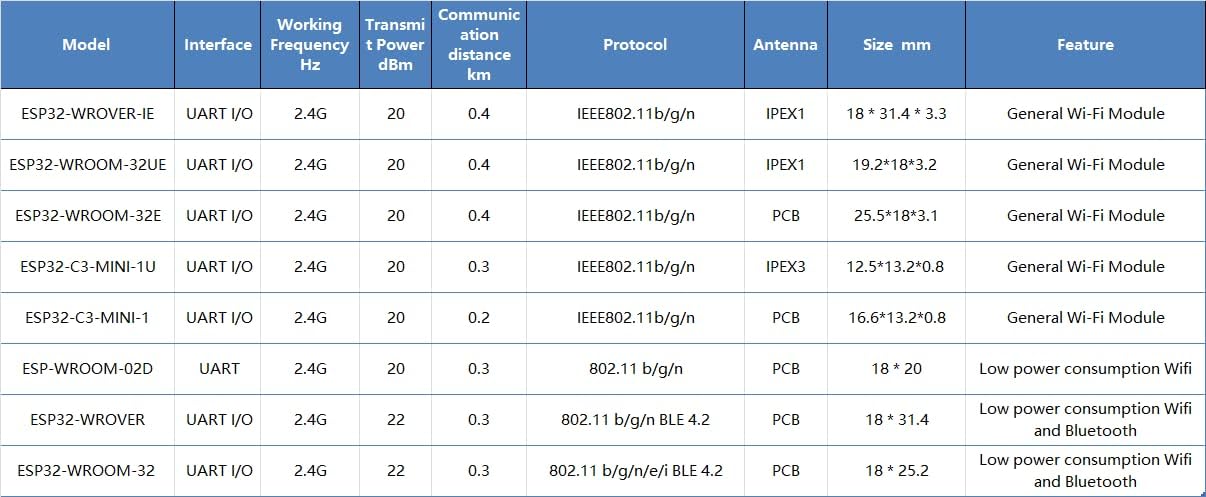
Figure 3: Detailed comparison table showing various EBYTE ESP32 modules, including their interfaces, frequencies, transmit power, communication distances, protocols, antenna types, sizes, and features.
3. การติดตั้งและการผสานรวม
The ESP32-WROVER-IE module is designed for integration into custom hardware or development boards. Proper setup is crucial for optimal performance.
3.1 การเชื่อมต่อฮาร์ดแวร์
- แหล่งจ่ายไฟ: Connect the module to a stable power supply within its specified voltage range. Refer to the datasheet for exact voltagข้อกำหนดอี
- อินเทอร์เฟซ UART: Connect the module's UART (Universal Asynchronous Receiver/Transmitter) pins (TX, RX, GND) to your host microcontroller or development board. Ensure correct voltage levels (e.g., 3.3V).
- การเชื่อมต่อเสาอากาศ: Attach a compatible Ipex antenna to the module's Ipex connector. Ensure the connection is secure to achieve the specified communication range.
- พิน GPIO: Utilize the available General Purpose Input/Output (GPIO) pins for connecting sensors, actuators, or other peripherals as required by your application.
3.2 การกำหนดค่าซอฟต์แวร์
- สภาพแวดล้อมการพัฒนา: Install the ESP-IDF (Espressif IoT Development Framework) or a compatible Arduino IDE environment with ESP32 board support.
- การอัปโหลดเฟิร์มแวร์: Use the chosen development environment to compile and upload your application firmware to the ESP32-WROVER-IE module via the UART interface.
- การทดสอบเบื้องต้น: After uploading, perform basic tests to verify Wi-Fi connectivity and communication with your host system.
4. การใช้งานโมดูล
Once the ESP32-WROVER-IE module is integrated and programmed, its operation depends on the specific application firmware.
4.1 การเชื่อมต่อ Wi-Fi
- โหมดสถานี: The module can connect to an existing Wi-Fi network (router) to access the internet or communicate with other devices on the local network.
- โหมดจุดเข้าใช้งาน (AP): The module can create its own Wi-Fi network, allowing other devices to connect directly to it.
- โหมดรวม: The module can operate as both a station and an access point simultaneously.
4.2 การสื่อสารข้อมูล
The module supports various communication protocols over Wi-Fi, including TCP/IP, UDP, HTTP, MQTT, and more, enabling data exchange with cloud services, local servers, or other IoT devices.

รูปที่ 4: อดีตample of the ESP32 module's application in smart home environments, enabling wireless connectivity for various devices and systems.

รูปที่ 5: อดีตample of the ESP32 module's application in industrial automation, contributing to reliable and efficient control systems.
5. การบำรุงรักษาและการใช้งาน
To ensure the longevity and reliable operation of your ESP32-WROVER-IE module, follow these guidelines:
- ไฟฟ้าสถิต: Handle the module with care, preferably in an ESD-safe environment, to prevent damage from static discharge.
- สภาพแวดล้อม : Operate and store the module within its specified temperature and humidity ranges. Avoid extreme conditions.
- การป้องกันทางกายภาพ: Protect the module from physical impact, excessive bending, or pressure, especially on the antenna connector and pins.
- การทำความสะอาด: If necessary, clean the module gently with a dry, soft brush or compressed air. Avoid liquids or harsh chemicals.
- อัพเดตเฟิร์มแวร์: Regularly check for and apply firmware updates from Espressif or EBYTE to benefit from performance improvements, bug fixes, and security enhancements.
6 การแก้ไขปัญหา
If you encounter issues with your ESP32-WROVER-IE module, consider the following troubleshooting steps:
- ไม่มีไฟฟ้า:
- ตรวจสอบปริมาณแหล่งจ่ายไฟtage และความจุปัจจุบัน
- Check all power connections for proper contact.
- ปัญหาการเชื่อมต่อ Wi-Fi:
- ตรวจสอบให้แน่ใจว่าเสาอากาศเชื่อมต่ออย่างแน่นหนา
- Check Wi-Fi credentials (SSID, password) in your firmware.
- Verify that the Wi-Fi network is within range and operating on the 2.4GHz band.
- Confirm that the module's firmware includes Wi-Fi functionality and is correctly initialized.
- UART Communication Problems:
- Check TX/RX connections (ensure TX of one device connects to RX of the other).
- Verify baud rate settings match between the module and the host.
- ยืนยันฉบับที่tage levels are compatible (e.g., 3.3V).
- โมดูลไม่ตอบสนอง:
- Try a hard reset by cycling the power.
- Re-upload the firmware to ensure it's not corrupted.
- Check for any short circuits or incorrect wiring on your PCB.
7. การรับประกันและการสนับสนุน
For specific warranty information and technical support, please refer to the official EBYTE webหรือติดต่อฝ่ายบริการลูกค้าโดยตรง เก็บใบเสร็จรับเงินไว้เพื่อใช้ในการเคลมประกัน
ผู้ผลิต: อีไบต์
แบบอย่าง: ESP32-WROVER-IE