
1. บทนำ
Thank you for choosing the Calex Smart Ceiling Lamp. This 30cm smart ceiling light is designed for indoor use in spaces such as bedrooms and living rooms, offering versatile lighting options including 16 million colors and tunable white light. It can be controlled via the Calex Smart App and is compatible with popular voice assistants.

Figure 1: Calex Smart Ceiling Lamp (รุ่น 5301000200)
2. ข้อมูลด้านความปลอดภัย
- ผลิตภัณฑ์นี้มีไว้สำหรับ ใช้ภายในอาคารเท่านั้นห้ามติดตั้งในที่เปียกหรือแห้งamp สถานที่
- โปรดตรวจสอบให้แน่ใจว่าได้ตัดกระแสไฟแล้วก่อนทำการติดตั้ง บำรุงรักษา หรือทำความสะอาด เพื่อป้องกันไฟฟ้าช็อต
- การติดตั้งต้องดำเนินการโดยช่างไฟฟ้าที่มีคุณสมบัติเหมาะสม หรือเป็นไปตามข้อกำหนดด้านไฟฟ้าของท้องถิ่น
- ใช้งาน lamp only within the specified voltage range of 230 Volts AC.
- อย่าพยายามแยกชิ้นส่วนหรือดัดแปลง lamp. ไม่มีชิ้นส่วนใดที่ผู้ใช้สามารถซ่อมบำรุงเองได้ภายใน
- เก็บไว้ลamp ห่างจากแหล่งความร้อนและแสงแดดโดยตรง
3. เนื้อหาบรรจุภัณฑ์
ตรวจสอบว่ามีส่วนประกอบทั้งหมดอยู่ในแพ็คเกจ:
- 1x Calex Smart Ceiling Lamp (รุ่น 5301000200)
4. การตั้งค่าและการติดตั้ง
The Calex Smart Ceiling Lamp requires ceiling mounting and assembly. Follow these steps carefully:
- การตระเตรียม: Turn off the main power supply at the circuit breaker before starting installation.
- การติดตั้ง: ติด l อย่างปลอดภัยamp's mounting bracket to the ceiling using appropriate screws and anchors (not included, typically supplied by installer). Ensure the mounting surface can support the lamp's weight (934 grams).
- การเดินสายไฟ: เชื่อมต่อสายไฟจากเพดานเข้ากับ...amp's terminals. Ensure correct polarity (Live, Neutral, Earth) as indicated in the lamp's wiring diagram.
- การประกอบ: แนบลamp body to the mounting bracket, ensuring it is firmly secured.
- เปิดเครื่อง: Restore power at the circuit breaker. The lamp should turn on or enter pairing mode.
5. การใช้งาน Lamp
The Calex Smart Ceiling Lamp is primarily controlled via the Calex Smart App. It offers a wide range of lighting options:
- การเลือกสี: Choose from 16 million colors to set the perfect mood.
- สีขาวที่ปรับได้: ปรับแสงสีขาวจากโทนอุ่นไปเป็นโทนเย็น
- หรี่แสงได้: Adjust the brightness from 0% to 100%.
- ฉากและตารางเวลา: Create custom lighting scenes and set timers for automated operation.
6. Calex Smart App Control
To unlock the full potential of your Calex Smart Ceiling Lamp, download and install the Calex Smart App on your smartphone or tablet. The app allows you to control your lamp จากทุกที่ที่มีการเชื่อมต่ออินเทอร์เน็ต
- ดาวน์โหลดแอป: ค้นหา "Calex Smart" in your device's app store (iOS or Android).
- สร้างบัญชี: เปิดแอปและทำตามคำแนะนำเพื่อสร้างบัญชีผู้ใช้ใหม่หรือเข้าสู่ระบบหากคุณมีบัญชีผู้ใช้อยู่แล้ว
- เพิ่มอุปกรณ์: In the app, select "Add Device" or the "+" icon. Choose "Lighting" and then "Ceiling Lamp" or a similar option.
- การจับคู่: ตรวจสอบให้แน่ใจว่าแอลของคุณamp is powered on and in pairing mode (it may flash). Follow the in-app instructions to connect the lamp ไปยังเครือข่าย Wi-Fi 2.4 GHz ของคุณ
- ควบคุม: Once paired, you can control the lamp's color, brightness, and set schedules directly from the app.
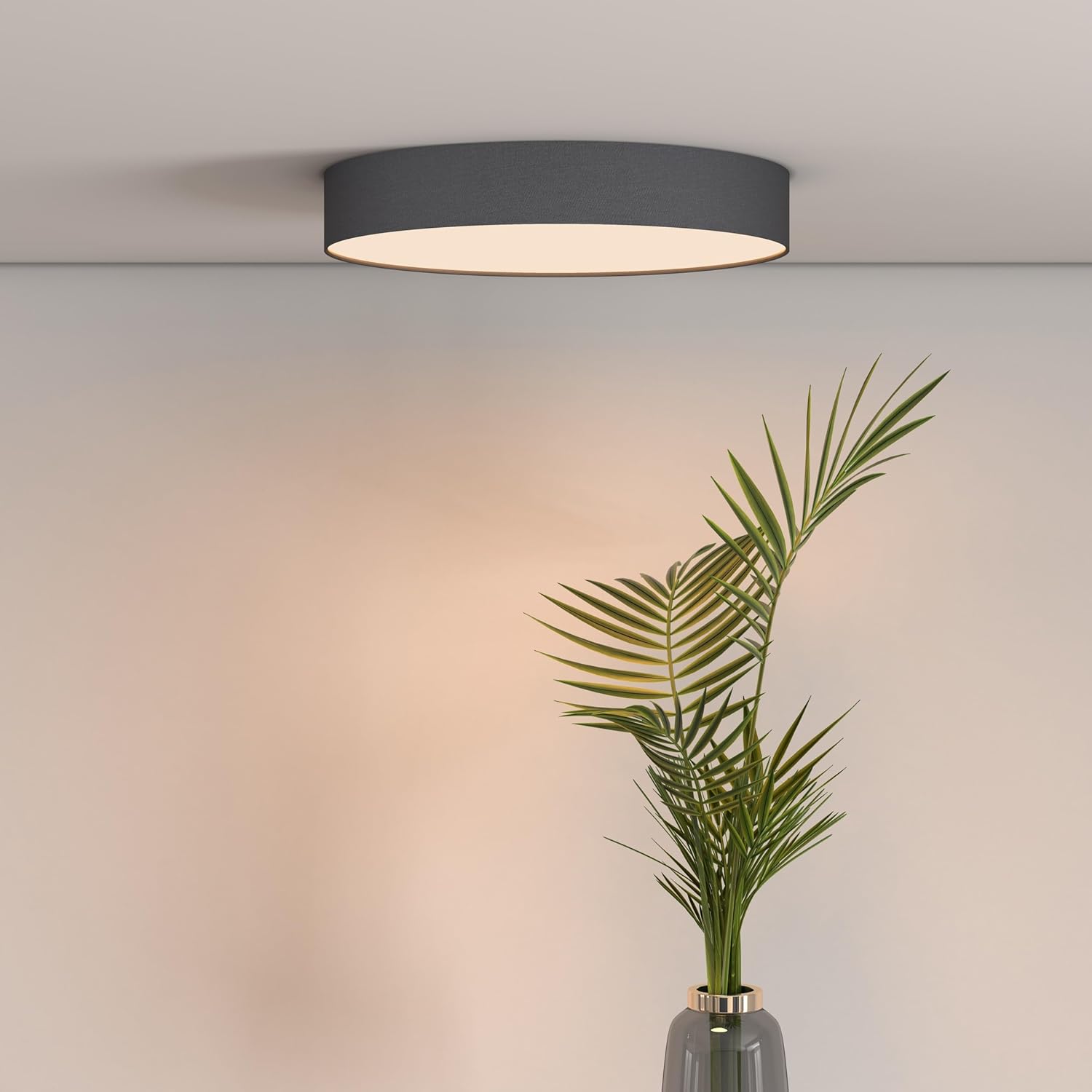
Figure 2: Calex Smart App Interface
7. การควบคุมด้วยเสียง
The Calex Smart Ceiling Lamp is compatible with leading voice assistants, allowing for hands-free control:
- อเมซอนอเล็กซ่า: Link your Calex Smart account to Alexa through the Alexa app.
- ผู้ช่วยหน้าแรกของ Google: Link your Calex Smart account to Google Home through the Google Home app.
- สิริ: Use Siri Shortcuts to control your lamp (setup via the Calex Smart App).
Once linked, you can use commands such as: "Alexa, turn on the ceiling lamp," "Hey Google, set the ceiling lamp to blue," or "Siri, dim the ceiling lamp ถึงร้อยละ 50”
8. การบำรุงรักษา
To ensure the longevity and optimal performance of your Calex Smart Ceiling Lampปฏิบัติตามคำแนะนำการบำรุงรักษาง่ายๆ เหล่านี้:
- การทำความสะอาด: ถอดปลั๊กไฟออกก่อนทำความสะอาด ใช้ผ้านุ่ม แห้ง หรือผ้านุ่มๆ เช็ดเบาๆamp ผ้าสำหรับเช็ดพื้นผิวของลampห้ามใช้สารทำความสะอาดที่มีฤทธิ์กัดกร่อน ตัวทำละลาย หรือสารเคมีรุนแรง เพราะอาจทำให้พื้นผิวเสียหายได้
- การตรวจสอบ: ตรวจสอบ l เป็นระยะamp for any signs of damage or loose connections. If any issues are found, disconnect power and consult a qualified technician.
- ไม่มีชิ้นส่วนที่ผู้ใช้สามารถซ่อมบำรุงได้: The LED light source is integrated and not replaceable by the user. Do not attempt to open the lamp.
9 การแก้ไขปัญหา
If you encounter issues with your Calex Smart Ceiling Lampให้ดูวิธีแก้ปัญหาทั่วไปต่อไปนี้:
- Lamp ไม่เปิด:
- ตรวจสอบว่าแหล่งจ่ายไฟหลักเปิดอยู่หรือไม่
- ให้แน่ใจว่าลamp is correctly wired and securely connected to the power source.
- Verify that the light switch (if applicable) is in the ON position.
- Lamp does not connect to Wi-Fi/App:
- Ensure your Wi-Fi network is 2.4 GHz. The lamp does not support 5 GHz Wi-Fi.
- Check your Wi-Fi signal strength at the lampที่ตั้งของ
- รีสตาร์ทเราเตอร์ Wi-Fi ของคุณ
- รีเซ็ตลamp to pairing mode (usually by cycling power ON/OFF several times). Refer to the Calex Smart App for specific reset instructions.
- Ensure your smartphone is connected to the same 2.4 GHz Wi-Fi network during the pairing process.
- การควบคุมด้วยเสียงไม่ทำงาน:
- Verify that your Calex Smart account is correctly linked to your voice assistant app (Alexa, Google Home).
- ตรวจสอบการเชื่อมต่ออินเตอร์เน็ตของคุณ
- ให้แน่ใจว่าลamp is online and controllable via the Calex Smart App.
10. ข้อมูลจำเพาะ
| คุณสมบัติ | ข้อมูลจำเพาะ |
|---|---|
| ยี่ห้อ | คาเล็กซ์ |
| หมายเลขรุ่น | 5301000200 |
| GTIN | 08712879151081 |
| สี | Black (exterior) |
| ขนาด | 30cm diameter (approx.) |
| น้ำหนัก | 934 กรัม |
| แหล่งพลังงาน | AC |
| เล่มที่tage | 230 โวลต์ |
| วัดtage | 16 วัตต์ |
| ความสว่าง | 1500 ลูเมน |
| แหล่งกำเนิดแสง | ไฟ LED แบบบูรณาการ |
| สีอ่อน | RGBW (16 million colors + Tunable White) |
| หรี่แสงได้ | ใช่ |
| การเชื่อมต่อ | Wi-Fi (2.4 GHz) |
| วิธีการควบคุม | Calex Smart App, Voice Control (Alexa, Google Home, Siri) |
| ประเภทการติดตั้ง | การติดตั้งบนเพดาน |
| การใช้งานในร่ม/กลางแจ้ง | ในร่มเท่านั้น |
| ระดับประสิทธิภาพการใช้พลังงาน | F |

Figure 3: Energy Label for Model 5301000200
สำหรับข้อมูลผลิตภัณฑ์โดยละเอียด โปรดดูที่ฐานข้อมูล EPREL: https://eprel.ec.europa.eu/qr/711744
11. การรับประกันและการสนับสนุน
Calex products are manufactured to high-quality standards and come with a manufacturer's warranty. For specific warranty terms and conditions, please refer to the documentation provided with your purchase or visit the official Calex webเว็บไซต์.
For technical support, troubleshooting assistance, or warranty claims, please contact Calex customer service through their official webไซต์หรือข้อมูลการติดต่อที่ให้ไว้ในบรรจุภัณฑ์ผลิตภัณฑ์ของคุณ