1. บทนำ
Thank you for choosing the MINISO Xo-9838 Waterproof Bluetooth Speaker. This portable wireless speaker is designed to provide high-quality audio with the convenience of Bluetooth connectivity and a durable, waterproof design. Please read this manual carefully before using the product to ensure proper operation and to maximize your listening experience.
2. เนื้อหาบรรจุภัณฑ์
- MINISO Xo-9838 Waterproof Bluetooth Speaker
- สายชาร์จ USB
- คู่มือการใช้งาน (เอกสารนี้)
3. คุณสมบัติของผลิตภัณฑ์
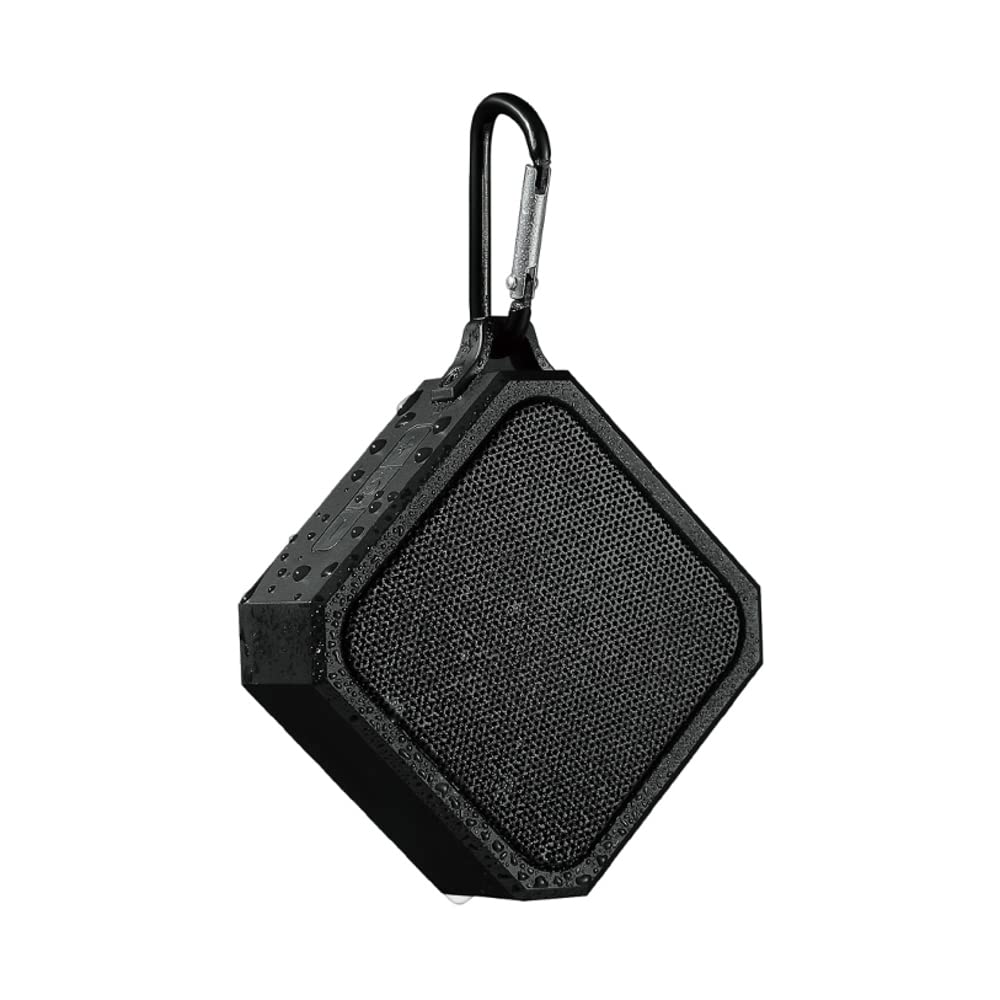
- การออกแบบกันน้ำ: IPX5 rated, offering protection against low-pressure water jets from any direction.
- พกพาสะดวกและมีน้ำหนักเบา: Compact design with an integrated hook for easy carrying.
- Bluetooth 5.0: รับประกันการเชื่อมต่อไร้สายที่เสถียรและมีประสิทธิภาพ
- แบตเตอรี่ใช้งานได้ยาวนาน: แบตเตอรี่ลิเธียม 3.7V ในตัว
- การชาร์จด่วน: ประมาณ 1.5 ชั่วโมงสำหรับการชาร์จเต็ม
- เวลาเล่นที่ขยาย: สามารถเล่นเพลงได้อย่างต่อเนื่องนานสูงสุด 2 ชั่วโมง
- การควบคุมแบบสัญชาตญาณ: Easy-to-use buttons for power and volume.
4. การตั้งค่า
4.1 การชาร์จลำโพง
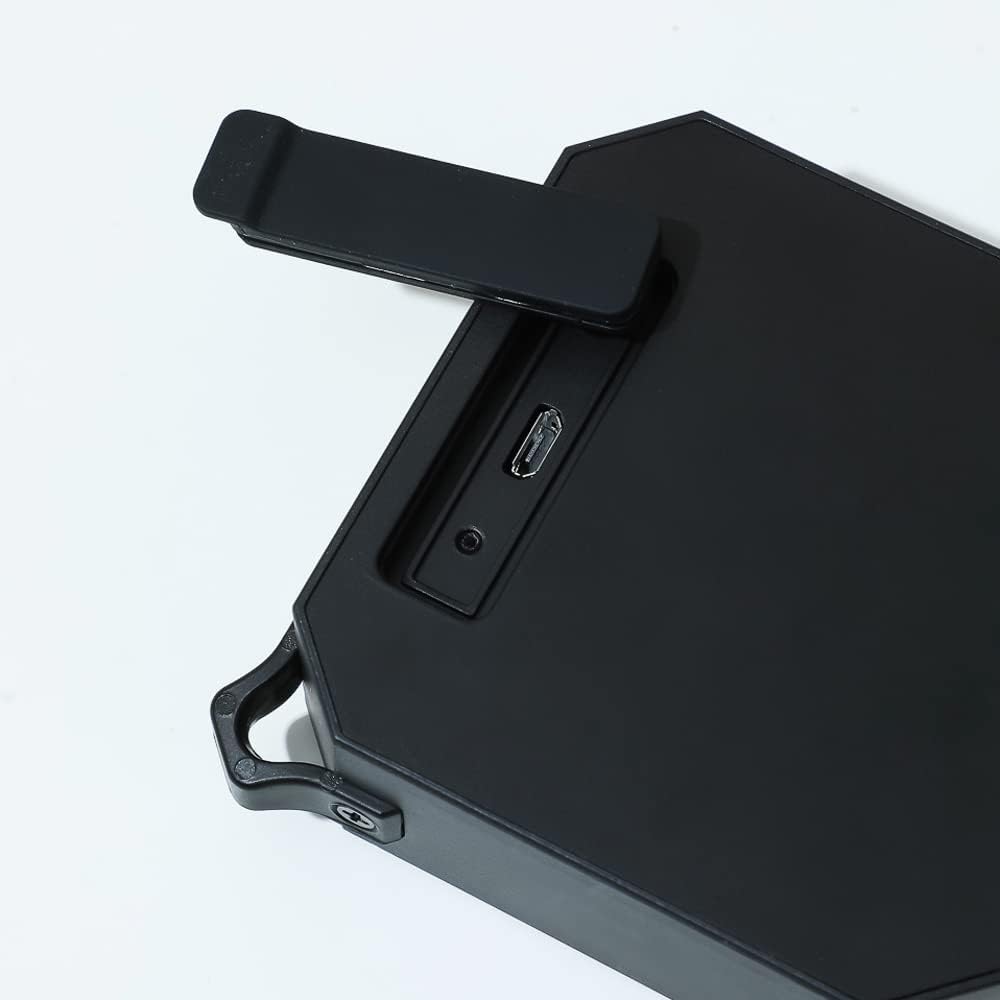
- Locate the charging port on the side of the speaker, usually protected by a rubber flap.
- Open the rubber flap to expose the Micro USB charging port.
- Connect the small end of the included USB charging cable to the speaker's charging port.
- ต่อปลายสาย USB ด้านที่ใหญ่กว่าเข้ากับอะแดปเตอร์แปลงไฟ USB (ไม่ได้รวมอยู่ในชุด) หรือพอร์ต USB ของคอมพิวเตอร์
- The charging indicator light (usually red) will illuminate to show that the speaker is charging.
- Once fully charged (approximately 1.5 hours), the indicator light may change color or turn off.
4.2 การเปิด/ปิดเครื่อง
- การเปิดเครื่อง: กดปุ่มเปิด/ปิดค้างไว้ (⏻) located on the top panel of the speaker for a few seconds until you hear an audible prompt or see an indicator light.
- วิธีปิดเครื่อง: กดปุ่มเปิด/ปิดค้างไว้ (⏻) again for a few seconds until you hear an audible prompt or the indicator light turns off.
4.3 การจับคู่บลูทูธ
- Ensure the speaker is fully charged and powered on. The Bluetooth indicator light will typically flash, indicating it is in pairing mode.
- On your mobile device (smartphone, tablet, laptop), go to the Bluetooth settings.
- เปิดใช้งาน Bluetooth และค้นหาอุปกรณ์ที่มีอยู่
- Select "MINISO Xo-9838" (or similar name) from the list of found devices.
- เมื่อจับคู่สำเร็จแล้ว ลำโพงจะส่งเสียงยืนยัน และไฟแสดงสถานะบลูทูธจะหยุดกะพริบและติดสว่างค้างอยู่
- ตอนนี้คุณสามารถเล่นเสียงจากอุปกรณ์ของคุณผ่านลำโพงได้
5. การใช้งานลำโพง
5.1 การเล่นเพลงและการควบคุมระดับเสียง
- เล่น/หยุดชั่วคราว: While music is playing, a short press of the power button (⏻) will typically pause or resume playback.
- ปรับระดับเสียงขึ้น: กดปุ่ม "+" เพื่อเพิ่มระดับเสียง
- ลดเสียงลง: กดปุ่ม "-" เพื่อลดระดับเสียง
- เพลงถัดไป: A long press of the "+" button may skip to the next track.
- แทร็กก่อนหน้า: A long press of the "-" button may go to the previous track.
5.2 การใช้งานกันน้ำ (IPX5)
The MINISO Xo-9838 speaker is rated IPX5, meaning it is protected against low-pressure water jets from any direction. This makes it suitable for use in environments where it might be exposed to splashes, such as by a pool or in a bathroom. However, it is ไม่ designed to be submerged in water. Ensure the charging port's rubber flap is securely closed before exposing the speaker to water.

6. การบำรุงรักษา
- การทำความสะอาด: ใช้ผ้าแห้งนุ่มเช็ดลำโพง สำหรับคราบสกปรกที่ติดแน่น ให้ใช้ผ้าชุบน้ำหมาดๆ เช็ดทำความสะอาดamp cloth can be used, but ensure the charging port flap is closed and dry the speaker thoroughly afterward. Do not use harsh chemicals or abrasive cleaners.
- พื้นที่จัดเก็บ: เก็บลำโพงไว้ในที่แห้งและเย็น หลีกเลี่ยงแสงแดดโดยตรงและอุณหภูมิที่สูงหรือต่ำเกินไป
- การดูแลแบตเตอรี่ เพื่อยืดอายุการใช้งานแบตเตอรี่ ควรหลีกเลี่ยงการปล่อยประจุแบตเตอรี่จนหมดบ่อยๆ ควรชาร์จลำโพงเป็นประจำ แม้จะไม่ได้ใช้งานเป็นเวลานานก็ตาม
- การป้องกันน้ำ: Always ensure the rubber flap covering the charging port is securely closed when not charging, especially when near water.
7 การแก้ไขปัญหา
- ลำโพงไม่เปิดเครื่อง: Ensure the speaker is charged. Connect it to a power source and try again after a few minutes.
- ไม่สามารถจับคู่กับอุปกรณ์:
- ตรวจสอบให้แน่ใจว่าลำโพงอยู่ในโหมดจับคู่ (ไฟแสดงสถานะกะพริบ)
- ตรวจสอบให้แน่ใจว่าได้เปิดใช้งานบลูทูธบนอุปกรณ์ของคุณแล้ว
- ย้ายลำโพงให้เข้าใกล้อุปกรณ์ของคุณมากขึ้น
- ปิดและเปิดลำโพงและบลูทูธของอุปกรณ์ของคุณ
- ลืมอุปกรณ์จากรายการบลูทูธของโทรศัพท์ของคุณและลองจับคู่ใหม่อีกครั้ง
- ไม่มีเสียงหรือระดับเสียงต่ำ:
- ตรวจสอบระดับเสียงทั้งบนลำโพงและอุปกรณ์ที่เชื่อมต่อของคุณ
- ตรวจสอบให้แน่ใจว่าลำโพงได้รับการจับคู่อย่างถูกต้อง
- ลองเล่นแหล่งเสียงอื่น
- คุณภาพเสียงไม่ดี:
- ย้ายลำโพงให้เข้าใกล้อุปกรณ์ของคุณมากขึ้นเพื่อลดสัญญาณรบกวน
- ตรวจสอบให้แน่ใจว่าไม่มีสิ่งกีดขวางระหว่างลำโพงและอุปกรณ์ของคุณ
- Check if the speaker's battery is low, which can affect sound quality.
8. ข้อมูลจำเพาะ
| คุณสมบัติ | ข้อมูลจำเพาะ |
|---|---|
| แบบอย่าง | Xo-9838 |
| เวอร์ชันบลูทูธ | 5.0 |
| ประเภทแบตเตอรี่ | แบตเตอรี่ลิเธียม 3.7V |
| เวลาในการชาร์จ | ประมาณ 1.5 ชั่วโมง |
| ระยะเวลาการใช้งาน | ประมาณ 2 ชั่วโมง |
| ระดับการกันน้ำ | IPX5 |
| ขนาดลำโพง | 9.2 x 9 ซม. (โดยประมาณ) |
| ขนาดแพ็คเกจ | 20.3 x 12.2 x 6 ซม. |
| น้ำหนัก | 200 กรัม |
| การเชื่อมต่อ | บลูทูธ, ยูเอสบี |
| โหมดเอาต์พุตเสียง | โมโน |
9. การรับประกันและการสนับสนุน
For warranty information, please refer to the terms and conditions provided at the time of purchase or contact your retailer. Keep your purchase receipt as proof of purchase.
For technical support or further assistance, please contact MINISO customer service through their official webไซต์หรือข้อมูลการติดต่อที่ให้มาพร้อมกับบรรจุภัณฑ์ผลิตภัณฑ์ของคุณ