
1. บทนำ
ขอบคุณสำหรับการซื้อasing the Inscabin D2/D4 Internet Radio. This device offers a versatile audio experience, combining access to thousands of internet radio stations with modern connectivity options like Bluetooth and Spotify Connect. Please read this manual carefully to ensure proper setup and operation of your new radio.
2. ข้อมูลด้านความปลอดภัย
- อย่าให้เครื่องโดนฝนหรือความชื้นเพื่อป้องกันไฟไหม้หรือไฟฟ้าช็อต
- อย่าเปิดcasinก. ส่งต่อการบริการทั้งหมดให้กับบุคลากรที่มีคุณสมบัติเหมาะสม
- ตรวจสอบให้แน่ใจว่ามีการระบายอากาศที่เหมาะสมรอบ ๆ เครื่อง อย่าปิดกั้นช่องระบายอากาศ
- ใช้เฉพาะอะแดปเตอร์ไฟฟ้าที่มาพร้อมกับเครื่องเท่านั้น
- ควรวางอุปกรณ์ให้ห่างจากแสงแดดโดยตรง แหล่งความร้อน และสนามแม่เหล็กแรงสูง
- ทำความสะอาดตัวเครื่องด้วยผ้าแห้งเนื้อนุ่ม ห้ามใช้สารทำความสะอาดที่มีฤทธิ์กัดกร่อนหรือตัวทำละลาย
3. เนื้อหาบรรจุภัณฑ์
Carefully unpack your Inscabin D2/D4 Internet Radio and check that all items are present and in good condition. If any items are missing or damaged, please contact your retailer.
- Inscabin D2/D4 Internet Radio Unit
- อะแดปเตอร์แปลงไฟ
- รีโมทคอนโทรล
- คู่มือการใช้งาน (เอกสารนี้)
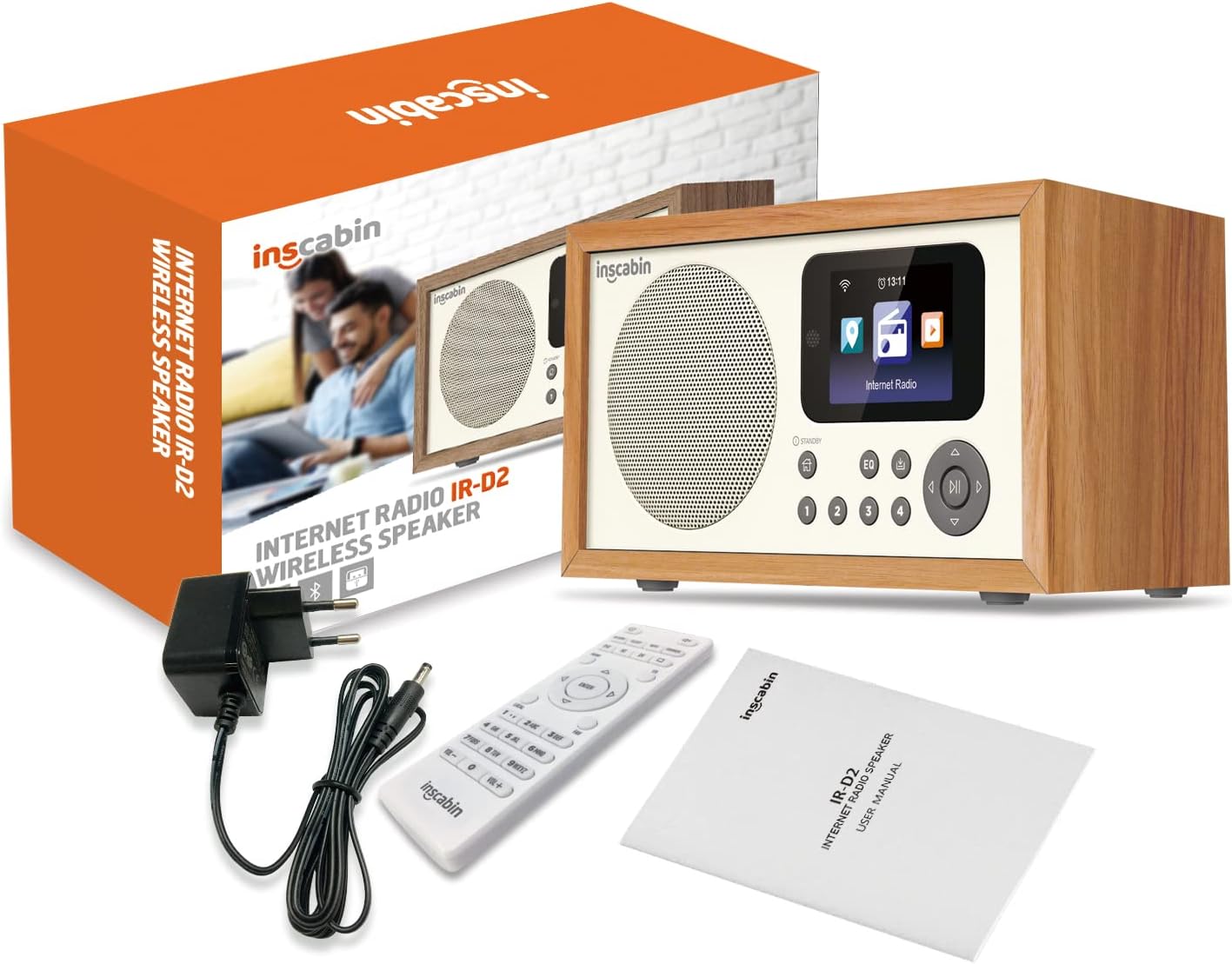
Image: The Inscabin D2/D4 Internet Radio, power adapter, remote control, and user manual as included in the product packaging.
4. สินค้าหมดview
Familiarize yourself with the main components and controls of your Inscabin D2/D4 Internet Radio.

ภาพ: ด้านหน้า view of the Inscabin D2/D4 Internet Radio, showing the speaker grille on the left, a color display screen on the right, and various control buttons below the screen. The screen displays icons for different functions like Internet Radio.
4.1 แผงควบคุมด้านหน้า
- ผู้บรรยาย: เอาท์พุตเสียง
- Color TFT Display: Shows program information, track details, album art, and weather.
- ปุ่มสแตนด์บาย: เปิดหรือปิดเครื่อง
- ปุ่มโฮม: กลับไปที่เมนูหลัก
- ปุ่ม EQ: เข้าถึงการตั้งค่าอีควอไลเซอร์
- ปุ่มตั้งค่าล่วงหน้า (1-4): Quick access to saved radio stations.
- ปุ่มนำทาง (ขึ้น, ลง, ซ้าย, ขวา, ตกลง): สำหรับการนำทางและเลือกเมนู
- ปุ่มเล่น/หยุดชั่วคราว: ควบคุมการเล่น
4.2 การเชื่อมต่อแผงด้านหลัง
The rear panel typically includes the power input and potentially other ports like auxiliary input/output.
5. การตั้งค่า
5.1 การเชื่อมต่อสายไฟ
- Connect the supplied power adapter to the DC IN port on the back of the radio.
- เสียบอะแดปเตอร์ไฟเข้ากับเต้ารับไฟฟ้ามาตรฐาน
- Press the Standby button to power on the unit.
5.2 Initial Setup (Wi-Fi and Language)
Upon first power-on, the radio will guide you through the initial setup process.
- เลือกภาษา: Use the navigation buttons to select your preferred language and press OK.
- การตั้งค่าเครือข่าย: อุปกรณ์จะสแกนหาเครือข่าย Wi-Fi ที่ใช้งานได้ เลือกเครือข่ายของคุณจากรายการ
- กรอกรหัสผ่าน: Use the navigation buttons to enter your Wi-Fi password. Press OK to confirm.
- The radio will attempt to connect to the internet. Once connected, the Wi-Fi icon will appear on the display.
6. คู่มือการใช้งาน
6.1 วิทยุอินเทอร์เน็ต
Access thousands of radio stations from around the world.
- From the main menu, select "Internet Radio" using the navigation buttons and press OK.
- คุณสามารถเลือกดูสถานีตามสถานที่ ประเภท หรือใช้ฟังก์ชันค้นหาได้
- Select a station and press OK to start playback.
- To save a station as a preset, press and hold one of the preset buttons (1-4) until the display confirms it's saved.
6.2 โหมดบลูทู ธ
สตรีมเสียงแบบไร้สายจากสมาร์ทโฟนหรือแท็บเล็ตของคุณ
- From the main menu, select "Bluetooth" and press OK. The radio will enter pairing mode.
- บนสมาร์ทโฟนหรือแท็บเล็ตของคุณ ให้เปิดใช้งาน Bluetooth และค้นหาอุปกรณ์ที่มีอยู่
- Select "Inscabin D2/D4" (or similar name) from the list to pair.
- Once connected, you can play audio from your device through the radio.
6.3 การเชื่อมต่อ Spotify
Control your Spotify music directly from the Spotify app.
- Ensure your radio and the device running the Spotify app are connected to the same Wi-Fi network.
- Open the Spotify app on your smartphone or tablet.
- Play a song and tap the "Devices Available" icon (usually a speaker or computer icon).
- Select your Inscabin D2/D4 radio from the list of available devices.
- Your Spotify audio will now play through the radio, controlled by your app.
6.4 นาฬิกาปลุกคู่
ตั้งค่าสัญญาณเตือนภัยอิสระได้สูงสุดสองชุด
- From the main menu, navigate to "Alarm" or "Settings" and then "Alarm".
- เลือก นาฬิกาปลุก 1 หรือ นาฬิกาปลุก 2
- Set the alarm time, source (e.g., buzzer, internet radio station), volume, and frequency (daily, once, weekdays, weekends).
- ตรวจสอบให้แน่ใจว่าได้เปิดใช้งานระบบเตือนภัยแล้ว
การควบคุมแอพ 6.5 ตัว
Control your radio using a dedicated smartphone application (e.g., UNDOK app).
- Download the compatible control app (e.g., UNDOK) from your device's app store.
- Ensure your smartphone and the radio are connected to the same Wi-Fi network.
- Open the app and follow the on-screen instructions to discover and connect to your Inscabin D2/D4 radio.
- You can now control various functions of the radio, such as changing stations, adjusting volume, and managing presets, directly from your smartphone.
7. การบำรุงรักษา
- การทำความสะอาด: Use a soft, dry, lint-free cloth to clean the radio's surface. Do not use liquid or aerosol cleaners.
- พื้นที่จัดเก็บ: หากต้องเก็บรักษาวิทยุไว้เป็นเวลานาน ควรตัดการเชื่อมต่อจากแหล่งจ่ายไฟและเก็บไว้ในที่แห้งและเย็น
- การอัปเดตซอฟต์แวร์: Periodically check the radio's settings menu for available software updates to ensure optimal performance and access to new features.
8 การแก้ไขปัญหา
| ปัญหา | สาเหตุที่เป็นไปได้ | สารละลาย |
|---|---|---|
| ไม่มีไฟฟ้า | ไม่ได้เชื่อมต่ออะแดปเตอร์ไฟหรือเต้ารับไฟฟ้าชำรุด | ตรวจสอบการเชื่อมต่อสายไฟ ลองใช้ปลั๊กไฟอื่นดู |
| ไม่สามารถเชื่อมต่อ Wi-Fi ได้ | รหัสผ่านไม่ถูกต้อง สัญญาณอ่อน หรือเราเตอร์มีปัญหา | Verify Wi-Fi password. Move radio closer to router. Restart router. |
| Internet radio stations not playing | No internet connection, station offline, or buffering. | Check Wi-Fi connection. Try other stations. Internet speed may be slow. |
| การจับคู่บลูทูธล้มเหลว | อุปกรณ์ไม่ได้อยู่ในโหมดจับคู่ หรืออยู่ห่างออกไปมากเกินไป | Ensure radio is in Bluetooth pairing mode. Keep devices within range. |
| การบิดเบือนเสียง | Volume too high, poor signal, or EQ settings. | Adjust volume. Check signal strength. Reset EQ settings. |
9. ข้อมูลจำเพาะ
| คุณสมบัติ | รายละเอียด |
|---|---|
| ยี่ห้อ | Inscabin |
| หมายเลขรุ่น | 054114379934 |
| สี | D2-WT |
| เทคโนโลยีการเชื่อมต่อ | Bluetooth, Wi-Fi (Internet Radio) |
| คุณสมบัติพิเศษ | Portable, Wireless, Dual Alarm, Spotify Connect, App Control |
| อุปกรณ์ที่รองรับ | สมาร์ทโฟน, แท็บเล็ต |
| แหล่งพลังงาน | สายไฟ (อะแดปเตอร์ AC) |
| ส่วนประกอบที่รวมอยู่ | อะแดปเตอร์แปลงไฟ |
| การใช้ที่แนะนำ | Music, Podcasts, Internet Radio, Bluetooth Speaker |
| แสดง | Color TFT Screen |
| ขนาด (โดยประมาณ) | 210 มม. (กว้าง) x 110 มม. (สูง) x 90 มม. (ลึก) |

Image: The Inscabin D2/D4 Internet Radio with approximate dimensions: 210mm width, 110mm height, and 90mm depth.
10. การรับประกันและการสนับสนุน
For warranty information and customer support, please refer to the documentation provided with your purchase or visit the official Inscabin website. Information regarding spare parts availability and software update guarantees is not available at this time.