
dalattin AB5050L38212US
dalattin 12.5ft LED Lights for TV User Manual
Model: AB5050L38212US
1. บทนำ
This user manual provides comprehensive instructions for the installation, operation, and maintenance of your dalattin 12.5ft LED Lights for TV. Designed for 40-55 inch TVs and computers, these LED strip lights offer versatile lighting options with dual control modes via an infrared remote and a Bluetooth application. Enhance your viewing experience and transform your space with customizable colors and dynamic lighting effects.
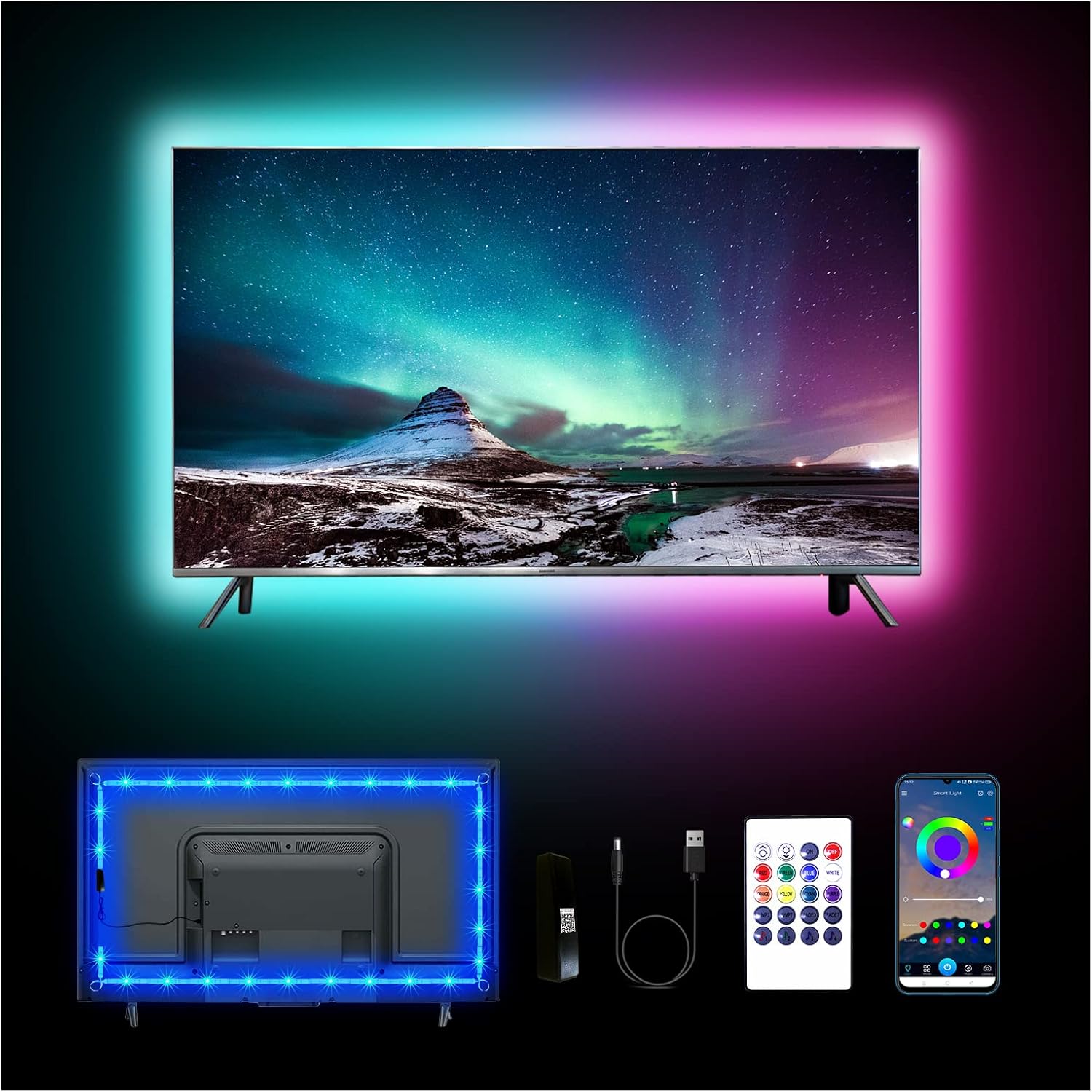
ภาพ: เหนือview of the dalattin 12.5ft LED Lights for TV, showing the strip installed on a TV, the remote control, and the mobile app interface.
2. ข้อมูลด้านความปลอดภัย
โปรดอ่านและทำความเข้าใจคำแนะนำด้านความปลอดภัยทั้งหมดก่อนใช้ผลิตภัณฑ์นี้ การไม่ปฏิบัติตามคำแนะนำเหล่านี้อาจส่งผลให้เกิดไฟฟ้าช็อต ไฟไหม้ หรืออันตรายอื่นๆ
- Ensure the power source is 5V USB. Do not connect to higher voltagแหล่งพลังงานไฟฟ้า
- Do not submerge the LED strip or controller in water or expose them to excessive moisture.
- Avoid bending the LED strip sharply, as this may damage the internal circuitry.
- เก็บให้พ้นจากมือเด็ก
- Do not cover the LED strip when it is in operation, as this may cause overheating.
- ตัดการเชื่อมต่อไฟฟ้าก่อนทำความสะอาดหรือดำเนินการบำรุงรักษาใดๆ
3. อะไรอยู่ในกล่อง
ตรวจสอบว่ามีส่วนประกอบทั้งหมดอยู่ครบเมื่อแกะกล่อง:
- 1 x 12.5ft LED Light Strip
- 1 x Mini Infrared Controller
- 1 x Upgrade Controller (Bluetooth receiver)
- สายไฟ 1 x USB
4. การตั้งค่าและการติดตั้ง
Follow these steps for proper installation of your dalattin LED TV backlight system:
- เตรียมพื้นผิว: Ensure the back of your TV or computer monitor is clean and dry. Use a clean cloth to wipe away any dust or debris. For optimal adhesion, you may use isopropyl alcohol to clean the surface and allow it to dry completely.
- การวัดและวางแผน: Before peeling the adhesive, temporarily position the LED strip around the back of your TV to plan the layout. The 12.5ft strip is suitable for 40-55 inch TVs. Ensure the USB cable can reach a power source.
- ติดแถบ LED: Carefully peel off the adhesive backing from the LED strip, starting from one corner. Press the strip firmly onto the back of the TV, following the edges. Apply gentle pressure along the entire length to ensure good contact. Avoid sharp bends.
- เชื่อมต่อคอนโทรลเลอร์: Connect the LED strip to the upgrade controller (Bluetooth receiver) and then connect the upgrade controller to the USB power cable.
- เปิดเครื่อง: Plug the USB power cable into a 5V USB port on your TV or a USB wall adapter. The lights should illuminate.

Image: Visual guide demonstrating the easy installation process, including cleaning the surface, attaching the strip, and connecting components.
5. คู่มือการใช้งาน
Your dalattin LED lights can be controlled using the included mini infrared remote or the Bluetooth mobile application.
5.1. Using the Mini Infrared Remote Control
The remote control allows for basic functions such as power on/off, color selection, and brightness adjustment. Ensure the remote is pointed towards the infrared receiver on the controller for proper operation.
- ปุ่มเปิด/ปิด: กดเพื่อเปิดหรือปิดไฟ
- ปุ่มสี: Select from a variety of static colors.
- การปรับความสว่าง: Use the up/down arrows to increase or decrease light intensity.
- ปุ่มโหมด: Cycle through various dynamic lighting modes (e.g., flash, fade, jump).
5.2. Using the Bluetooth APP Control
For advanced features and customization, download the "MARVELLIGHT" application from your smartphone's app store (iOS/Android). The app offers over 16 million colors, multiple scene modes, music sync, and DIY customization.
- ดาวน์โหลดแอป: ค้นหา "MARVELLIGHT" in the App Store or Google Play Store and install it.
- เปิดใช้งานบลูทูธ: ตรวจสอบให้แน่ใจว่าได้เปิดใช้งาน Bluetooth บนสมาร์ทโฟนของคุณแล้ว
- เปิดแอป: Launch the MARVELLIGHT app. It should automatically detect and connect to your LED lights. If not, follow the in-app instructions to pair.
- สำรวจคุณสมบัติ:
- จานสี: เลือกสีใดก็ได้จากสเปktrumสี
- โหมดฉาก: Choose from pre-programmed lighting scenes for different moods or occasions.
- การซิงค์เพลง: Activate the built-in microphone feature to synchronize light changes with music or ambient sounds.
- โหมด DIY: Create and save your own custom lighting effects.
- ฟังก์ชั่นจับเวลา: ตั้งเวลาให้ไฟเปิดหรือปิดอัตโนมัติ

Image: Screenshots of the MARVELLIGHT mobile application, illustrating the color selection, music sync, and timer functions.

Image: Depiction of the LED lights reacting to music, highlighting the built-in sensitive microphone feature.
6. การบำรุงรักษา
To ensure the longevity and optimal performance of your dalattin LED lights, follow these maintenance guidelines:
- การทำความสะอาด: ค่อยๆ เช็ดแถบไฟ LED ด้วยผ้าแห้งเนื้อนุ่มเพื่อกำจัดฝุ่น ห้ามใช้น้ำยาทำความสะอาดหรือวัสดุที่มีฤทธิ์กัดกร่อน
- พื้นที่จัดเก็บ: If storing the lights for an extended period, ensure they are clean, dry, and stored in a cool, dry place away from direct sunlight.
- การยึดเกาะ: If the adhesive begins to lose its grip, you may use additional double-sided adhesive tape designed for electronics to re-secure the strip.
7 การแก้ไขปัญหา
If you encounter issues with your dalattin LED lights, refer to the following common problems and solutions:
| ปัญหา | สาเหตุที่เป็นไปได้ | สารละลาย |
|---|---|---|
| ไฟไม่เปิด | No power, loose connection, remote battery dead, or controller issue. | Ensure USB cable is securely plugged into a 5V USB port. Check all connections between the strip, controller, and USB cable. Replace remote battery if using the IR remote. Try controlling with the app to rule out remote issues. Unplug and replug the USB power. |
| รีโมทคอนโทรลไม่ทำงาน | Remote battery dead, remote not pointed at receiver, or obstruction. | Replace the remote battery. Ensure the remote is pointed directly at the IR receiver on the controller. Remove any obstructions between the remote and receiver. Try controlling with the app. |
| แอปไม่สามารถเชื่อมต่อกับไฟได้ | Bluetooth not enabled, app not paired, or interference. | Ensure Bluetooth is enabled on your smartphone. Restart the app and try pairing again. Move closer to the lights. Ensure no other devices are interfering with the Bluetooth connection. |
| แสงสว่างไม่เพียงพอหรือไม่สม่ำเสมอ | Insufficient power, damaged strip, or incorrect brightness setting. | Ensure the USB power source provides sufficient power (5V). Increase brightness using the remote or app. Inspect the LED strip for any visible damage or kinks. |
8. ข้อมูลจำเพาะ
| คุณสมบัติ | รายละเอียด |
|---|---|
| หมายเลขรุ่น | AB5050L38212US |
| ความยาว | 12.5 ฟุต (3.81 เมตร) |
| ความเข้ากันได้ | 40-55 inch TVs and computers |
| โหมดการควบคุม | Mini Infrared Remote, Bluetooth APP (MARVELLIGHT) |
| แหล่งกำเนิดแสง | นำ |
| ตัวเลือกสี | 16 Million Colors (via App) |
| คุณสมบัติพิเศษ | Music Sync (Built-in MIC), DIY Mode, Timer Function, Multiple Scene Modes |
| แหล่งพลังงาน | ใช้พลังงานจาก USB (5V) |
| วัดtage | 5 วัตต์ |
| การใช้งานภายใน/ภายนอกอาคาร | ในร่ม |
| น้ำหนักสินค้า | 3.84 ออนซ์ |
9. การรับประกันและการสนับสนุน
dalattin products are manufactured to high-quality standards. For warranty information or technical support, please refer to the contact details provided with your purchase or visit the official dalattin webเว็บไซต์.
หากต้องการความช่วยเหลือเพิ่มเติม โปรดติดต่อฝ่ายสนับสนุนลูกค้าได้ที่ support@dalattin.com หรือเยี่ยมชม dalattin Store on Amazon.
Ask a question about this manual
Ask about setup, troubleshooting, compatibility, parts, safety, or missing instructions. Manuals+ will review the question and use this page’s manual context to help answer it.