
AUBEU AUBEU-3
AUBEU Car Interior LED Ambient Lighting Manual
Model: AUBEU-3
1. บทนำ
Thank you for choosing the AUBEU Car Interior LED Ambient Lighting Kit. This system is designed to enhance your vehicle's interior with vibrant, customizable lighting, offering a dynamic and immersive driving experience. Please read this manual carefully before installation and operation to ensure proper use and longevity of the product.
2. สินค้าหมดview
The AUBEU Car Interior LED Ambient Lighting Kit features Symphony RGB LED strip lights with acrylic fiber optics, providing a 6-in-1 lighting solution. Key functionalities include:
- ควบคุมผ่านแอปพลิเคชันบนมือถือ: Manage various functions such as music mode, scene mode, brightness, and on/off control directly from your smartphone.
- โหมดฉากไดนามิก: Choose from 210 pre-programmed dynamic modes to match any mood or occasion, transforming your car's interior ambiance.
- Music Sync Rhythm: A built-in sensitive microphone allows the lights to synchronize with the rhythm of your music, creating a captivating visual display.
- การปรับแต่ง DIY: Access 64 colors via the app to create personalized lighting effects.
- การออกแบบไฟเบอร์ออพติก: Utilizes LED acrylic light guide lines for uniform light emission and high brightness.
- Safe and Discreet Installation: Designed for installation in vehicle gaps, ensuring a tidy appearance and operating safely at 12V.
3. เนื้อหาบรรจุภัณฑ์
ตรวจสอบว่ามีสินค้าทั้งหมดที่ระบุไว้ด้านล่างอยู่ในแพ็คเกจของคุณ:
- 6 x RGB LED Light Strips
- 1 x Remote Sound Receiver
- 6 x Acrylic Light Guides (2 x 100cm, 4 x 80cm)
- ที่ชาร์จในรถยนต์ 1 ชิ้น (12V)
- 1 x Plastic Crowbar (for installation)
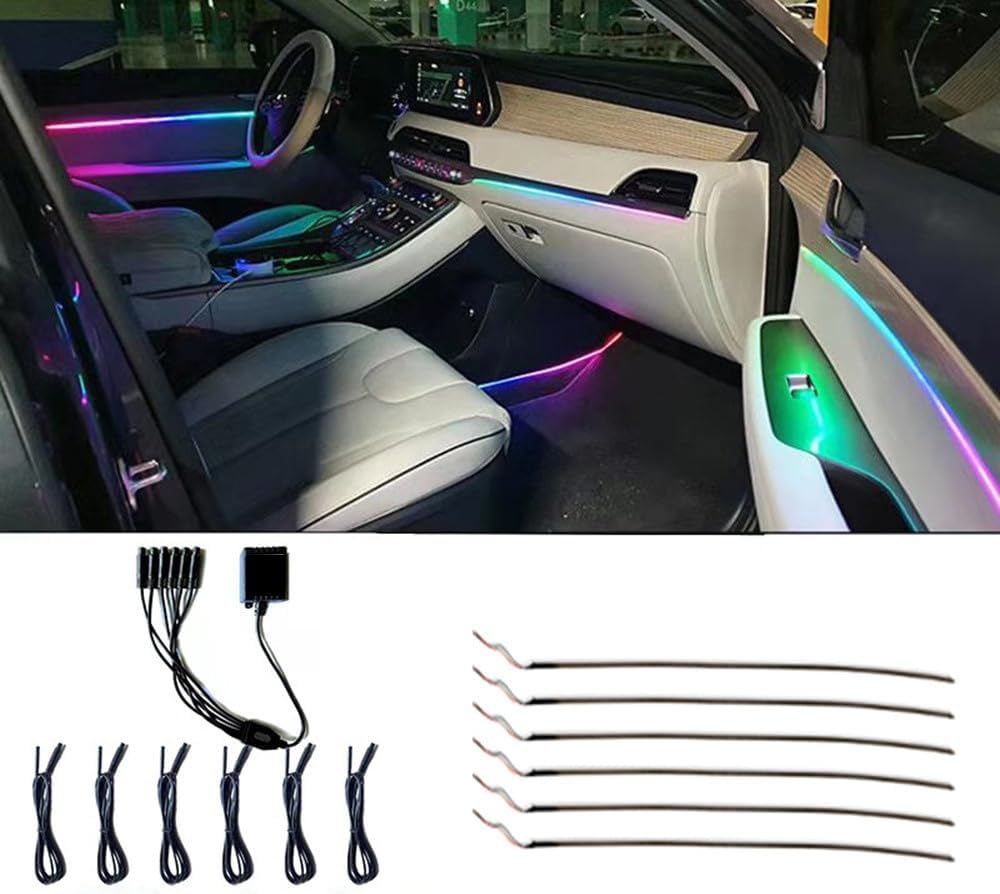
รูปที่ 3.1: เกินview of the AUBEU Car Interior LED Ambient Lighting Kit components.
4. การตั้งค่าและการติดตั้ง
Proper installation is crucial for optimal performance and aesthetic integration. The flexible design allows for discreet placement within your car's interior gaps.
- การจัดวางแผน: Identify desired locations for the light strips, such as dashboard seams, door panels, or under seats. Consider areas where the acrylic fiber optic can be easily inserted into existing gaps.
- เตรียมพื้นผิวให้พร้อม: Ensure all installation surfaces are clean and dry.
- Insert Fiber Optic: Use the provided plastic crowbar to gently pry open gaps in your car's interior trim. Carefully insert the acrylic fiber optic cables into these gaps. The cables can be cut to desired lengths to fit specific areas.
- เชื่อมต่อแถบไฟ LED: Attach the LED light strips to the ends of the fiber optic cables. Ensure secure connections.
- เชื่อมต่อกับกล่องควบคุม: Connect all LED light strips to the remote sound receiver/control box.
- การเชื่อมต่อไฟฟ้า: Plug the car charger into your vehicle's 12V power outlet (cigarette lighter socket) and connect it to the control box.
- Conceal Wiring: Route and secure all wiring to be hidden and out of the way, maintaining a tidy and safe interior.

รูปที่ 4.1: อดีตample of installed ambient lighting in a car interior, demonstrating how the lights integrate into existing gaps.

Figure 4.2: Detail of the LED strip and fiber optic, showing its flexibility and thin profile เพื่อให้ง่ายต่อการใส่
5. คู่มือการใช้งาน
Control your ambient lighting system using the dedicated mobile application or the physical control box.
5.1. การควบคุมผ่านแอปพลิเคชันบนมือถือ
Download the companion mobile application (refer to the QR code on the control box or packaging for download link). Once installed and connected via Bluetooth, you can access the full range of features:
- เปิด/ปิดเครื่อง: เปิดหรือปิดไฟ
- การปรับความสว่าง: Adjust the intensity of the lighting.
- โหมดฉาก: Select from 210 pre-programmed dynamic modes, including various flow, basic, transition, and trailing effects.
- โหมดเพลง: Activate the music sync feature. The built-in microphone will detect audio, and the lights will react to the beat and rhythm.
- DIY Color Creation: Choose from 64 available colors to create and save your own custom lighting effects.
- ความสม่ำเสมอของสี: If colors appear inconsistent, ensure the RGB setting in the app is correctly configured (e.g., change RGB to GRB if needed).

รูปที่ 5.1: ส่วนติดต่อผู้ใช้แอปพลิเคชันบนมือถือสำหรับการควบคุมแสง
5.2. Control Box Operation
The physical control box provides basic functionality for quick adjustments:
- ปุ่มเปิด/ปิด: กดเพื่อเปิดหรือปิดไฟ
- ปุ่มโหมด: หมุนเวียนผ่านโหมดแสงที่แตกต่างกัน
- ปุ่มความสว่าง: ปรับความเข้มของแสง
Video 5.1: Demonstration of Symphony and dynamic lighting modes. This video illustrates the various light patterns and color changes available with the system.
6. การบำรุงรักษา
The AUBEU LED Ambient Lighting Kit is designed for durability and long life. Minimal maintenance is required:
- การทำความสะอาด: Gently wipe the visible parts of the light strips and fiber optics with a soft, dry cloth to remove dust. Avoid using abrasive cleaners or excessive moisture.
- การจัดการสายเคเบิล: Periodically check that all cables remain securely tucked away in the car's gaps to prevent damage or interference with vehicle operation.
- การเชื่อมต่อไฟฟ้า: Ensure the car charger connection remains firm in the 12V outlet.
7 การแก้ไขปัญหา
If you encounter issues with your AUBEU LED Ambient Lighting Kit, refer to the following common problems and solutions:
| ปัญหา | สาเหตุที่เป็นไปได้ | สารละลาย |
|---|---|---|
| ไฟไม่เปิด | No power, loose connection, faulty car charger. | Check if the car charger is properly inserted into the 12V outlet. Ensure all cables are securely connected to the control box and LED strips. Test the 12V outlet with another device. |
| ไฟหรี่หรือกะพริบ | Low power, loose connection, damaged fiber optic. | Verify power connection. Check for any kinks or damage to the fiber optic cables. Adjust brightness via the app or control box. |
| แอปไม่สามารถเชื่อมต่อกับอุปกรณ์ได้ | Bluetooth not enabled, app not updated, device not discoverable. | Ensure Bluetooth is enabled on your smartphone. Restart the app and the car's ignition. Make sure the device is powered on and within range. Reinstall the app if necessary. |
| Colors are inconsistent or incorrect. | Incorrect app settings, damaged LED segment. | In the app settings, check if the color order (e.g., RGB/GRB) is correctly configured. If a segment remains incorrect, it may indicate a damaged LED strip. |
| การซิงค์เพลงไม่ทำงาน | Microphone obstructed, low music volume, app setting. | Ensure the control box's microphone is not covered. Increase music volume. Verify music mode is activated in the app. |
8. ข้อมูลจำเพาะ
| คุณสมบัติ | รายละเอียด |
|---|---|
| ยี่ห้อ | AUBEU |
| หมายเลขรุ่น | AUBEU-3 |
| ขนาดรายการ (ยาว x กว้าง x สูง) | 100 x 3.15 x 0.79 inches (approximate, for main unit/packaging) |
| ตัวเลือกสีแสง | RGB (Red/Blue/Green/Ice Blue/Yellow/White and 64 DIY colors via app) |
| ฟอร์มแฟกเตอร์ | สตริป |
| การใช้ที่แนะนำ | Car interior decoration, night driving, music enjoyment, parties, camping, bar decoration |
| ตำแหน่งอะไหล่ยนต์ | ข้างใน |
| ส่วนประกอบที่รวมอยู่ | 6Pc RGB LED Light, 1 x Remote Sound Receiver, 6pc acrylic light guide (2pc: 100cm +4pc: 80cm), 1 x Car Charger, 1 x Plastic crowbar |
| เทคโนโลยีการเชื่อมต่อ | RF (ความถี่วิทยุ) |
| คุณสมบัติพิเศษ | Ultra-thin thickness, Symphony function (210 modes: flow, basic, transition, trailing, etc.), Music Sync, DIY color creation, Optical fiber light guide. |
| วัสดุ | Acrylic Symphony Guide Light, LED |
| ระดับความต้านทานต่อน้ำ | ไม่ทนน้ำ |
| น้ำหนักสินค้า | 1.59 ปอนด์ |
| ประเทศต้นกำเนิด | จีน |
9. การรับประกันและการสนับสนุน
หากต้องการข้อมูลเกี่ยวกับเงื่อนไขการรับประกันสินค้า การคืนสินค้า หรือการสนับสนุนทางเทคนิค โปรดติดต่อผู้ขายหรือผู้ผลิตโดยตรง โปรดเก็บใบเสร็จรับเงินไว้เป็นหลักฐานการซื้อ