
1. สินค้าหมดview
This replacement remote control is designed to function as a direct substitute for your original Yamaha remote. It comes pre-programmed with all the essential functions of the original RAV477, RAV501, RAV504, RX-A730, RX-V675, and RX-V773 remote controls, requiring no setup or pairing. Simply insert batteries, and it is ready for immediate use.
1.1 รุ่นที่เข้ากันได้
This remote control is compatible with the following Yamaha models:
- YAMAHA RAV477
- YAMAHA RAV501
- YAMAHA RAV504
- YAMAHA RX-A730
- YAMAHA RX-V675
- YAMAHA RX-V773
2. การเริ่มต้น
2.1 การติดตั้งแบตเตอรี่
The remote control requires two AAA alkaline batteries (not included). Follow these steps to install them:
- ค้นหาช่องใส่แบตเตอรี่ที่ด้านหลังของรีโมทคอนโทรล
- กดสลักลงแล้วเลื่อนฝาครอบแบตเตอรี่ลงด้านล่างเพื่อเปิดออก
- ใส่แบตเตอรี่ AAA สองก้อน โดยตรวจสอบให้แน่ใจว่าขั้วบวก (+) และขั้วลบ (-) ตรงกับเครื่องหมายภายในช่อง
- เลื่อนฝาครอบแบตเตอรี่กลับเข้าที่จนกระทั่งคลิกเข้าที่
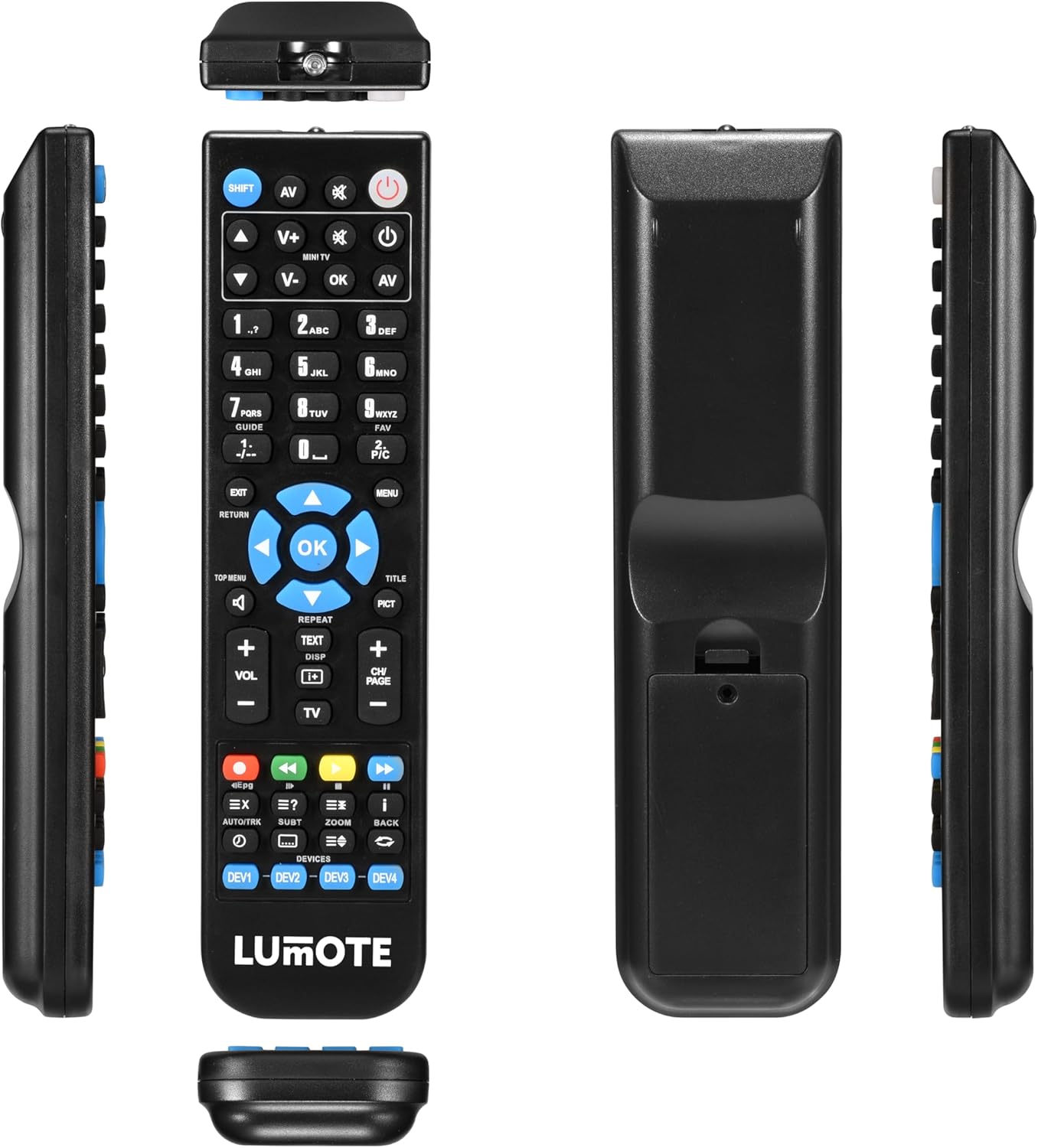
Image: The Generic Replacement Remote Control, displaying its front, back, and side profiles. The battery compartment is visible on the back.
3. คู่มือการใช้งาน
3.1 การทำงานพื้นฐาน
Once batteries are installed, the remote control is ready for use. Point the remote directly at your Yamaha audio/video receiver or compatible device. Ensure there are no obstructions between the remote and the device's infrared sensor.
3.2 ฟังก์ชันปุ่ม
The remote control features a comprehensive set of buttons designed to replicate the functionality of your original Yamaha remote. Below is a general guide to common button groups:
- ปุ่มเพาเวอร์ (พลัง): เปิดหรือปิดอุปกรณ์
- Input Select Buttons (e.g., AV, TV, ดีวีดี): เลือกแหล่งที่มาของอินพุตเสียง/วิดีโอ
- การควบคุมระดับเสียง (เล่ม + / -): ปรับระดับเสียง
- ปุ่มปิดเสียง (MUTE): ปิดเสียงหรือเปิดเสียง
- แป้นตัวเลข (0-9): For direct input of channel numbers or other numerical selections.
- ปุ่มนำทาง (ขึ้น ลง ซ้าย ขวา ตกลง): ใช้สำหรับนำทางเมนูและยืนยันการเลือก
- Menu/Setup Buttons (MENU, SETUP, RETURN, EXIT): Accesses device menus, navigates back, or exits current screens.
- Media Control Buttons (PLAY, PAUSE, STOP, REW, FF, SKIP): Controls playback of media (e.g., CD, DVD, USB).
- Function Buttons (e.g., SHIFT, TOP MENU, TITLE, PICT): Specific functions related to device operation or display modes.
4. การดูแลรักษา
- การทำความสะอาด: Wipe the remote control with a soft, dry cloth. Do not use abrasive cleaners, solvents, or alcohol, as these can damage the surface.
- การเปลี่ยนแบตเตอรี่: ควรเปลี่ยนแบตเตอรี่เมื่อรีโมททำงานช้าลงหรือหยุดทำงาน ควรเปลี่ยนแบตเตอรี่ทั้งสองก้อนพร้อมกันด้วยแบตเตอรี่ใหม่ชนิดเดียวกันเสมอ
- พื้นที่จัดเก็บ: หากไม่ได้ใช้งานรีโมทคอนโทรลเป็นเวลานาน ควรถอดแบตเตอรี่ออกเพื่อป้องกันการรั่วไหลและความเสียหายที่อาจเกิดขึ้น เก็บไว้ในที่แห้งและเย็น หลีกเลี่ยงแสงแดดโดยตรง
- หลีกเลี่ยงความชื้น: เก็บรีโมทคอนโทรลให้ห่างจากน้ำและความชื้นสูง
5 การแก้ไขปัญหา
หากคุณพบปัญหาเกี่ยวกับรีโมทคอนโทรล โปรดดูวิธีแก้ไขปัญหาทั่วไปต่อไปนี้:
- รีโมตไม่ตอบสนอง:
- ตรวจสอบว่าใส่แบตเตอรี่ถูกต้องและขั้วถูกต้องหรือไม่
- เปลี่ยนแบตเตอรี่ด้วยแบตเตอรี่อัลคาไลน์ AAA ใหม่
- ตรวจสอบให้แน่ใจว่าไม่มีสิ่งกีดขวางระหว่างรีโมทคอนโทรลและเซ็นเซอร์อินฟราเรดของอุปกรณ์
- Make sure you are pointing the remote directly at the device.
- ช่วงการทำงานสั้น:
- Replace the batteries. Weak batteries can reduce the remote's effective range.
- Ensure the remote's infrared emitter and the device's sensor are clean and unobstructed.
- ฟังก์ชั่นเฉพาะไม่ทำงาน:
- Verify that the function you are trying to use is supported by your specific Yamaha model.
- Some advanced functions might require specific settings on your Yamaha device. Refer to your Yamaha device's original manual.
6. ข้อมูลจำเพาะทางเทคนิค
| ยี่ห้อ | ทั่วไป |
| เทคโนโลยีการเชื่อมต่อ | อินฟราเรด |
| ประเภทตัวควบคุม | รีโมทคอนโทรล |
| ระยะสูงสุด | 10 เมตร |
| คำอธิบายแบตเตอรี่ | อัลคาไลน์ (AAA) |
| จำนวนรายการ | 1 |
| ยูพีซี | 037203302044 |
7. ข้อมูลการรับประกัน
ผลิตภัณฑ์นี้มาพร้อมกับ รับประกัน 12 เดือน from the date of purchase. This warranty covers manufacturing defects under normal use. It does not cover damage caused by misuse, accidents, unauthorized modifications, or battery leakage. Please retain your proof of purchase for warranty claims.
8. การสนับสนุนลูกค้า
If you encounter any issues not covered in this manual or require further assistance, please contact your retailer or the point of purchase for support. Provide your product model and a detailed description of the issue to facilitate a quicker resolution.