
การแนะนำ
This manual provides comprehensive instructions for the use and care of your new Remote brand compatible remote control. This remote is specifically designed to function seamlessly with Nordmende ND40S3000J SMART televisions, offering full functionality without the need for complex programming.
Please read this manual carefully to ensure proper setup and operation of your remote control.
การตั้งค่า
1. การติดตั้งแบตเตอรี่
The remote control requires alkaline batteries (not included). Follow these steps to install them:
- ค้นหาฝาปิดช่องใส่แบตเตอรี่ที่ด้านหลังของรีโมทคอนโทรล
- เลื่อนฝาครอบลงหรือกดที่สลักเพื่อเปิด
- Insert two new alkaline batteries, ensuring the positive (+) and negative (-) terminals match the diagrams inside the compartment.
- ปิดฝาช่องใส่แบตเตอรี่ โดยเลื่อนกลับเข้าที่จนกระทั่งได้ยินเสียงคลิกและแน่นสนิท
สำคัญ: Always use new alkaline batteries for optimal performance. Do not mix old and new batteries, or different types of batteries.
2. Initial Use (No Programming Required)
This compatible remote control is pre-programmed for the Nordmende ND40S3000J SMART TV model. No additional programming or setup steps are required. Once batteries are installed, the remote is ready for immediate use with your television.
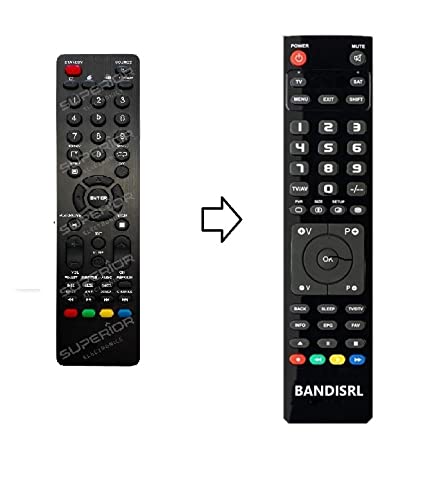
รูปที่ 1: The Remote compatible remote control. This image displays the layout of the buttons and the overall design of the remote, ready for use with your Nordmende TV.
คำแนะนำการใช้งาน
To operate your Nordmende ND40S3000J SMART TV with this remote control, point the remote directly at the television's infrared receiver. Ensure there are no obstructions between the remote and the TV.
- ปุ่มเปิด/ปิด: กดเพื่อเปิดหรือปิดทีวี
- เพิ่ม/ลดระดับเสียง: ปรับระดับเสียง
- ช่องขึ้น/ลง: เปลี่ยนช่องทีวีตามลำดับ
- ปุ่มตัวเลข (0-9): เลือกช่องทีวีได้โดยตรง
- ปุ่มนำทาง (ปุ่มลูกศร, ปุ่มตกลง): เลื่อนดูเมนูและเลือกตัวเลือก
- ปุ่มควบคุมสมาร์ททีวี: Access specific Smart TV functions or applications (e.g., Home, Apps, Netflix, YouTube, etc., depending on the remote's layout and TV's features).
- ปุ่มปิดเสียง: ปิดเสียงทีวี
- ปุ่มที่มา/อินพุต: หมุนเวียนผ่านแหล่งอินพุตที่มีอยู่ (HDMI, AV ฯลฯ)
Refer to your Nordmende TV's original user manual for specific details on its menu structure and Smart TV functionalities.
การซ่อมบำรุง
การทำความสะอาดรีโมทคอนโทรล
ในการทำความสะอาดรีโมทคอนโทรล ให้ใช้ผ้านุ่มและแห้ง สำหรับคราบสกปรกฝังแน่น ให้เช็ดเบาๆampen the cloth with water. Do not use abrasive cleaners, alcohol, or solvents, as these can damage the remote's surface and internal components.
การเปลี่ยนแบตเตอรี่
Replace batteries when the remote control's response becomes sluggish or stops working. Always replace both batteries simultaneously with new alkaline batteries. Dispose of used batteries according to local regulations.
พื้นที่จัดเก็บ
เก็บรีโมทคอนโทรลไว้ในที่แห้งและเย็น หลีกเลี่ยงแสงแดดโดยตรงและอุณหภูมิที่สูงหรือต่ำเกินไป หากไม่ได้ใช้งานรีโมทคอนโทรลเป็นเวลานาน ขอแนะนำให้ถอดแบตเตอรี่ออกเพื่อป้องกันการรั่วไหล
การแก้ไขปัญหา
- รีโมทคอนโทรลไม่ทำงาน:
- ตรวจสอบว่าใส่แบตเตอรี่ถูกต้องตามขั้ว (+/-)
- Replace the batteries with new alkaline batteries.
- ตรวจสอบให้แน่ใจว่าไม่มีสิ่งกีดขวางระหว่างรีโมทคอนโทรลและเครื่องรับอินฟราเรดของทีวี
- ตรวจสอบให้แน่ใจว่าคุณหันรีโมทไปที่ทีวีโดยตรง
- ตรวจสอบว่าทีวีเปิดอยู่
- Some buttons are not responding:
- This remote is designed for the Nordmende ND40S3000J SMART TV. If you are using it with a different model, some advanced functions may not be compatible.
- ตรวจสอบให้แน่ใจว่าปุ่มกดสะอาดและปราศจากสิ่งสกปรก
- ทีวีตอบสนองเป็นช่วงๆ:
- แบตเตอรี่อาจจะเหลือน้อย ควรเปลี่ยนแบตเตอรี่ใหม่
- Ensure a clear line of sight to the TV's infrared sensor.
- Avoid strong light sources (like direct sunlight) that might interfere with the infrared signal.
If troubleshooting steps do not resolve the issue, please refer to the Support section.
ข้อมูลจำเพาะ
| ยี่ห้อ: | Remote (Manufacturer: Bandisrl) |
| อุปกรณ์ที่รองรับ: | Nordmende ND40S3000J SMART Television |
| เทคโนโลยีการเชื่อมต่อ: | อินฟาเรด (IR) |
| คุณสมบัติพิเศษ: | ไม่จำเป็นต้องมีการเขียนโปรแกรม |
| ประเภทแบตเตอรี่: | ด่าง |
| รวมแบตเตอรี่: | เลขที่ |
| สี: | สีดำ |
| จำนวนปุ่ม: | 25 |
| ประเภทตัวควบคุม: | ปุ่มควบคุม |
การรับประกันและการสนับสนุน
ข้อมูลการรับประกัน
Specific warranty details for this compatible remote control are not provided in this manual. Please refer to the purchase documentation or contact the seller/manufacturer (Bandisrl) for information regarding warranty coverage and terms.
การสนับสนุนลูกค้า
For further assistance, technical support, or inquiries regarding compatibility with other TV models, please contact the manufacturer, Bandisrl. Contact information can typically be found on the product packaging or the seller's webเว็บไซต์.
If you own a different TV model than the Nordmende ND40S3000J SMART, it is recommended to contact Bandisrl to confirm compatibility before purchase or use.