
การแนะนำ
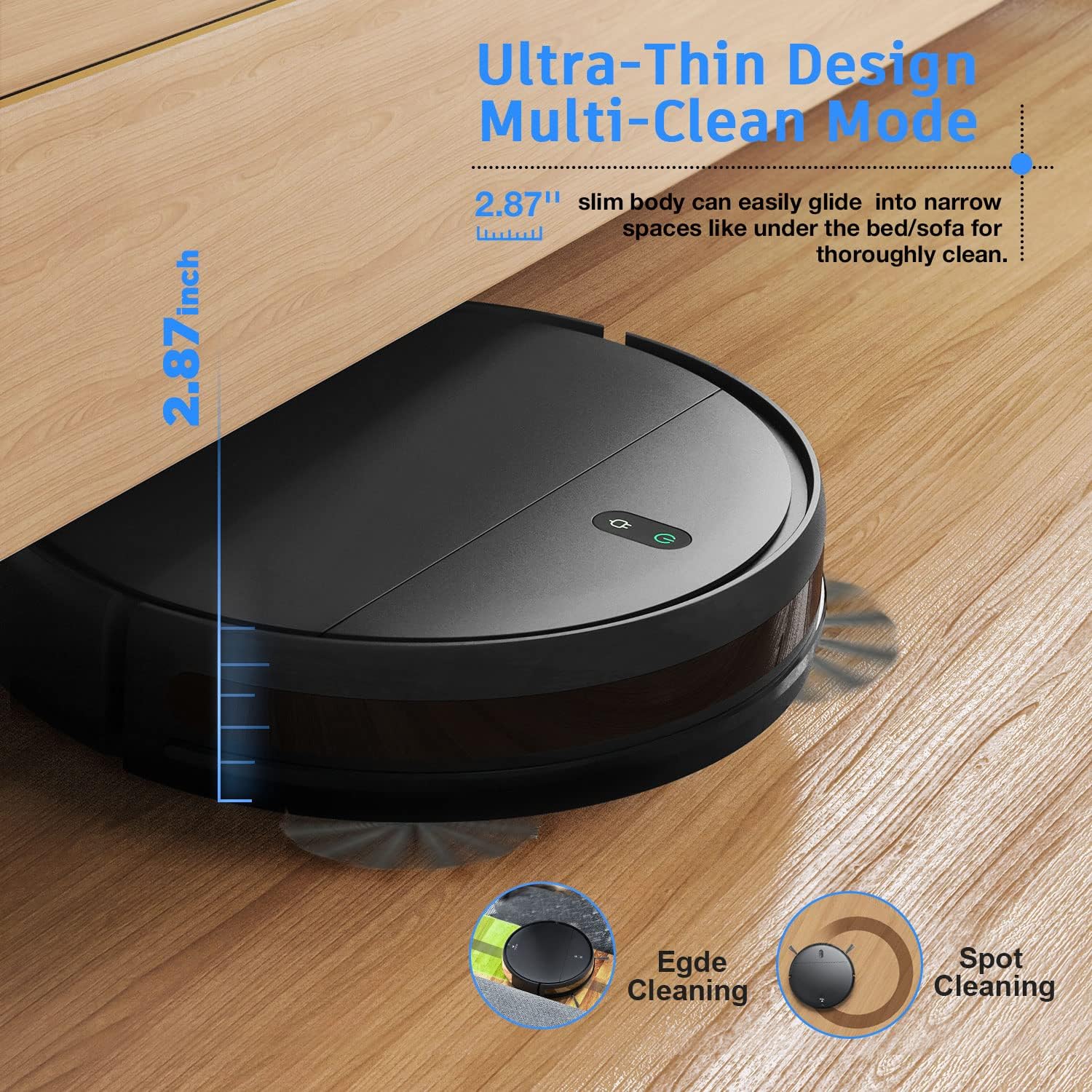
This manual provides detailed instructions for the setup, operation, and maintenance of your MAMNV Robot Vacuum and Mop Combo, Model BR151. This 2-in-1 device is designed to efficiently vacuum and mop various floor types, offering smart control options via WiFi, app, and Alexa voice commands. Its ultra-thin design allows for thorough cleaning in hard-to-reach areas, making it ideal for homes with hard floors, carpets, and pet hair.
มีอะไรอยู่ในกล่อง
Upon unboxing your MAMNV Robot Vacuum and Mop Combo, please ensure all the following components are present:
- MAMNV Robot Vacuum and Mop Main Unit
- แท่นชาร์จ
- อะแดปเตอร์แปลงไฟ
- รีโมทคอนโทรล (พร้อมแบตเตอรี่)
- ถังขยะพร้อมตัวกรอง
- ถังเก็บน้ำ
- แผ่นซับ
- แปรงด้านข้าง (2 คู่)
- เครื่องมือทำความสะอาด

การตั้งค่า
- ตำแหน่งแท่นชาร์จ: Place the charging dock against a wall in an open area, ensuring there are no obstacles within 1 meter (3 feet) to the sides and 2 meters (6 feet) in front. Connect the power adapter to the dock and plug it into a wall outlet.
- การชาร์จครั้งแรก: Place the robot vacuum onto the charging dock. Ensure the charging contacts on the robot align with those on the dock. The indicator light on the robot will show charging status. Allow for a full charge before first use (approximately 4-5 hours).
- ติดตั้งแปรงด้านข้าง: Gently press the side brushes onto the posts on the bottom of the robot until they click into place.
- Prepare for Vacuuming: Ensure the dustbin with its filter is securely installed in the robot.
- Prepare for Mopping (Optional): Open the water tank, fill it with clean water (do not use cleaning solutions), and securely close the cap. Attach the mop pad to the bottom of the water tank. Insert the filled water tank into the designated slot on the robot.

การดำเนินงาน
Your MAMNV Robot Vacuum offers multiple ways to initiate and manage cleaning tasks.
- เริ่มต้นด้วยตนเอง: Press the power button on the robot's top panel to start or pause cleaning.
- รีโมทคอนโทรล: Use the included remote control to start/stop cleaning, select cleaning modes (Auto, Spot, Edge, Zig-zag), direct the robot manually, or send it back to the charging dock.
- การควบคุมแอพ: Download the dedicated app (refer to the Quick Start Guide for QR code) to connect your robot via WiFi. The app allows for scheduling, real-time monitoring, cleaning mode selection, and adjusting suction power/water flow intensity.
- การควบคุมด้วยเสียง: Integrate with Alexa for convenient voice commands to start or stop cleaning.



การซ่อมบำรุง
การบำรุงรักษาตามปกติจะช่วยให้หุ่นยนต์ดูดฝุ่นของคุณทำงานได้อย่างเหมาะสมที่สุดและยืดอายุการใช้งาน
- การทิ้งถังขยะ: After each cleaning cycle, remove the dustbin by pulling the 'PULL' tab on the top cover. Open the dustbin lid and empty its contents into a trash receptacle.
- การทำความสะอาดตัวกรอง: Remove the filter from the dustbin. Tap it gently to dislodge dust. For a deeper clean, rinse the filter under running water. Ensure it is completely dry before reinserting. Replace the filter every 2-3 months, or more frequently depending on usage.
- Cleaning the Water Tank & Mop Pad: After mopping, remove the water tank and empty any remaining water. Detach the mop pad, wash it by hand or machine, and allow it to air dry.
- ทำความสะอาดแปรงด้านข้าง: Periodically check the side brushes for tangled hair or debris. Use the provided cleaning tool or scissors to carefully cut and remove any tangled material. Replace worn-out brushes.
- Cleaning Main Brush: Open the main brush cover on the bottom of the robot. Remove the main brush and use the cleaning tool to remove any tangled hair or debris. Reinstall the brush and cover.
- การทำความสะอาดเซ็นเซอร์และหน้าสัมผัสการชาร์จ: Use a dry cloth to wipe the anti-drop sensors, bumper sensors, and charging contacts on both the robot and the charging dock.
การแก้ไขปัญหา
If your robot vacuum encounters an issue, try the following steps:
- หุ่นยนต์ไม่ชาร์จ: ตรวจสอบให้แน่ใจว่าแท่นชาร์จเปิดใช้งานอยู่ และขั้วต่อชาร์จของหุ่นยนต์สะอาดและอยู่ในตำแหน่งที่ถูกต้องตรงกับแท่นชาร์จ
- Robot stuck or moving erratically: Check for any obstructions (cables, small objects) around the wheels, brushes, or sensors. Clean these areas if necessary.
- ประสิทธิภาพการทำความสะอาดไม่ดี: Empty the dustbin, clean or replace the filter, and clean the main and side brushes. Ensure the water tank is filled for mopping.
- ปัญหาการเชื่อมต่อแอป: Ensure your home WiFi network is 2.4GHz and the robot is within range. Restart the robot and your router if needed.
ข้อมูลจำเพาะ
| คุณสมบัติ | รายละเอียด |
|---|---|
| ยี่ห้อ | แมมเอ็นวี |
| คุณสมบัติพิเศษ | ปราดเปรื่อง |
| สี | สีดำ |
| ขนาดสินค้า | ยาว 11.81 นิ้ว x กว้าง 2.91 นิ้ว x สูง 11.81 นิ้ว |
| ประเภทตัวกรอง | ตลับหมึก |
| อายุการใช้งานแบตเตอรี่ | 100 นาที |
| เล่มที่tage | 14.4 โวลต์ |
| ความจุถังน้ำ | 0.2 ลิตร |
| แหล่งพลังงาน | ใช้พลังงานจากแบตเตอรี่ |
| วิธีการควบคุม | รีโมท, เสียง |
| อุปกรณ์ที่รองรับ | อเมซอน เอคโค่ |
| ฟอร์มแฟกเตอร์ | หุ่นยนต์ |
| น้ำหนักสินค้า | 9.2 ปอนด์ |
| คำแนะนำด้านพื้นผิว | พื้นแข็ง, พรม |
การรับประกันและการสนับสนุน
For warranty information or technical support, please refer to the product packaging or contact MAMNV customer service directly. Keep your purchase receipt for warranty claims.