
TECH PAD SW Sport Pro
คู่มือผู้ใช้สมาร์ทวอทช์ TECHPAD รุ่น SW Sport Pro
Model: SW Sport Pro
1. บทนำ
This manual provides essential instructions for setting up, operating, and maintaining your TECHPAD Smartwatch SW Sport Pro. Please read this guide thoroughly to ensure proper use and to maximize the features of your device. The smartwatch is designed to integrate with both iOS and Android smartphones, offering multisport tracking, notification alerts, and health monitoring capabilities.

ภาพที่ 1.1: ด้านหน้า view of the TECHPAD Smartwatch SW Sport Pro displaying various metrics.
2. เนื้อหาบรรจุภัณฑ์
โปรดตรวจสอบว่าสินค้าทั้งหมดมีอยู่ในแพ็คเกจ:
- TECHPAD Smartwatch SW Sport Pro (with pre-installed strap)
- สายชาร์จ
- คู่มือการใช้งาน (เอกสารนี้)
3. คู่มือการติดตั้ง
3.1. การชาร์จสมาร์ทวอทช์
Before first use, fully charge your smartwatch. Connect the charging cable to the charging port on the back of the smartwatch and plug the USB end into a standard USB power adapter (not included) or a computer's USB port. The watch display will indicate charging status.
3.2. การเปิด/ปิดเครื่อง
- เปิดเครื่อง: กดปุ่มด้านข้างค้างไว้จนกว่าหน้าจอจะสว่างขึ้น
- หมดแรง: Navigate to the 'Settings' menu on the smartwatch, then select 'Power Off' or press and hold the side button, then confirm power off.
3.3. การติดตั้งและการจับคู่แอป
To unlock the full functionality of your smartwatch, you must pair it with your smartphone via a companion application. The specific app name is not provided, please refer to the packaging or product information for the correct app to download from the App Store (iOS) or Google Play Store (Android).
- Download and install the companion app on your iOS or Android smartphone.
- ตรวจสอบให้แน่ใจว่าได้เปิดใช้งาน Bluetooth บนสมาร์ทโฟนของคุณแล้ว
- เปิดแอปและทำตามคำแนะนำบนหน้าจอเพื่อสร้างบัญชีและตั้งค่าบัญชีโปรของคุณfile.
- Within the app, select 'Add Device' or 'Pair Smartwatch' and choose 'SW Sport Pro' from the list of available devices.
- หากระบบแจ้งให้ยืนยันการจับคู่ โปรดยืนยันคำขอจับคู่ทั้งบนสมาร์ทโฟนและสมาร์ทวอทช์ของคุณ
Once paired, the smartwatch will synchronize data with your phone, and you can customize settings through the app.
4. คู่มือการใช้งาน
4.1. การนำทางพื้นฐาน
The TECHPAD Smartwatch SW Sport Pro features a responsive touch screen and a side button for navigation:
- ปัดขึ้น/ลง: เลื่อนดูเมนูและการแจ้งเตือน
- ปัดไปทางซ้าย/ขวา: Access different widgets or quick functions (e.g., heart rate, activity data).
- แตะ: เลือกสินค้าหรือยืนยันการดำเนินการ
- ปุ่มด้านข้าง: Press to return to the home screen or wake the device. A long press may access power options.
4.2. คุณสมบัติหลัก
Your smartwatch offers a range of features to enhance your daily life and fitness:
- Multisport Mode: Track various activities such as running, walking, cycling, and more. Select your desired sport from the activity menu to begin tracking.
- การติดตามการนอนหลับ: ติดตามรูปแบบการนอนหลับของคุณโดยอัตโนมัติ รวมถึงการนอนหลับลึก การนอนหลับตื้น และช่วงเวลาที่ตื่นนอน View การวิเคราะห์โดยละเอียดในแอปพลิเคชันคู่หู
- การแจ้งเตือนแบบพุช: Receive alerts for incoming calls, text messages, and app notifications directly on your wrist. The smartwatch will vibrate to alert you.
- การแจ้งเตือนการโทร: See who is calling and choose to accept or reject calls from your smartwatch (call answering functionality may vary).
- สัญญาณเตือนภัย: Set silent vibrating alarms through the companion app to wake you up or remind you of important events.
- GPS ผ่านสมาร์ทโฟน: When connected to your smartphone, the smartwatch can utilize your phone's GPS for more accurate distance and route tracking during outdoor activities.

Image 4.1: Smartwatch display showing real-time health and activity data.
4.3. การปรับแต่งหน้าปัดนาฬิกา
You can change the watch face to personalize your device. This is typically done through the companion app, where you can browse and download various watch face designs. Some watch faces may allow for customization of displayed information.
5. การบำรุงรักษาและการดูแล
To ensure the longevity and optimal performance of your TECHPAD Smartwatch SW Sport Pro, follow these care guidelines:
- การทำความสะอาด: Regularly clean the smartwatch and strap with a soft, damp ผ้า หลีกเลี่ยงการใช้สารเคมีรุนแรงหรือวัสดุที่มีฤทธิ์กัดกร่อน ตรวจสอบให้แน่ใจว่าหน้าสัมผัสการชาร์จสะอาดและแห้ง
- ความต้านทานน้ำ: Refer to the product specifications for the exact water resistance rating. Avoid exposing the device to hot water, steam, or high-pressure water jets.
- อุณหภูมิ: Do not expose the smartwatch to extreme temperatures (very hot or very cold) as this can damage the battery and internal components.
- การชาร์จ: ใช้เฉพาะสายชาร์จที่ให้มาเท่านั้น ห้ามฝืนเสียบสายชาร์จเข้าไปในพอร์ต
- การดูแลสายรัด: If the strap is removable, clean it separately. Ensure it is securely reattached before wearing.
6 การแก้ไขปัญหา
หากคุณประสบปัญหาเกี่ยวกับสมาร์ทวอทช์ของคุณ ให้ลองวิธีแก้ปัญหาต่อไปนี้:
- นาฬิกาอัจฉริยะเปิดไม่ติด: Ensure the device is fully charged. Connect it to the charging cable and allow it to charge for at least 30 minutes before attempting to power on again.
- ไม่สามารถจับคู่กับสมาร์ทโฟนได้:
- ตรวจสอบให้แน่ใจว่าได้เปิดใช้งาน Bluetooth บนสมาร์ทโฟนของคุณแล้ว
- Make sure the smartwatch is within Bluetooth range of your phone.
- รีสตาร์ททั้งสมาร์ทวอทช์และสมาร์ทโฟนของคุณ
- ล้างแคชบลูทูธในโทรศัพท์ของคุณ (ถ้ามี) แล้วลองจับคู่ใหม่อีกครั้ง
- Ensure the correct companion app is installed and updated.
- การแจ้งเตือนไม่ปรากฏ:
- ตรวจสอบการตั้งค่าการแจ้งเตือนภายในแอปพลิเคชันที่ใช้งานร่วมกัน เพื่อให้แน่ใจว่าได้เปิดใช้งานการแจ้งเตือนสำหรับแอปพลิเคชันที่ต้องการแล้ว
- Verify that your smartphone's notification settings allow the companion app to display alerts.
- Ensure the smartwatch is connected via Bluetooth to your phone.
- การติดตามกิจกรรมที่ไม่ถูกต้อง:
- Ensure the smartwatch is worn snugly on your wrist, about one finger's width above your wrist bone.
- Update your personal information (height, weight, age) in the companion app for better accuracy.
- For GPS-dependent activities, ensure your phone's GPS is active and the smartwatch is connected to the phone.
- อายุการใช้งานแบตเตอรี่สั้น:
- ลดความสว่างหน้าจอ
- ปิดการตรวจสอบอัตราการเต้นของหัวใจอย่างต่อเนื่องหากไม่จำเป็น
- Limit the number of apps sending notifications to the smartwatch.
- ตรวจสอบให้แน่ใจว่าสมาร์ทวอทช์ชาร์จเต็มแล้วก่อนใช้งาน
หากปัญหายังคงมีอยู่ โปรดติดต่อฝ่ายสนับสนุนลูกค้าเพื่อขอความช่วยเหลือเพิ่มเติม
7. ข้อมูลจำเพาะ
| คุณสมบัติ | คำอธิบาย |
|---|---|
| แบบอย่าง | TECHPAD Smartwatch SW Sport Pro |
| ประเภทจอภาพ | อโมเลด |
| ขนาดหน้าจอ | 1 นิ้ว |
| ระบบปฏิบัติการ | Android Wear (as specified) |
| การเชื่อมต่อ | บลูทูธ |
| อุปกรณ์ที่รองรับ | สมาร์ทโฟน (iOS, Android) |
| คุณสมบัติพิเศษ | Sleep Monitor, Multisport Mode, Push Notifications, Call Alerts, Alarms, Touch Screen, GPS via smartphone |
| อายุการใช้งานแบตเตอรี่ (สแตนด์บาย) | นานถึง 15 วัน |
| Battery Life (Training) | 4 ถึง 6 วัน |
| รูปร่าง | กลม |
| อุปกรณ์เสริมที่รวมอยู่ด้วย | Strap, Charging Cable |
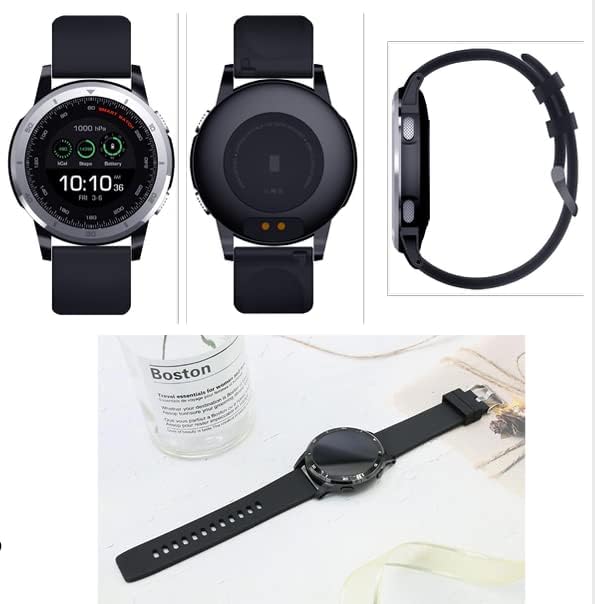
Image 7.1: Various angles of the smartwatch, including its charging contacts and side profile.
8. การรับประกันและการสนับสนุน
For warranty information, please refer to the warranty card included with your product or visit the official TECH PAD webไซต์นี้ โปรดเก็บหลักฐานการซื้อไว้เพื่อใช้ยืนยันการรับประกัน
If you require technical support or have questions not covered in this manual, please contact TECH PAD customer service. Contact details can typically be found on the product packaging or the official brand webเว็บไซต์.