
สินค้าเกินview
The EWO'S XRT140 Universal Remote Control is designed as a direct replacement for various VIZIO Smart TV remotes. This product has been professionally inspected and tested to ensure it functions and appears like new. It offers seamless control over your VIZIO Smart TV, providing a reliable and user-friendly experience.

ภาพ: ด้านหน้าและด้านข้าง view of the EWO'S XRT140 Universal Remote Control, showcasing การออกแบบตามหลักสรีรศาสตร์และเค้าโครงปุ่ม
คู่มือการติดตั้ง
The EWO'S XRT140 remote control is designed for immediate use with compatible VIZIO Smart TVs. No pairing or programming is required.
การติดตั้งแบตเตอรี่
- ค้นหาช่องใส่แบตเตอรี่ที่ด้านหลังของรีโมทคอนโทรล
- เลื่อนเปิดฝาครอบช่องใส่แบตเตอรี่
- Insert two (2) 1.5V AAA batteries, ensuring the positive (+) and negative (-) terminals align correctly with the indicators inside the compartment.
- ปิดฝาช่องใส่แบตเตอรี่ให้แน่น
Once batteries are installed, the remote is ready to operate your VIZIO Smart TV.
การใช้งานรีโมทคอนโทรลของคุณ
This section details the functions of the buttons on your EWO'S XRT140 Universal Remote Control.
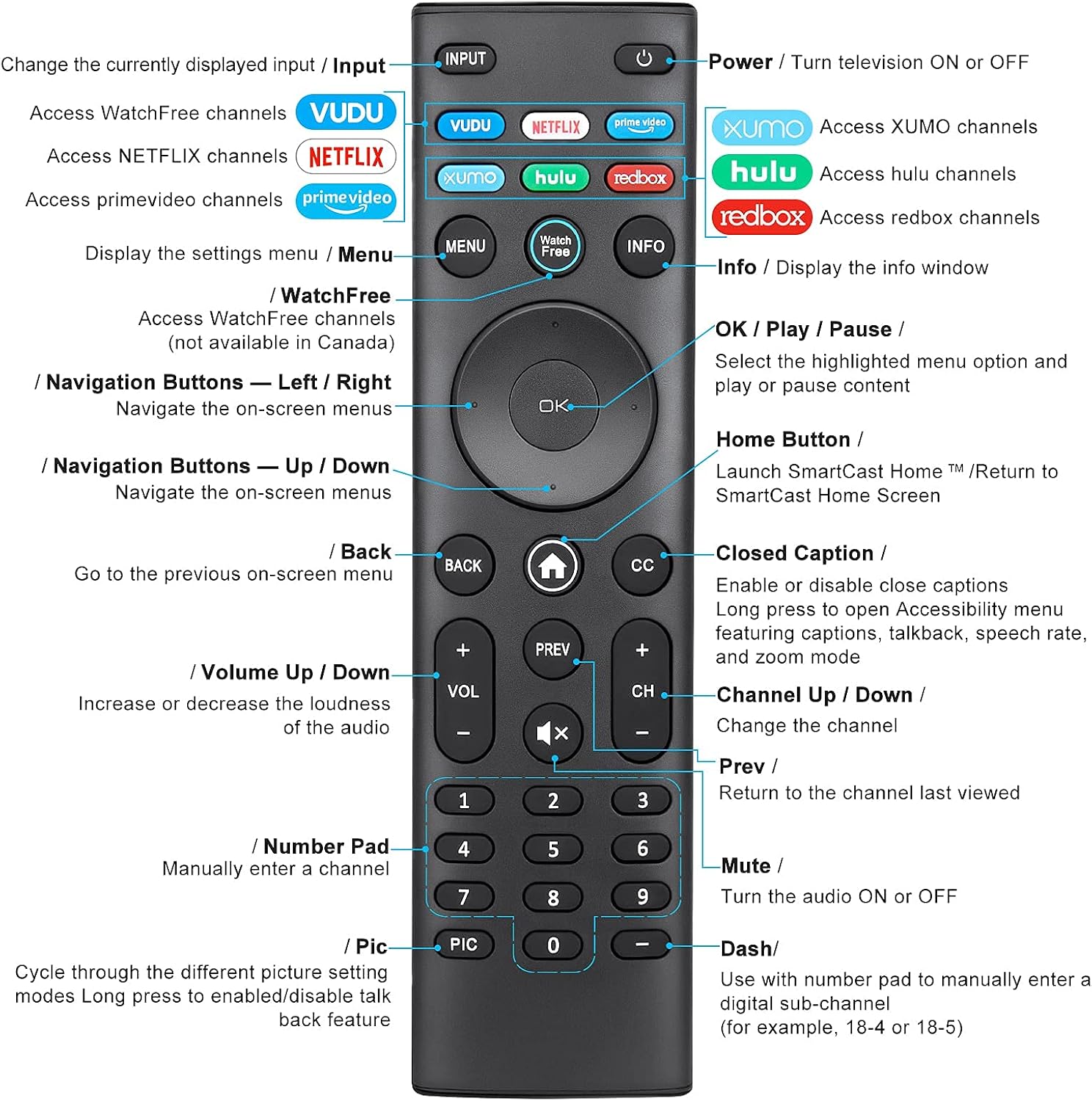
Image: Detailed diagram of the EWO'S XRT140 remote control, labeling each button with its corresponding function.
ปุ่มฟังก์ชั่น:
- อินพุต: Change the currently displayed input source.
- พลังงาน (⏻): Turn the television ON or OFF.
- วูดู: Access VUDU channels.
- เน็ตฟลิกซ์: Access Netflix channels.
- prime video: Access Prime Video channels.
- XUMO: Access XUMO channels.
- hulu: Access Hulu channels.
- redbox: Access Redbox channels.
- เมนู: Display the settings menu.
- WatchFree: Access WatchFree channels (Note: May not be available in all regions, e.g., Canada).
- ข้อมูล: Display the info window.
- OK / Play / Pause: Select the highlighted menu option and play or pause content.
- ปุ่มนำทาง (ขึ้น/ลง/ซ้าย/ขวา): นำทางไปยังเมนูบนหน้าจอ
- Home Button (⌂): Launch SmartCast Home or return to the SmartCast Home Screen.
- กลับ: Go to the previous on-screen menu.
- CC (คำบรรยายปิด): Enable or disable closed captions. Long press to open Accessibility menu featuring captions, talkback, speech rate, and zoom mode.
- VOL +/- (เพิ่ม/ลดระดับเสียง): เพิ่มหรือลดความดังของเสียง
- ก่อนหน้านี้: Return to the channel last viewบก.
- CH +/- (เปลี่ยนช่องขึ้น/ลง): เปลี่ยนช่อง
- ปิดเสียง (🔇): Turn the audio ON or OFF.
- แป้นตัวเลข (0-9): Manually enter a channel number.
- PIC: Cycle through different picture setting modes. Long press to enable/disable talk back feature.
- แดช (-): Use with the number pad to manually enter a digital sub-channel (e.g., 18-4 or 18-5).
คุณสมบัติหลัก
- ตอบกลับทันที: This remote control boasts a quick transmission and response time of 0.2 seconds, ensuring minimal delay between your command and the TV's action.
- กระดุมที่ทนทาน: The buttons are rigorously tested to support over 150,000 clicks, providing long-lasting reliability.
- ระยะขยาย: The remote transmits a signal effectively over long distances, up to 12 meters (40 feet), allowing for flexible viewตำแหน่งการจัดงาน
- การออกแบบพรีเมี่ยม: Upgraded with a high-end glossy finish, the remote is made from durable ABS material, making it safe for use by children.
- ปุ่มลัดเฉพาะ: Features 7 convenient shortcut buttons for popular streaming services like VUDU, Netflix, Prime Video, XUMO, Hulu, and Redbox, plus a WatchFree button for quick access.
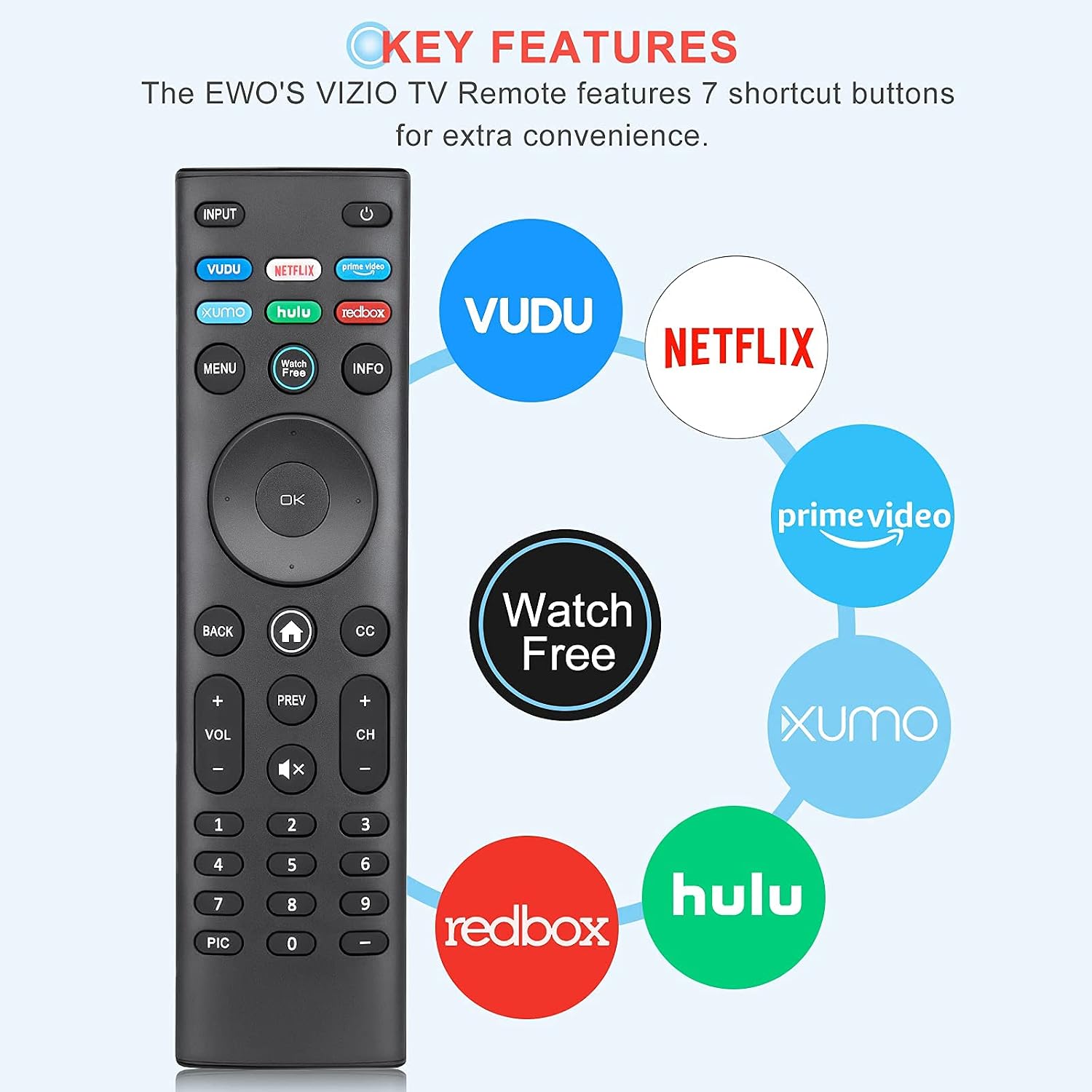
Image: The EWO'S XRT140 remote control with its 7 shortcut buttons for streaming services highlighted, emphasizing convenience.

Image: A hand holding the EWO'S XRT140 remote, with text indicating its fast response time and high click durability.

Image: An illustration demonstrating the EWO'S XRT140 remote's ability to transmit signals over 40 feet, highlighting its long-distance capability.
ความเข้ากันได้
The EWO'S XRT140 Universal Remote Control is designed for broad compatibility with VIZIO Smart TVs and various VIZIO remote models.
Compatible VIZIO TV Series:
- All VIZIO LED LCD HD UHD HDR Smartcast 4K 3D Smart TVs
- Including D-Series, E-Series, M-Series, P-Series, PX-Series, V-Series, and OLED-Series.

Image: The EWO'S XRT140 remote alongside various VIZIO SmartCast TV models, illustrating its broad compatibility.
Compatible VIZIO Remote Models:
The XRT140 is a universal remote control compatible with, but not limited to, the following VIZIO remote models:
- XRT112
- XRT122
- XRT302
- XRT135
- XRT510
- XRT500
- XRT100
- XRT136
- VR1
- VR2
- VR10
- VR15

Image: The EWO'S XRT140 remote displayed next to several other VIZIO remote models, indicating its universal compatibility.
การซ่อมบำรุง
การดูแลรักษาอย่างถูกวิธีจะช่วยยืดอายุการใช้งานของรีโมทคอนโทรลของคุณได้
การทำความสะอาด:
- เช็ดรีโมทคอนโทรลด้วยผ้าแห้งและนุ่ม
- สำหรับสิ่งสกปรกฝังแน่น ให้เช็ดออกเล็กน้อยampชุบผ้าด้วยน้ำหรือน้ำยาทำความสะอาดอ่อนๆ ที่ไม่ทำให้เกิดรอยขีดข่วน ห้ามฉีดน้ำยาทำความสะอาดลงบนรีโมทโดยตรง
- หลีกเลี่ยงการใช้สารเคมีรุนแรง ตัวทำละลาย หรือแผ่นขัดถู เพราะอาจทำให้พื้นผิวหรือชิ้นส่วนภายในของรีโมทเสียหายได้
การดูแลแบตเตอรี่
- ควรเปลี่ยนแบตเตอรี่เมื่อรีโมททำงานลดลงหรือหยุดตอบสนอง
- ควรเปลี่ยนแบตเตอรี่ทั้งสองก้อนพร้อมกันด้วยแบตเตอรี่ใหม่ชนิดเดียวกัน (AAA) เสมอ
- If the remote will not be used for an extended period (e.g., several weeks or months), remove the batteries to prevent leakage and potential damage to the remote.
การแก้ไขปัญหา
If you encounter issues with your remote control, refer to the following common troubleshooting steps:
| ปัญหา | สาเหตุที่เป็นไปได้ | สารละลาย |
|---|---|---|
| รีโมทไม่ตอบสนอง | แบตเตอรี่หมดหรือใส่ไม่ถูกต้อง | Replace batteries with new 1.5V AAA batteries, ensuring correct polarity. |
| การทำงานระยะไกลเป็นระยะๆ | Low battery power; Obstruction between remote and TV; Remote sensor on TV is blocked. | Replace batteries. Ensure a clear line of sight between the remote and the TV's IR sensor. Remove any objects blocking the TV's sensor. |
| ปุ่มบางปุ่มใช้งานไม่ได้ | Dirt or debris under the button; Button malfunction. | Clean the remote surface around the button. If the issue persists, the button may be faulty. |
| Remote range is reduced | Low battery power; Interference from other electronic devices. | Replace batteries. Move other electronic devices away from the TV or remote. |
ข้อมูลจำเพาะผลิตภัณฑ์
| ข้อมูลจำเพาะ | รายละเอียด |
|---|---|
| ยี่ห้อ | EWO'S |
| แบบอย่าง | XRT140 |
| อุปกรณ์ที่รองรับ | Television (VIZIO Smart TVs) |
| ระยะสูงสุด | 40 ฟุต (ประมาณ 12 เมตร) |
| ประเภทแบตเตอรี่ | 2 x AAA (ไม่รวม) |
| น้ำหนักสินค้า | 2.39 ออนซ์ |
| ขนาดแพ็คเกจ | 8.19 x 3.66 x 0.83 นิ้ว |
| ASIN | B098YWCB68 |
| ยูพีซี | 656942198109 |
| วันที่พร้อมใช้งานครั้งแรก | 8 กรกฎาคม 2021 |
การรับประกันและการสนับสนุน
As an Amazon Renewed product, the EWO'S XRT140 Universal Remote Control is backed by the Amazon Renewed Guarantee. This ensures that the product has been professionally inspected and tested to work and look like new.
If you are not satisfied with your purchase, renewed products are eligible for replacement or refund under the Amazon Renewed Guarantee. Please refer to the Amazon Renewed program terms and conditions for specific details regarding returns, replacements, and refunds.
For further assistance or inquiries, please contact Amazon customer support or refer to the Amazon Renewed Store for more information.
Amazon Renewed Store Link: เยี่ยมชมร้านค้า Amazon Renewed