
1. บทนำ
ขอบคุณสำหรับการซื้อasing the QFX E-B3 Bluetooth Professional High-Power Speaker. This manual provides essential information for the safe and efficient operation of your speaker. Please read it thoroughly before use and retain it for future reference.
The QFX E-B3 is designed to deliver powerful audio with features including Bluetooth connectivity, FM radio, USB/SD card playback, LED party lights, and a 250W power amplifier. It also supports True Wireless System (TWS) for stereo pairing with another compatible speaker.
2. ข้อมูลด้านความปลอดภัย
- แหล่งพลังงาน: Connect the speaker only to the specified power supply as indicated on the unit.
- การระบายอากาศ : ตรวจสอบให้แน่ใจว่ามีการระบายอากาศที่เพียงพอรอบๆ ลำโพง อย่าปิดกั้นช่องระบายอากาศใดๆ
- น้ำและความชื้น: This speaker is not waterproof. Do not expose it to rain, moisture, or any liquids to prevent electric shock or fire.
- ความร้อน: Keep the speaker away from heat sources such as radiators, heat registers, stoves, or other apparatus that produce heat.
- การทำความสะอาด: Unplug the speaker from the power outlet before cleaning. Use a dry cloth for cleaning. Do not use liquid cleaners or aerosol cleaners.
- การบริการ: อย่าพยายามให้บริการผลิตภัณฑ์นี้ด้วยตนเอง ส่งต่อการบริการทั้งหมดไปยังช่างบริการที่ผ่านการรับรอง
- การจัดวาง: วางลำโพงบนพื้นผิวที่มั่นคงและเรียบเพื่อป้องกันไม่ให้ล้ม
3. เนื้อหาบรรจุภัณฑ์
ตรวจสอบว่ามีรายการทั้งหมดอยู่ในแพ็คเกจ:
- QFX E-B3 High-Power Speaker
- ไมโครโฟน
- รีโมทคอนโทรล
- สายไฟ AC
- คู่มือการใช้งาน (เอกสารนี้)
4. สินค้าหมดview
The QFX E-B3 speaker features dual 15-inch woofers and a 1-inch tweeter, protected by a metal grill. It includes integrated handles and wheels for portability.

รูปที่ 4.1 : ด้านหน้า view of the QFX E-B3 Speaker.
Rear Panel Controls and Ports
The rear panel houses all input/output connections and control knobs.
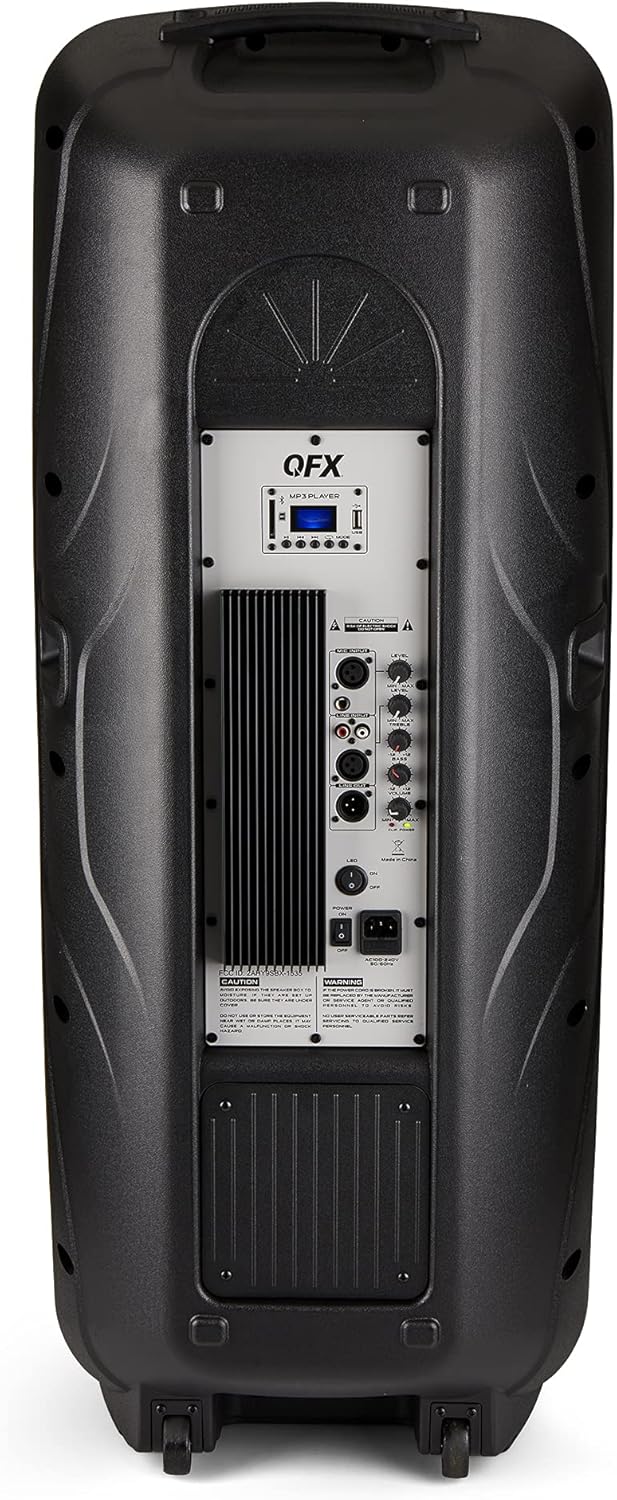
Figure 4.2: Rear panel with controls and ports.
- สวิตช์ไฟ: เปิด/ปิดลำโพง
- อินพุตไฟฟ้ากระแสสลับ: เชื่อมต่อสายไฟ AC
- USB/SD Card Ports: สำหรับการเล่นเสียง fileจากไดรฟ์ USB หรือการ์ด SD
- หน้าจอแสดงผล: แสดงโหมดปัจจุบันและข้อมูลเส้นทาง
- ปุ่มโหมด: Switches between input modes (Bluetooth, FM, USB, SD, RCA).
- ปุ่มเล่น/หยุดชั่วคราว: Controls playback for USB/SD/Bluetooth.
- ปุ่มแทร็กก่อนหน้า/ถัดไป: นำทางไปยังแทร็กเพลงหรือสถานีวิทยุ FM
- ปุ่มปรับระดับเสียงหลัก: ปรับระดับเสียงโดยรวม
- Bass/Treble Control Knobs: Adjusts low and high frequencies.
- อินพุตไมโครโฟน XLR: Connects a wired microphone.
- Microphone Volume/Echo Knobs: Adjusts microphone volume and echo effect.
- ช่องต่อ RCA (ซ้าย/ขวา): Connects external audio devices via RCA cables.
- XLR Line Input/Output: For connecting to other audio equipment.
5. การตั้งค่า
การจัดวางเริ่มต้น
Place the speaker on a stable, flat surface. For optimal sound, position it in a central location within the listening area. The integrated wheels and handle allow for easy transport.

Figure 5.1: Speaker being moved with handle and wheels.
การเชื่อมต่อไฟฟ้า
- ตรวจสอบให้แน่ใจว่าสวิตช์เปิดปิดของลำโพงอยู่ในตำแหน่งปิด
- Connect the AC power cable to the AC input on the rear panel of the speaker.
- เสียบปลายอีกด้านของสายไฟ AC เข้ากับเต้ารับติดผนังมาตรฐาน
- Flip the power switch to the ON position. The display screen will illuminate.
6. คู่มือการใช้งาน
จับคู่บลูทู ธ
- Turn on the QFX E-B3 speaker.
- กดปุ่ม โหมด button on the speaker or remote control until "BLUE" appears on the display screen, indicating Bluetooth mode.
- เปิดใช้งานบลูทูธบนอุปกรณ์เคลื่อนที่ของคุณ (สมาร์ทโฟน แท็บเล็ต ฯลฯ)
- ค้นหา available Bluetooth devices and select "QFX E-B3" from the list.
- เมื่อจับคู่เสร็จแล้ว ลำโพงจะส่งเสียงยืนยัน จากนั้นคุณสามารถเล่นเสียงจากอุปกรณ์ของคุณผ่านลำโพงได้
True Wireless System (TWS) Pairing
TWS allows two QFX E-B3 speakers to connect wirelessly for a stereo sound experience. This feature works only in Bluetooth mode.
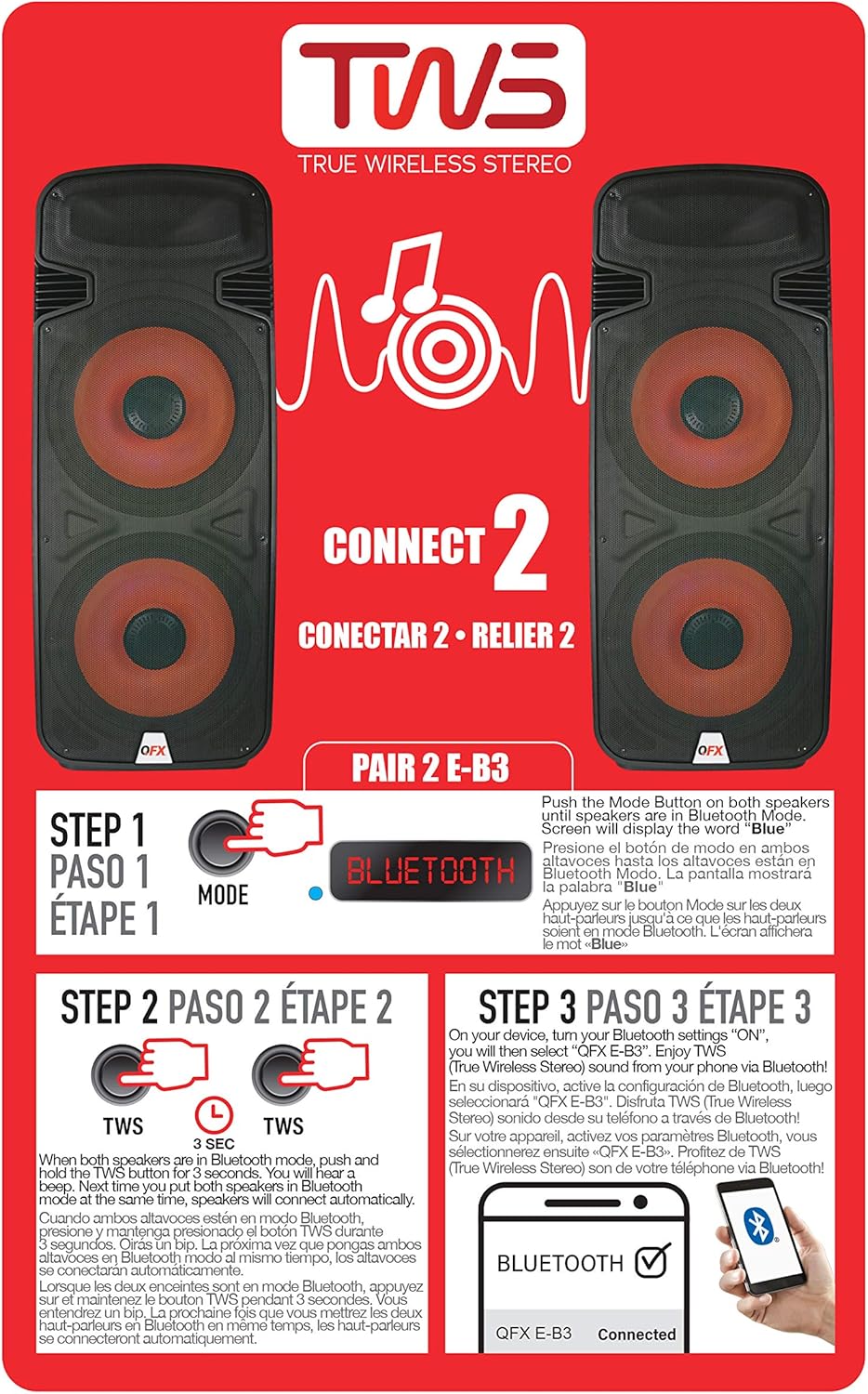
Figure 6.1: TWS Pairing Instructions.
- Ensure both QFX E-B3 speakers are powered on and in Bluetooth mode. The display on both speakers should show "BLUE".
- บนลำโพงตัวใดตัวหนึ่ง (ซึ่งจะเป็นลำโพงหลักของคุณ) ให้กดปุ่มค้างไว้ ทไวซ์ button for approximately 3 seconds. The speakers will attempt to connect to each other.
- Once successfully paired, you will hear a confirmation sound, and the display on the primary speaker will show "BLUE" while the secondary speaker will show "BLUE" as well.
- On your Bluetooth-enabled device, search for and select "QFX E-B3". The two speakers will now play audio in stereo.
การทำงานของวิทยุ FM
- กดปุ่ม โหมด button to switch to FM radio mode. The display will show the FM frequency.
- กดปุ่มค้างไว้ เล่น/หยุดชั่วคราว button to initiate an automatic scan for FM stations. The speaker will save all found stations.
- ใช้ เพลงก่อนหน้า/ถัดไป ปุ่มสำหรับนำทางไปยังสถานี FM ที่บันทึกไว้
การเล่นการ์ด USB/SD
- Insert a USB flash drive or SD card (with compatible audio files) into the respective port on the rear panel.
- The speaker will automatically switch to USB/SD mode and begin playing the audio fileถ้าไม่ ให้กดปุ่ม โหมด กดปุ่มเพื่อเลือกโหมด USB หรือ SD
- ใช้ เล่น/หยุดชั่วคราว และ เพลงก่อนหน้า/ถัดไป ปุ่มเพื่อควบคุมการเล่น
อินพุตไมโครโฟน
- Connect a microphone to the XLR Microphone Input on the rear panel.
- Adjust the Microphone Volume and Echo knobs to achieve the desired sound.
อินพุต RCA
- Connect an external audio source (e.g., CD player, mixer) to the RCA Input (L/R) ports using appropriate RCA cables.
- กดปุ่ม โหมด button to select RCA input mode.
- Adjust the master volume on the speaker and the volume on your external audio source.
ไฟปาร์ตี้ LED
The speaker features integrated LED party lights that activate automatically when the speaker is powered on. There are no specific controls for the LED lights mentioned; they are designed to enhance the audio experience.
7. การบำรุงรักษา
การทำความสะอาด
- ถอดปลั๊กของลำโพงทุกครั้งก่อนทำความสะอาด
- ใช้ผ้าแห้งนุ่มเช็ดทำความสะอาดพื้นผิวด้านนอกของลำโพง
- ห้ามใช้สารทำความสะอาดที่มีฤทธิ์กัดกร่อน ขี้ผึ้ง หรือตัวทำละลาย เพราะอาจทำให้พื้นผิวเสียหายได้
- รักษาช่องระบายอากาศให้สะอาดปราศจากฝุ่นและเศษขยะ
พื้นที่จัดเก็บ
When not in use for extended periods, store the speaker in a cool, dry place, away from direct sunlight and extreme temperatures. Cover the speaker to protect it from dust.
8 การแก้ไขปัญหา
If you encounter issues with your QFX E-B3 speaker, refer to the following common problems and solutions:
| ปัญหา | สาเหตุที่เป็นไปได้ | สารละลาย |
|---|---|---|
| ไม่มีไฟฟ้า | Power cable not connected; Power outlet not active; Speaker power switch off. | Ensure AC cable is securely connected to speaker and outlet. Check if outlet is working. Turn speaker power switch ON. |
| ไม่มีเสียง | Volume too low; Incorrect input mode selected; Audio source not playing. | Increase master volume. Press MODE button to select correct input. Ensure audio source is playing and its volume is up. |
| บลูทูธไม่เชื่อมต่อ | Speaker not in Bluetooth mode; Device Bluetooth off; Speaker already paired to another device; Device too far. | Ensure speaker is in Bluetooth mode ("BLUE" on display). Turn on device Bluetooth. Disconnect from other devices. Move device closer to speaker (within 30 feet). |
| การจับคู่ TWS ล้มเหลว | ลำโพงไม่ได้อยู่ในโหมดบลูทูธ หรือไม่ได้กดปุ่ม TWS ค้างไว้นานพอ | Ensure both speakers are in Bluetooth mode. Press and hold the TWS button on one speaker for 3 seconds. |
| การเล่น USB/SD ไม่ทำงาน | โหมดไม่ถูกต้อง; ไม่เข้ากัน file format; Corrupted USB/SD card. | Press MODE to select USB/SD. Ensure audio files are in a compatible format (e.g., MP3). Try a different USB/SD card. |
9. ข้อมูลจำเพาะ
| คุณสมบัติ | ข้อมูลจำเพาะ |
|---|---|
| ยี่ห้อ | คิวเอฟเอ็กซ์ |
| หมายเลขรุ่น | อี-บี3 |
| กำลังขับสูงสุดของลำโพง | 250 วัตต์ |
| เทคโนโลยีการเชื่อมต่อ | ยูเอสบี, บลูทูธ |
| โหมดเอาต์พุตเสียง | สเตอริโอ |
| ประเภทการติดตั้ง | Plug Mount, Wheel Mount |
| ประเภทลำโพง | Woofer (Dual 15 Inches) |
| ประเภทตัวควบคุม | รีโมทคอนโทรล |
| สี | Party LED |
| กันน้ำได้ | เท็จ |
| วิธีการควบคุม | ระยะไกล |
| เส้นผ่านศูนย์กลางวูฟเฟอร์ | 15 นิ้ว |
| จำนวนช่องสัญญาณเสียง | 2.0 |
| เทคโนโลยีไร้สาย | บลูทูธ |
| โปรโตคอลการเชื่อมต่อ | บลูทูธ |
| แหล่งพลังงาน | สายไฟ |
| ประเภทไดร์เวอร์เสียง | ไดร์เวอร์แบบไดนามิก |
| ขนาดไดร์เวอร์เสียง | 15 นิ้ว |
| ขนาดสินค้า (ลึก x กว้าง x สูง) | ลึก 16.77 นิ้ว x กว้าง 13.98 นิ้ว x สูง 23.74 นิ้ว |
| น้ำหนักสินค้า | 13.2 ปอนด์ |
| อุปกรณ์ที่รองรับ | แล็ปท็อป, เครื่องเล่น MP3, สมาร์ทโฟน, แท็บเล็ต, โทรทัศน์ |
| ยูพีซี | 606540039618 |
10. ข้อมูลการรับประกัน
This product is covered by a limited warranty. For specific details regarding warranty coverage and terms, please refer to the warranty information provided at the point of purchase or contact QFX customer support directly. The warranty is typically per contract with the retailer.
11. การสนับสนุน
For technical assistance, troubleshooting beyond this manual, or inquiries about your QFX E-B3 speaker, please contact QFX customer support or your retailer. Contact information can usually be found on the manufacturer's webไซต์หรือบนใบเสร็จรับเงินของคุณ