1. บทนำ
Thank you for choosing the ZHNN Double Din Car Stereo Radio. This manual provides essential information for the proper installation, operation, and maintenance of your new car stereo. Featuring a 7-inch HD LCD touch screen, this unit supports Apple CarPlay, Android Auto, Bluetooth connectivity, Mirror Link, a backup camera input, USB/SD media playback, and FM/AM radio. Please read this manual thoroughly before use to ensure optimal performance and safety.
2. สินค้าหมดview และขนาด
Familiarize yourself with the main components and physical dimensions of your car stereo unit.

รูปที่ 2.1 : ด้านหน้า view of the ZHNN Double Din Car Stereo, showcasing the 7-inch HD LCD touch screen and physical buttons.
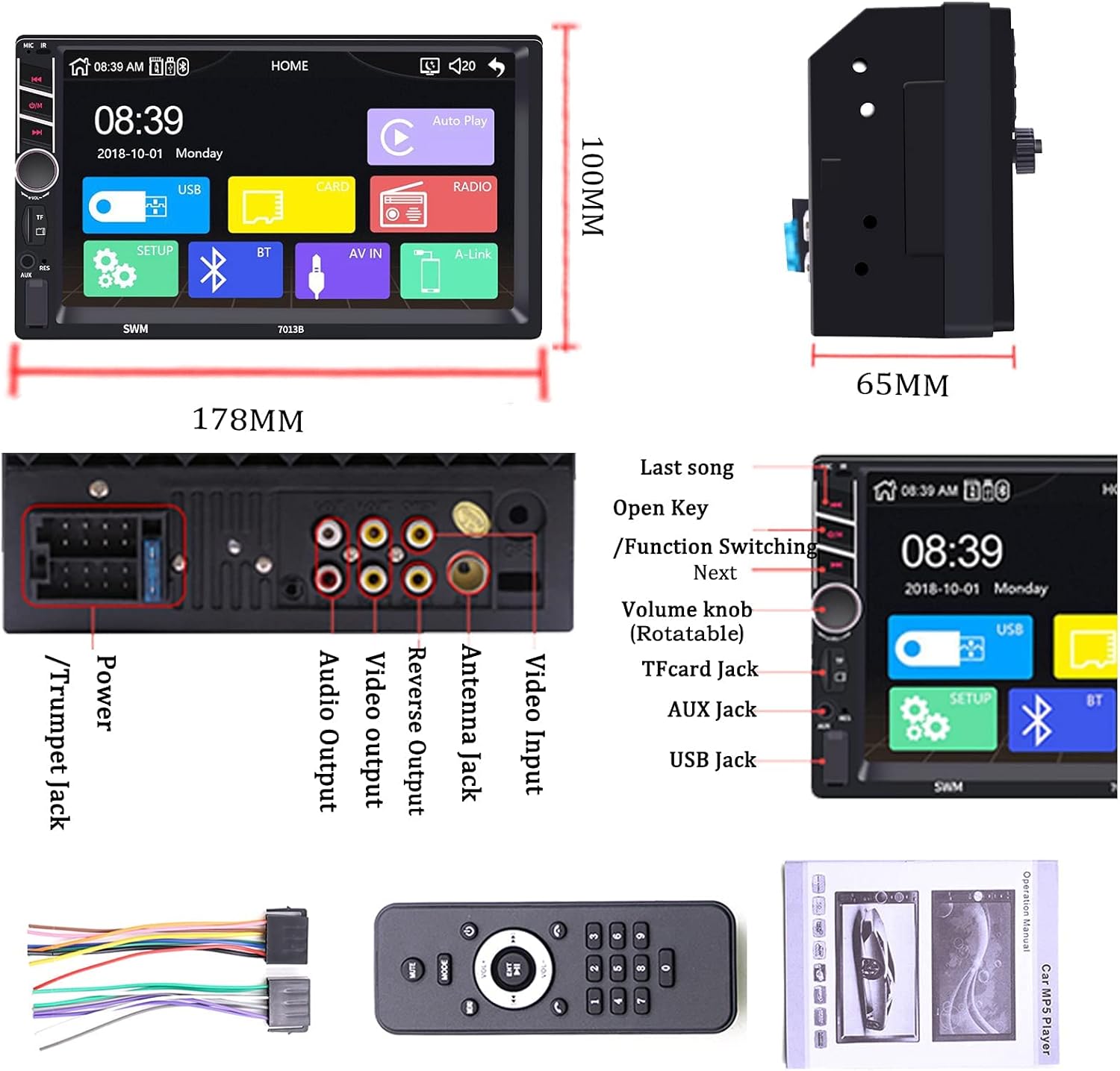
Figure 2.2: Detailed dimensions of the car stereo (178mm width, 100mm height, 65mm depth) and a view of the rear ports including RCA input/output, power cable, camera input, USB cables, and GPS antenna connection.
3. การตั้งค่าและการติดตั้ง
Proper installation is crucial for the optimal performance of your car stereo. It is recommended to have this unit installed by a professional.
3.1 แผนผังการเดินสายไฟ
โปรดดูแผนภาพต่อไปนี้เพื่อดูวิธีการต่อสายไฟที่ถูกต้อง ตรวจสอบให้แน่ใจว่าการเชื่อมต่อทั้งหมดแน่นหนาเพื่อป้องกันการทำงานผิดพลาด
Figure 3.1: Comprehensive wiring diagram showing connections for power, speakers (rear right, front left, rear left, front right), reverse control, auto antenna, illuminate backlight, ignition switch (ACC), memory backup (+12V), and ground (B-).
Video 3.1: A short demonstration of the ZHNN Double Din Car Stereo Wire Diagram, illustrating the various connections for installation.
3.2 ขั้นตอนการติดตั้งทั่วไป
- ถอดขั้วแบตเตอรี่ลบของรถยนต์
- ถอดวิทยุเดิมออกจากแผงหน้าปัด
- Connect the wiring harness according to the diagram (Figure 3.1).
- Connect any external accessories such as the backup camera or GPS antenna.
- Mount the new car stereo securely into the dashboard.
- Reconnect the vehicle's negative battery terminal and test the unit.
4. คู่มือการใช้งาน
This section details the operation of various features of your ZHNN car stereo.
4.1 แอปเปิล คาร์เพลย์
Connect your iPhone via USB to access CarPlay features directly on the stereo's screen. This allows for hands-free calling, navigation, music playback, and more.

Figure 4.1: The Apple CarPlay interface displayed on the 7-inch screen, showing phone, music, maps, and messaging apps.
Video 4.1: Demonstration of Wireless CarPlay functionality, including hands-free calling, music playback, and navigation features.
วิดีโอ 4.2: รายละเอียดเพิ่มเติมview of Apple CarPlay features on the ZHNN 7-inch double din car stereo, showcasing various applications and interactions.
4.2 แอนดรอยด์อัตโนมัติ
Connect your Android phone via USB to use Android Auto. This integrates your phone's functions like navigation, communication, and entertainment into the car's display.
Video 4.3: A demonstration of Android Auto features on the ZHNN double din car stereo, including navigation, music, and phone calls.
4.3 Mirror Link (Wired & Wireless)
Mirror Link allows you to display your smartphone's screen directly onto the car stereo. This feature supports both wired and wireless connections for Apple and Android devices.
วิดีโอ 4.4: จบview of the ZHNN 7-inch double din car stereo, highlighting the wired and wireless Mirror Link capabilities for both Apple and Android phones.
4.4 การเชื่อมต่อบลูทูธ
Pair your smartphone via Bluetooth for hands-free calling and wireless audio streaming. This enhances safety and convenience while driving.

Figure 4.2: The Bluetooth connection screen, showing options for Bluetooth music playback and hands-free calling with a dial pad.
4.5 วิทยุเอฟเอ็ม/เอเอ็ม
Tune into your favorite FM/AM radio stations for news, music, and entertainment on the go. The unit features a clear digital display for station frequencies.
Figure 4.3: The FM/AM radio interface, displaying frequency tuning and preset station options.
4.6 การเล่นสื่อ (USB/SD)
Play your favorite audio and video files directly from a USB drive or SD card. The unit supports various media formats for versatile entertainment.

Figure 4.4: Media playback screen showing music files from a USB device, with options for track selection and playback control.
4.7 อินพุตกล้องสำรอง
Connect a backup camera to the dedicated input for enhanced safety when reversing. The screen automatically displays the rear view เมื่อรถอยู่ในเกียร์ถอยหลัง
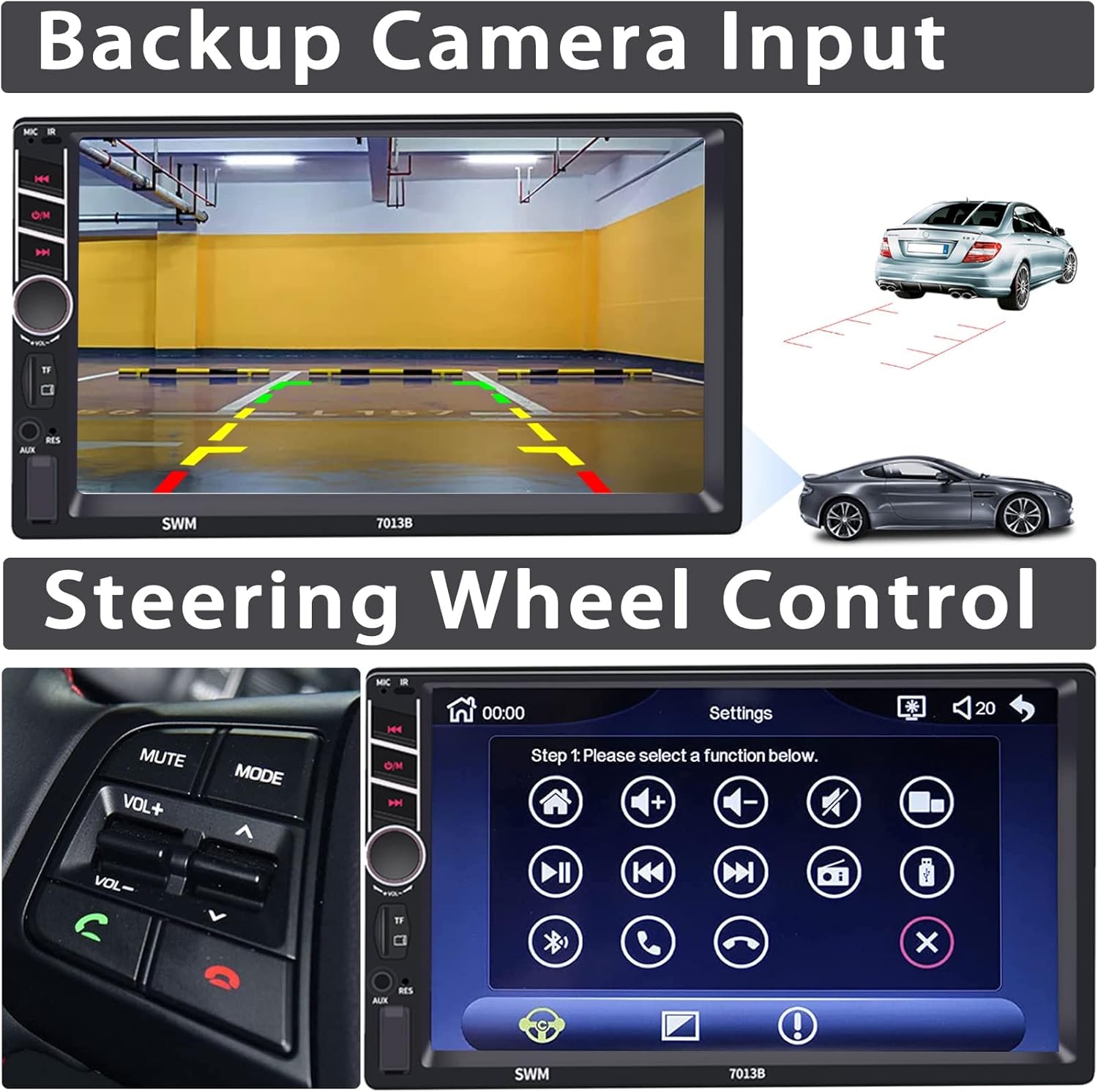
Figure 4.5: The backup camera display showing the rear view with parking guidelines, alongside an illustration of a car reversing.
4.8 ระบบควบคุมพวงมาลัย
Integrate with your vehicle's existing steering wheel controls for convenient operation of the stereo without taking your hands off the wheel.
Figure 4.6: The steering wheel control setup interface, allowing users to map various functions to their vehicle's steering wheel buttons.
4.9 ส่วนติดต่อผู้ใช้และการปรับแต่ง
The intuitive user interface offers various customization options, including colorful lamp settings and different home screen layouts.
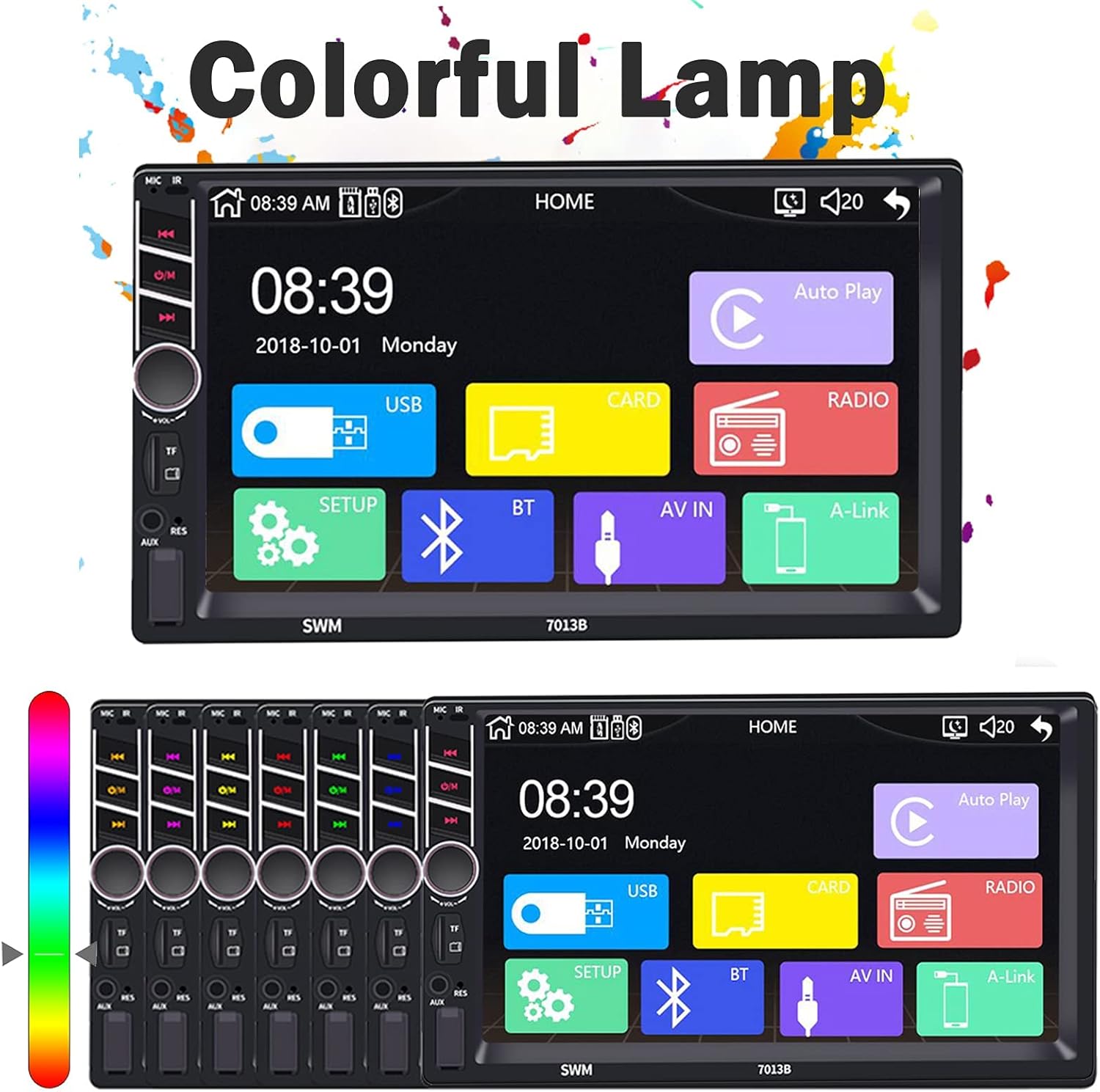
Figure 4.7: The colorful lamp settings interface, allowing users to customize the illumination colors of the unit's buttons.

Figure 4.8: A collage of various user interface screens, demonstrating the phone dialer, music player, radio, and settings menus.
5. การบำรุงรักษา
To ensure the longevity and optimal performance of your ZHNN car stereo, follow these maintenance guidelines:
- การทำความสะอาดหน้าจอ: ใช้ผ้านุ่มไม่เป็นขุยเช็ดหน้าจอสัมผัสเบาๆ สำหรับรอยเปื้อนฝังแน่น ให้เช็ดเบาๆampชุบผ้าด้วยน้ำหรือน้ำยาทำความสะอาดหน้าจอ หลีกเลี่ยงสารเคมีรุนแรงหรือวัสดุที่มีฤทธิ์กัดกร่อน
- การทำความสะอาดทั่วไป: รักษาตัวเครื่องให้สะอาดปราศจากฝุ่นและเศษผง ใช้แปรงขนนุ่มหรือลมอัดทำความสะอาดบริเวณปุ่มและพอร์ตต่างๆ
- อุณหภูมิ: ควรหลีกเลี่ยงการวางเครื่องไว้ในที่ที่มีอุณหภูมิสูงหรือต่ำเกินไป การสัมผัสกับแสงแดดโดยตรงหรือสภาพอากาศหนาวจัดเป็นเวลานานอาจส่งผลต่อประสิทธิภาพและอายุการใช้งาน
- การอัปเดตซอฟต์แวร์: ตรวจสอบผู้ผลิตเป็นระยะ website for any available software updates to ensure you have the latest features and bug fixes.
6 การแก้ไขปัญหา
หากคุณพบปัญหาใดๆ เกี่ยวกับเครื่องเสียงรถยนต์ของคุณ โปรดดูขั้นตอนการแก้ไขปัญหาทั่วไปต่อไปนี้:
| ปัญหา | สาเหตุที่เป็นไปได้ | สารละลาย |
|---|---|---|
| ไม่มีไฟฟ้า | การเชื่อมต่อไฟฟ้าหลวม ฟิวส์ขาด | Check power cables and fuse. Ensure proper connection to battery and ignition. |
| ไม่มีเสียง | Volume too low, incorrect audio source, loose speaker wires | เพิ่มระดับเสียง เลือกแหล่งเสียงที่ถูกต้อง ตรวจสอบการเชื่อมต่อลำโพง |
| หน้าจอสัมผัสไม่ตอบสนอง | System freeze, debris on screen | Restart the unit (turn car off and on). Clean the screen. |
| CarPlay/Android Auto ไม่เชื่อมต่อ | Faulty USB cable, phone settings, app issues | Use original or certified USB cable. Check phone settings for CarPlay/Android Auto. Restart phone and unit. |
| บลูทูธไม่จับคู่ | Bluetooth off, device not discoverable, interference | Ensure Bluetooth is on for both devices. Make device discoverable. Try pairing in a different location. |
7. ข้อมูลจำเพาะ
Key technical specifications of the ZHNN Double Din Car Stereo Radio:
- ยี่ห้อ: ZHNN
- แบบอย่าง: B08LR81FP1
- ขนาดหน้าจอ: 7-inch HD LCD Touch Screen
- เทคโนโลยีการเชื่อมต่อ: อุปกรณ์เสริม, บลูทูธ, USB
- ประเภทตัวควบคุม: Android (compatible with Apple CarPlay)
- อุปกรณ์ที่รองรับ: ลำโพง, สมาร์ทโฟน
- ประเภทตัวเชื่อมต่อ: แจ็ค 3.5 มม. USB
- การเข้ารหัสเสียง: สเตอริโอ
- โหมดเอาต์พุตเสียง: สเตอริโอ
- จำนวนช่องสัญญาณ: 4
- บริการอินเทอร์เน็ตที่รองรับ: Maps, Spotify
- วิธีการควบคุม: สัมผัส
- น้ำหนักสินค้า: 1.83 ปอนด์
- ขนาดแพ็คเกจ: 7.68 x 6.77 x 4.41 นิ้ว
8. การรับประกันและการสนับสนุน
For warranty information or technical support, please refer to the product packaging or contact ZHNN customer service directly. Keep your purchase receipt as proof of purchase for any warranty claims.
For further assistance, please visit the official ZHNN website or contact their support team through the contact information provided with your product.