
การแนะนำ
This manual provides essential information for the safe and efficient operation of your QFX SBX-213 12-inch Portable Bluetooth Speaker. Please read it thoroughly before using the product and retain it for future reference.
คำแนะนำเพื่อความปลอดภัย
เพื่อให้มั่นใจถึงการทำงานที่ปลอดภัยและป้องกันความเสียหาย โปรดปฏิบัติตามข้อควรระวังด้านความปลอดภัยต่อไปนี้:
- อย่าให้เครื่องโดนฝน ความชื้น หรืออุณหภูมิที่สูงหรือต่ำเกินไป
- อย่าเปิดลำโพงasinก. ส่งต่อการบริการทั้งหมดให้กับบุคลากรที่มีคุณสมบัติเหมาะสม
- ควรวางลำโพงให้ห่างจากแหล่งความร้อน แสงแดดโดยตรง และเปลวไฟ
- Use only the specified power adapter and charging cable provided with the unit.
- ควรจัดให้มีการระบายอากาศที่เหมาะสมรอบๆ ลำโพงเพื่อป้องกันความร้อนสูงเกินไป
- ควรหลีกเลี่ยงการวางสิ่งของหนักๆ ทับลำโพง
เนื้อหาแพ็คเกจ
เมื่อแกะกล่องแล้ว โปรดตรวจสอบว่าสินค้าทั้งหมดที่ระบุไว้ด้านล่างนี้มีอยู่และอยู่ในสภาพดี:
- QFX SBX-213 Portable Bluetooth Speaker
- สายไฟ
- รีโมทคอนโทรล
- คู่มือการใช้งาน (เอกสารนี้)
สินค้าเกินview
The QFX SBX-213 is a 12-inch portable speaker designed for versatile audio playback. It features Bluetooth connectivity for wireless streaming, an FM radio tuner, and a USB input for playing audio fileจากแฟลชไดรฟ์
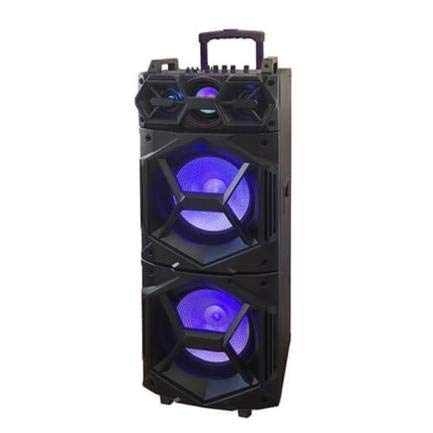
ภาพ: ด้านหน้า view of the QFX SBX-213 Portable Bluetooth Speaker, showcasing its 12-inch driver and robust design. The speaker features a black finish and a protective grille over the main driver.
The speaker's control panel and ports typically include:
- สวิตช์เปิด/ปิดเครื่อง
- Mode Button (to switch between Bluetooth, FM, USB inputs)
- Volume Control Knobs or Buttons
- Play/Pause, Previous/Next Track Buttons
- USB Port for media playback
- Charging Port for power cable connection
- LED Indicator Lights for power, charging, and Bluetooth status
การตั้งค่า
- การชาร์จลำโพง: Before first use, connect the provided power cable to the speaker's charging port and plug it into a standard electrical outlet. Allow the speaker to fully charge. The charging indicator light will typically change color or turn off when charging is complete.
- การจัดวาง: Place the speaker on a stable, flat surface. For optimal sound dispersion, avoid placing it in enclosed spaces or directly against walls.
คำแนะนำการใช้งาน
1. เปิด/ปิดเครื่อง
To power on the speaker, locate the power switch, usually on the back or side panel, and slide it to the "ON" position. To power off, slide the switch to the "OFF" position.
2. การจับคู่บลูทู ธ
- Turn on the speaker. It will typically enter Bluetooth pairing mode automatically, indicated by a flashing LED light and an audible prompt.
- เปิดใช้งานบลูทูธบนอุปกรณ์เคลื่อนที่ของคุณ (สมาร์ทโฟน แท็บเล็ต ฯลฯ)
- ค้นหา available Bluetooth devices. You should see "QFX SBX-213" or a similar name in the list.
- Select the speaker to pair. Once connected, you will hear a confirmation sound, and the LED indicator will stop flashing.
- ตอนนี้คุณสามารถเล่นเสียงจากอุปกรณ์ของคุณผ่านลำโพงได้
3. การใช้งานวิทยุ FM
- Press the "MODE" button on the speaker or remote control until "FM" mode is selected.
- Press the "Play/Pause" button to initiate an automatic scan for FM stations. The speaker will save all found stations.
- Use the "Previous/Next Track" buttons to navigate between saved FM stations.
4. การเล่นผ่าน USB
- ใส่แฟลชไดรฟ์ USB ที่มีไฟล์เสียง MP3 fileเข้าสู่พอร์ต USB บนลำโพง
- Press the "MODE" button until "USB" mode is selected. The speaker will automatically begin playing audio fileจากไดรฟ์ USB
- Use the "Play/Pause" and "Previous/Next Track" buttons to control playback.
5. การควบคุมระดับเสียง
Adjust the master volume using the dedicated volume knob or buttons on the speaker. You can also control the volume from your connected Bluetooth device or the remote control.
การซ่อมบำรุง
- การทำความสะอาด: Use a soft, dry cloth to clean the speaker's exterior. Do not use abrasive cleaners, waxes, or solvents, as these may damage the finish.
- พื้นที่จัดเก็บ: เมื่อไม่ได้ใช้งานเป็นเวลานาน ควรเก็บลำโพงไว้ในที่แห้งและเย็น หลีกเลี่ยงแสงแดดโดยตรงและอุณหภูมิที่สูงหรือต่ำเกินไป
- การดูแลแบตเตอรี่ To prolong battery life, avoid fully discharging the battery frequently. Charge the speaker regularly, even if not in use for long periods, to maintain battery health.
การแก้ไขปัญหา
If you encounter any issues with your QFX SBX-213 speaker, please refer to the following table for common problems and solutions:
| ปัญหา | สาเหตุที่เป็นไปได้ | สารละลาย |
|---|---|---|
| ไม่มีไฟฟ้า | Battery discharged; Power cable not connected securely | Charge the speaker fully; Ensure power cable is securely connected to both the speaker and the power outlet. |
| ไม่มีการเชื่อมต่อบลูทูธ | Bluetooth not enabled on device; Speaker not in pairing mode; Device too far from speaker | Enable Bluetooth on your device; Put the speaker into Bluetooth pairing mode; Move your device closer to the speaker (within 10 meters). |
| ไม่มีเสียงออก | Volume too low; Incorrect mode selected; Device or speaker is muted | Increase the volume on both the speaker and your connected device; Press the MODE button to select the correct input (Bluetooth, USB, FM); Check if the speaker or device is muted. |
| สัญญาณรบกวนวิทยุ FM หรือรับสัญญาณได้ไม่ดี | สัญญาณอ่อน; สัญญาณรบกวน | Relocate the speaker to an area with better reception; Perform an auto-scan for stations again; Avoid placing near other electronic devices that may cause interference. |
ข้อมูลจำเพาะ
- ยี่ห้อ: คิวเอฟเอ็กซ์
- แบบอย่าง: เอสบีเอ็กซ์-213
- ขนาดลำโพง: 12 นิ้ว
- เทคโนโลยีการเชื่อมต่อ: ยูเอสบี, บลูทูธ
- คุณสมบัติพิเศษ: Lightweight, Portable, FM Radio
- ประเภทการติดตั้ง: Floor, Table Mount
- ประเภทตัวควบคุม: รีโมทคอนโทรล
- แหล่งพลังงาน: สายไฟฟ้า
- ขนาด (สูง x กว้าง x ลึก): ขนาดประมาณ 113 x 42 x 42 ซม
- น้ำหนัก: ประมาณ 4 กก.
- ยูพีซี: 606540036341
- ASIN: B08GL3SHQP
การรับประกันและการสนับสนุน
QFX products are designed for reliability and performance. For detailed warranty information or technical support, please refer to the warranty card included with your purchase or visit the official QFX webไซต์ เก็บหลักฐานการซื้อของคุณไว้เพื่อใช้ในกรณีเรียกร้องการรับประกัน
For further assistance, please contact QFX customer service through their official channels.