
1. บทนำ
This manual provides detailed instructions for the safe and effective use of the Walfront PM6508 Digital Temperature Humidity Meter. This device is designed for high-precision measurement of ambient temperature and relative humidity, offering features such as data hold, backlight display, and wet bulb/dew point temperature calculations. It is suitable for various applications including home, office, industrial settings, and environmental monitoring.
2. ข้อมูลด้านความปลอดภัย
Please read and understand all safety warnings and operating instructions before using this instrument. Failure to follow these instructions may result in electric shock, fire, or injury.
- ห้ามใช้งานมิเตอร์หากพบว่าชำรุดเสียหาย หรือหากฝาปิดช่องใส่แบตเตอรี่ปิดไม่สนิท
- Avoid exposing the meter to extreme temperatures, direct sunlight, or high humidity for prolonged periods.
- Do not attempt to repair or modify the meter. Refer all servicing to qualified personnel.
- ถอดแบตเตอรี่ออกหากไม่ได้ใช้งานมิเตอร์เป็นเวลานานเพื่อป้องกันการรั่วไหล
- Keep the sensor area clean and free from obstructions to ensure accurate readings.
3. สินค้าหมดview
The Walfront PM6508 is a compact and portable digital meter designed for accurate environmental measurements. It features an easy-to-read LCD display with backlight and intuitive button controls.

รูปที่ 3.1: ด้านหน้า view of the Walfront PM6508 meter with key components labeled. This includes the temperature and humidity sensor at the top, the HD display, various control buttons (Power, Max/Min, Data Hold, Data Storage, Unit Switch, Backlight), and an anti-fall protective sleeve.
3.1 คุณสมบัติหลัก
- เซนเซอร์ความแม่นยำสูง: Provides accurate temperature and humidity readings.
- จอแสดงผล LCD พร้อมไฟแบ็คไลท์: ช่วยให้อ่านได้ชัดเจนในสภาพแสงต่างๆ
- ฟังก์ชั่นการเก็บข้อมูล: หยุดการอ่านค่าปัจจุบันบนจอแสดงผล
- การจัดเก็บข้อมูล: Stores up to 100 groups of measurement data.
- Wet Bulb & Dew Point Temperature: Calculates and displays these critical environmental parameters.
- การสลับหน่วย: สามารถสลับระหว่างองศาเซลเซียส (°C) และองศาฟาเรนไฮต์ (°F) ได้อย่างง่ายดาย
- ปิดเครื่องอัตโนมัติ: ช่วยประหยัดอายุการใช้งานแบตเตอรี่
- ไฟแสดงสถานะพลังงานต่ำ: แจ้งเตือนเมื่อแบตเตอรี่ถึงเวลาเปลี่ยน
3.2 เนื้อหาบรรจุภัณฑ์

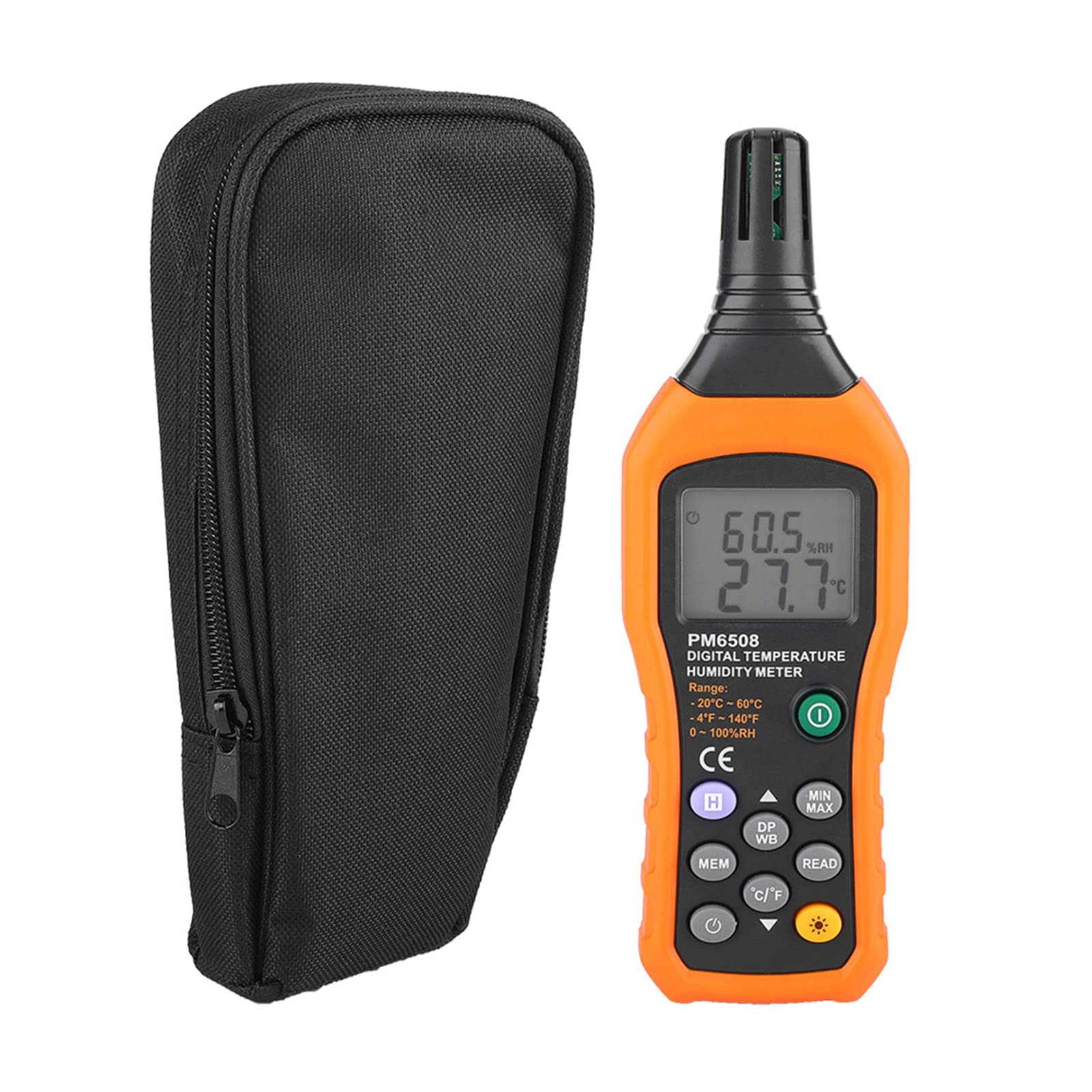
รูปที่ 3.2: The Walfront PM6508 meter shown alongside its portable storage bag, indicating typical package contents.
- Walfront PM6508 Digital Temperature Humidity Meter
- กระเป๋าเก็บแบบพกพา
- คู่มือการใช้งาน
4. การตั้งค่า
4.1 การติดตั้งแบตเตอรี่
The PM6508 meter requires 4 x 1.5V AAA batteries (not included) for operation.
- ค้นหาฝาครอบช่องใส่แบตเตอรี่ที่ด้านหลังของมิเตอร์
- เลื่อนฝาครอบแบตเตอรี่ลงเพื่อเปิด
- ใส่แบตเตอรี่ AAA จำนวน 4 ก้อน โดยตรวจสอบให้แน่ใจว่าขั้วบวกและขั้วลบถูกต้องตามที่ระบุไว้ภายในช่องใส่แบตเตอรี่
- ปิดฝาครอบแบตเตอรี่กลับเข้าที่โดยเลื่อนกลับเข้าที่จนกระทั่งล็อคเข้าที่อย่างแน่นหนา
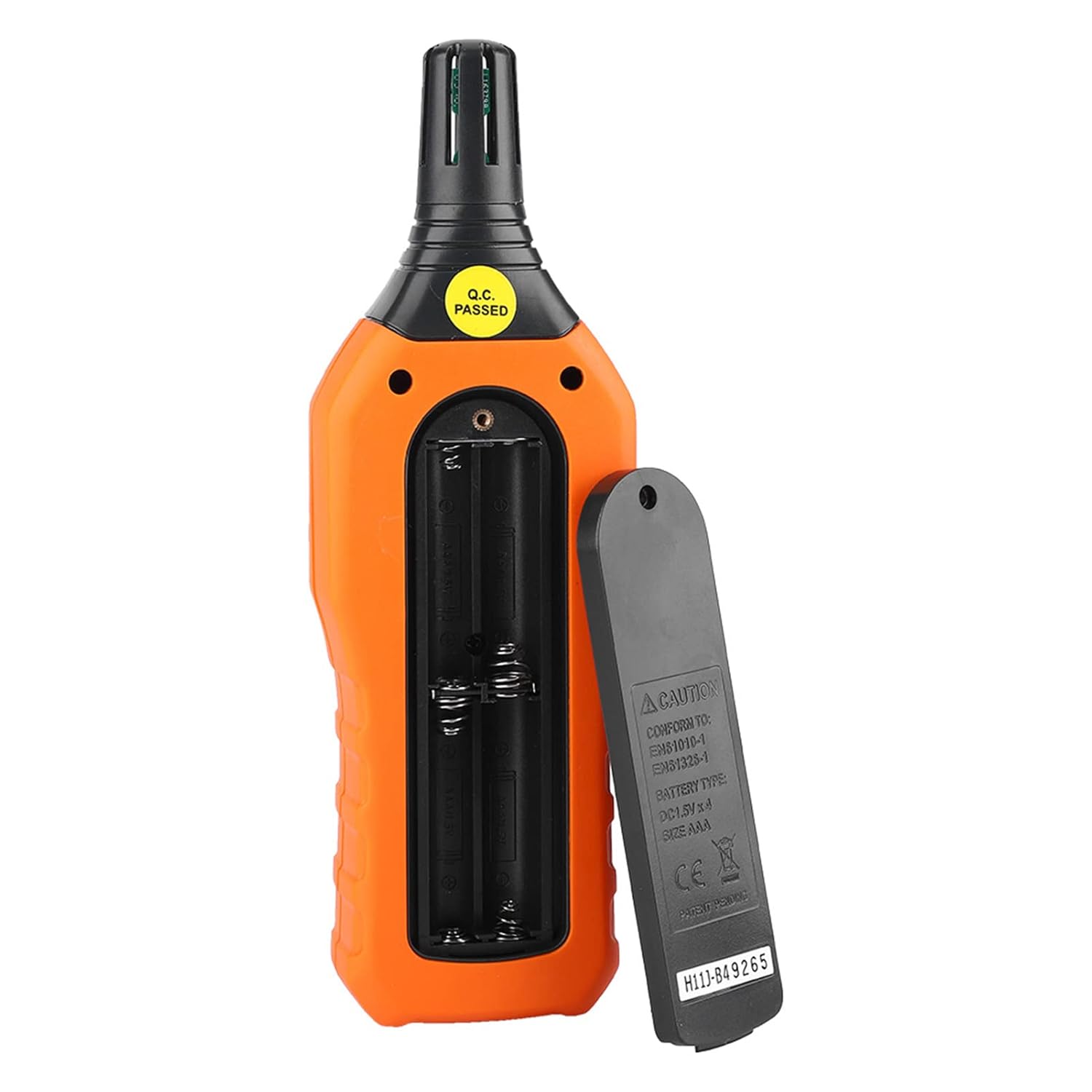
รูปที่ 4.1: หลัง view of the meter showing the open battery compartment for AAA battery installation.
5. คู่มือการใช้งาน
5.1 เปิด/ปิดเครื่อง
- กดปุ่ม green power button (
 ) to turn the meter on.
 - กดปุ่มค้างไว้ gray power button () for approximately 2 seconds to turn the meter off. The meter also features an automatic shut-down function to conserve battery life.
5.2 การวัด
Once powered on, the meter will immediately begin displaying real-time temperature and humidity readings on the LCD screen. Ensure the sensor at the top of the device is exposed to the environment you wish to measure.

รูปที่ 5.1: The meter in use, displaying temperature and humidity readings on its LCD screen.
5.3 การสลับหน่วย (°C/°F)
วิธีการสลับหน่วยอุณหภูมิระหว่างองศาเซลเซียส (°C) และองศาฟาเรนไฮต์ (°F):
- กดปุ่ม ปุ่ม°C/°F () located on the keypad. The display will update to show readings in the selected unit.
5.4 ฟังก์ชันไฟแบ็คไลท์
To activate or deactivate the display backlight:
- กดปุ่ม ปุ่มแบ็คไลท์ () to toggle the backlight on or off. This is useful for reading in low-light conditions.
5.5 การเก็บข้อมูล (ชั่วโมง)
To freeze the current readings on the display:
- กดปุ่ม ปุ่ม H (). The "H" icon will appear on the display, indicating that the data is held.
- กดปุ่ม ปุ่ม H again to release the data hold and resume real-time measurements.
5.6 Maximum/Minimum (MIN/MAX) Measurement
ถึง view the maximum or minimum recorded values:
- กดปุ่ม ปุ่ม MIN/MAX () once to display the maximum temperature and humidity recorded since the meter was powered on or the function was reset.
- กดปุ่ม ปุ่ม MIN/MAX again to display the minimum temperature and humidity.
- กดปุ่ม ปุ่ม MIN/MAX a third time to exit the MIN/MAX mode and return to real-time readings.
5.7 Data Storage (MEM) and Retrieval (READ)
The meter can store up to 100 groups of measurement data.
- To Store Data: กดปุ่ม ปุ่ม MEM () to save the current temperature and humidity readings. The display will briefly show a memory location number.
- To Retrieve Data: กดปุ่ม ปุ่มอ่าน () to enter data retrieval mode. Use the ปุ่ม MEM to scroll through stored data records.
- To Exit Retrieval: กดปุ่ม ปุ่มอ่าน again to exit data retrieval mode.
5.8 Wet Bulb (WB) and Dew Point (DP) Temperature
To display Wet Bulb or Dew Point temperatures:
- กดปุ่ม ปุ่ม DP/WB () once to display the Dew Point temperature.
- กดปุ่ม ปุ่ม DP/WB again to display the Wet Bulb temperature.
- กดปุ่ม ปุ่ม DP/WB a third time to return to standard temperature and humidity display.
6. การบำรุงรักษา
6.1 การทำความสะอาด
- เช็ดทำความสะอาดมิเตอร์asing กับ d อ่อนamp ผ้า ห้ามใช้สารทำความสะอาดที่มีฤทธิ์กัดกร่อนหรือตัวทำละลาย
- Keep the sensor area clean and free from dust or debris to ensure accurate readings. Do not insert any objects into the sensor opening.
6.2 พื้นที่จัดเก็บ
- When not in use for extended periods, remove the batteries to prevent leakage and damage to the device.
- เก็บเครื่องวัดไว้ในที่แห้งและเย็น หลีกเลี่ยงแสงแดดโดยตรงและอุณหภูมิที่สูงหรือต่ำเกินไป
- Utilize the provided portable storage bag for protection during storage and transport.
7 การแก้ไขปัญหา
| ปัญหา | สาเหตุที่เป็นไปได้ | สารละลาย |
|---|---|---|
| มิเตอร์ไม่เปิดใช้งาน |
|
|
| การอ่านที่ไม่ถูกต้อง |
|
|
| จอภาพมืดหรือกระพริบ |
|
|
| Cannot store or retrieve data. |
|
|
8. ข้อมูลจำเพาะ
The following table outlines the technical specifications for the Walfront PM6508 Digital Temperature Humidity Meter.


รูปที่ 8.1: Detailed technical specifications including ranges, resolution, and precision for temperature, humidity, wet bulb, and dew point measurements, along with general parameters.
| พารามิเตอร์ | ค่า |
|---|---|
| แบบอย่าง | พีเอ็ม6508 |
| ช่วงอุณหภูมิแวดล้อม | -20 ถึง 60 °C (-4 ถึง 140 °F) |
| Ambient Temperature Precision | ±1.5 °C (-20 to 0 °C, 45 to 60 °C), ±0.5 °C (0 to 45 °C) |
| ช่วงความชื้นสัมพัทธ์ | ความชื้นสัมพัทธ์ 0% - 100% |
| Relative Humidity Precision | ±4.0% (0-20%, 80-100%), ±3.0% (20-80%) |
| ช่วงอุณหภูมิกระเปาะเปียก | -20 ถึง 60 °C (4 ถึง 140 °F) |
| Wet Bulb Temperature Precision | ±1.5 °C (-20 to 0 °C, 45 to 60 °C), ±0.5 °C (0 to 45 °C) |
| ช่วงอุณหภูมิจุดน้ำค้าง | -50 ถึง 60 °C (-58 ถึง 140 °F) |
| Dew Point Temperature Precision | ±1.5 °C (-50 to 0 °C, 45 to 60 °C), ±0.5 °C (0 to 45 °C) |
| ปณิธาน | 0.1 °C / °F / %RH |
| การจัดเก็บข้อมูล | 100 กลุ่ม |
| แหล่งจ่ายไฟ | แบตเตอรี่ AAA ขนาด 1.5 โวลต์ จำนวน 4 ก้อน (ไม่รวมอยู่ในชุด) |
| ขนาด (กว้าง x ยาว x สูง) | 180 x 60 x 29 มม. (7.1 x 2.4 x 1.1 นิ้ว) |
| น้ำหนัก | 254 กรัม (9 ออนซ์) |
| ความชื้นในการทำงาน | 0% - 100% (non-condensing) |
9. การสมัคร
The Walfront PM6508 is suitable for a wide range of applications requiring accurate temperature and humidity monitoring.

รูปที่ 9.1: Examples of environments where the PM6508 meter can be effectively used for temperature and humidity monitoring.
- Residential and Office Environments: Monitoring indoor climate for comfort and health.
- Industrial Production: Ensuring optimal conditions for manufacturing processes.
- Warehousing and Storage: Protecting goods sensitive to temperature and humidity, such as in wine cellars or general storage.
- เกษตรกรรม: Monitoring conditions in planting sheds, greenhouses, and aquaculture.
- Research and Development Laboratories: Maintaining precise environmental controls for experiments.
- ระบบ HVAC: Assisting in the evaluation and maintenance of heating, ventilation, and air conditioning systems.
10. การรับประกันและการสนับสนุน
Walfront products are designed for reliability and performance. For warranty information, technical support, or service inquiries, please refer to the contact information provided with your purchase or visit the official Walfront webไซต์ โปรดเก็บหลักฐานการซื้อไว้เพื่อใช้ในการเรียกร้องการรับประกัน