
1. ข้อมูลด้านความปลอดภัยที่สำคัญ
Before operating the Razor T25 Electric Scooter, please read and understand all safety warnings and instructions. Failure to follow these instructions may result in serious injury or property damage.
- สวมอุปกรณ์ป้องกันความปลอดภัยที่เหมาะสมเสมอ รวมถึงหมวกกันน็อค สนับเข่า และสนับศอก
- Observe all local laws and regulations regarding electric scooter use.
- Do not ride in wet conditions, on uneven surfaces, or at night without proper lighting.
- Ensure the battery is fully charged and all components are securely fastened before each ride.
- The scooter is designed for riders aged 18 and up, with a maximum weight limit of 220 pounds (100 kg).
2. สินค้าหมดview
The Razor T25 Electric Scooter is a foldable and portable electric scooter designed for urban commuting and travel. It features a 250-watt brushless hub-driven motor and a 36V lithium-ion battery, offering a balance of speed and range for adult riders.
คุณสมบัติหลัก:
- มอเตอร์: 250-watt, kick-to-start, variable-speed, brushless, hub-driven motor.
- แบตเตอรี่: UL certified rechargeable 36V lithium-ion battery pack.
- ความเร็ว: ความเร็วสูงสุด 15.5 ไมล์ต่อชั่วโมง (25 กิโลเมตรต่อชั่วโมง)
- พิสัย: วิ่งได้ไกลสูงสุด 18 ไมล์ (29 กิโลเมตร) ต่อการชาร์จหนึ่งครั้ง
- โหมดการขับขี่: Three selectable modes (Pedestrian, Cruising, Sport).
- เบรค : Hand-operated electronic front brake and rear disc brake.
- การมองเห็น: LED headlight, brake-activated taillight, and reflectors.
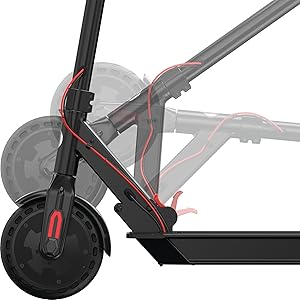
- ความสามารถในการพกพา: Folding design for easy storage and transport.

3. การตั้งค่า
3.1 การแกะกล่องและการประกอบเบื้องต้น
The Razor T25 Electric Scooter comes partially assembled. Follow these steps to complete the setup:
- นำส่วนประกอบทั้งหมดออกจากบรรจุภัณฑ์อย่างระมัดระวัง
- กางสกูตเตอร์โดยการปลดล็อคasing the folding mechanism. Ensure it locks securely into the upright position.
- Insert the handlebar assembly into the stem.
- Secure the handlebars using the provided four screws and Allen wrench. Ensure they are tightened firmly.
3.2 การชาร์จแบตเตอรี่เริ่มต้น
Before first use, fully charge the scooter's battery. The initial charge time is approximately 8 hours.
- Locate the charging port, typically on the bottom of the scooter deck.
- Connect the charger to the scooter and then to a standard wall outlet.
- The charger indicator light will change (e.g., red to green) when charging is complete.
- อย่าชาร์จแบตเตอรี่มากเกินไป ถอดปลั๊กเครื่องชาร์จเมื่อชาร์จเสร็จแล้ว
4. คู่มือการใช้งาน
4.1 การเปิด/ปิดเครื่อง
To power on the scooter, press and hold the power button on the handlebar display until the display illuminates. To power off, press and hold the power button again until the display turns off.

4.2 โหมดการขับขี่
The T25 offers three riding modes to suit different preferences and environments:
- โหมดคนเดินเท้า: Approximately 9.3 mph (15 km/h) maximum speed. Suitable for crowded areas or when a slower pace is desired.
- โหมดล่องเรือ: Approximately 12.4 mph (20 km/h) maximum speed. A balanced mode for general riding.
- โหมดกีฬา: Approximately 15.5 mph (25 km/h) maximum speed. For maximum performance and speed.
Switch between modes using the dedicated button on the handlebar display.
4.3 ความเร่ง
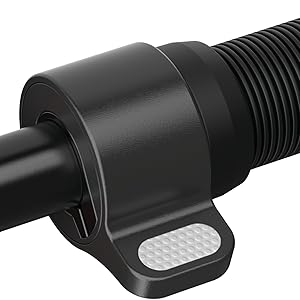
The scooter features a thumb-activated acceleration control. Gently press the thumb lever to engage the motor and increase speed. The scooter is kick-to-start, meaning you need to push off with your foot to initiate movement before the motor engages.
4.4 การเบรก
The T25 is equipped with a single hand-operated control that activates both the electronic front brake and the rear disc brake. Apply gentle pressure to the brake lever to slow down. Practice braking in a safe, open area to become familiar with its response, as the disc brake can be quite responsive.


5. การชาร์จแบตเตอรี่
The Razor T25 Electric Scooter is powered by a 36V lithium-ion battery. Proper charging procedures ensure battery longevity and safe operation.
- Use only the charger supplied with your Razor T25 scooter.
- Ensure the charging port is clean and dry before connecting the charger.
- Connect the charger to the scooter's charging port, then plug the charger into a standard 100-240V AC wall outlet.
- The charging indicator light on the charger will typically be red during charging and turn green when the battery is fully charged.
- การชาร์จจนเต็มจากแบตเตอรี่หมดใช้เวลาประมาณ 8 ชั่วโมง
- Do not leave the scooter charging unattended for extended periods after the light indicates a full charge.
- Store the scooter and charger in a dry, well-ventilated area away from direct sunlight and extreme temperatures.
6. การบำรุงรักษา
Regular maintenance helps ensure the safety and longevity of your Razor T25 Electric Scooter.
6.1 การดูแลทั่วไปและการทำความสะอาด
- เช็ดสกูตเตอร์ให้สะอาดด้วยน้ำยาทำความสะอาดamp เช็ดทำความสะอาดด้วยผ้าหลังการใช้งานทุกครั้ง หลีกเลี่ยงการใช้สารเคมีรุนแรงหรือน้ำยาทำความสะอาดที่มีฤทธิ์กัดกร่อน
- Do not use a high-pressure washer or submerge the scooter in water.
- Inspect the frame for any cracks or damage before each ride.
6.2 ล้อและยาง
The T25 features airless tires, which require less maintenance than pneumatic tires. However, regularly inspect them for wear, cuts, or embedded debris.
6.3 เบรค
- Regularly check the brake lever for proper function and responsiveness.
- Ensure the rear disc brake is clean and free of obstructions.
- If the brakes feel too grabby or too loose, consult a qualified technician for adjustment.
6.4 พื้นที่จัดเก็บ
When not in use, store the scooter in a cool, dry place. If storing for an extended period, ensure the battery is partially charged (around 50%) and recharge it every 30-60 days to prevent deep discharge.
7 การแก้ไขปัญหา
This section addresses common issues you might encounter with your Razor T25 Electric Scooter.
7.1 Scooter Not Powering On
- ตรวจสอบให้แน่ใจว่าแบตเตอรี่ชาร์จเต็มแล้ว
- ตรวจสอบการเชื่อมต่อสายเคเบิลทั้งหมดว่าหลวมหรือเสียหายหรือไม่
- หากปัญหายังคงอยู่ โปรดติดต่อฝ่ายสนับสนุนลูกค้า
7.2 Loss of Power or Reduced Range
- Verify the battery is fully charged before each ride.
- Riding conditions (e.g., uphill, heavy loads, cold weather) can affect range and power.
- ประสิทธิภาพของแบตเตอรี่อาจลดลงเมื่อใช้งานเป็นเวลานาน
7.3 Throttle Malfunction
If the throttle is unresponsive or inconsistent, inspect the thumb lever for any physical damage or obstruction. Issues with the throttle may require professional service.
8. ข้อมูลจำเพาะ
| คุณสมบัติ | ข้อมูลจำเพาะ |
|---|---|
| ยี่ห้อ | มีดโกน |
| ชื่อรุ่น | T25 |
| มอเตอร์ | 250-watt, brushless, hub-driven |
| แบตเตอรี่ | ลิเธียมไอออน 36V |
| ความเร็วสูงสุด | 15.5 ไมล์ต่อชั่วโมง (25 กม./ชม.) |
| ระยะสูงสุด | 18 ไมล์ (29 กม.) |
| จำกัด น้ำหนัก | 220 ปอนด์ (100 กก.) |
| น้ำหนักสินค้า | 27 ปอนด์ (12.2 กก.) |
| วัสดุกรอบ | อลูมิเนียม |
| วัสดุของล้อ | โพลียูรีเทน |
| ขนาดล้อ | 200 มิลลิเมตร |
| จัดการความสูง | 42.5 นิ้ว (108 ซม.) |
| สไตล์เบรค | Hand-operated, electric front and rear disc |
| ช่วงอายุ (คำอธิบาย) | ผู้ใหญ่ |
9. การรับประกันและการสนับสนุน
9.1 ข้อมูลการรับประกัน
The Razor T25 Electric Scooter comes with a 90-day Limited Manufacturer Warranty. This warranty covers manufacturing defects and workmanship under normal use. Please retain your proof of purchase for warranty claims. For full details, refer to the warranty documentation included with your product or visit the official Razor webเว็บไซต์.
9.2 การสนับสนุนลูกค้า
For technical assistance, troubleshooting not covered in this manual, or warranty inquiries, please contact Razor USA, LLC customer support.
- ผู้ผลิต: บริษัท เรเซอร์ ยูเอสเอ จำกัด
- การสนับสนุนทางออนไลน์: เยี่ยมชม Razor Store on Amazon สำหรับข้อมูลผลิตภัณฑ์และทรัพยากรสนับสนุน


