
1. คำแนะนำด้านความปลอดภัย
Please read these safety instructions carefully before using the MINISO Mini Portable Aromatic Fan. Keep this manual for future reference.
- ห้ามจุ่มพัดลมลงในน้ำหรือของเหลวอื่นๆ
- เก็บให้พ้นจากมือเด็ก
- Do not insert fingers or any objects into the fan blades.
- ใช้เฉพาะสาย USB ที่ให้มาในการชาร์จ
- ห้ามถอดประกอบ ซ่อมแซม หรือดัดแปลงพัดลมด้วยตนเอง โปรดติดต่อช่างผู้ชำนาญเพื่อขอรับบริการ
- Avoid exposing the fan to extreme temperatures or direct sunlight for prolonged periods.
- Only use essential oils specifically designed for diffusers in the aromatherapy compartment.
2. สินค้าหมดview
The MINISO Mini Portable Aromatic Fan is designed for personal cooling and aromatherapy. Its compact and ergonomic design makes it suitable for various environments, including offices, schools, and outdoor use.

รูปที่ 2.1: ด้านหน้า view of the MINISO Mini Portable Aromatic Fan. This image shows the fan's overall design, including the protective grille and handle.
คุณสมบัติหลัก:
- การออกแบบพกพา: Compact size (4.5 x 9.8 x 20.1 cm) and ergonomic handle for easy carrying.
- การตั้งค่าความเร็ว 3 ระดับ: ปรับระดับการไหลเวียนของอากาศเพื่อความสบายส่วนบุคคล
- Aromatherapy Compartment: Integrated space for adding aromatic oils.
- ชาร์จไฟด้วย USB: Built-in 1200 mAh lithium battery, charged via USB.
- การทำงานที่เงียบ: Engineered for low noise while providing effective airflow.

รูปที่ 2.2: Close-up of the fan's ergonomic handle. The handle is designed to fit comfortably in your hand, ensuring a secure grip.
3. การตั้งค่า
3.1 การชาร์จพัดลม
Before first use, fully charge the fan. The fan is equipped with a 1200 mAh lithium battery.
- หาตำแหน่งพอร์ตชาร์จ USB บนด้ามจับของพัดลม
- Connect the provided USB cable to the fan's charging port.
- ต่อปลายอีกด้านของสาย USB เข้ากับแหล่งจ่ายไฟ USB ที่ใช้งานร่วมกันได้ (เช่น คอมพิวเตอร์ อะแดปเตอร์ติดผนัง)
- The charging indicator light will illuminate (color may vary) to show that the fan is charging.
- Charging time is approximately 1.5 to 3 hours. The indicator light will change or turn off once fully charged.

รูปที่ 3.1: Illustration of the fan's rechargeable battery feature. The fan uses a USB cable for charging, providing up to 3.5 hours of continuous use on a full charge.
3.2 Adding Aromatic Oil
The fan includes a special compartment for aromatherapy.
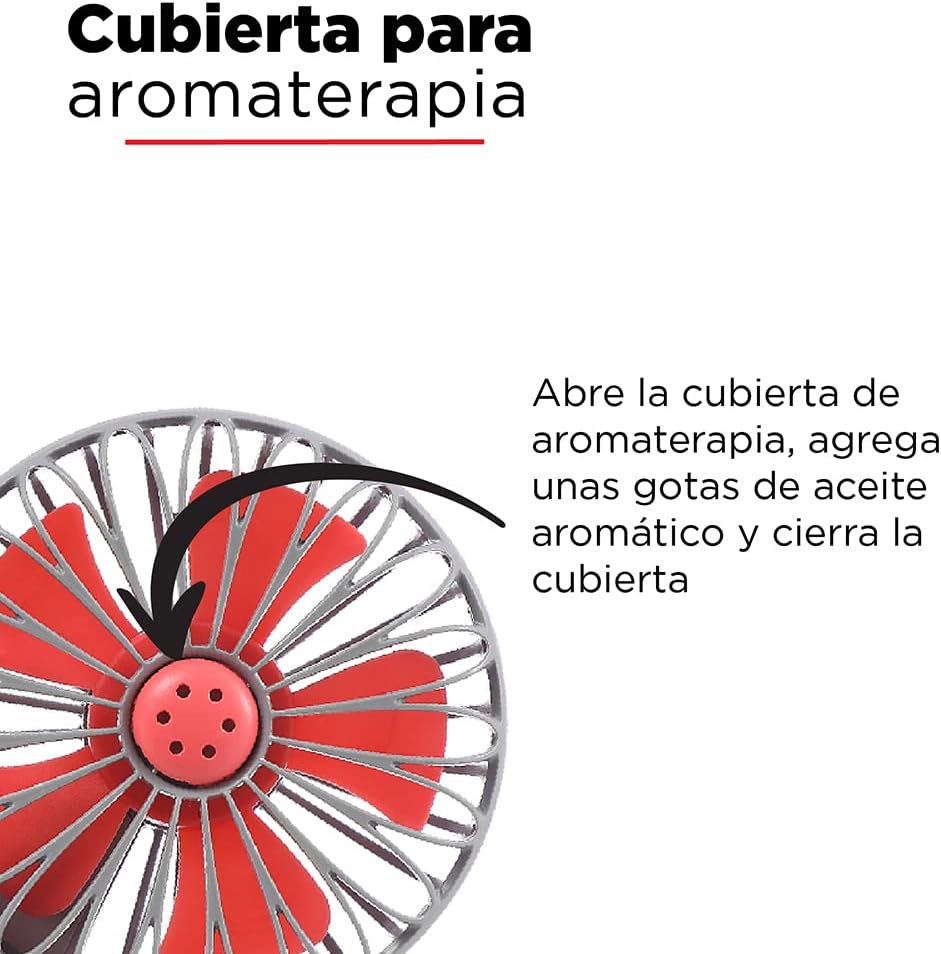
- Locate the aromatherapy cover on the front grille of the fan.
- ค่อยๆ เปิดฝาออก
- Add a few drops of your preferred aromatic oil onto the small pad inside the compartment. Do not overfill.
- ปิดฝาให้แน่น

รูปที่ 3.2: Detail of the aromatherapy cover. To use, open the cover, add a few drops of aromatic oil, and then close it.
4. การดำเนินการ
4.1 การเปิด/ปิดเครื่องและการปรับความเร็ว
The fan features a single button for power control and speed adjustment.
- การเปิดเครื่อง: Press the power button located on the handle once. The fan will start at the lowest speed setting.
- การปรับความเร็ว: While the fan is on, press the power button repeatedly to cycle through the three speed settings (Low → Medium → High).
- วิธีปิดเครื่อง: After the highest speed setting, press the power button one more time to turn the fan off.

รูปที่ 4.1: Location of the power/speed button on the fan handle. Pressing this button cycles through the three available speeds and turns the fan off.
5. การบำรุงรักษา
การบำรุงรักษาอย่างถูกวิธีจะช่วยให้พัดลมของคุณมีอายุการใช้งานยาวนานและทำงานได้อย่างมีประสิทธิภาพสูงสุด
- การทำความสะอาดภายนอก: Wipe the fan's exterior with a soft, dry cloth. For stubborn dirt, a slightly damp cloth can be used, but ensure no water enters the fan's internal components.
- การทำความสะอาดใบมีด: Use a soft brush or cotton swab to gently clean dust from the fan blades through the grille. Do not attempt to remove the grille or blades.
- Aromatherapy Compartment: Regularly clean the aromatic oil pad and compartment to prevent residue buildup. Replace the pad if it becomes discolored or loses effectiveness.
- พื้นที่จัดเก็บ: When not in use for extended periods, store the fan in a cool, dry place, away from direct sunlight and moisture. Ensure the battery is partially charged before storage.
6 การแก้ไขปัญหา
If you encounter issues with your fan, refer to the following table for common problems and solutions.
| ปัญหา | สาเหตุที่เป็นไปได้ | สารละลาย |
|---|---|---|
| พัดลมไม่เปิด | แบตเตอรี่หมด | ชาร์จพัดลมโดยใช้สาย USB ที่ให้มา |
| Fan runs weakly or stops unexpectedly. | ชาร์จแบตเตอรี่ต่ำ | ชาร์จพัดลม |
| Aroma is not noticeable. | Aromatic oil pad is dry or needs more oil. | Add more drops of aromatic oil to the pad or replace the pad. |
| พัดลมมีเสียงผิดปกติ | การอุดตันของใบพัดหรือปัญหาภายใน | Turn off the fan and check for any visible obstructions. If the noise persists, discontinue use and contact support. |
7. ข้อมูลจำเพาะ
Technical details for the MINISO Mini Portable Aromatic Fan.
| คุณสมบัติ | รายละเอียด |
|---|---|
| ยี่ห้อ | มินิโซ |
| ชื่อรุ่น | Mini Ventilador Aromático |
| แหล่งพลังงาน | Battery, Electric Cord (USB) |
| ประเภทแบตเตอรี่ | แบตเตอรี่ลิเธียม 1200 mAh |
| เวลาในการชาร์จ | 1.5 ถึง 3 ชั่วโมง |
| ระยะเวลาการใช้งาน | 1.5 to 3 hours (up to 3.5 hours continuous use) |
| กำลังขับ | 3 วัตต์ |
| จำนวนความเร็ว | 3 |
| วิธีการควบคุม | Touch (Single Button) |
| ขนาด (D x W x H) | 4.5 x 9.8 x 20.1 ซม. (1.77 x 3.86 x 7.91 นิ้ว) |
| วัสดุ | พลาสติก |
| สี | Black (as per product data, though images show grey) |
รูปที่ 7.1: Visual representation of the fan's dimensions, showing a height of 20 cm and a width of 9.8 cm.
8. การรับประกันและการสนับสนุน
For warranty information, technical support, or service inquiries, please contact MINISO customer support through their official webไซต์หรือผู้ค้าปลีกที่ซื้อผลิตภัณฑ์
Please have your product model name (Mini Ventilador Aromático) and purchase details ready when contacting support.
You can visit the MINISO store on Amazon for more information: ร้านค้าอย่างเป็นทางการของ MINISO