
Iproda T1045A
iProda T1045A 10.1 inch Android Tablet User Manual
Comprehensive instructions for your iProda T1045A Android Tablet.
1. บทนำ
This manual provides detailed instructions for the setup, operation, maintenance, and troubleshooting of your iProda T1045A 10.1 inch Android Tablet. Please read this manual thoroughly before using your device to ensure proper functionality and to maximize your user experience.
The iProda T1045A is a 10.1-inch tablet featuring an HD IPS display with 1280x800 resolution, powered by a 64-bit Quad-core processor running Android 9 Pie. It includes 3GB RAM, 64GB internal storage expandable up to 128GB via TF card, dual-band Wi-Fi, HDMI output, and a 5000mAh battery for extended use.
2. สินค้าหมดview
2.1 เนื้อหาบรรจุภัณฑ์
เมื่อเปิดบรรจุภัณฑ์ ตรวจสอบว่ามีสิ่งของครบทั้งหมด:
- iProda T1045A 10.1 inch Android Tablet
- สาย USB
- อะแดปเตอร์แปลงไฟ
- คู่มือการใช้งาน (เอกสารนี้)

Image: Contents of the iProda T1045A tablet package.
2.2 เค้าโครงอุปกรณ์
Familiarize yourself with the physical components and ports of your tablet:
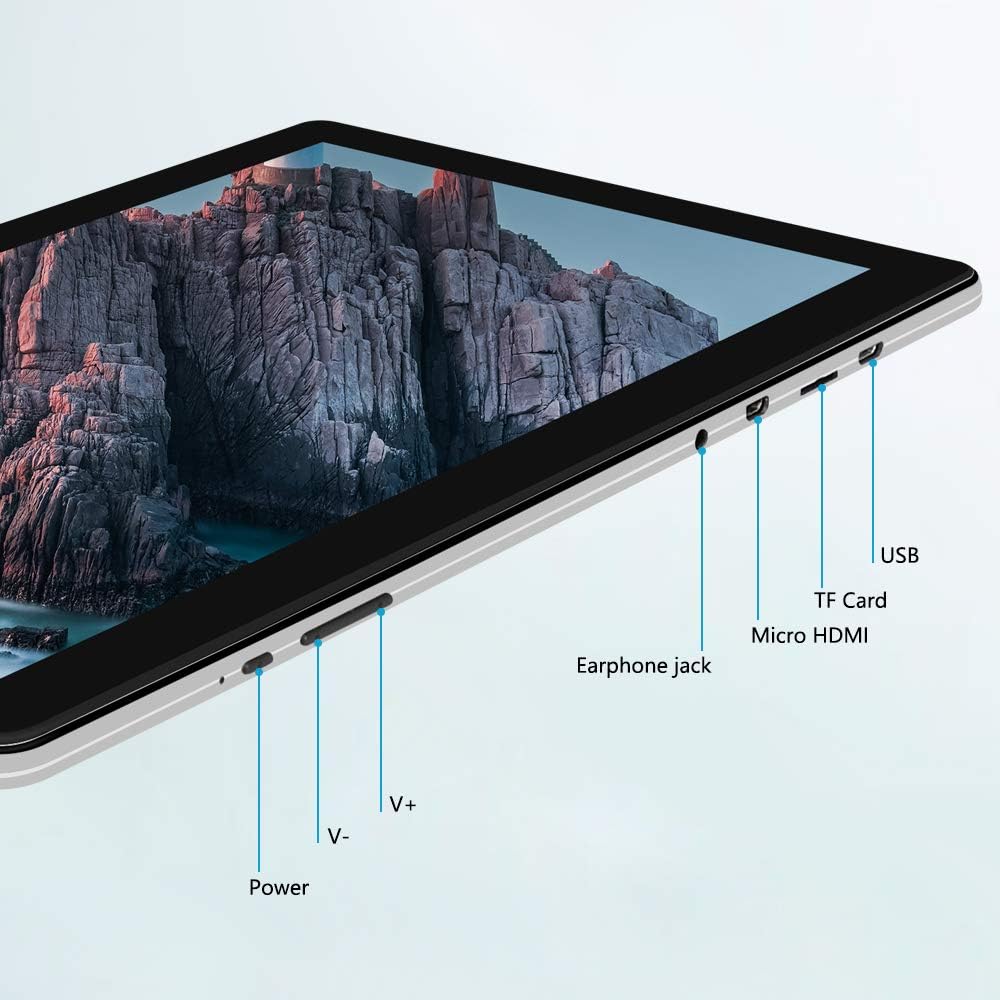
ภาพ: ด้านข้าง view of the iProda T1045A tablet highlighting port locations.
- ปุ่มเปิด/ปิด: กดค้างไว้เพื่อเปิด/ปิดหรือรีสตาร์ทแท็บเล็ต กดสั้นๆ เพื่อเปิด/ปิดหน้าจอ
- Volume Buttons (V+, V-): ปรับระดับเสียง
- แจ็คหูฟัง: เชื่อมต่อหูฟังขนาด 3.5 มม.
- ช่องเสียบการ์ด TF: Insert a microSD card for expandable storage (up to 128GB).
- พอร์ต Micro HDMI: Connect to an external display using a Micro HDMI to HDMI cable.
- พอร์ต USB: Connect to a computer for data transfer or for charging the device.
3. การตั้งค่า
3.1 การชาร์จเริ่มต้น
Before first use, fully charge the tablet. Connect the provided USB cable to the tablet's USB port and the power adapter, then plug the adapter into a wall outlet. The charging indicator will typically illuminate. A full charge may take several hours.
3.2 การเปิด/ปิดเครื่อง
- การเปิดเครื่อง: กดปุ่มเปิด/ปิดค้างไว้จนกว่าหน้าจอจะสว่างขึ้น
- วิธีปิดเครื่อง: กดปุ่มเปิด/ปิดค้างไว้จนกว่าเมนูเปิด/ปิดจะปรากฏบนหน้าจอ เลือก "ปิดเครื่อง" แล้วยืนยัน
- ในการรีสตาร์ท: จากเมนูเปิด/ปิด ให้เลือก "รีสตาร์ท"
- เปิด/ปิดหน้าจอ: Briefly press the Power button to turn the screen off (sleep mode) or wake it up.
3.3 ตัวช่วยการตั้งค่าเริ่มต้น
The first time you power on the tablet, you will be guided through an initial setup process. Follow the on-screen prompts to:
- เลือกภาษาที่คุณต้องการ
- เชื่อมต่อกับเครือข่าย Wi-Fi
- ตั้งค่าบัญชี Google ของคุณ (ไม่บังคับ แต่แนะนำสำหรับการดาวน์โหลดแอป)
- กำหนดการตั้งค่าวันที่และเวลา
3.4 Inserting a TF Card (MicroSD)
การขยายพื้นที่เก็บข้อมูลของแท็บเล็ต:
- หาช่องเสียบการ์ด TF ที่ด้านข้างของแท็บเล็ต
- Carefully insert a microSD card (up to 128GB) into the slot with the gold contacts facing down until it clicks into place.
- ในการถอด ให้ค่อยๆ ดันการ์ดเข้าไปด้านในจนกว่ามันจะเด้งออกมา
4. คู่มือการใช้งาน
4.1 การนำทางพื้นฐาน
The iProda T1045A uses a touch-sensitive screen for navigation:
- แตะ: เลือกรายการหรือเปิดแอปพลิเคชัน
- แตะค้างไว้: เข้าถึงเมนูบริบทหรือย้ายไอคอน
- ปัด: เลื่อนดูรายการหรือสลับระหว่างหน้าจอหลัก
- หยิก: ซูมเข้าหรือออกจากรูปภาพและ web หน้า
4.2 การเชื่อมต่อ Wi-Fi
ในการเชื่อมต่อกับเครือข่ายไร้สาย:
- ไปที่ การตั้งค่า > เครือข่ายและอินเตอร์เน็ต > ไวไฟ.
- สลับ Wi-Fi On.
- เลือกเครือข่ายที่คุณต้องการจากรายการ
- ป้อนรหัสผ่านหากได้รับแจ้ง จากนั้นแตะ เชื่อมต่อ.
The tablet supports both 2.4G and 5G dual-band Wi-Fi for faster and more stable connections.
4.3 การจับคู่บลูทูธ
ในการจับคู่กับอุปกรณ์บลูทูธ (เช่น หูฟัง ลำโพง):
- ไปที่ การตั้งค่า > อุปกรณ์ที่เชื่อมต่อ > บลูทูธ.
- สลับบลูทูธ On.
- ตรวจสอบให้แน่ใจว่าอุปกรณ์ Bluetooth ของคุณอยู่ในโหมดจับคู่
- Select your device from the list of available devices and follow any on-screen prompts to complete pairing.
4.4 การใช้กล้อง
แท็บเล็ตนี้มาพร้อมกล้องหน้า 2MP และกล้องหลัง 5MP
- เปิด กล้อง application from the app drawer.
- แตะไอคอนกล้องเพื่อสลับระหว่างกล้องหน้าและกล้องหลัง
- แตะปุ่มชัตเตอร์เพื่อถ่ายภาพหรือเริ่ม/หยุดบันทึกวิดีโอ

Image: Tablet in use, showcasing its camera capabilities.
4.5 Connecting to an External Display (HDMI)
To display your tablet's screen on a larger monitor or TV:
- Connect one end of a Micro HDMI cable to the tablet's Micro HDMI port.
- Connect the other end of the cable to an HDMI input on your external display.
- Select the correct HDMI input source on your external display.
- The tablet's screen content should now be mirrored on the external display.
4.6 การจัดการแอปพลิเคชัน
The tablet runs Android 9 Pie and supports applications from the Google Play Store.
- การติดตั้งแอพ: เปิด เพลย์สโตร์ ค้นหาแอปพลิเคชันที่คุณต้องการ แล้วแตะ ติดตั้ง.
- การถอนการติดตั้งแอป: Tap and hold an app icon on the home screen or in the app drawer, then drag it to "Uninstall" or select "App info" and choose "Uninstall". Alternatively, go to การตั้งค่า > แอปและการแจ้งเตือนเลือกแอปแล้วแตะ ถอนการติดตั้ง.
5. การบำรุงรักษา
5.1 การทำความสะอาดเครื่อง
วิธีทำความสะอาดแท็บเล็ตของคุณ:
- ปิดแท็บเล็ตก่อนทำความสะอาด
- ใช้ผ้านุ่มไม่เป็นขุยเช็ดเบาๆampล้างออกด้วยน้ำหรือน้ำยาทำความสะอาดหน้าจอ เพื่อเช็ดหน้าจอและตัวเครื่องให้สะอาด
- หลีกเลี่ยงการใช้สารเคมีรุนแรง น้ำยาทำความสะอาดที่มีฤทธิ์กัดกร่อน หรือความชื้นที่มากเกินไป
5.2 การอัปเดตซอฟต์แวร์
Periodically check for software updates to ensure optimal performance and security:
- ไปที่ การตั้งค่า > ระบบ > ขั้นสูง > การอัพเดทระบบ.
- ทำตามคำแนะนำบนหน้าจอเพื่อดาวน์โหลดและติดตั้งการอัปเดตที่มีอยู่ทั้งหมด ตรวจสอบให้แน่ใจว่าแท็บเล็ตของคุณมีแบตเตอรี่เพียงพอหรือเชื่อมต่อกับแหล่งจ่ายไฟในระหว่างการอัปเดต
5.3 การจัดการการจัดเก็บข้อมูล
To manage internal storage and the TF card:
- ไปที่ การตั้งค่า > พื้นที่จัดเก็บ.
- ที่นี่คุณสามารถ view storage usage, free up space, and manage files on both internal storage and the inserted TF card.
6 การแก้ไขปัญหา
This section addresses common issues you might encounter with your iProda T1045A tablet.
6.1 อุปกรณ์ไม่เปิดเครื่อง
- Ensure the tablet is sufficiently charged. Connect it to the power adapter and allow it to charge for at least 30 minutes before attempting to power on again.
- Try holding the Power button for 10-15 seconds to force a restart.
6.2 ปัญหาการเชื่อมต่อ Wi-Fi
- Verify that Wi-Fi is enabled in การตั้งค่า.
- ตรวจสอบให้แน่ใจว่าคุณป้อนรหัสผ่าน Wi-Fi ที่ถูกต้อง
- รีสตาร์ทเราเตอร์ Wi-Fi และแท็บเล็ตของคุณ
- Try connecting to a different Wi-Fi network to determine if the issue is with the tablet or the network.
6.3 ประสิทธิภาพช้า
- ปิดแอพพลิเคชันพื้นหลังที่ไม่จำเป็น
- ล้างข้อมูลแคชสำหรับแอปใน การตั้งค่า > แอปและการแจ้งเตือน > [ชื่อแอป] > การจัดเก็บและแคช > ล้างแคช.
- Ensure sufficient free storage space. Uninstall unused apps or move large files to a TF card.
- รีสตาร์ทแท็บเล็ต
6.4 แบตเตอรี่หมดเร็ว
- ลดความสว่างหน้าจอ
- ปิดใช้งาน Wi-Fi, Bluetooth และ GPS เมื่อไม่ได้ใช้งาน
- Close background apps that consume significant power.
- ตรวจสอบการใช้งานแบตเตอรี่ใน การตั้งค่า > แบตเตอรี่ เพื่อระบุแอปที่กินพลังงาน
- Ensure the tablet is not allowed to run below 15% charge frequently, as this can impact battery longevity.
6.5 รีเซ็ตเป็นค่าโรงงาน
หากปัญหาเกิดขึ้นอย่างต่อเนื่อง การรีเซ็ตเป็นค่าโรงงานอาจแก้ไขปัญหาได้ คำเตือน: การดำเนินการนี้จะลบข้อมูลทั้งหมดในแท็บเล็ตของคุณ โปรดสำรองข้อมูลสำคัญก่อนดำเนินการต่อ
- ไปที่ การตั้งค่า > ระบบ > ขั้นสูง > ตัวเลือกการรีเซ็ต.
- เลือก ลบข้อมูลทั้งหมด (รีเซ็ตเป็นค่าโรงงาน).
- ยืนยันการตัดสินใจของคุณและทำตามคำแนะนำบนหน้าจอ
7. ข้อมูลจำเพาะ
Below are the technical specifications for the iProda T1045A tablet:
| ชื่อรุ่น | T1045A |
| ระบบปฏิบัติการ | ระบบปฏิบัติการ Android 9 Pie |
| ขนาดจอแสดงผล | 10.1 นิ้ว |
| ความละเอียดการแสดงผล | 1280 x 800 พิกเซล (HD IPS) |
| โปรเซสเซอร์ | MediaTek Quad-core 1.5Ghz |
| แรม | 3GB |
| การจัดเก็บข้อมูลภายใน | SSD ความจุ 64GB |
| พื้นที่เก็บข้อมูลแบบขยายได้ | Up to 128 GB via TF Card (MicroSD) |
| โคโปรเซสเซอร์กราฟิก | ARM Mali-T720 MP2 |
| กล้องหลัง | 5 MP |
| กล้องหน้า | 2 MP |
| ความจุของแบตเตอรี่ | ลิเธียมโพลีเมอร์ 5000 mAh |
| อายุการใช้งานแบตเตอรี่โดยเฉลี่ย | นานถึง 8 ชั่วโมง |
| การเชื่อมต่อแบบไร้สาย | Dual-Band Wi-Fi (802.11a/b/g/n), Bluetooth 4.0 |
| พอร์ต | 1x USB 2.0, 1x Micro HDMI, 3.5mm Earphone Jack, TF Card Slot |
| ขนาด | 34.5 x 19.7 x 5.5 ซม. |
| น้ำหนัก | 550 กรัม |

Image: Key performance specifications of the tablet.

Image: Tablet portability and battery details.
8. การรับประกันและการสนับสนุน
8.1 การรับประกันสินค้า
The iProda T1045A tablet comes with a รับประกัน 12 เดือน นับจากวันที่ซื้อสินค้า การรับประกันนี้ครอบคลุมถึงข้อบกพร่องจากการผลิตและการทำงานผิดปกติภายใต้การใช้งานปกติ ไม่ครอบคลุมถึงความเสียหายที่เกิดจากการใช้งานผิดวิธี อุบัติเหตุ การซ่อมแซมโดยไม่ได้รับอนุญาต หรือการสึกหรอตามปกติ
8.2 การสนับสนุนลูกค้า
If you encounter any issues not covered in the troubleshooting section or require further assistance, please contact iProda customer support. Refer to your purchase documentation or the iProda official webเว็บไซต์สำหรับข้อมูลการติดต่อ
When contacting support, please have your tablet's model number (T1045A) and purchase details readily available.
Ask a question about this manual
Ask about setup, troubleshooting, compatibility, parts, safety, or missing instructions. Manuals+ will review the question and use this page’s manual context to help answer it.