
1. บทนำ
ขอบคุณสำหรับการซื้อasinจี เดอะ มูคีย์ เอ็มAMP1 220W Bluetooth Dual Channel Power Ampเครื่องฟอก นี้ amplifier is designed to provide powerful and versatile audio amplification for various applications, including karaoke, home theater systems, and general audio playback. It features multiple input options, Bluetooth 5.0 connectivity, and intuitive controls for an enhanced audio experience. Please read this manual thoroughly before use to ensure proper operation and to maximize the product's performance.
2. คำแนะนำด้านความปลอดภัย
เพื่อป้องกันไฟฟ้าช็อต ไฟไหม้ หรือความเสียหายต่อตัวเครื่อง โปรดปฏิบัติตามข้อควรระวังด้านความปลอดภัยดังต่อไปนี้:
- อย่าให้อุปกรณ์นี้โดนฝนหรือความชื้น
- อย่าเปิดcasinก. ไม่มีชิ้นส่วนใดที่ผู้ใช้สามารถซ่อมบำรุงเองได้ภายใน แนะนำให้ช่างผู้ชำนาญการซ่อมบำรุงเป็นผู้รับผิดชอบ
- ตรวจสอบแหล่งจ่ายไฟ voltage ตรงตามข้อกำหนดที่ระบุไว้ในหน่วย
- Place the unit on a stable, flat surface with adequate ventilation. Do not block ventilation openings.
- เก็บเครื่องให้ห่างจากแหล่งความร้อน แสงแดดโดยตรง และฝุ่นละอองจำนวนมาก
- Disconnect the power plug from the outlet if the unit will not be used for an extended period.
- ห้ามใช้งานเครื่องด้วยมือเปียก
3. เนื้อหาบรรจุภัณฑ์
ตรวจสอบว่ามีรายการทั้งหมดอยู่ในแพ็คเกจ:
- มุกกี้ เอ็มAMP1 อำนาจ Ampหน่วย liifier
- รีโมทคอนโทรล
- เสาอากาศเอฟเอ็ม
- คู่มือผู้ใช้ (เอกสารนี้)
4. สินค้าหมดview
4.1 Front Panel Controls and Functions
The front panel provides access to all primary controls and input ports for easy operation.

Image: Detailed diagram of the Moukey MAMP1 front panel, highlighting each control and port with corresponding numbers.
- สวิตช์ไฟ: เปิดหรือปิดเครื่อง
- USB / SD Slot: สำหรับการเล่นเสียง files from USB drives (max 32GB) or SD cards (max 16GB).
- ปุ่มโหมด: Cycles through input modes (Bluetooth, USB, SD, AUX, FM).
- ปุ่ม BT: Directly switches to Bluetooth mode.
- ปุ่มก่อนหน้า: ข้ามไปยังแทร็ก/สถานีก่อนหน้า
- ปุ่มเล่น/หยุดชั่วคราว: เริ่มหรือหยุดการเล่นเสียงชั่วคราว
- ปุ่มถัดไป: ข้ามไปยังแทร็ก/สถานีถัดไป
- จอแสดงผล LED: Shows current mode, track information, or frequency.
- Folder / Track: Navigates through folders or tracks on USB/SD.
- ปุ่มปรับระดับเสียงหลัก: ปรับระดับเสียงเอาต์พุตโดยรวม
- แจ็คหูฟัง: 3.5mm output for monitor headphones.
- Microphone 1 Input: แจ็คขนาด 6.35 มม. สำหรับเชื่อมต่อไมโครโฟน
- Microphone 2 Input: 6.35mm jack for a second microphone connection.
- ปุ่มปรับระดับเสียงไมโครโฟน: ปรับระดับเสียงของไมโครโฟนที่เชื่อมต่อ
- ปุ่มเอคโค่: ควบคุมเอฟเฟกต์เสียงสะท้อนสำหรับไมโครโฟน
- ปุ่มเบส: ปรับระดับเสียงความถี่ต่ำ
- ปุ่มเสียงแหลม: ปรับระดับเสียงความถี่สูง
- ลูกบิดสมดุล: ปรับสมดุลช่องสัญญาณซ้าย/ขวา
- แจ็คอินพุต AUX: อินพุต 3.5 มม. สำหรับอุปกรณ์เสียงภายนอก
- ตัวเลือกอินพุต: Rotary switch to select between CD, AUX, DVD, and MP3/W inputs.
4.2 การเชื่อมต่อแผงด้านหลัง
The rear panel houses the main audio input and output connections.

ภาพ: ด้านหลัง view of the Moukey MAMP1 ampเครื่องขยายเสียง แสดงพอร์ตอินพุตและเอาต์พุตทั้งหมด

Image: Detailed diagram of the Moukey MAMP1 rear panel, highlighting each connection point.
- Audio Input for DVD (RCA): Connect DVD players or other audio sources.
- Audio Input for CD (RCA): Connect CD players or other audio sources.
- Line Out Jack (RCA): สำหรับการเชื่อมต่อกับสิ่งอื่น amplifier หรืออุปกรณ์บันทึก
- ช่องเสียบเสาอากาศ FM: เชื่อมต่อเสาอากาศ FM ที่ให้มาเพื่อรับสัญญาณวิทยุ
- Speaker Output Jacks: Connect passive speakers (4-16 Ohm impedance).
- อินพุตสายไฟ: เชื่อมต่อสายไฟ AC
5. การตั้งค่า
5.1 การจัดวาง
วาง amplifier on a flat, stable surface. Ensure there is sufficient space around the unit for proper ventilation to prevent overheating.
5.2 การเชื่อมต่อสายไฟ
Connect the power cable to the Power Cable Input on the rear panel of the amplifier, then plug the other end into a suitable AC power outlet (115V AC).
5.3 การเชื่อมต่อลำโพง
พวกเขาAMP1 amplifier supports two sets of passive speakers with an impedance of 4-16 Ohms. Use appropriate speaker wire to connect your speakers to the Speaker Output Jacks on the rear panel.

Image: Diagram illustrating how to connect speakers to the amplifier's binding posts.
- Rotate and loosen the speaker knob on the binding post.
- Insert the bare wire (remove approximately 10mm of insulation) into the hole. Ensure correct polarity (+ to + and - to -).
- Tighten the knobs to secure the wires firmly.
5.4 Input Device Connection
Connect your audio sources (CD player, DVD player, tuner, etc.) to the corresponding RCA Audio Input jacks on the rear panel. For microphones, use the 6.35mm jacks on the front panel. For 3.5mm AUX devices, use the front panel AUX Input Jack.
6. คู่มือการใช้งาน
6.1 เปิด/ปิดเครื่อง
กดปุ่ม สวิตซ์ไฟฟ้า บนแผงด้านหน้าเพื่อหมุน ampเปิดหรือปิดเครื่องขยายเสียง จอแสดงผล LED จะสว่างขึ้นเมื่อเปิดเครื่อง
6.2 การเลือกอินพุต
ใช้ ปุ่มโหมด on the front panel or the remote control to cycle through available input sources (Bluetooth, USB, SD, AUX, FM). Alternatively, use the ตัวเลือกอินพุต knob on the front panel for RCA inputs (CD, AUX, DVD, MP3/W).
6.3 การควบคุมระดับเสียง
- ปริมาณหลัก: หมุน ปุ่มปรับระดับเสียงหลัก to adjust the overall output level of the ampชีวิต.
- ปริมาณไมโครโฟน: ใช้ ปุ่มปรับระดับเสียงไมโครโฟน to control the volume of connected microphones independently.
6.4 โทนคอนโทรล
Adjust the audio characteristics using the ปุ่มเบส และ ปุ่มเสียงแหลม to suit your preference. The ลูกบิดบาลานซ์ allows adjustment of the left and right channel output levels.

Image: Close-up of the Moukey MAMP1 showing the Bass and Treble adjustment knobs.
6.5 การควบคุมเสียงสะท้อน
หมุน ลูกบิดก้อง to add or reduce the echo effect on the microphone inputs, suitable for karaoke applications.
6.6 การจับคู่บลูทูธ
ในการเชื่อมต่ออุปกรณ์บลูทูธ:
- กดปุ่ม ปุ่ม BT or cycle through modes until "BLUE" appears on the LED display.
- เปิดใช้งานบลูทูธบนสมาร์ทโฟน แท็บเล็ต หรือคอมพิวเตอร์ของคุณ
- ค้นหา "Moukey MAMP1" in your device's Bluetooth settings and select it to pair.
- Once paired, you can stream audio wirelessly. Playback will temporarily pause during phone calls to protect privacy.
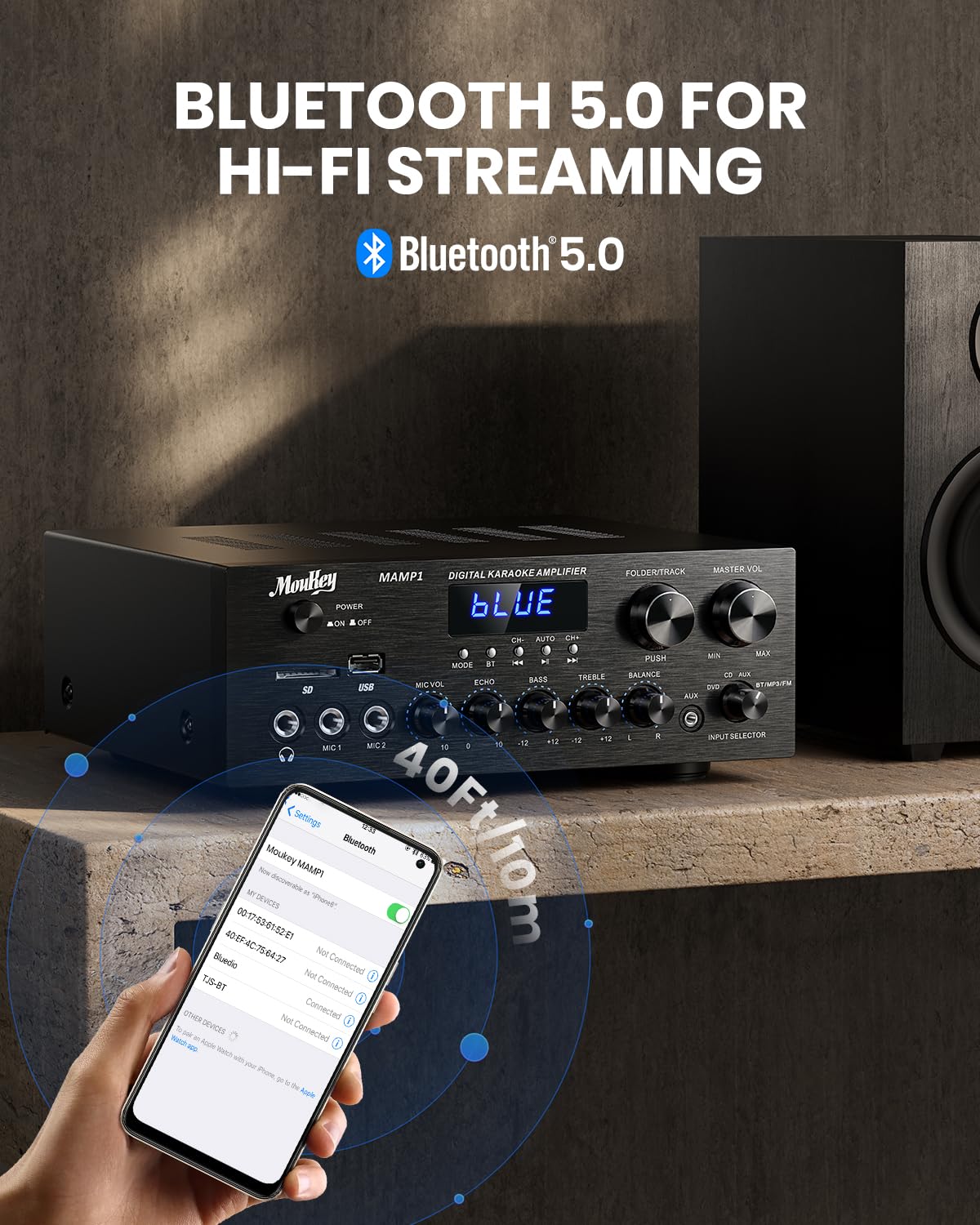
Image: The Moukey MAMP1 amplifier displaying "BLUE" on its screen, indicating Bluetooth mode, with a smartphone showing pairing options.
6.7 การเล่น USB/SD
Insert a USB drive (max 32GB) or SD card (max 16GB) into the respective slot on the front panel. The amplifier will automatically switch to USB/SD mode and begin playback. Use the ก่อนหน้า, เล่น/หยุดชั่วคราว, ต่อไป, และ Folder/Track ปุ่มเพื่อควบคุมการเล่น
6.8 วิทยุ FM
Ensure the FM antenna is connected to the rear panel. Select FM mode using the ปุ่มโหมด. ใช้ ก่อนหน้า และ ต่อไป buttons to tune to radio stations. The LED display will show the current frequency.
7. การบำรุงรักษา
เพื่อรักษาประสิทธิภาพและรูปลักษณ์ของอุปกรณ์ของคุณ ampเครื่องฟอก:
- การทำความสะอาด: ใช้ผ้าแห้งนุ่มเช็ดทำความสะอาดภายนอกตัวเครื่อง ห้ามใช้น้ำยาทำความสะอาดหรือสารเคมีที่มีฤทธิ์กัดกร่อน
- การระบายอากาศ : ตรวจสอบให้แน่ใจว่าช่องระบายอากาศไม่มีฝุ่นและเศษขยะ
- พื้นที่จัดเก็บ: หากจะจัดเก็บเครื่องเป็นเวลานาน ควรถอดปลั๊กออกและเก็บไว้ในที่แห้งและเย็น
8 การแก้ไขปัญหา
If you encounter issues with your Moukey MAMP1 ampสำหรับเครื่องขยายเสียง โปรดดูตารางต่อไปนี้สำหรับปัญหาและวิธีแก้ไขที่พบบ่อย:
| ปัญหา | สาเหตุที่เป็นไปได้ | สารละลาย |
|---|---|---|
| ไม่มีไฟฟ้า | ไม่ได้เสียบสายไฟ; ปลั๊กไฟชำรุด; สวิตช์ไฟปิดอยู่ | Ensure power cable is securely connected. Try a different power outlet. Press the power switch to ON. |
| ไม่มีเสียงออก | Incorrect input selected; Volume too low; Speakers not connected; Speaker wires loose; Mute function active. | Select the correct input source. Increase Master Volume. Check speaker connections and polarity. Ensure mute is off. |
| บลูทูธไม่เชื่อมต่อ | Amplifier not in Bluetooth mode; Device too far; Device already paired to another unit. | ทำให้มั่นใจ amplifier is in Bluetooth mode ("BLUE" on display). Move device closer to amplifier. Disconnect from other devices. |
| ไมโครโฟนไม่ทำงาน | Microphone not connected; Mic volume too low; Echo knob set to minimum. | Connect microphone securely. Increase Microphone Volume. Adjust Echo knob. |
| ปัญหาการเล่น USB/SD | ไม่ได้รับการสนับสนุน file format; USB drive/SD card corrupted; Capacity exceeded. | รับรองเสียง files are in supported formats (e.g., MP3). Try a different USB drive/SD card. Check capacity limits (USB max 32G, SD max 16G). |
หากปัญหายังคงมีอยู่หลังจากลองวิธีแก้ไขเหล่านี้แล้ว โปรดติดต่อฝ่ายสนับสนุนลูกค้า
9. ข้อมูลจำเพาะ
| คุณสมบัติ | ข้อมูลจำเพาะ |
|---|---|
| ยี่ห้อ | มูกี้ |
| แบบอย่าง | MAMP1 |
| กำลังขับ | 220 วัตต์ |
| ช่องทางการ | 2 |
| เล่มที่tage | 115 โวลต์ (AC) |
| ความต้านทานของลำโพง | 4-16 โอห์ม |
| เวอร์ชันบลูทูธ | 5.0 |
| ช่วงบลูทูธ | สูงกว่า 12 เมตร (40 ฟุต) |
| รองรับ USB/การ์ด SD | USB: Max 32GB, SD: Max 16GB |
| ขนาด (กว้าง x ยาว x สูง) | 25 ซม. x 21.3 ซม. x 9.5 ซม. (ประมาณ 10 นิ้ว x 8 นิ้ว x 4 นิ้ว) |
| ยูพีซี | 715802779039 |
| ประเทศต้นกำเนิด | จีน |

Image: The Moukey MAMP1 amplifier with its dimensions labeled.
10. การรับประกันและการสนับสนุน
This Moukey MAMP1 อำนาจ Ampเครื่องขยายเสียงมาพร้อมกับ รับประกัน 1 ปี นับจากวันที่ซื้อ การรับประกันนี้ครอบคลุมข้อบกพร่องในการผลิตและฝีมือการผลิตภายใต้การใช้งานปกติ
การรับประกันไม่ครอบคลุมถึง:
- Damage caused by accident, abuse, misuse, flood, fire, or other natural causes.
- ความเสียหายที่เกิดจากการดัดแปลงหรือซ่อมแซมโดยไม่ได้รับอนุญาต
- Damage caused by improper installation or connection.
- Cosmetic damage, such as scratches, dents, and broken plastic on ports.
For warranty claims or technical support, please contact the retailer where you purchased the product or visit the official Moukey website for contact information. Please have your purchase receipt and product model number (MAMP1) ready when contacting support.