
การแนะนำ
This manual provides essential information for setting up, operating, maintaining, and troubleshooting your Xiaomi Redmi Note 8 Pro smartphone. Please read this guide carefully to ensure optimal performance and longevity of your device.
การตั้งค่า
เนื้อหาแพ็คเกจ
ตรวจสอบว่าแพ็คเกจของคุณมีรายการต่อไปนี้:
- สมาร์ทโฟน Xiaomi Redmi Note 8 Pro
- Earphone Kit
- บล็อกการชาร์จ
- สายเคเบิล USB Type-C
- คู่มือการใช้งาน
การใส่ซิมการ์ด
The Redmi Note 8 Pro supports dual Nano-SIM cards. Use the provided SIM ejector tool to open the SIM tray located on the side of the device. Carefully place your Nano-SIM cards into the designated slots, ensuring the gold contacts face downwards. Reinsert the tray firmly.
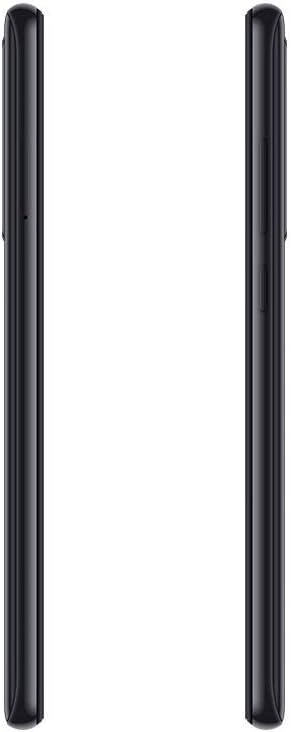
ภาพ: ด้านข้าง view of the Redmi Note 8 Pro, illustrating the location of the SIM card tray and physical buttons.
การเปิดเครื่องครั้งแรกและการตั้งค่าพื้นฐาน
Press and hold the Power button until the Xiaomi logo appears. Follow the on-screen instructions to select your language, connect to a Wi-Fi network, and set up your Google account. This process will guide you through essential settings to prepare your device for use.
การใช้งานอุปกรณ์ของคุณ
การแสดงผลและการนำทาง
Your Redmi Note 8 Pro features a 6.53-inch FHD+ Dot Drop Display with a resolution of 2340 x 1080 pixels. Navigate the interface using touch gestures. The power button is located on the right side, along with the volume rocker. The device runs on Android with Xiaomi's MIUI interface, offering a customizable user experience.

ภาพ: ด้านหน้า view of the Redmi Note 8 Pro, showcasing its 6.53-inch FHD+ Dot Drop Display.
คุณสมบัติกล้อง
The device is equipped with a 64MP AI Quad Camera system on the rear, allowing for versatile photography in various scenarios. The camera module includes multiple lenses for wide-angle, macro, and depth sensing. Open the Camera app to explore different modes and settings.

ภาพ: ด้านหลัง view of the Redmi Note 8 Pro, highlighting the 64MP AI Quad Camera system.
แบตเตอรี่และการชาร์จ
The Redmi Note 8 Pro features a 4500mAh high-capacity battery. Use the provided USB Type-C cable and charging block to charge your device. For optimal battery life, avoid extreme temperatures and fully discharging the battery frequently.
การเชื่อมต่อ
The smartphone supports 4G cellular networks and NFC (Near Field Communication) for contactless payments and quick pairing with compatible devices. Bluetooth and Wi-Fi connectivity are also available for wireless communication and internet access.

ภาพ: บนและล่าง view of the Redmi Note 8 Pro, showing the USB-C port, 3.5mm headphone jack, and speaker grille.
การซ่อมบำรุง
ทำความสะอาดอุปกรณ์ของคุณ
Use a soft, lint-free cloth to clean the screen and body of your smartphone. Avoid using harsh chemicals or abrasive materials, as these can damage the device's finish. For stubborn smudges, lightly dampเทน้ำหรือน้ำยาทำความสะอาดหน้าจอที่ออกแบบมาสำหรับอุปกรณ์อิเล็กทรอนิกส์โดยเฉพาะลงบนผ้า
ความต้านทานต่อน้ำ
The Xiaomi Redmi Note 8 Pro is ไม่กันน้ำ. Avoid exposing the device to water, rain, or excessive humidity. Liquid damage is not covered under warranty.
การอัพเดตซอฟต์แวร์
ตรวจสอบและติดตั้งการอัปเดตซอฟต์แวร์เป็นประจำเพื่อให้แน่ใจว่าอุปกรณ์ของคุณมีฟีเจอร์ แพตช์ความปลอดภัย และการปรับปรุงประสิทธิภาพล่าสุด คุณสามารถค้นหาตัวเลือกนี้ได้ในการตั้งค่าอุปกรณ์ภายใต้ "เกี่ยวกับโทรศัพท์" หรือ "การอัปเดตระบบ"
การแก้ไขปัญหา
ปัญหาทั่วไปและแนวทางแก้ไข
- อุปกรณ์ไม่เปิดเครื่อง: Ensure the battery is charged. Connect the device to its charger and wait a few minutes before attempting to power it on again. If it still doesn't turn on, try holding the power button for an extended period (10-15 seconds).
- ปัญหาการชาร์จ: Check if the charging cable and adapter are securely connected. Try using a different cable or adapter to rule out faulty accessories. Ensure the charging port is clean and free of debris.
- Camera focus problems: Ensure the camera lens is clean and free from smudges. In some low-light conditions, autofocus may be slower. Try tapping on the screen to manually focus on your subject.
- ประสิทธิภาพช้า: Close unused applications running in the background. Clear cache data for apps that are frequently used. Consider restarting your device periodically. If performance issues persist, a factory reset might be necessary (back up your data first).
รีเซ็ตเป็นค่าโรงงาน
A factory reset will erase all data from your device and restore it to its original factory settings. This can resolve persistent software issues. Before performing a factory reset, ensure you have backed up all important data. The option is typically found in Settings > System > Reset options.
ข้อมูลจำเพาะ
| ยี่ห้อ | เสี่ยวหมี่ |
| ชื่อรุ่น | เรดหมี่ โน้ต 8 โปร |
| ระบบปฏิบัติการ | แอนดรอยด์ |
| แรม | 6GB |
| ความจุในการเก็บข้อมูล | 128GB |
| ขนาดหน้าจอ | 6.53 นิ้ว |
| ความละเอียดการแสดงผล | 2340 x 1080 (FHD+) |
| เทคโนโลยีเซลลูล่าร์ | 4G |
| เทคโนโลยีการเชื่อมต่อ | เอ็นเอฟซี |
| ช่องใส่ซิมการ์ด | ซิมคู่ |
| ขนาดซิมการ์ด | นาโน |
| ระดับความต้านทานต่อน้ำ | ไม่กันน้ำ |
| แจ็คหูฟัง | 3.5 มม. |
| ความละเอียดกล้องหลัง | 64 Megapixels (Quad Camera) |
| ความจุของแบตเตอรี่ | 4500 มิลลิแอมป์ |
| โปรเซสเซอร์ | G90T liquidcool System |
ข้อมูลการรับประกัน
The Xiaomi Redmi Note 8 Pro comes with a การรับประกันจากผู้ผลิต 2 ปี from the date of purchase. This warranty covers defects in materials and workmanship under normal use. It does not cover damage caused by accidents, misuse, unauthorized modifications, or liquid exposure. Please retain your proof of purchase for warranty claims.
สนับสนุน
For further assistance, technical support, or to inquire about service and repairs, please visit the official Xiaomi website or contact their customer service. You can find detailed support resources, FAQs, and contact information on their official support pages.
Xiaomi อย่างเป็นทางการ Webเว็บไซต์: www.mi.com/global/support