
1. สินค้าหมดview
This DCU TECNOLOGIC universal remote control is designed for use with LG LCD/LED televisions. It offers an operable distance of up to 8 meters and is ready to use without any complex setup procedures. The remote includes dedicated buttons for popular streaming services like Netflix and Prime Video, enhancing your viewการสร้างประสบการณ์
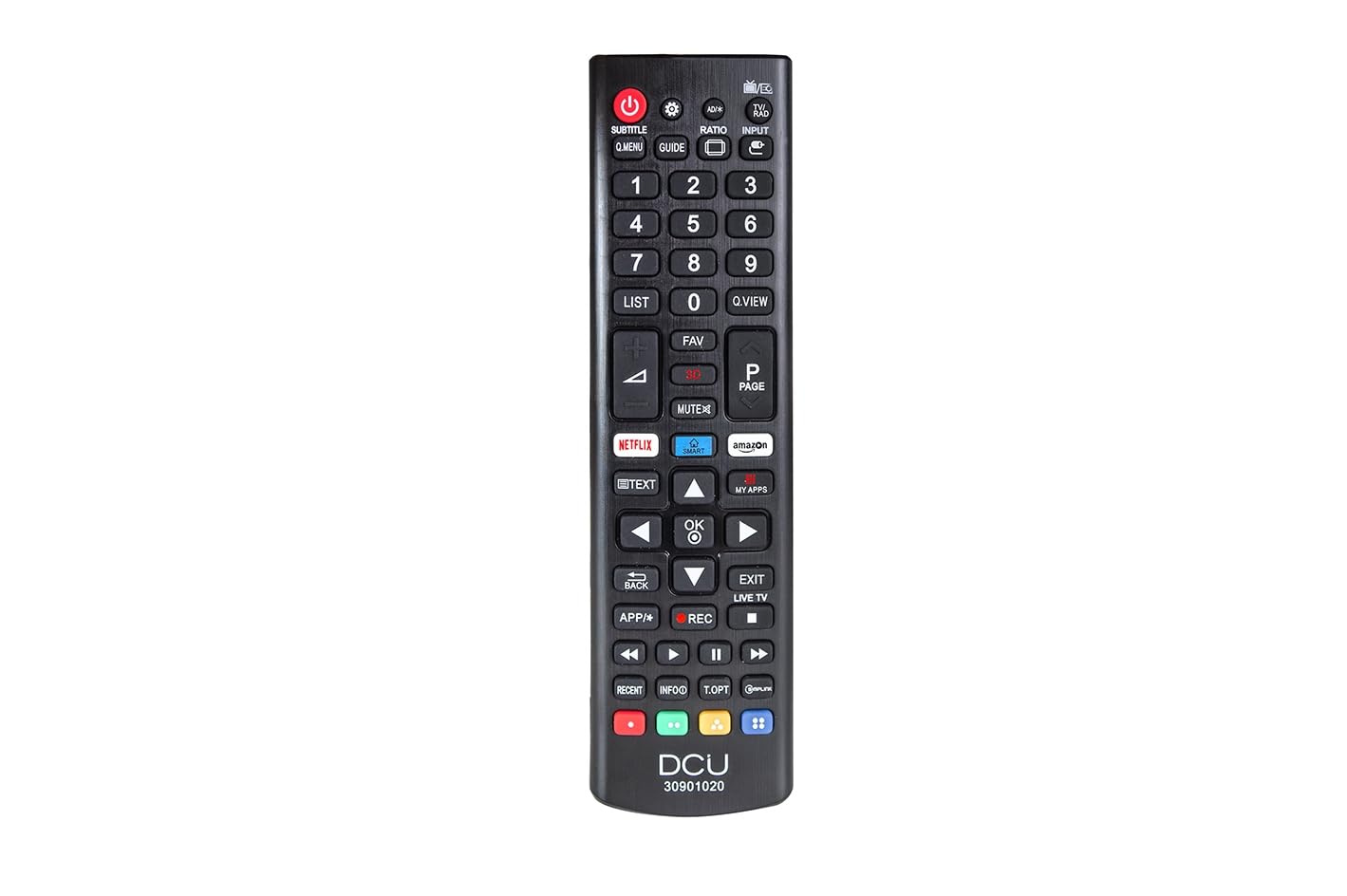
ภาพแสดงด้านหน้า view of the DCU TECNOLOGIC LG Universal Remote Control, highlighting its button layout including dedicated Netflix and Prime Video buttons.
2. การตั้งค่า
2.1 การติดตั้งแบตเตอรี่
The remote control requires two (2) AAA batteries for operation. Batteries are not included with the product.
- ค้นหาช่องใส่แบตเตอรี่ที่ด้านหลังของรีโมทคอนโทรล
- เลื่อนฝาปิดช่องใส่แบตเตอรี่ลงหรือตามทิศทางที่ระบุด้วยลูกศรเพื่อเปิด
- ใส่แบตเตอรี่ AAA สองก้อน โดยตรวจสอบให้แน่ใจว่าขั้วบวก (+) และขั้วลบ (-) ตรงกับเครื่องหมายภายในช่อง
- ปิดฝาช่องใส่แบตเตอรี่กลับเข้าที่โดยเลื่อนกลับเข้าที่จนกระทั่งล็อคเข้าที่อย่างแน่นหนา
The remote control is now ready for use. No additional programming or pairing is required for compatible LG LCD/LED TVs.
3. คู่มือการใช้งาน
This remote control functions identically to an original LG remote for basic TV operations.
3.1 ฟังก์ชั่นพื้นฐาน
- ปุ่มเปิด/ปิด: เปิดหรือปิดทีวี
- เพิ่ม/ลดระดับเสียง: ปรับระดับเสียง
- ช่องขึ้น/ลง: เปลี่ยนช่องทีวี
- ปุ่มตัวเลข (0-9): เลือกช่องทีวีได้โดยตรง
- Navigation Buttons (Up, Down, Left, Right, OK/Enter): ใช้สำหรับการนำทางและเลือกเมนู
- ปุ่มปิดเสียง: ปิดเสียงทีวี
3.2 Special Features: Netflix and Prime Video Buttons
The remote includes dedicated buttons for quick access to Netflix and Amazon Prime Video. Pressing these buttons will launch the respective application on your LG Smart TV.
หมายเหตุสำคัญ: The functionality of the Netflix and Prime Video buttons depends on whether your original LG TV remote control had these specific buttons and if your TV supports these applications. If your original remote did not feature these buttons, or if your TV model does not support direct app launch via remote, these buttons on the universal remote may not function.
4. การบำรุงรักษา
- การทำความสะอาด: ใช้ผ้านุ่มและแห้งเช็ดทำความสะอาดรีโมทคอนโทรล ห้ามใช้น้ำยาทำความสะอาดหรือวัสดุที่มีฤทธิ์กัดกร่อน
- การเปลี่ยนแบตเตอรี่: เปลี่ยนแบตเตอรี่เมื่อรีโมทตอบสนองช้าลงหรือหยุดทำงาน ควรเปลี่ยนแบตเตอรี่ทั้งสองก้อนพร้อมกันด้วยแบตเตอรี่ใหม่เสมอ
- พื้นที่จัดเก็บ: เก็บรีโมทไว้ในที่แห้ง หลีกเลี่ยงแสงแดดโดยตรง อุณหภูมิที่สูงหรือต่ำเกินไป และความชื้นสูง
- หลีกเลี่ยงการหยด: ปกป้องรีโมตจากแรงกระแทก เพราะการตกอาจทำให้ส่วนประกอบภายในเสียหายได้
5 การแก้ไขปัญหา
| ปัญหา | สาเหตุที่เป็นไปได้ | สารละลาย |
|---|---|---|
| รีโมทคอนโทรลไม่ทำงาน. | แบตเตอรี่หมดหรือใส่ไม่ถูกต้อง มีสิ่งกีดขวางระหว่างรีโมทกับทีวี รีโมทอยู่ไกลจากทีวีเกินไป | Check and replace batteries, ensuring correct polarity. Remove any objects blocking the line of sight to the TV's IR receiver. Move closer to the TV (within 8 meters). |
| Netflix/Prime Video buttons do not work. | Original TV remote did not have these buttons. TV model does not support direct app launch. | Verify if your original LG TV remote had these specific buttons. Ensure your TV is a Smart TV and supports these applications. The universal remote replicates original remote functions; if the original lacked these, the universal remote's buttons may not activate them. |
| ปุ่มไม่ตอบสนองหรือติดขัด | สิ่งสกปรกหรือเศษต่างๆ ใต้กระดุม | Clean the remote control with a soft, dry cloth. Avoid pressing buttons excessively hard. |
6. ข้อมูลจำเพาะ
| คุณสมบัติ | รายละเอียด |
|---|---|
| ยี่ห้อ | ดีซียู เทคโนโลจิค |
| หมายเลขรุ่น | 30901020 |
| อุปกรณ์ที่รองรับ | LG LCD/LED Televisions |
| เทคโนโลยีการเชื่อมต่อ | อินฟาเรด (IR) |
| ระยะสูงสุด | 8 เมตร |
| แหล่งพลังงาน | 2 x แบตเตอรี่ AAA (ไม่รวม) |
| ขนาดสินค้า | 5 x 5 x 15 ซม. |
| น้ำหนัก | 120 กรัม |
| คุณสมบัติพิเศษ | Universal, Dedicated Netflix & Prime Video Buttons |
7. การรับประกันและการสนับสนุน
Information regarding product warranty and customer support is not provided in the available product details. Please refer to the product packaging or contact the retailer for specific warranty terms and support options.