
Vive 3 Wheel Mobility Scooter
Vive 3 Wheel Mobility Scooter Instruction Manual
Model: 3 Wheel Mobility Scooter
1. บทนำ
This manual provides essential information for the safe and effective operation, assembly, and maintenance of your Vive 3 Wheel Mobility Scooter. Designed for adults, this electric-powered device offers stable assistance for navigating smooth indoor and light outdoor surfaces, ensuring comfort and independence.
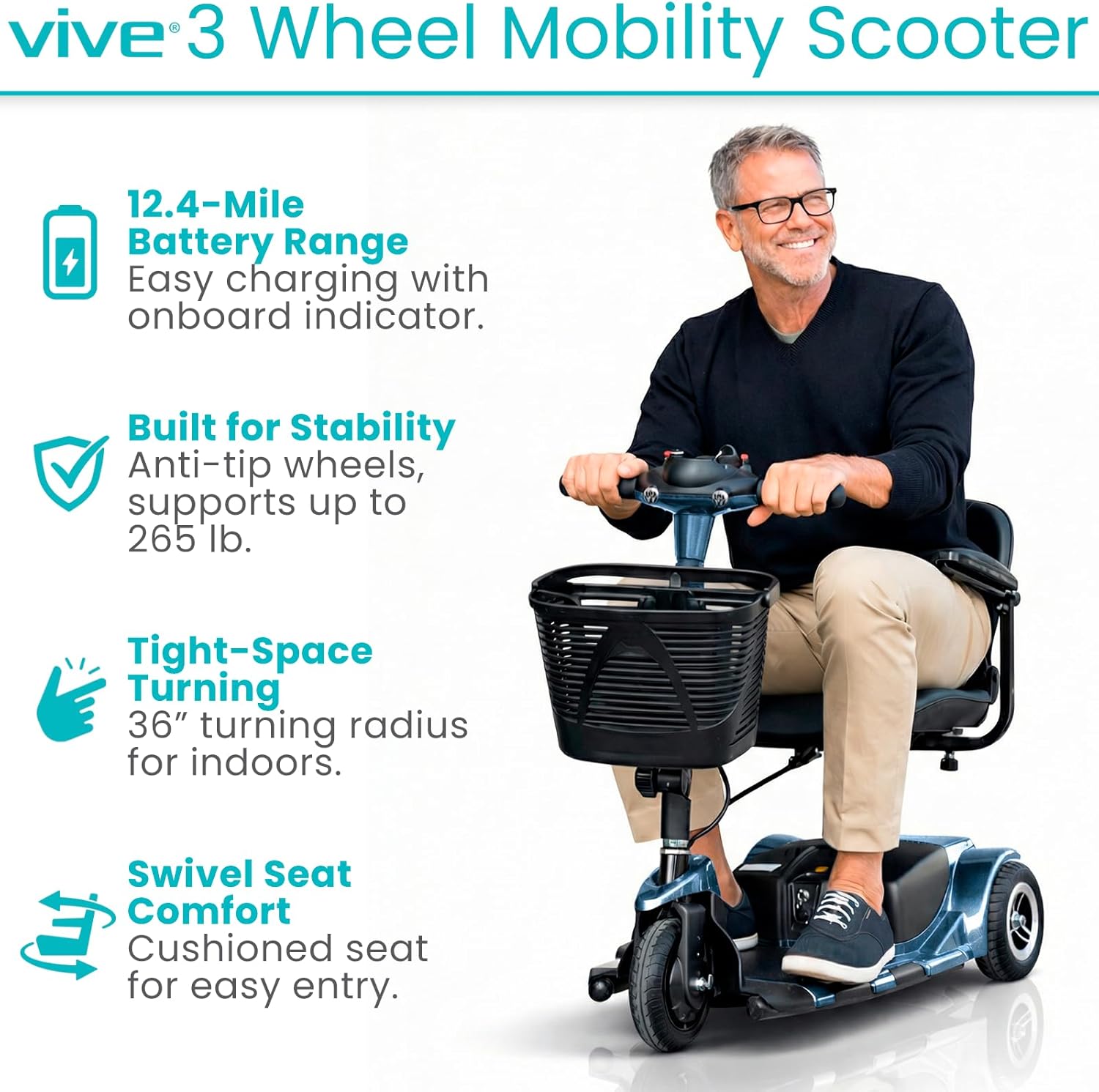
Image: A man riding the Vive 3 Wheel Mobility Scooter, showcasinด้วยดีไซน์ที่กะทัดรัดและใช้งานง่าย
2. ข้อมูลด้านความปลอดภัย
Always prioritize safety when operating the mobility scooter. Adhere to the following guidelines:
- ความจุน้ำหนัก: The scooter is designed to safely support up to 265 pounds. Do not exceed this limit.
- ภูมิประเทศ: Suitable for smooth indoor surfaces and light outdoor terrains such as concrete, pavement, and short grass. Avoid rugged terrain, very steep inclines, or uneven surfaces to prevent instability.
- ยางรถยนต์ : Equipped with flat-free, non-marking 8-inch tires for worry-free rides.
- ความเสถียร: Features anti-tip wheels for enhanced stability.
- การเบรก: The scooter is equipped with an automatic braking system. Ensure the drive lever is released to engage the brakes.
- การหลบหลีก: Exercise caution when navigating tight spaces or around obstacles.

ภาพ: รายละเอียด view of the scooter's flat-free tires, suitable for different smooth terrains.
3. เนื้อหาบรรจุภัณฑ์
ตรวจสอบว่ามีส่วนประกอบทั้งหมดอยู่ครบเมื่อแกะกล่อง:
- Vive 3 Wheel Mobility Scooter (main unit)
- Comfortably padded seat with flip-up armrests
- Front-mounted storage basket
- แบตเตอรี่เสริม
- Quick-connect battery charger
- กุญแจจุดระเบิด
4. การประกอบและการติดตั้ง
The Vive 3 Wheel Mobility Scooter is designed for quick and easy assembly and disassembly. It can be separated into four lightweight pieces for convenient transport and storage.
- แกะส่วนประกอบ: นำชิ้นส่วนทั้งหมดออกจากบรรจุภัณฑ์อย่างระมัดระวัง
- Attach Rear Section: Connect the rear drive section to the main chassis.
- ติดตั้งแบตเตอรี่: Securely place the extended battery into its compartment.
- แนบที่นั่ง: Mount the padded seat onto the seat post, ensuring it locks into place.
- Install Tiller: Raise and secure the folding tiller into the upright position.
- ติดตะกร้า: Hook the front storage basket onto the tiller.

Image: The scooter disassembled into its main components, demonstrating its portability for vehicle transport.
For a visual guide on assembly, please refer to the "About the Vive 3 Wheel Mobility Scooter" video below.
วิดีโอ: จบแล้วview of the Vive 3 Wheel Mobility Scooter, including assembly and key features.
5. คู่มือการใช้งาน
5.1 Tiller Console Controls
The tiller console provides all necessary controls for operating your scooter:

ภาพ: รายละเอียด view of the scooter's control panel, showing the power switch, battery indicator, speed dial, horn, and headlight controls.
- สวิตช์กุญแจ: Insert the key and turn to the 'ON' position to power on the scooter.
- ตัวบ่งชี้ระดับแบตเตอรี่: Located at the top of the console, this color-coded display shows the current battery charge.
- ปุ่มหมุนความเร็วตัวแปร: Adjust the maximum speed of the scooter. Turn left for slower speeds, right for faster speeds (up to 3.7 mph).
- Drive Lever: Press the right side of the lever to move forward. Press the left side to engage reverse. Releasing the lever will activate the automatic brake.
- สวิตช์ไฟหน้า: Activates the scooter's headlight.
- ปุ่มแตร: กดเพื่อส่งเสียงแตร
For a detailed demonstration of the control panel, watch the video below:
Video: A demonstration of the Vive 3 Wheel Mobility Scooter's control panel functions.
5.2 การจัดที่นั่งและความสะดวกสบาย
The scooter features a comfortably padded 16.9-inch wide seat and backrest. The seat can be adjusted for height and swivels to facilitate easier entry and exit. Padded armrests can be adjusted and flipped upward for added convenience.

Image: A user demonstrating the adjustable and flip-up armrests, highlighting the comfortable padded seat.
5.3 ความคล่องตัว
The 3-wheel design provides a tight 36-inch turning radius, allowing for easy navigation through doorways, hallways, and other narrow indoor and outdoor spaces.

Image: A woman demonstrating the scooter's maneuverability by navigating around cones, showcasing its tight turning radius.
6. การชาร์จแบตเตอรี่
The scooter is equipped with an extended battery providing a driving range of up to 12.4 miles per charge. The battery is removable, allowing for convenient off-board charging.
- ตรวจสอบให้แน่ใจว่าปิดสกู๊ตเตอร์แล้ว
- ค้นหาช่องใส่แบตเตอรี่และถอดแบตเตอรี่ออก
- Connect the quick-connect charger to the battery and a standard power outlet.
- Allow the battery to charge fully. The battery indicator lights on the charger will indicate charging status.
- Once fully charged, disconnect the charger and re-install the battery into the scooter.

Image: The quick-connect charger and the scooter's battery, illustrating the charging process.
7. Disassembly for Transport
For easy transport and storage, the scooter quickly disassembles into four manageable pieces. The heaviest piece weighs approximately 29 pounds, making it suitable for lifting into standard vehicle trunks.
- Remove the front storage basket.
- Fold down the tiller.
- ถอดเบาะออก
- Separate the main chassis from the rear drive section.
Reverse these steps for reassembly.
8. การบำรุงรักษา
การบำรุงรักษาอย่างสม่ำเสมอจะช่วยให้สกูตเตอร์ของคุณทำงานได้อย่างมีประสิทธิภาพสูงสุดและมีอายุการใช้งานยาวนาน:
- การทำความสะอาด: เช็ดทำความสะอาดสกูตเตอร์เป็นประจำด้วยน้ำยาทำความสะอาดamp ผ้า. หลีกเลี่ยงการใช้สารเคมีที่รุนแรงหรือน้ำยาทำความสะอาดที่มีฤทธิ์กัดกร่อน
- การดูแลแบตเตอรี่ Keep the battery charged, especially during periods of non-use, to prolong its lifespan.
- การตรวจสอบยาง: Periodically check tires for wear and tear. Although flat-free, excessive wear can affect performance.
- การเชื่อมต่อ: ตรวจสอบให้แน่ใจว่าการเชื่อมต่อไฟฟ้าทั้งหมดปลอดภัยและปราศจากการกัดกร่อน
- พื้นที่จัดเก็บ: ควรเก็บสกูตเตอร์ไว้ในที่แห้งและเย็นเมื่อไม่ได้ใช้งาน
9 การแก้ไขปัญหา
If your scooter experiences an issue, the battery indicator lights on the tiller console may blink in a specific sequence to indicate an error code. Refer to your user manual (physical copy) for a comprehensive list of error codes and their corresponding troubleshooting steps.
ปัญหาทั่วไป:
- สกู๊ตเตอร์ไม่สามารถเปิดเครื่องได้: Check if the key is fully inserted and turned to the 'ON' position. Ensure the battery is charged and properly connected. Verify the manual/drive mode lever is in the correct position (drive mode).
- Reduced speed or range: This may indicate a low battery charge. Charge the battery fully.
- ปุ่มควบคุมไม่ตอบสนอง: Ensure all connections are secure and the scooter is powered on.
10. ข้อมูลจำเพาะ
| คุณสมบัติ | ข้อมูลจำเพาะ |
|---|---|
| ขนาดสินค้า | ลึก 38 นิ้ว x กว้าง 19.5 นิ้ว x สูง 33 นิ้ว |
| น้ำหนักสินค้า | 84 ปอนด์ |
| ความจุน้ำหนัก | มากถึง 265 ปอนด์ |
| ความเร็วสูงสุด | 3.7 ไมล์ต่อชั่วโมง |
| สนามไดร์ฟกอล์ฟ | สูงสุด 12.4 ไมล์ต่อการชาร์จหนึ่งครั้ง |
| รัศมีวงเลี้ยว | 36 นิ้ว |
| ขนาดยาง | 8 inches (flat-free, non-marking) |
| Heaviest Piece (Disassembled) | 29 ปอนด์ |
| ประเภทแบตเตอรี่ | แบตเตอรี่แบบไม่มาตรฐาน (มีให้ในชุด) |
| ผู้ผลิต | ไวฟ์ เฮลท์ |

Image: The scooter's durable aluminum frame, designed for everyday reliability.
11. การรับประกันและการสนับสนุน
The Vive 3 Wheel Mobility Scooter comes with a รับประกัน 5 ปี, reflecting our commitment to quality and customer satisfaction. For any questions, technical assistance, or warranty claims, please contact Vive Health Direct customer support.

Image: Highlighting the Vive Health 5-Year Guarantee, ensuring product reliability and customer confidence.
Ask a question about this manual
Ask about setup, troubleshooting, compatibility, parts, safety, or missing instructions. Manuals+ will review the question and use this page’s manual context to help answer it.