
อเว่ย T5
AWEI T5 True Wireless Earbuds User Manual
การแนะนำ
This manual provides detailed instructions for the AWEI T5 True Wireless Earbuds. Please read this guide carefully before using the product to ensure proper operation and to maximize your listening experience.
เนื้อหาแพ็คเกจ
ตรวจสอบว่ามีสินค้าทั้งหมดที่ระบุไว้ด้านล่างอยู่ในแพ็คเกจของคุณ:
- AWEI T5 True Wireless Earbuds (Left and Right)
- เคสชาร์จไฟ
- สายชาร์จ USB
- คู่มือการใช้งาน
- จุกหูฟังหลายขนาด

Image: AWEI T5 True Wireless Earbuds retail packaging, showing the brand logo and product model.
สินค้าเกินview
Familiarize yourself with the components of your AWEI T5 True Wireless Earbuds and charging case.

Image: The AWEI T5 True Wireless Earbuds inside their charging case, with an additional image showing an earbud being worn by a user.

ภาพ: ภาพระยะใกล้ view of the AWEI T5 True Wireless Earbuds and their charging case resting on a laptop keyboard.
The earbuds are designed for a secure and comfortable fit, and the charging case provides both protection and power on the go.
การตั้งค่า
1. การชาร์จครั้งแรก
ก่อนใช้งานครั้งแรก ควรชาร์จหูฟังและเคสชาร์จให้เต็ม
- ใส่หูฟังเอียร์บัดทั้งสองข้างลงในกล่องชาร์จ
- เชื่อมต่อสายชาร์จ USB เข้ากับเคสชาร์จและแหล่งจ่ายไฟ
- The indicator lights on the case and earbuds will show charging status.
- เมื่อชาร์จเต็มแล้ว ให้ถอดสายเคเบิลออก
2. การจับคู่กับอุปกรณ์
To connect your AWEI T5 earbuds to a Bluetooth-enabled device:
- ตรวจสอบให้แน่ใจว่าได้ชาร์จเอียร์บัดแล้ว
- เปิดกล่องชาร์จและนำหูฟังทั้งสองข้างออก หูฟังจะเข้าสู่โหมดจับคู่โดยอัตโนมัติ
- บนอุปกรณ์ของคุณ (สมาร์ทโฟน แท็บเล็ต ฯลฯ) ไปที่การตั้งค่าบลูทูธ แล้วเปิดใช้งานบลูทูธ
- ค้นหา อุปกรณ์ที่มีอยู่ และเลือก "AWEI T5" จากรายการ
- เมื่อเชื่อมต่อเสร็จแล้ว คุณจะได้ยินเสียงยืนยัน และไฟแสดงสถานะบนหูฟังจะเปลี่ยนไป
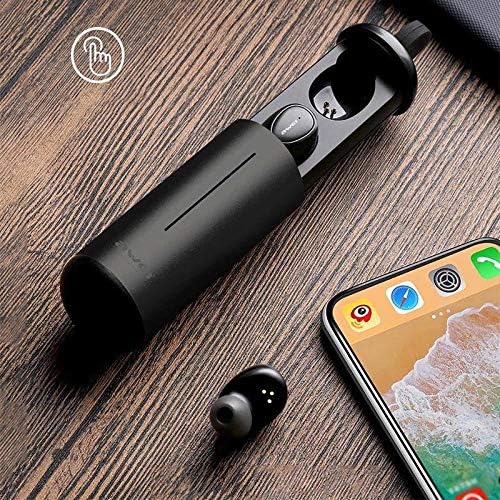
Image: AWEI T5 Earbuds in their charging case, positioned next to a smartphone, illustrating the pairing process.
คำแนะนำการใช้งาน
การควบคุมพื้นฐาน
The AWEI T5 earbuds feature touch controls for various functions:
- เล่น/หยุดชั่วคราว: แตะหนึ่งครั้งที่หูฟังเอียร์บัดข้างใดข้างหนึ่ง
- เพลงถัดไป: แตะสองครั้งที่หูฟังเอียร์บัดด้านขวา
- แทร็กก่อนหน้า: แตะสองครั้งที่หูฟังเอียร์บัดด้านซ้าย
- รับ/วางสาย: แตะที่หูฟังข้างใดข้างหนึ่งหนึ่งครั้งขณะมีสายเรียกเข้า
- ปฏิเสธสาย: กดปุ่มหูฟังข้างใดข้างหนึ่งค้างไว้ 2 วินาทีในระหว่างที่มีสายเรียกเข้า
- เปิดใช้งาน Voice Assistant: แตะสามครั้งที่หูฟังเอียร์บัดข้างใดข้างหนึ่ง
โหมดเอียร์บัดเดี่ยว
You can use either the left or right earbud independently:
- Remove one earbud from the charging case. It will automatically connect to the last paired device.
- The other earbud can remain in the case or be turned off.
โหมดเอียร์บัดคู่
For a stereo audio experience, use both earbuds:
- Remove both earbuds from the charging case. They will automatically connect to each other and then to the last paired device.
การบำรุงรักษาและการดูแล
To ensure the longevity and optimal performance of your AWEI T5 earbuds:
- การทำความสะอาด: ทำความสะอาดหูฟังและกล่องชาร์จเป็นประจำด้วยผ้านุ่ม แห้ง และไม่เป็นขุย ห้ามใช้สารเคมีรุนแรงหรือวัสดุที่มีฤทธิ์กัดกร่อน
- พื้นที่จัดเก็บ: เมื่อไม่ได้ใช้งาน ให้เก็บหูฟังไว้ในกล่องชาร์จเพื่อป้องกันฝุ่นและความเสียหาย
- การดูแลแบตเตอรี่ Avoid fully discharging the battery frequently. Charge the earbuds and case regularly, even if not used for extended periods.
- ความต้านทานน้ำ: The earbuds are rated IPX4, meaning they are resistant to splashing water from any direction. Do not submerge them in water or expose them to heavy rain.

Image: AWEI T5 Earbuds with water droplets, indicating their IPX4 splash-resistant rating.
การแก้ไขปัญหา
หากคุณพบปัญหาใดๆ กับหูฟัง AWEI T5 โปรดดูปัญหาและวิธีแก้ไขที่พบบ่อยต่อไปนี้:
| ปัญหา | สารละลาย |
|---|---|
| หูฟังไม่จับคู่กับอุปกรณ์ | ตรวจสอบให้แน่ใจว่าหูฟังชาร์จแบตเตอรี่เต็มแล้ว ปิดและเปิดบลูทูธบนอุปกรณ์ของคุณ ลบ "AWEI T5" ออกจากรายการบลูทูธของอุปกรณ์ของคุณ แล้วจับคู่ใหม่อีกครั้ง |
| หูฟังเอียร์บัดเดียวเท่านั้นที่ใช้งานได้ | ใส่หูฟังทั้งสองข้างกลับเข้าไปในกล่องชาร์จ ปิดฝา จากนั้นเปิดและนำหูฟังทั้งสองข้างออกมาพร้อมกัน ตรวจสอบให้แน่ใจว่าหูฟังทั้งสองข้างชาร์จเต็มแล้ว |
| ไม่มีเสียงหรือเสียงเบา | ตรวจสอบระดับเสียงทั้งบนอุปกรณ์ของคุณและหูฟัง ตรวจสอบให้แน่ใจว่าหูฟังเชื่อมต่ออย่างถูกต้อง |
| เคสชาร์จไม่ชาร์จ | Verify the USB cable is securely connected to both the case and the power source. Try a different cable or power adapter. |
ข้อมูลจำเพาะ
Technical details for the AWEI T5 True Wireless Earbuds:
| คุณสมบัติ | รายละเอียด |
|---|---|
| หมายเลขรุ่น | T5 |
| การเชื่อมต่อ | บลูทูธ |
| ฟอร์มแฟกเตอร์ | อินเอียร์ |
| วัสดุ | พลาสติก |
| สี | สีดำ |
| ขนาด (สินค้า) | 4 x 10 x 16.5 ซม. |
| น้ำหนัก (สินค้า) | 4.54 กรัม |
| ประเภทแบตเตอรี่ | 1 Lithium Ion (per earbud, typically) |
| ระดับการต้านทานน้ำ | IPX4 (กันน้ำกระเด็น) |
การรับประกันและการสนับสนุน
สำหรับข้อมูลการรับประกันและการสนับสนุนลูกค้า โปรดดูเอกสารประกอบที่ให้มาพร้อมกับสินค้าที่คุณซื้อ หรือติดต่อตัวแทนจำหน่าย โปรดเก็บหลักฐานการซื้อไว้เพื่อใช้ในกรณีที่ต้องการเคลมประกัน
Ask a question about this manual
Ask about setup, troubleshooting, compatibility, parts, safety, or missing instructions. Manuals+ will review the question and use this page’s manual context to help answer it.