
Road Angel Aura HD3
Road Angel Halo Pro Dashcam User Manual
Model: Aura HD3
1. สินค้าหมดview
The Road Angel Halo Pro is an advanced dual-channel dashcam system designed to provide comprehensive video surveillance for your vehicle. It records high-resolution footage from both the front and rear of your vehicle, offering peace of mind and crucial evidence in the event of an incident. Its compact design ensures minimal obstruction to your view.

Figure 1.1: Road Angel Halo Pro Dashcam Front and Rear Units.
คุณสมบัติหลัก:
- การบันทึกภาพด้วยกล้องคู่: Captures 2K (1440p) footage from the front and 1080p from the rear simultaneously.
- กว้าง Viewอิงมุม: 140-degree front and 120-degree rear viewing angles for extensive coverage.
- GPS ในตัว: Records speed and location data for accurate incident reconstruction.
- จีเซ็นเซอร์: Automatically detects impacts and sudden movements, locking the current footage เพื่อป้องกันการเขียนทับ
- โหมดจอดรถ: Provides 24/7 surveillance when your vehicle is parked, protecting against bumps and vandalism.
- การเชื่อมต่อ Wi-Fi: Seamlessly connect to the dashcam via a smartphone app for live viewฟูtage playback, and settings management.
- การบันทึกแบบวนซ้ำ: บันทึกอย่างต่อเนื่องโดยเขียนทับไฟล์ foo ที่เก่าที่สุดtagเช่นเมื่อการ์ดหน่วยความจำเต็ม
- การมองเห็นตอนกลางคืน: Enhanced low-light performance for clear recordings in challenging conditions.

รูปที่ 1.2: เกินview of Halo Pro's main features including dual cameras, 2K quality, wide viewing angles, parking mode, and GPS/telematics.
2. การตั้งค่าและการติดตั้ง
Proper installation is crucial for optimal performance of your Road Angel Halo Pro Dashcam. Please follow these steps carefully.
2.1 เนื้อหาบรรจุภัณฑ์
ก่อนเริ่มต้น โปรดตรวจสอบให้แน่ใจว่ามีอุปกรณ์ครบทุกชิ้น:
- Road Angel Halo Pro Front Camera Unit
- Road Angel Halo Pro Rear Camera Unit
- สายต่อกล้องด้านหลัง
- Power Cable (12V USB-C)
- Mounting Bracket with Adhesive Pad
- คู่มือการใช้งาน (เอกสารนี้)
2.2 การใส่การ์ด Micro SD
The Halo Pro supports Micro SD cards up to 128GB (sold separately). A high-speed Class 10 or U3 card is recommended for reliable recording.
- Locate the Micro SD card slot on the side of the front camera unit.
- เสียบการ์ด Micro SD โดยให้ด้านที่เป็นสีทองหันออกจากหน้าจอ จนกระทั่งได้ยินเสียงคลิกเข้าที่
- ในการถอดออก ให้ดันการ์ดเบาๆ จนกว่าจะมีเสียงคลิก จากนั้นปล่อยเพื่อดีดออก
2.3 การติดตั้งกล้องติดรถยนต์
Choose a location that does not obstruct the driver's view or interfere with airbags. The recommended position is behind the rearview กระจกเงา.
- Clean the windshield surface thoroughly where the dashcam will be mounted. Ensure it is dry and free of dust.
- ติดแผ่นกาวเข้ากับขายึด
- Peel off the protective film from the adhesive pad and firmly press the bracket onto the chosen location on the windshield for at least 30 seconds.
- Slide the front camera unit onto the mounted bracket until it locks securely.
- For the rear camera, mount it on the rear windshield, ensuring a clear view. Connect it to the front unit using the provided rear camera cable. Route the cable neatly along the vehicle's interior trim.

Figure 2.1: Illustration of dual front and rear dashcam placement and their respective viewing angles (140° front, 120° rear).
2.4 การเชื่อมต่อสายไฟ
Connect the power cable to the dashcam's USB-C port and route it to your vehicle's 12V power outlet (cigarette lighter socket) or a hardwire kit (sold separately) for parking mode functionality.
- Plug the small end of the power cable into the USB-C port on the dashcam.
- Plug the other end into your vehicle's 12V power outlet.
- Start your vehicle. The dashcam should power on automatically and begin recording.
3. การใช้งานกล้องติดรถยนต์
The Road Angel Halo Pro is designed for simple operation, with most functions managed via the dedicated smartphone app.
3.1 Initial Power On and Recording
Once connected to power, the dashcam will automatically power on and begin loop recording when the vehicle's ignition is on. The front and rear cameras will record simultaneously.
3.2 Smartphone App Integration
The Road Angel app allows you to control settings, view อยู่ footagและดาวน์โหลดไฟล์บันทึก
- Download the "Road Angel Halo" app from your smartphone's app store (available on iOS and Android).
- เปิดแดชแคม
- On your smartphone, go to Wi-Fi settings and connect to the dashcam's Wi-Fi network (SSID and password can be found on the dashcam or in the manual).
- Open the Road Angel Halo app. You should now see the live view from the dashcam and be able to access its features.
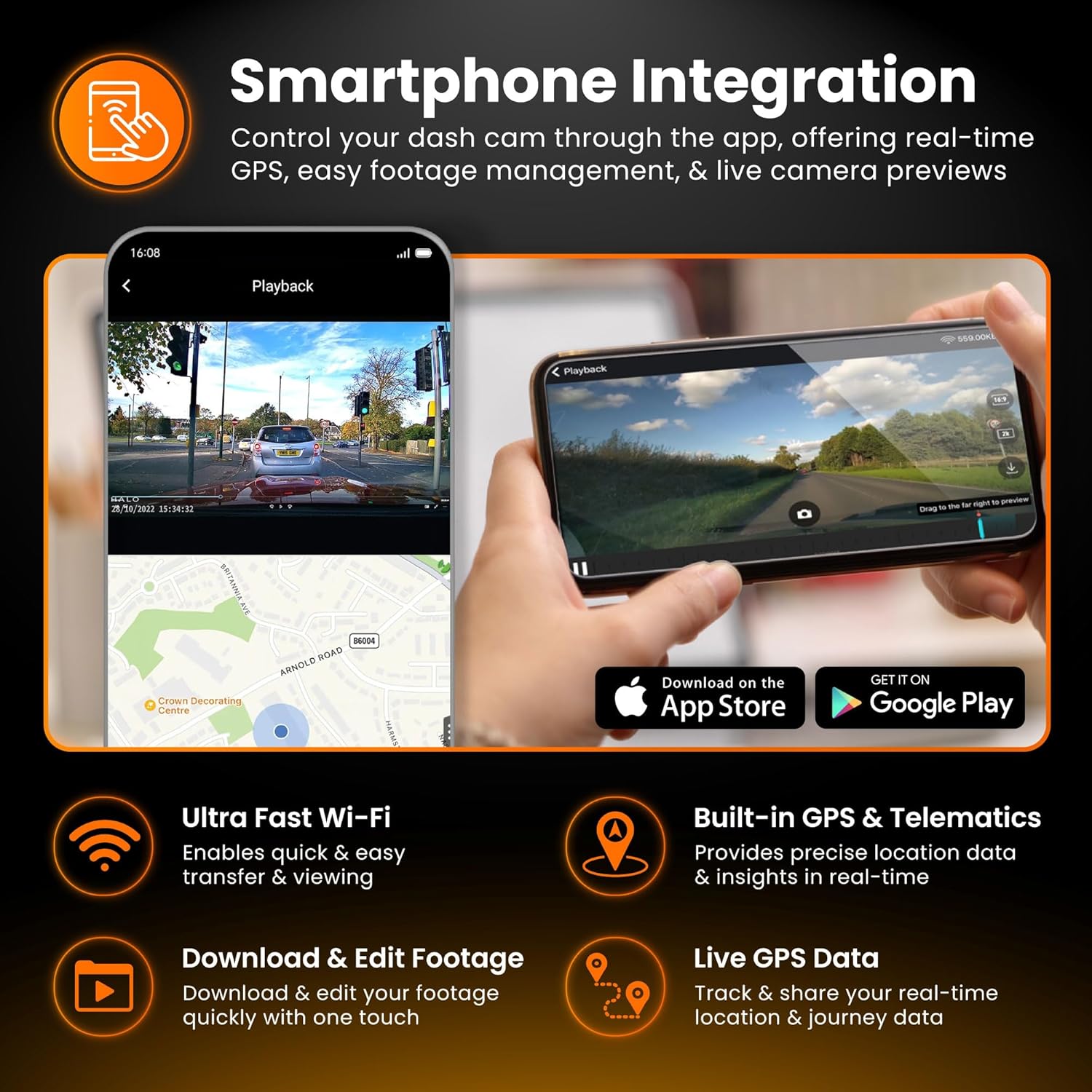
Figure 3.1: Smartphone integration showing live view, playback, and app download options for the Halo Pro.
3.3 G-Sensor และการบันทึกเหตุการณ์ฉุกเฉิน
The built-in G-Sensor detects sudden impacts or rapid acceleration/deceleration. When triggered, it automatically locks the current video segment, preventing it from being overwritten by loop recording. These emergency fileไฟล์ต่างๆ จะถูกจัดเก็บไว้ในโฟลเดอร์แยกต่างหากบนการ์ด SD
3.4 โหมดการจอดรถ
For 24/7 surveillance, the Parking Mode feature requires a continuous power supply (e.g., via a hardwire kit). In parking mode, the dashcam will monitor for impacts or motion and record accordingly, conserving power when idle.

Figure 3.2: Parking Mode feature, illustrating G-Sensor detection and continuous surveillance for your vehicle.
3.5 Accessing and Managing Footage
ฟูtage can be accessed and managed in two primary ways:
- ผ่านแอปพลิเคชันบนสมาร์ทโฟน: Connect to the dashcam's Wi-Fi, open the app, and navigate to the playback or gallery section. You can view, download, and share video clips directly from your phone.
- ผ่านทางการ์ด Micro SD: Remove the Micro SD card from the dashcam and insert it into a computer's card reader. Video files are typically organized into folders (e.g., Normal, Event, Parking).

Figure 3.3: Accessing and managing footage instantly on your smartphone via Wi-Fi, showing 2K front and 1080p rear capture.
4. การบำรุงรักษา
การบำรุงรักษาตามปกติจะช่วยให้กล้องติดรถยนต์ของคุณมีอายุการใช้งานยาวนานและมีประสิทธิภาพเหมาะสมที่สุด
4.1 การจัดการการ์ด Micro SD
It is recommended to format the Micro SD card regularly (e.g., once a month) using the dashcam's app or settings menu. This helps prevent data corruption and ensures smooth recording. Replace the SD card if you experience frequent errors or degraded performance.
4.2 การทำความสะอาดเลนส์
Periodically clean the front and rear camera lenses with a soft, lint-free cloth. Avoid abrasive materials or harsh chemicals that could scratch the lens or damage the coating.
การอัปเดตเฟิร์มแวร์ 4.3 รายการ
Check the Road Angel website or app periodically for firmware updates. Keeping your dashcam's firmware up-to-date can improve performance, add new features, and resolve bugs.
5 การแก้ไขปัญหา
If you encounter issues with your Road Angel Halo Pro, refer to the following common problems and solutions.
5.1 Dashcam Not Powering On
- ตรวจสอบการเชื่อมต่อพลังงาน: Ensure the power cable is securely plugged into both the dashcam and the vehicle's 12V outlet.
- กำลังรถยนต์: Verify that the vehicle's 12V outlet is receiving power (e.g., by testing with another device).
- ฟิวส์: Check the fuse in your vehicle's fuse box that corresponds to the 12V outlet.
5.2 "SD Card Error" Message
- ฟอร์แมตการ์ด SD: Format the Micro SD card using the dashcam's app or by inserting it into a computer and formatting it to FAT32.
- Check SD Card Compatibility: Ensure you are using a Class 10 or U3 Micro SD card from a reputable brand.
- Replace SD Card: If errors persist, the SD card may be faulty and require replacement.
5.3 ปัญหาการเชื่อมต่อ Wi-Fi
- Dashcam On: Ensure the dashcam is powered on and Wi-Fi is enabled.
- ลืมเครือข่าย: On your phone, 'forget' the dashcam's Wi-Fi network and try reconnecting.
- รีสตาร์ทอุปกรณ์: Restart both your smartphone and the dashcam.
- การอนุญาตสิทธิ์ของแอป: Ensure the Road Angel Halo app has necessary permissions (e.g., location, local network access) on your smartphone.
5.4 คุณภาพวิดีโอไม่ดี
- ทำความสะอาดเลนส์: Ensure both front and rear camera lenses are clean and free from smudges or dirt.
- ฟิล์มป้องกัน: Check if any protective film is still on the lenses.
- การตั้งค่าความละเอียด: Verify that the recording resolution is set to the highest available (2K front, 1080p rear) in the app settings.
6. ข้อมูลจำเพาะ
Detailed technical specifications for the Road Angel Halo Pro Dashcam.
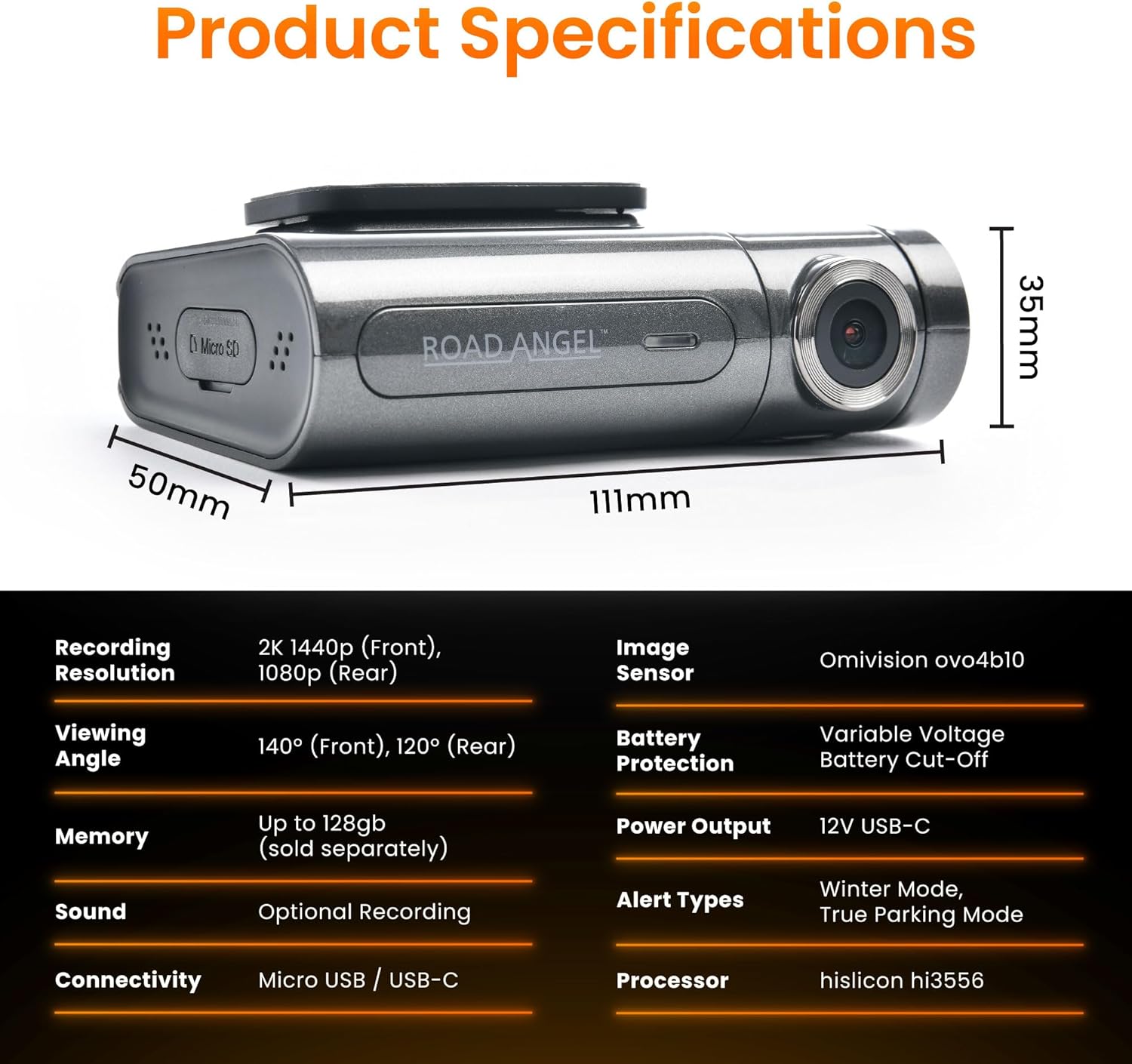
Figure 6.1: Detailed product specifications including dimensions and technical parameters.
| คุณสมบัติ | ข้อมูลจำเพาะ |
|---|---|
| หมายเลขรุ่น | Aura HD3 |
| ความละเอียดในการบันทึก | Front: 2K (1440p), Rear: 1080p |
| Viewอิงแองเกิล | ด้านหน้า: 140°, ด้านหลัง: 120° |
| เซ็นเซอร์รับภาพ | Omnivision ovo4b10 |
| โปรเซสเซอร์ | Hisilicon hi3556 |
| การรองรับหน่วยความจำ | Up to 128GB Micro SD (Class 10/U3 recommended) |
| การเชื่อมต่อ | Wi-Fi, Micro USB / USB-C |
| จีเซนเซอร์ | ในตัว |
| จีพีเอส | ในตัว |
| ประเภทจอภาพ | จอแอลซีดี |
| กำลังไฟเข้า | 12V USB-C |
| Product Dimensions (Front Unit) | 6.2 x 9.3 x 2.8 ซม. |
| น้ำหนักผลิตภัณฑ์ | 0.13 กก. (130 กรัม) |
| อุณหภูมิในการทำงาน | Refer to manufacturer's guidelines |
7. การรับประกันและการสนับสนุน
For warranty information, technical support, and frequently asked questions, please visit the official Road Angel webหรือติดต่อฝ่ายบริการลูกค้าโดยตรง โปรดเก็บหลักฐานการซื้อไว้เพื่อใช้ในการเคลมประกัน
Road Angel Official Webเว็บไซต์: www.roadangelgroup.com