
การแนะนำ
ขอบคุณสำหรับการซื้อasing the Hopestar H24 Portable Wireless Bluetooth Speaker. This speaker is designed to provide high-quality audio with versatile connectivity options, including Bluetooth, FM Radio, AUX input, USB drive, and TF card support. Its compact and portable design makes it ideal for use anywhere. Please read this manual carefully to ensure proper operation and to maximize your listening experience.
เนื้อหาแพ็คเกจ
กรุณาตรวจสอบแพ็คเกจสำหรับรายการต่อไปนี้:
- 1 x Hopestar H24 Wireless Bluetooth Speaker
- สาย 1 x AUX
- สายชาร์จ USB 1 เส้น
สินค้าเกินview
ทำความคุ้นเคยกับส่วนประกอบและการควบคุมของลำโพง
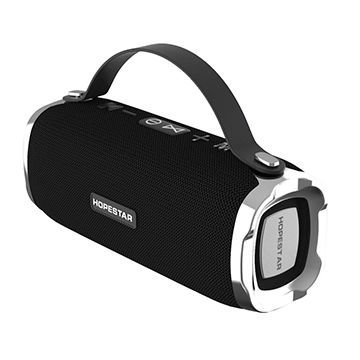
Figure 1: Hopestar H24 Speaker with integrated top handle. This view highlights the control panel on top, including power, volume, and mode buttons, along with the Hopestar branding on the front grille.
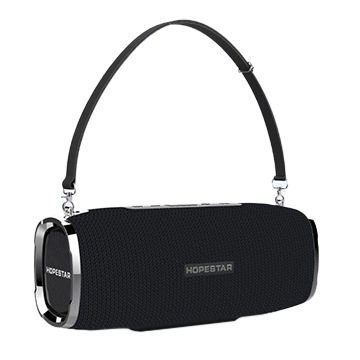
Figure 2: Hopestar H24 Speaker with an optional shoulder strap attached. This image demonstrates the speaker's portability and the attachment points for the strap, offering a different carrying option.
แผงควบคุม (ด้านบน) View)
- ปุ่มเปิด/ปิด: กดค้างไว้เพื่อเปิด/ปิดลำโพง
- ปุ่มโหมด (M): Press to switch between Bluetooth, FM Radio, AUX, USB, and TF Card modes.
- ปุ่มเล่น/หยุดชั่วคราว: Press to play or pause audio. In FM mode, press to auto-scan stations.
- ลดเสียง / เพลงก่อนหน้า (-): กดเพื่อลดระดับเสียง กดค้างไว้เพื่อเล่นเพลงก่อนหน้า
- เพิ่มเสียง / เพลงถัดไป (+): กดเพื่อเพิ่มระดับเสียง กดค้างไว้เพื่อเล่นเพลงถัดไป
Ports (Rear/Side)
- พอร์ต USB: สำหรับการเล่นไดรฟ์ USB
- ช่องเสียบการ์ด TF: สำหรับการเล่นการ์ด TF (MicroSD)
- อินพุต AUX: สำหรับเชื่อมต่ออุปกรณ์เสียงภายนอกผ่านสายสัญญาณเสียงขนาด 3.5 มม.
- พอร์ตชาร์จ Micro USB: สำหรับชาร์จลำโพง
การตั้งค่า
1. ชาร์จลำโพง
- Connect the supplied USB charging cable to the Micro USB charging port on the speaker.
- เชื่อมต่อปลายอีกด้านหนึ่งของสาย USB เข้ากับอะแดปเตอร์ไฟ USB (ไม่รวมอยู่ด้วย) หรือพอร์ต USB ของคอมพิวเตอร์
- ไฟแสดงสถานะการชาร์จจะสว่างขึ้น โดยปกติจะเป็นสีแดง ในระหว่างการชาร์จ
- The light will turn off or change color (e.g., blue) once fully charged. A full charge takes approximately 2-3 hours.
2. การเปิด/ปิดเครื่อง
- การเปิดเครื่อง: Press and hold the Power Button for 2-3 seconds until you hear an audible prompt.
- วิธีปิดเครื่อง: Press and hold the Power Button for 2-3 seconds until you hear an audible prompt.
คำแนะนำการใช้งาน
1. โหมดบลูทู ธ
- Turn on the speaker. It will automatically enter Bluetooth pairing mode, indicated by a flashing LED light and an audible prompt.
- เปิดใช้งานบลูทูธบนสมาร์ทโฟน แท็บเล็ต หรืออุปกรณ์อื่นๆ ที่รองรับบลูทูธ
- ค้นหา อุปกรณ์บลูทูธที่มีอยู่และเลือก "โฮปสตาร์ เอช24" จากรายการ
- Once paired, the LED light will stop flashing, and you will hear a connection sound.
- ตอนนี้คุณสามารถเล่นเสียงจากอุปกรณ์ของคุณผ่านลำโพงได้
- Use the speaker's volume buttons or your device's volume controls to adjust the sound.
2. โหมดวิทยุ FM
- กดปุ่ม โหมด (M) กดปุ่มซ้ำๆ จนกว่าคุณจะได้ยินเสียงแจ้งเตือนวิทยุ FM
- Connect the AUX cable to the AUX port; it acts as an antenna for better reception.
- กดปุ่ม เล่น/หยุดชั่วคราว button once to start automatic station scanning. The speaker will scan and save available FM stations.
- เมื่อการสแกนเสร็จสิ้น ให้ใช้ เพลงก่อนหน้า (-) และ เพลงถัดไป (+) ปุ่มสำหรับนำทางระหว่างสถานีที่บันทึกไว้
3. โหมดอินพุต AUX
- กดปุ่ม โหมด (M) button until you hear the AUX mode prompt.
- Connect one end of the supplied 3.5mm AUX cable to the speaker's AUX port.
- Connect the other end of the AUX cable to the headphone jack of your external audio device (e.g., MP3 player, computer).
- Audio will now play through the speaker. Control playback and volume from your connected device.
4. USB Drive / TF Card Mode
- เสียบแฟลชไดรฟ์ USB เข้ากับพอร์ต USB หรือเสียบการ์ด TF (MicroSD) เข้ากับช่องเสียบการ์ด TF
- The speaker will automatically detect the storage device and switch to the corresponding mode, beginning playback of audio files.
- หากไม่สลับโดยอัตโนมัติ ให้กดปุ่ม โหมด (M) ปุ่มเพื่อเลือกโหมดที่ถูกต้อง
- ใช้ เล่น/หยุดชั่วคราว, เพลงก่อนหน้า (-), และ เพลงถัดไป (+) ปุ่มเพื่อควบคุมการเล่น
การซ่อมบำรุง
- ควรวางลำโพงให้ห่างจากอุณหภูมิที่สูงจัด แสงแดดโดยตรง และสภาพแวดล้อมที่มีฝุ่นละออง
- ทำความสะอาดลำโพงด้วยผ้านุ่มและแห้ง ห้ามใช้น้ำยาทำความสะอาดหรือสารละลายที่มีฤทธิ์กัดกร่อน
- Although the speaker is indicated as waterproof, avoid submerging it in water or exposing it to heavy rain for extended periods.
- When not in use for a long time, charge the speaker at least once every three months to maintain battery health.
การแก้ไขปัญหา
| ปัญหา | สาเหตุที่เป็นไปได้ | สารละลาย |
|---|---|---|
| ลําโพงไม่เปิดขึ้น | แบตเตอรี่อ่อน | ชาร์จลำโพงให้เต็ม |
| ไม่มีเสียง. | ระดับเสียงต่ำเกินไป; โหมดไม่ถูกต้อง; อุปกรณ์ไม่ได้เชื่อมต่อ | Increase volume; press 'M' to change mode; ensure Bluetooth/AUX connection. |
| การจับคู่บลูทูธล้มเหลว | ลำโพงไม่ได้อยู่ในโหมดจับคู่ อุปกรณ์อยู่ไกลเกินไป มีสัญญาณรบกวน | Ensure speaker is in pairing mode; move device closer; restart both devices. |
| การรับสัญญาณ FM ไม่ดี | No antenna; weak signal. | Connect the AUX cable to act as an antenna; reposition the speaker. |
ข้อมูลจำเพาะ
- แบบอย่าง: H24
- การเชื่อมต่อ: บลูทูธ, AUX, USB, การ์ด TF
- เทคโนโลยีการสื่อสารไร้สาย: บลูทูธ
- แหล่งพลังงาน: ใช้พลังงานจากแบตเตอรี่ (รวมแบตเตอรี่ลิเธียมไอออน 1 ก้อน)
- วิธีการควบคุม: สัมผัส
- อุปกรณ์ที่รองรับ: สมาร์ทโฟน, แท็บเล็ต
- ประเภทลำโพง: ชั้นวางหนังสือ
- การกำหนดค่าช่องสัญญาณเสียงรอบทิศทาง: 2.1
- ขนาดสินค้า : 23 x 10 x 10 ซม.
- น้ำหนักสินค้า: 748 กรัม
- กันน้ำ: ใช่
- ส่วนประกอบที่รวมอยู่: 1 Speaker, 1 Aux cable, 1 USB Cable
การรับประกันและการสนับสนุน
This Hopestar H24 speaker comes with a รับประกัน 6 เดือน นับจากวันที่ซื้อ การรับประกันนี้ครอบคลุมข้อบกพร่องจากการผลิต แต่ไม่ครอบคลุมความเสียหายที่เกิดจากการใช้งานผิดวิธี อุบัติเหตุ การดัดแปลงโดยไม่ได้รับอนุญาต หรือการสึกหรอตามปกติ
For warranty claims or technical support, please contact your retailer or the Hopestar customer service department with your proof of purchase.