
การแนะนำ
The SENXINGYAN 8-inch LCD Digital Calendar Day Clock is designed to clearly display the time, day of the week, date, and month in large, easy-to-read text. This device is particularly beneficial for individuals who may experience memory loss or visual impairment, providing essential information at a glance. It supports multiple languages and features an automatic dimming function for optimal visibility day and night.

ภาพ: ด้านหน้า view of the SENXINGYAN 8-inch LCD Digital Calendar Day Clock, showing the current day, time, and date clearly.
เนื้อหาแพ็คเกจ
กรุณาทำเครื่องหมายในช่องสำหรับรายการต่อไปนี้:
- 1 x SENXINGYAN 8-inch LCD Digital Calendar Day Clock
- อะแดปเตอร์ไฟฟ้า 1 ตัว
- 1 x คู่มือผู้ใช้
คุณสมบัติหลัก
- Clear Display in 8 Languages: Displays day, week, and month in large, bold, non-abbreviated characters. Supported languages include English, Spanish, French, German, Polish, Italian, Dutch, and Welsh.
- Dual Time and Date Modes: Easily switch between 12-hour or 24-hour time formats, and British (Day-Month-Year) or American (Month-Day-Year) date formats.
- Automatic Night Dimmer: The screen automatically dims at 6:00 PM and brightens at 6:00 AM for comfortable viewทดสอบภายใต้สภาพแสงที่แตกต่างกัน
- High-Quality 8-inch Screen: Features a pure white text on a black background for exceptional readability from all viewing angles, with minimal glare.
- การแจ้งเตือนการใช้ยา: Programmable reminders to assist with medication schedules.

Image: The clock highlighting its various functions, including alarm, medication reminders, and display options.
การตั้งค่า
- แกะกล่องนาฬิกา: ถอดนาฬิกาและอุปกรณ์เสริมทั้งหมดออกจากบรรจุภัณฑ์อย่างระมัดระวัง
- ตั้งตำแหน่งนาฬิกา: Place the clock on a stable, flat surface or mount it on a wall using the integrated mounting hole. Ensure it is near an AC power outlet.
- เชื่อมต่อพลังงาน: Insert the small end of the power adapter into the DC 5V input port on the back of the clock. Plug the other end of the power adapter into a standard AC wall outlet. The clock will power on automatically.
- การแสดงผลเริ่มต้น: Upon first power-on, the clock will display the default time and date. You may need to adjust these settings.
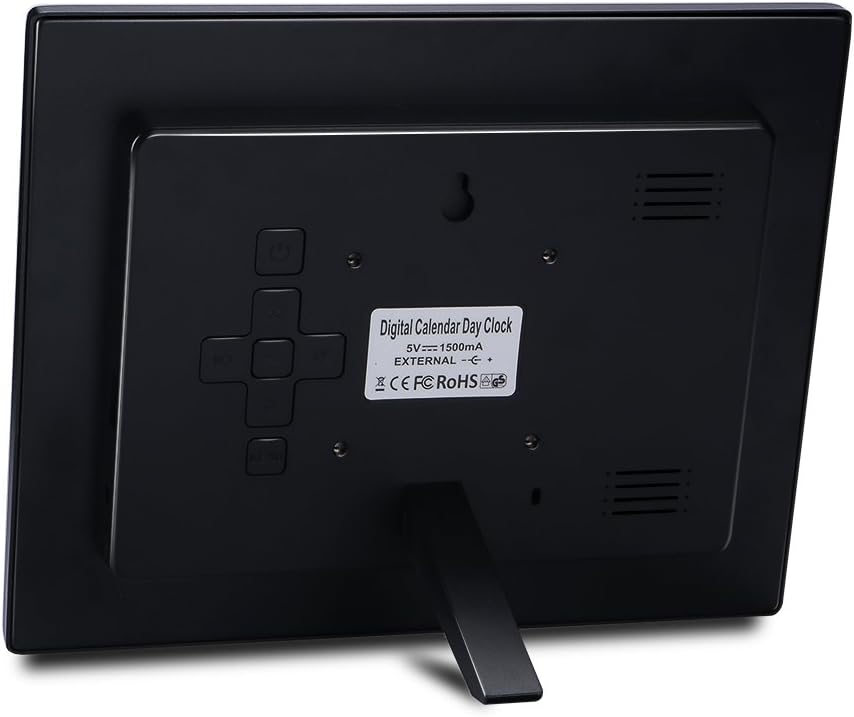
ภาพ: ด้านหลัง view of the clock, illustrating the power input and control buttons for setup.
คำแนะนำการใช้งาน
The control buttons are located on the back of the clock. Refer to the image in the Setup section for button placement.
การตั้งเวลาและวันที่
- กดปุ่ม เมนู ปุ่มเพื่อเข้าสู่เมนูการตั้งค่า
- ใช้ ขึ้น/ลง arrows to navigate through the options (e.g., Set Time, Set Date).
- กด OK เพื่อเลือกตัวเลือก
- ใช้ ขึ้น/ลง arrows to adjust values (hours, minutes, day, month, year).
- กด OK to confirm each adjustment.
- กด เมนู again to exit the settings.
12/24 Hour Mode and Date Format
- In the settings menu, navigate to 'Time Mode' to switch between 12-hour (with AM/PM) and 24-hour formats.
- Navigate to 'Date Mode' to select between Month-Day-Year (American) and Day-Month-Year (British) formats.
Automatic Dimmer Function
The clock features an automatic dimmer that adjusts screen brightness. It will dim at 6:00 PM and brighten at 6:00 AM. This feature is enabled by default and can usually be toggled in the settings menu under 'Auto Dimming' or 'Brightness'.
การตั้งค่าภาษา
ในการเปลี่ยนภาษาที่แสดง:
- เข้าสู่เมนูการตั้งค่า
- Navigate to 'Language'.
- ใช้ ขึ้น/ลง arrows to select your desired language from the available options (English, Spanish, French, German, Polish, Italian, Dutch, Welsh).
- กด OK เพื่อยืนยัน.
คำเตือนการทานยา
The clock can be programmed to display medication reminders. Consult the full manual for detailed instructions on setting specific reminder times and messages.

Image: The clock displaying a medication reminder, indicating its utility for scheduled tasks.
การซ่อมบำรุง
- การทำความสะอาด: Use a soft, dry, lint-free cloth to clean the screen and casing. Avoid abrasive cleaners or sprays directly on the screen.
- พลัง: Always use the provided power adapter. Disconnect power before cleaning or if the clock will be unused for an extended period.
- สิ่งแวดล้อม: Keep the clock in a dry environment, away from direct sunlight, extreme temperatures, and high humidity.
การแก้ไขปัญหา
- Clock does not turn on: Ensure the power adapter is securely connected to both the clock and a working AC wall outlet. This clock requires continuous AC power and does not operate on batteries.
- Time/Date resets after power outage: This clock does not have an internal battery backup for time and date settings. In the event of a power interruption, you will need to manually reset the time and date once power is restored.
- Display is unclear or distorted: Check for smudges or dust on the screen and clean with a soft cloth. Ensure the clock is not exposed to extreme temperatures.
- Cannot read USB photos: This model is designed as a calendar day clock and does not support displaying photos from a USB drive.
ข้อมูลจำเพาะ
| คุณสมบัติ | ข้อมูลจำเพาะ |
|---|---|
| ยี่ห้อ | เซินซิงหยาน |
| หมายเลขรุ่น | จอ LCD ขนาด 8 นิ้ว |
| ขนาดสินค้า (กว้าง x ยาว x สูง) | 21 x 17 x 2 ซม. |
| น้ำหนักผลิตภัณฑ์ | 272.16 กรัม |
| แบตเตอรี่ที่จำเป็น | เลขที่ |
| แหล่งพลังงาน | สายไฟ |
| ประเภทจอภาพ | ดิจิตอล |
| คุณสมบัติพิเศษ | การแสดงปฏิทิน |
| สี | สีดำ |
| รูปร่าง | สี่เหลี่ยมผืนผ้า |
| การใช้งานในร่ม/กลางแจ้ง | ในร่ม |
| ประเทศต้นกำเนิด | จีน |
การรับประกันและการสนับสนุน
No specific warranty information is provided with this product. For support or further inquiries, please refer to the contact information provided by your retailer or the manufacturer's official webเว็บไซต์ (ถ้ามี)