
คำแนะนำด้านความปลอดภัยที่สำคัญ
โปรดอ่านคำแนะนำเหล่านี้อย่างละเอียดก่อนใช้งานเครื่อง เก็บคู่มือนี้ไว้เพื่อใช้อ้างอิงในอนาคต
- ห้ามปิดกั้นช่องระบายอากาศใดๆ
- ห้ามติดตั้งใกล้แหล่งความร้อนใดๆ
- ปกป้องสายไฟจากการถูกเหยียบหรือถูกหนีบ
- ใช้เฉพาะอุปกรณ์เสริม/สิ่งที่แนบตามที่ผู้ผลิตกำหนดเท่านั้น
- ถอดปลั๊กอุปกรณ์นี้ในระหว่างพายุฝนฟ้าคะนองหรือเมื่อไม่ได้ใช้งานเป็นเวลานาน
- ส่งต่อการบริการทั้งหมดไปยังบุคลากรบริการที่มีคุณสมบัติเหมาะสม
- คำเตือน: เพื่อลดความเสี่ยงต่อการเกิดไฟไหม้หรือไฟฟ้าช็อต อย่าให้อุปกรณ์นี้โดนฝนหรือความชื้น
สินค้าเกินview
The Victrola VS-120 is a versatile microsystem offering multiple audio playback options. It includes Bluetooth connectivity, a CD player, USB playback, an Aux-in port, and an FM radio.
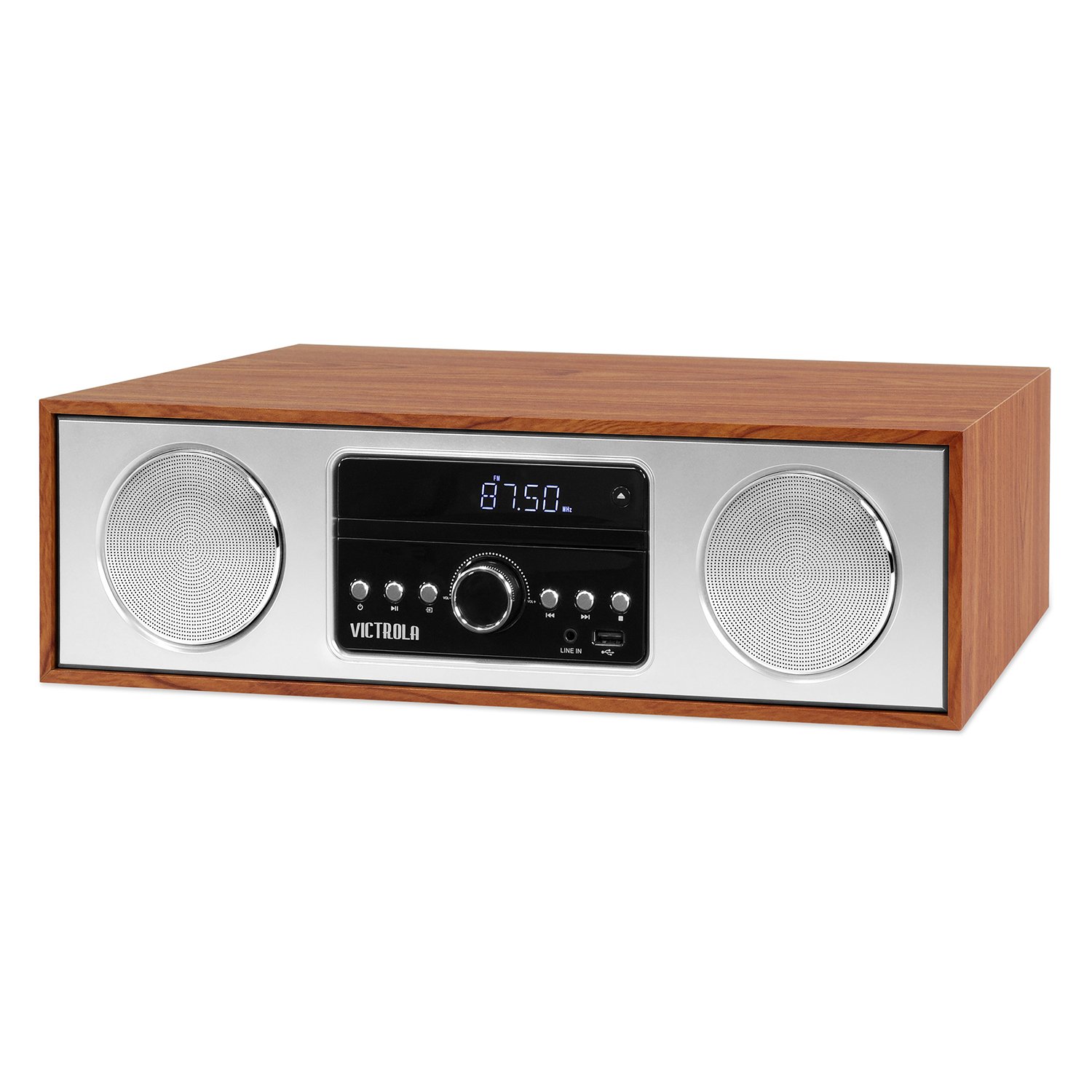
ด้านหน้า view of the Victrola VS-120 Bluetooth Microsystem, showing the speaker, display, and control panel.

The Victrola VS-120 microsystem with its CD tray open, revealing a disc, and the included remote control positioned in the foreground.
คู่มือการติดตั้ง
การแกะกล่อง
Carefully remove the unit from its packaging. Ensure all accessories are present:
- Victrola VS-120 Microsystem
- รีโมทคอนโทรล
- อะแดปเตอร์แปลงไฟ
- คู่มือการใช้งาน (เอกสารนี้)
การเชื่อมต่อไฟฟ้า
- Insert the small end of the power adapter into the DC IN jack on the rear of the unit.
- เสียบปลายอีกด้านของอะแดปเตอร์แปลงไฟเข้ากับเต้ารับไฟฟ้ามาตรฐาน (AC 100-240V, 50/60Hz)
- The unit will enter standby mode, and the LED clock display will illuminate.
Antenna Connection (FM Radio)
For optimal FM radio reception, extend the FM wire antenna fully. Adjust its position for the best signal.
คำแนะนำการใช้งาน
เปิด/ปิดเครื่อง
กดปุ่ม พลัง button on the unit or remote control to turn the system on or off (standby mode).
การเลือกโหมด
กดปุ่ม โหมด button on the unit or remote control repeatedly to cycle through available functions: บลูทูธ, CD, ยูเอสบี, อ๊อกซ์, และ วิทยุเอฟเอ็ม.
การใช้งานบลูทูธ
- เลือก บลูทูธ mode. The display will show "BT" and flash, indicating pairing mode.
- On your Bluetooth-enabled device (smartphone, tablet, etc.), enable Bluetooth and search for "Victrola VS-120".
- Select "Victrola VS-120" to pair. Once connected, the "BT" indicator will stop flashing and a confirmation tone will sound.
- You can now stream audio from your device to the microsystem.
- Use your device or the microsystem's controls (PLAY/PAUSE, NEXT, PREVIOUS) to manage playback.
การเล่นซีดี
- เลือก CD โหมด.
- กดปุ่ม เปิด/ปิด ปุ่มเพื่อเปิดถาดซีดี
- วางแผ่นซีดี (ซีดีเพลงหรือซีดี MP3) โดยให้ด้านที่มีฉลากหงายขึ้นในถาด
- กด เปิด/ปิด again to close the tray. The unit will read the disc and begin playback automatically.
- ใช้ เล่น/หยุดชั่วคราว, ต่อไป, และ ก่อนหน้า ปุ่มเพื่อควบคุมการเล่น
การเล่นผ่าน USB
- Insert a USB flash drive (FAT32 format, containing MP3 fileเสียบ (s) เข้ากับพอร์ต USB
- เลือก ยูเอสบี โหมดนี้ เครื่องจะตรวจจับและเริ่มเล่นไฟล์ MP3 โดยอัตโนมัติ fileจากไดรฟ์
- ใช้ เล่น/หยุดชั่วคราว, ต่อไป, และ ก่อนหน้า ปุ่มเพื่อควบคุมการเล่น
การทำงานของวิทยุ FM
- เลือก วิทยุเอฟเอ็ม โหมด.
- กดปุ่มค้างไว้ ปรับ +/- ปุ่มสำหรับสแกนหาสถานีที่ว่างอยู่ถัดไปโดยอัตโนมัติ
- กดปุ่ม ปรับ +/- buttons briefly to manually adjust the frequency in small increments.
- To save a station as a preset, press the เมม จากนั้นจึงใช้งาน ค่าที่ตั้งไว้ล่วงหน้า +/- เพื่อเลือกหมายเลขที่กำหนดไว้ล่วงหน้า แล้วกด เมม เพื่อยืนยันอีกครั้ง
- หากต้องการเรียกสถานีที่ตั้งไว้ล่วงหน้า ให้ใช้ปุ่ม ค่าที่ตั้งไว้ล่วงหน้า +/- ปุ่ม
การเชื่อมต่อ Aux-in
- เชื่อมต่ออุปกรณ์เสียงภายนอก (เช่น เครื่องเล่น MP3, สมาร์ทโฟน) เข้ากับ AUX IN เสียบเข้ากับแจ็คโดยใช้สายสัญญาณเสียงขนาด 3.5 มม. (ไม่รวมอยู่ในชุด)
- เลือก อ๊อกซ์ โหมด.
- ควบคุมการเล่นและระดับเสียงจากอุปกรณ์ภายนอกของคุณ
ฟังก์ชั่นการควบคุมระยะไกล
The included remote control provides full functionality. Ensure batteries are correctly inserted. Key functions include:
- พลัง: Turn unit on/off.
- เส้นทาง: เลือกแหล่งที่มาของเสียง
- ฉบับ +/-: ปรับระดับเสียง.
- PLAY/PAUSE, NEXT, PREVIOUS: Control playback for CD, USB, and Bluetooth.
- ปรับ +/-: Tune FM radio stations.
- ข้อความ: Store FM presets.
- PRESET +/-: Select FM presets.
- EQ: Cycle through equalizer settings (Flat, Rock, Pop, Jazz, Classic).
- นาฬิกา: ตั้งนาฬิกา
- หรี่: ปรับความสว่างของการแสดงผล
การปรับการตั้งค่า EQ
กดปุ่ม EQ button on the remote control to cycle through preset equalizer modes: Flat, Rock, Pop, Jazz, and Classic. Select the mode that best suits your audio preference.
การตั้งนาฬิกา
ในการตั้งนาฬิกาให้กดปุ่ม นาฬิกา button on the remote control. Use the ปรับ +/- buttons to adjust the hour and minute, and press นาฬิกา อีกครั้งเพื่อยืนยันการตั้งค่าแต่ละอย่าง
การซ่อมบำรุง
การทำความสะอาดตัวเครื่อง
To clean the exterior of the unit, use a soft, dry cloth. Do not use abrasive cleaners, waxes, or solvents as these may damage the surface. Ensure the unit is unplugged before cleaning.
การดูแลเครื่องเล่นซีดี
Handle CDs by their edges. Keep them clean and free of scratches. If a CD is dirty, wipe it gently with a soft, lint-free cloth from the center outwards. Do not use solvents or abrasive cleaners on CDs.
การแก้ไขปัญหา
| ปัญหา | สาเหตุที่เป็นไปได้ | สารละลาย |
|---|---|---|
| ไม่มีไฟฟ้า | ไม่ได้เสียบสายไฟ; ปลั๊กไฟไม่ทำงาน | ตรวจสอบให้แน่ใจว่าเสียบสายไฟอย่างแน่นหนา ลองใช้เต้ารับอื่น |
| ไม่มีเสียง | ระดับเสียงต่ำเกินไป เลือกโหมดไม่ถูกต้อง อุปกรณ์ภายนอกไม่ได้เล่น | Increase volume; Select correct mode (BT, CD, USB, AUX, FM); Ensure external device is playing and its volume is up. |
| ซีดีไม่เล่น | ใส่แผ่นซีดีไม่ถูกต้อง; แผ่นซีดีสกปรกหรือมีรอยขีดข่วน; รูปแบบแผ่นไม่รองรับ | Insert CD with label side up; Clean or replace CD; Ensure it's an audio CD or MP3 CD. |
| การจับคู่บลูทูธล้มเหลว | Unit not in pairing mode; Device too far; Device already paired to another unit. | Ensure unit is in BT mode and "BT" is flashing; Move device closer; Disconnect from other devices. |
| การรับสัญญาณ FM ไม่ดี | เสาอากาศไม่ได้ยืดออกหรือวางตำแหน่งไม่ถูกต้อง | Fully extend and reposition the FM wire antenna. |
| รีโมตคอนโทรลไม่ทำงาน | Batteries dead or inserted incorrectly; Obstruction between remote and unit. | Replace batteries; Ensure correct polarity; Remove obstructions; Point remote directly at the unit's sensor. |
ข้อมูลจำเพาะ
- ยี่ห้อ: วิคโทรล่า
- แบบอย่าง: VS-120
- การเชื่อมต่อ: บลูทูธ, USB, ช่องเสียบ AUX (3.5 มม.)
- แหล่งที่มาของเสียง: CD Player, USB Player, FM Radio, Bluetooth, Aux-in
- กำลังขับ: 30 วัตต์
- รูปแบบเสียงที่รองรับ: ซีดี, MP3
- ขนาด (ยาว x กว้าง x สูง): 15.97 x 4.69 x 10.83 นิ้ว (40.56 x 11.91 x 27.51 ซม.)
- น้ำหนัก: 10.76 ปอนด์ (4.88 กก.)
- กำลังไฟเข้า: ไฟฟ้ากระแสสลับ 100-240 โวลต์, 50/60 เฮิรตซ์
- สี: เมเปิ้ล
การรับประกันและการสนับสนุน
Victrola products are designed with quality and performance in mind. For detailed warranty information, please refer to the warranty card included with your product or visit the official Victrola website. For technical support or customer service inquiries, please contact Victrola customer support through their official channels.
Webเว็บไซต์: www.victrola.com