
การแนะนำ
Thank you for choosing the Awei B923BL Wireless Magnetic Sports Bluetooth Earphones. This manual provides essential information for setting up, operating, maintaining, and troubleshooting your new earphones. Please read it carefully before use to ensure optimal performance and longevity of your device.
เนื้อหาแพ็คเกจ
กรุณาตรวจสอบแพ็คเกจสำหรับรายการต่อไปนี้:
- Awei B923BL Wireless Magnetic Sports Bluetooth Earphones
- สายชาร์จ USB
- จุกหูฟังหลายขนาด
- คู่มือการใช้งาน
สินค้าเกินview
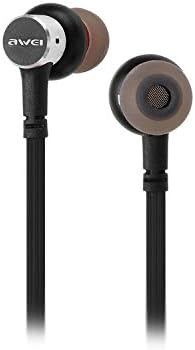
The Awei B923BL earphones are designed for active lifestyles, featuring a wireless Bluetooth connection and a magnetic design for convenient storage around your neck when not in use. They include an integrated microphone for hands-free calling.

การตั้งค่า
1. การชาร์จหูฟัง
Before first use, fully charge your earphones. Connect the provided USB charging cable to the charging port on the earphones and the other end to a USB power source (e.g., computer USB port, wall adapter). The indicator light will show charging status and turn off or change color when fully charged.
2. การจับคู่บลูทู ธ
- ตรวจสอบให้แน่ใจว่าหูฟังปิดอยู่
- Press and hold the multi-function button (usually the power button) until the indicator light flashes red and blue alternately, indicating pairing mode.
- On your mobile phone or Bluetooth-enabled device, go to the Bluetooth settings and enable Bluetooth.
- ค้นหา available devices. You should see "Awei B923BL" or a similar name in the list.
- Select "Awei B923BL" to connect. Once connected, the indicator light will usually flash blue slowly or turn off, and you may hear a confirmation tone.
- หากได้รับแจ้งให้ป้อนรหัสผ่าน ให้ป้อน "0000"
Once paired, the earphones will automatically connect to the last paired device when turned on, if the device's Bluetooth is active and within range.
คำแนะนำการใช้งาน
เปิด/ปิดเครื่อง
- เปิดเครื่อง: กดปุ่มมัลติฟังก์ชั่นค้างไว้ประมาณ 3 วินาที จนกว่าไฟแสดงสถานะสีน้ำเงินจะกะพริบ
- หมดแรง: กดปุ่มมัลติฟังก์ชันค้างไว้ประมาณ 5 วินาที จนกระทั่งไฟแสดงสถานะสีแดงกะพริบแล้วดับลง
การเล่นเพลง
- เล่น/หยุดชั่วคราว: กดปุ่มมัลติฟังก์ชั่นหนึ่งครั้ง
- เพลงถัดไป: กดปุ่มปรับระดับเสียง + ค้างไว้
- แทร็กก่อนหน้า: กดปุ่มปรับระดับเสียง - ค้างไว้
การจัดการการโทร
- รับ/วางสาย: กดปุ่มมัลติฟังก์ชั่นหนึ่งครั้ง
- ปฏิเสธสาย: กดปุ่มมัลติฟังก์ชันค้างไว้ประมาณ 2 วินาที
- โทรซ้ำหมายเลขล่าสุด: กดปุ่มมัลติฟังก์ชันสองครั้ง
การควบคุมระดับเสียง
- เพิ่มปริมาณ: กดปุ่มระดับเสียง +
- ลดระดับเสียง: กดปุ่มปรับระดับเสียง -
การซ่อมบำรุง
- Clean the earphones regularly with a soft, dry cloth. Do not use harsh chemicals or abrasive materials.
- ถอดปลายหูออกและทำความสะอาดด้วยสบู่ชนิดอ่อนและน้ำหากจำเป็น และตรวจสอบให้แน่ใจว่าแห้งสนิทก่อนจะใส่กลับเข้าไปอีกครั้ง
- เก็บหูฟังไว้ในที่แห้งและเย็น หลีกเลี่ยงแสงแดดโดยตรงและอุณหภูมิที่สูงหรือต่ำเกินไป
- Avoid exposing the earphones to water or excessive moisture.
- ห้ามถอดประกอบหรือดัดแปลงหูฟัง เนื่องจากจะทำให้การรับประกันเป็นโมฆะ
การแก้ไขปัญหา
- หูฟังไม่เปิด: ตรวจสอบให้แน่ใจว่าหูฟังชาร์จจนเต็มแล้ว
- ไม่สามารถจับคู่กับอุปกรณ์:
- Make sure the earphones are in pairing mode (flashing red and blue).
- ตรวจสอบให้แน่ใจว่าได้เปิดใช้งานบลูทูธบนอุปกรณ์ของคุณแล้ว
- ขยับหูฟังให้ใกล้กับอุปกรณ์ของคุณมากขึ้น
- Try restarting both the earphones and your device.
- หากมีการเชื่อมต่อบลูทูธเก่าๆ มากเกินไป ให้ลบการเชื่อมต่อเหล่านั้นออกจากอุปกรณ์ของคุณ
- ไม่มีเสียงหรือระดับเสียงต่ำ:
- ตรวจสอบระดับเสียงทั้งบนหูฟังและอุปกรณ์ที่เชื่อมต่อของคุณ
- ตรวจสอบให้แน่ใจว่าหูฟังเชื่อมต่อกับอุปกรณ์ของคุณอย่างถูกต้อง
- ลองเล่นแหล่งเสียงที่แตกต่างกัน
- ปัญหาคุณภาพการโทร:
- ตรวจสอบให้แน่ใจว่าไมโครโฟนไม่ได้ถูกกีดขวาง
- ย้ายไปยังพื้นที่ที่มีการรบกวนน้อย
ข้อมูลจำเพาะ
| คุณสมบัติ | รายละเอียด |
|---|---|
| ชื่อยี่ห้อ | อาเว่ย |
| หมายเลขรุ่น | บีทูบีแอล |
| สี | สีดำ |
| ปัจจัยรูปแบบหูฟัง | ในหู |
| เทคโนโลยีการเชื่อมต่อ | ไร้สาย |
| เทคโนโลยีการสื่อสารไร้สาย | ไร้สาย |
| ช่วงอายุ คำอธิบาย | ผู้ใหญ่ |
| วัสดุ | ยาง |
| อุปกรณ์ที่รองรับ | โทรศัพท์มือถือ |
| คุณสมบัติสายเคเบิล | ไม่มีสายเคเบิล |
| วิธีการควบคุม | สัมผัส |
| จำนวนรายการ | 1 |
| ผู้ผลิต | อาเว่ย |
| คุณสมบัติพิเศษ | Microphone Included (Note: This model does not feature active noise cancellation as per product description.) |
การรับประกันและการสนับสนุน
ข้อมูลการรับประกัน
This product comes with a 1-year manufacturer's warranty from the date of purchase. For warranty claims or service, please contact the manufacturer or their authorized service agent. For further details, you may also contact the retailer where the product was purchased.
การสนับสนุนลูกค้า
If you encounter any issues not covered in this manual or require further assistance, please refer to the contact information provided with your product packaging or visit the official Awei webเว็บไซต์สำหรับทรัพยากรสนับสนุน