
1. บทนำ
This manual provides detailed instructions for the setup, operation, and maintenance of your Optoma UHD50 4K UHD Home Theater Projector. Designed to transform your living room into a high-quality home cinema, the Optoma UHD50 delivers stunning detail, clarity, and vibrant colors with its 4K UHD resolution and 2,400 lumens of brightness. Please read this manual thoroughly before using your projector to ensure optimal performance and longevity.
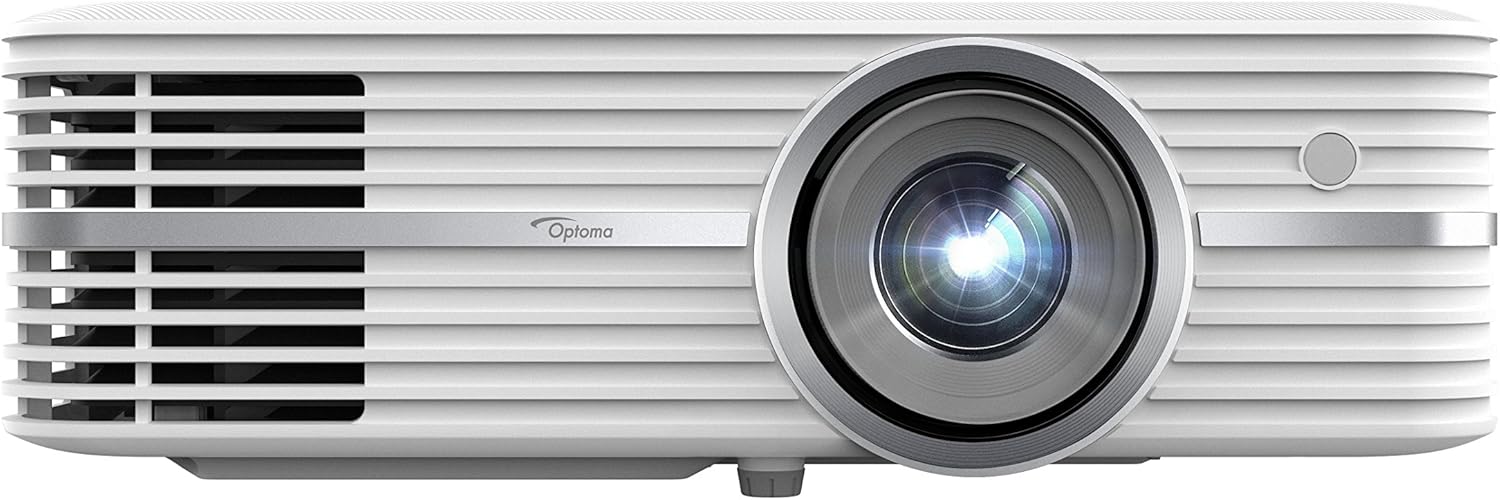
Figure 1: Optoma UHD50 4K UHD Home Theater Projector, front view.
2. การตั้งค่า
2.1 การแกะและการจัดวาง
Carefully remove all components from the packaging. Ensure all items listed in the "What's in the Box" section are present. Place the projector on a stable, flat surface or mount it securely to the ceiling. The Optoma UHD50 offers flexible installation options, including a 1.3x optical zoom and 15% vertical lens shift, allowing for precise image alignment whether placed on a table or ceiling-mounted.

Figure 2: Flexible installation of the Optoma UHD50, demonstrating zoom and vertical lens shift capabilities.
2.2 การเชื่อมต่อ
Connect your media players, gaming consoles, PCs, Macs, and mobile devices using the available input options. The Optoma UHD50 features HDMI 2.0 inputs with HDCP 2.2 support, HDMI 4K, USB, VGA, and more. Ensure all cables are securely connected to their respective ports.
3. การดำเนินการ
3.1 การเปิด/ปิดเครื่อง
To power on the projector, press the power button on the unit or the remote control. The indicator light will change to blue. To power off, press the power button again. The projector will go through a cool-down cycle before completely shutting down.
3.2 Image Quality and Features
The Optoma UHD50 delivers a true 4K Ultra HD experience with 8.3 million addressable pixels, ensuring a razor-sharp picture. It is HDR10 compatible, supporting DCI-P3 wide color gamut for richer, more vivid colors, brighter whites, and deeper blacks. Dynamic Black technology further enhances image depth with a 500,000:1 contrast ratio. Ultra detail technology ensures enhanced image sharpness with a higher frame rate.

Figure 3: The Optoma UHD50 delivers stunning 4K UHD detail and color.

Figure 4: HDR10 compatibility provides enhanced contrast and color depth.

Figure 5: Enjoy a rich, vivid image with advanced color technology and 2,400 lumens of brightness.
4. การบำรุงรักษา
4.1 ลิตรamp ชีวิต
The Optoma UHD50 features an extra-long lamp life of up to 15,000 hours, which translates to an average of two 2-hour movies every day for over 10 years. This significantly reduces the need for frequent lamp การทดแทน

Figure 6: The Optoma UHD50 offers an extended lamp life for prolonged enjoyment.
4.2 การทำความสะอาด
To maintain optimal performance, regularly clean the projector's lens with a soft, lint-free cloth designed for optical surfaces. Ensure the air vents are clear of dust and debris to prevent overheating. Do not use abrasive cleaners or solvents.
5 การแก้ไขปัญหา
If you encounter any issues with your Optoma UHD50 projector, please refer to the official คู่มือการแก้ไขปัญหา (PDF) for detailed solutions. Common issues may include:
- ไม่มีภาพ/สัญญาณ: Verify all cable connections (HDMI, VGA) and ensure the correct input source is selected on the projector.
- ปัญหาคุณภาพของภาพ: Adjust focus and keystone correction. Ensure the projection surface is flat and clean.
- เสียงผิดปกติ: Check for obstructions around the fan vents. Ensure the projector is placed on a stable surface.
- ภาพกะพริบ: This may indicate a signal issue or require a firmware update. Consult the troubleshooting guide for specific steps.
- ความร้อนสูงเกินไป: ตรวจสอบให้แน่ใจว่ามีการระบายอากาศที่เหมาะสมรอบๆ โปรเจ็กเตอร์
For further assistance, please contact Optoma customer support.
6. ข้อมูลจำเพาะ
| คุณสมบัติ | รายละเอียด |
|---|---|
| ขนาดสินค้า | 11.1 x 15.4 x 4.6 นิ้ว |
| น้ำหนักสินค้า | 11.75 ปอนด์ |
| หมายเลขรุ่น | UHD50 |
| ความละเอียดการแสดงผล | 3840 x 2160 (4K UHD) |
| ความสว่าง | 2400 ลูเมน |
| อัตราส่วนคอนทราสต์ | Up to 500,000:1 (Dynamic Black) |
| Lamp ชีวิต | นานถึง 15,000 ชั่วโมง |
| เทคโนโลยีการเชื่อมต่อ | VGA, USB, RS232C, Ethernet, HDMI (HDMI 2.0 with HDCP 2.2 support) |
| การเลื่อนเลนส์แนวตั้ง | 15% offset (with tolerance +/- 5%) |
| ระยะฉายภาพ | 2.9' – 34.89' |
7. อะไรอยู่ในกล่อง
- Optoma Home Theater Projectors Model UHD50
- สายไฟ
- รีโมทคอนโทรล
- User Manual (on CD or printed quick start guide)
- บัตรรับประกัน
Note: Specific contents may vary slightly by region or package.
8. การรับประกันและการสนับสนุน
Your Optoma UHD50 projector is covered by a limited warranty. Please refer to the warranty card included in your product packaging for specific terms and conditions. For technical support, product registration, or service inquiries, visit the official Optoma webเว็บไซต์หรือติดต่อฝ่ายบริการลูกค้าของพวกเขา
แหล่งข้อมูลเพิ่มเติม:
- คู่มือผู้ใช้อย่างเป็นทางการ (PDF): ดาวน์โหลดที่นี่
- คู่มือการแก้ไขปัญหา (PDF): ดาวน์โหลดที่นี่