
ออปโตม่า UHD65
คู่มือผู้ใช้เครื่องฉายภาพยนตร์ Optoma UHD65 True 4K UHD
Model: UHD65 | Brand: Optoma
1. บทนำ
This manual provides comprehensive instructions for the setup, operation, and maintenance of your Optoma UHD65 True 4K UHD Cinema Projector. The UHD65 is designed to deliver an immersive home cinema experience with its advanced 4K UHD resolution and color technologies. Please read this manual thoroughly before using the projector to ensure proper functionality and longevity.
2. สินค้าหมดview และคุณสมบัติที่สำคัญ
The Optoma UHD65 is a high-performance projector engineered for home theater enthusiasts, offering exceptional visual fidelity and flexible installation options.
- 4K Ultra HD แท้: Delivers 8.3 million distinct on-screen pixels for a premium home cinema experience, powered by the Texas Instruments 4K UHD DLP chipset.
- วงล้อสี 6 ส่วน: Ensures richer colors and enhanced brightness, with an RGBRGB color wheel for accurate cinematic color reproduction (Rec.709).
- เทคโนโลยีเพียวโมชั่น: Advanced frame-interpolation and motion control processing eliminate motion blurring and image judder in fast-action sequences.
- รองรับ HDR10: Supports HDR10 technology with DCI-P3 wide color gamut, displaying content in REC.2020 colors for brighter whites, deeper blacks, and greater color depth.
- อัตราส่วนความคมชัดสูง: Dynamic Black technology provides a 1,200,000:1 contrast ratio, enhancing image depth with clear bright scenes and detailed dark scenes.
- Cinematic Brightness: 2,200 lumens of brightness make the UHD65 suitable for various home theater environments, capable of projecting a 120" image from approximately 12 feet.
- การติดตั้งแบบยืดหยุ่น: Features 15% vertical lens shift and 1.6x optical zoom for versatile placement, whether ceiling-mounted or placed on a console.
- การเชื่อมต่อที่กว้างขวาง: Multiple input options including HDMI (with HDCP 2.2 support), HDMI 4K, USB, and VGA for connecting various devices like FireTV 4K, Chromecast Ultra, Roku 4K, Apple TV 4K, XBox One X, PS4 Pro, PCs, and Macs.
- ยาว Lamp ชีวิต: เพลิดเพลินได้ถึง 15,000 ชั่วโมงของลิตรamp life, providing years of viewความเพลิดเพลิน
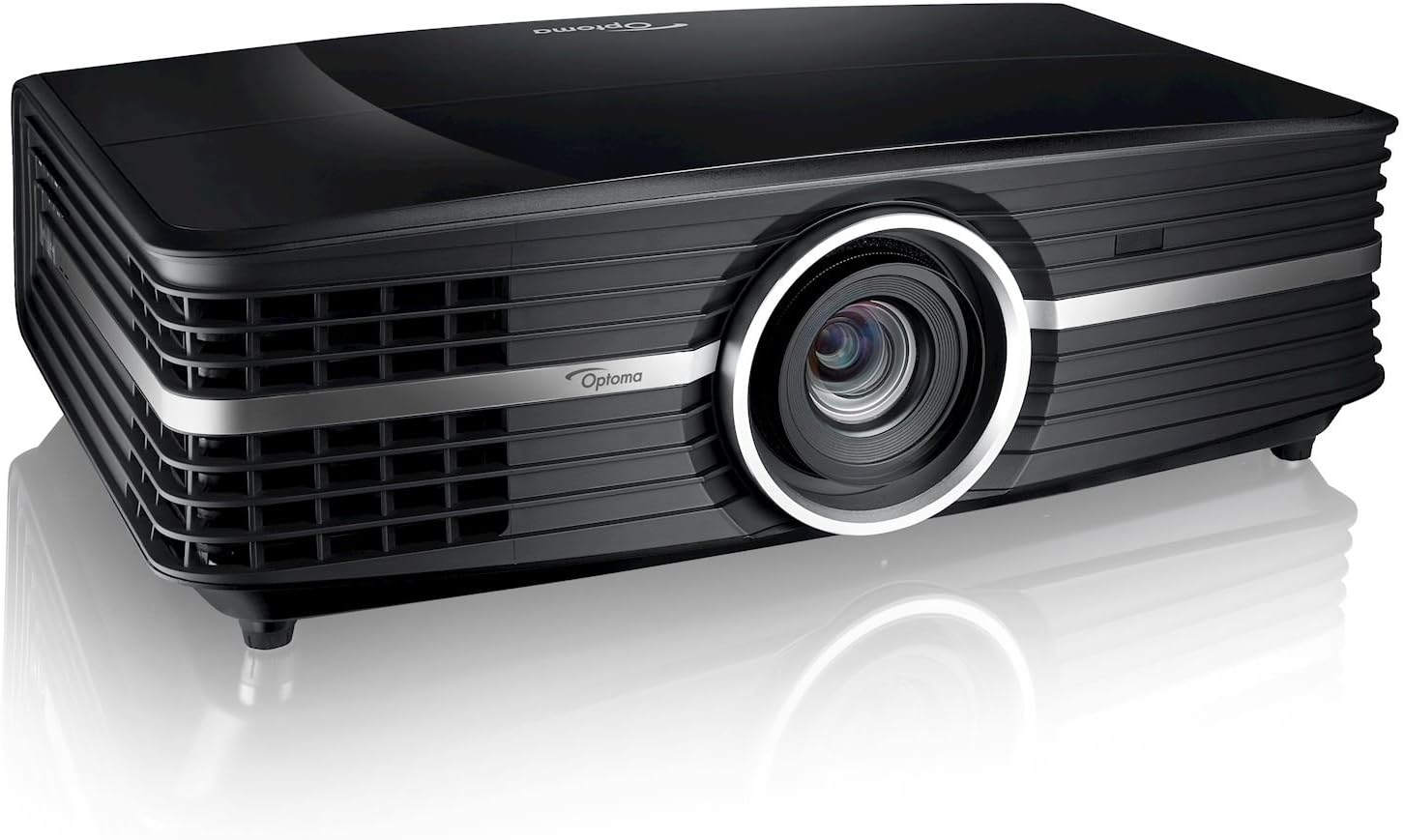
รูปที่ 2.1 : ด้านหน้า view of the Optoma UHD65 projector, showcasing its sleek black design and prominent lens.
3. คู่มือการติดตั้ง
3.1 การแกะกล่อง
นำส่วนประกอบทั้งหมดออกจากบรรจุภัณฑ์อย่างระมัดระวัง ตรวจสอบให้แน่ใจว่ามีส่วนประกอบต่อไปนี้:
- โปรเจ็กเตอร์ Optoma UHD65
- สายไฟ AC
- รีโมทคอนโทรล
- แบตเตอรี่สำหรับรีโมทคอนโทรล
- การ์ดเริ่มต้นอย่างรวดเร็ว
3.2 การจัดวาง
เมื่อเลือกตำแหน่งสำหรับติดตั้งโปรเจคเตอร์ โปรดพิจารณาสิ่งต่อไปนี้:
- ระยะฉายภาพ: The UHD65 can project an image from 4.2 feet to 30.5 feet away. For a 120-inch image, approximately 12 feet distance is recommended.
- ขนาดหน้าจอ: Supports projection screen sizes from 26.45 inches to 302.2 inches.
- การเปลี่ยนเลนส์: Utilize the 15% vertical lens shift for fine-tuning image position without moving the projector.
- การระบายอากาศ : Ensure adequate airflow around the projector to prevent overheating. Do not block ventilation openings.
- พื้นผิว: Place the projector on a stable, level surface or securely mount it to the ceiling.
3.3 การเชื่อมต่อ
Connect your source devices to the appropriate ports on the rear of the projector.

Figure 3.1: Rear panel of the Optoma UHD65, showing available input/output ports including HDMI, VGA, USB, and audio connections.
- ช่องต่อ HDMI: Connect HDMI 1.4a or HDMI 2.0 (w/ HDCP 2.2, MHL 2.1 and Full 18Gbps) for high-definition video and audio.
- VGA: Use the VGA-In port for connecting older computer systems.
- เสียง: Connect external audio devices via Audio-In (3.5mm) and Audio-Out (3.5mm). SPDIF Out (Optical) is also available for digital audio.
- ยูเอสบี: The USB 2.0 Port is for service, and a USB-A Power port is available for powering external devices.
- Network/Control: RJ45 for network control and RS232C for serial control. A 12V trigger output is also present.
- พลัง: Connect the AC power cord to the projector and a suitable power outlet (100-240V, 50-60Hz).
4. การดำเนินการ
4.1 เปิด/ปิดเครื่อง
- ตรวจสอบให้แน่ใจว่าเชื่อมต่อสายไฟอย่างแน่นหนา
- Press the power button on the projector or the remote control to turn on the unit. The power LED will illuminate.
- To power off, press the power button again. Confirm shutdown when prompted.
4.2 การเลือกอินพุต
Use the "Source" button on the remote control or projector panel to cycle through available input sources (HDMI 1, HDMI 2, VGA, etc.).
4.3 การปรับการตั้งค่า
Access the On-Screen Display (OSD) menu to adjust various picture and system settings.
- Press the "Menu" button on the remote control.
- ใช้ปุ่มลูกศรเพื่อเลื่อนดูตัวเลือกในเมนู
- Press "Enter" to select an option or confirm a setting.
- Adjust settings such as Brightness, Contrast, Color, Aspect Ratio, and PureMotion.
- Press "Menu" again to exit the OSD.
5. การบำรุงรักษา
5.1 ลิตรamp อายุการใช้งานและการเปลี่ยนทดแทน
ลamp in your Optoma UHD65 projector has an estimated life of up to 15,000 hours in Dynamic mode. When the lamp reaches the end of its life, a warning message will appear on the screen. Refer to the full user manual for detailed lamp ขั้นตอนการเปลี่ยน
5.2 การทำความสะอาด
- ภายนอก: Use a soft, lint-free cloth to wipe the projector's exterior. Do not use abrasive cleaners or solvents.
- เลนส์: Gently clean the projector lens with a lens cleaning cloth and specialized lens cleaning solution. Avoid touching the lens directly with your fingers.
- ตัวกรองอากาศ: Regularly check and clean the air filters to maintain optimal performance and prevent overheating.
6 การแก้ไขปัญหา
This section addresses common issues you might encounter with your Optoma UHD65 projector.
| ปัญหา | สาเหตุที่เป็นไปได้ | สารละลาย |
|---|---|---|
| ไม่มีภาพบนหน้าจอ | Power cable disconnected; incorrect input source selected; source device not powered on. | Check power connections; select correct input source; ensure source device is on. |
| ภาพเบลอ | Lens out of focus; projector too close/far from screen; dirty lens. | Adjust focus ring; reposition projector; clean the lens. |
| ไม่มีเสียง | Audio cables not connected; volume too low; incorrect audio output selected on source. | Check audio connections; increase volume; verify audio output settings on source device. |
| โปรเจ็กเตอร์ร้อนเกินไป | Blocked ventilation; dirty air filters. | Ensure clear space around vents; clean air filters. |
7. ข้อมูลจำเพาะ
| คุณสมบัติ | รายละเอียด |
|---|---|
| เทคโนโลยีการแสดงผล | Single 0.66″ TRP S610 4K UHD DMD DLP Technology by Texas Instruments |
| ความละเอียดดั้งเดิม | ยูเอชดี (3840 x 2160) |
| ความละเอียดสูงสุด | 4K (4096 x 2160) @ 60Hz with XPR Technology |
| ความสว่าง | 2,200 ลูเมน |
| อัตราส่วนคอนทราสต์ | สูงถึง 1,200,000: 1 พร้อม Dynamic Black |
| ประเภทแหล่งกำเนิดแสง | 240W ลิตรamp |
| แหล่งกำเนิดแสงชีวิต | 4,000/10,000/15,000 hours (Bright/ECO/Dynamic) |
| อัตราส่วนภาพ | 16:9 (native), 4:3, Auto, LBX (2160p and 1080p) |
| อัตราการโยน | 1.39 – 2.22 (distance/width) ± 5% variance |
| ระยะฉายภาพ | 4.2′ – 30.5′ |
| ขนาดจอฉายภาพ | 26.45″ – 302.2″ |
| เลื่อนเลนส์ | แนวตั้ง: +15% |
| ซูมออปติคอล | 1.6x (manual) |
| เสียง | 2x 4 Watt Stereo Speakers |
| ระดับเสียง | 28 / 25dB (สว่าง / ECO) |
| ขนาด (กว้าง x สูง x ลึก) | ขนาด 19.6×6×13 นิ้ว |
| น้ำหนัก | 16 ปอนด์ |
| ข้อมูลอินพุต | 1xHDMI 1.4a, 1xHDMI 2.0 (w/ HDCP 2.2, MHL 2.1 and Full 18Gbps), VGA-In, Audio-In (3.5mm), USB 2.0 Port (Service), USB-A Power, RJ45, RS232C |
| เอาท์พุต | Audio out (3.5mm), SPDIF out (optical), 12V trigger |
8. อะไรอยู่ในกล่อง
The Optoma UHD65 package includes the following items:
- UHD65 Projector
- สายไฟ AC
- รีโมทคอนโทรล
- แบตเตอรี่สำหรับรีโมท
- การ์ดเริ่มต้นอย่างรวดเร็ว
9. การรับประกันและการสนับสนุน
สำหรับข้อมูลการรับประกันโดยละเอียดและการสนับสนุนทางเทคนิค โปรดดูที่เว็บไซต์อย่างเป็นทางการของ Optoma webเยี่ยมชมเว็บไซต์หรือติดต่อฝ่ายบริการลูกค้าของ Optoma เก็บใบเสร็จรับเงินไว้เป็นหลักฐานการซื้อเพื่อใช้ในการเคลมประกัน
หากต้องการความช่วยเหลือเพิ่มเติม โปรดไปที่ ร้าน Optoma บน Amazon.
Ask a question about this manual
Ask about setup, troubleshooting, compatibility, parts, safety, or missing instructions. Manuals+ will review the question and use this page’s manual context to help answer it.