1. สินค้าหมดview
The MikroTik RouterBOARD 1100AHx4 Dude Edition is a high-performance Gigabit Ethernet router designed for demanding network environments. It features an Annapurna Alpine AL21400 CPU with four Cortex A15 cores, each clocked at 1.4GHz, delivering a maximum throughput of up to 7.5Gbps. This device supports IPsec hardware acceleration, achieving speeds up to 2.2Gbps with AES128 encryption. It comes in a 1U rackmount case and includes 13 Gigabit Ethernet ports, an RS232 serial port, and dual redundant power supplies with -48V DC telecom power and 802.3at/af support. For storage-intensive features like a Dude database or proxy cache, the RB1100AHx4 Dude Edition provides two SATA and two M.2 high-speed storage connectors, with a 60GB M.2 drive pre-installed.

รูปที่ 1 : ด้านหน้า view of the MikroTik RouterBOARD 1100AHx4 Dude Edition router.
2. เนื้อหาบรรจุภัณฑ์
The MikroTik RouterBOARD 1100AHx4 Dude Edition package includes the following items:
- 2 x IEC power cords
- สาย SATA
- ชุดสกรู K46
- 60GB M.2 SSD (pre-installed)
- หูแร็ค

Figure 2: Included IEC power cord.
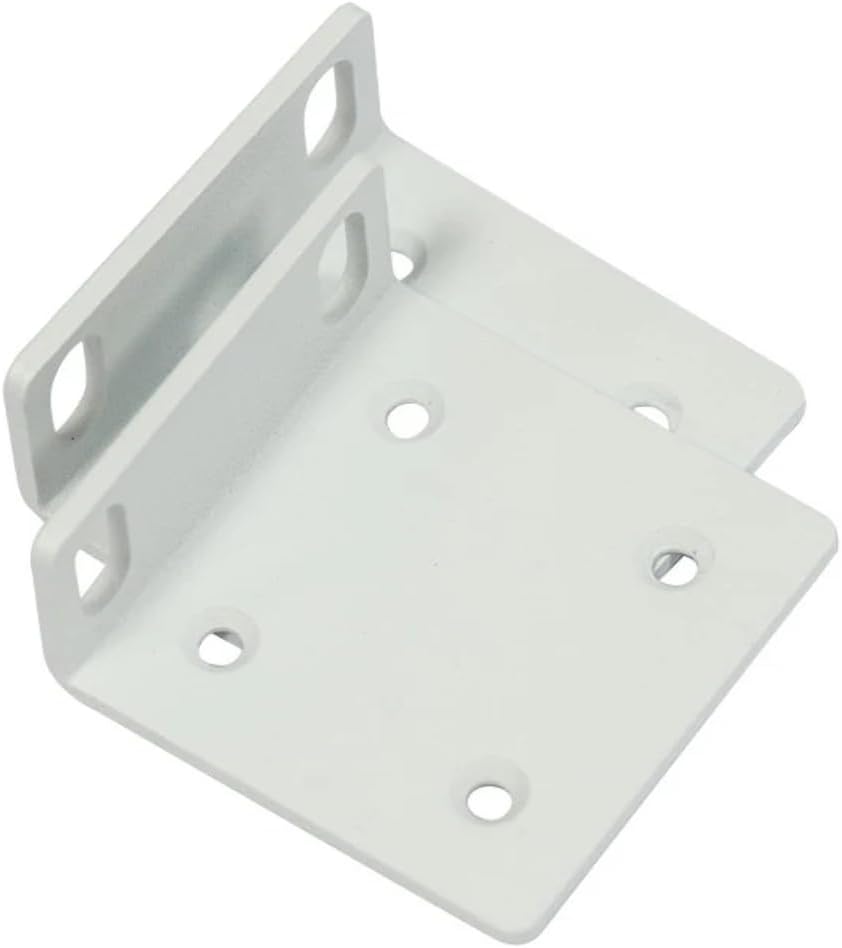
Figure 3: Rack ears for mounting.

Figure 4: K46 screw kit components.
3. คุณสมบัติด้านฮาร์ดแวร์
The RB1100AHx4 Dude Edition is equipped with a robust set of hardware features to ensure high performance and reliability:
- ซีพียู: Annapurna Alpine AL21400 with four Cortex A15 cores, 1.4 GHz nominal frequency.
- แรม : 1กิกะไบต์.
- พอร์ตอีเธอร์เน็ต: 13 x 10/100/1000 Gigabit Ethernet ports.
- พอร์ตอนุกรม: RS232.
- พลัง: Dual redundant power supplies, supporting -48V DC telecom power and 802.3at/af PoE in.
- พื้นที่จัดเก็บ: 2 x SATA3 ports, 2 x M.2 slots (60GB M.2 SSD included).

รูปที่ 5: ภายใน view of the router's mainboard.
4. การตั้งค่าเริ่มต้น
Follow these steps for the initial setup of your MikroTik RouterBOARD 1100AHx4 Dude Edition:
- การเชื่อมต่อไฟฟ้า: Connect one of the provided IEC power cords to the device and a power outlet. The device supports dual redundant power supplies for enhanced reliability.
- การเชื่อมต่ออีเทอร์เน็ต: Connect your computer to any of the Gigabit Ethernet ports (ETH1-ETH13) using an Ethernet cable.
- เข้าถึง RouterOS: เปิด web browser on your connected computer and navigate to the default IP address (usually 192.168.88.1). Log in using the default username 'admin' and no password.
- การกำหนดค่าเริ่มต้น: Follow the on-screen instructions in RouterOS to perform the initial configuration, including setting a new password, configuring network interfaces, and updating the system.
- การเชื่อมต่ออินเตอร์เน็ต: Connect your internet service provider's modem or main network line to the designated WAN port (typically ETH1, but configurable).
5. คู่มือการใช้งาน
The MikroTik RouterBOARD 1100AHx4 runs on RouterOS, a powerful and versatile operating system for MikroTik products. Key operational aspects include:
- การกำหนดค่าเครือข่าย: Utilize RouterOS to configure routing, firewall rules, NAT, VPNs (including IPsec hardware acceleration), and other advanced network settings.
- การจัดการพอร์ต: Manage the 13 Gigabit Ethernet ports, assigning them to different VLANs, bridge groups, or using them for WAN/LAN connectivity as needed.
- การใช้พื้นที่เก็บข้อมูล: The included 60GB M.2 SSD can be used for storing Dude database information, proxy cache data, or other storage-intensive applications to enhance network services.
- การติดตาม: Monitor network traffic, device performance, and system logs through the RouterOS interface or via external monitoring tools like The Dude.
6. การบำรุงรักษา
Regular maintenance ensures optimal performance and longevity of your device:
- อัพเดตเฟิร์มแวร์: ตรวจสอบและติดตั้งเฟิร์มแวร์ RouterOS เวอร์ชันล่าสุดจาก MikroTik เป็นประจำ webเว็บไซต์จะได้รับประโยชน์จากฟีเจอร์ใหม่ การแก้ไขช่องโหว่ด้านความปลอดภัย และการปรับปรุงประสิทธิภาพ
- การสำรองข้อมูลการกำหนดค่า: Periodically back up your device configuration to prevent data loss in case of unexpected issues.
- การตรวจร่างกาย: Ensure proper ventilation and keep the device free from dust and debris. Check cable connections for secure fit.
- การตรวจสอบระบบ: Monitor CPU usage, memory, and temperature to identify potential issues early.
7 การแก้ไขปัญหา
If you encounter issues with your RouterBOARD 1100AHx4, consider the following troubleshooting steps:
- ไม่มีไฟฟ้า: Verify that both power cords are securely connected and that the power outlets are functional. Check the power LED indicators on the device.
- ไม่มีการเชื่อมต่อเครือข่าย: Ensure Ethernet cables are properly connected to the correct ports. Check port status LEDs. Verify IP address configurations and firewall rules in RouterOS.
- ประสิทธิภาพการทำงานช้า: Check CPU and memory usage in RouterOS. Review network traffic statistics to identify bottlenecks. Ensure firmware is up to date.
- ปัญหาการเข้าสู่ระบบ: If you cannot access RouterOS, try resetting the device to factory defaults using the reset button (refer to the Quick Guide for specific instructions).
- IPsec Performance: Ensure IPsec hardware acceleration is enabled and configured correctly for optimal VPN throughput.
8. ข้อมูลจำเพาะทางเทคนิค
| คุณสมบัติ | ข้อมูลจำเพาะ |
|---|---|
| รหัสสินค้า | RB1100AHx4 |
| ความถี่ปกติของซีพียู | 1.4 กิกะเฮิรตซ์ |
| CPU Core Count | 4 |
| ขนาดของแรม | 1GB |
| พอร์ตอีเธอร์เน็ต 10/100/1000 | 13 |
| พาวเวอร์แจ็ค | 2 |
| โพเออิน | 802.3af/at |
| รองรับอินพุตโวลtage | 20 V - 57 V |
| ระบบปฏิบัติการ | RouterOS (License Level 6) |
| การใช้พลังงานสูงสุด | 25วัตต์ |
| พอร์ตซีเรียล | อาร์เอส232 |
| ประเภทการจัดเก็บข้อมูล | NAND (128 MB) |
| พื้นที่เก็บข้อมูลแบบขยาย | 60GB M.2 SSD included |
| ขนาด | 444 x 148 x 47 มม. |
9. วิดีโอผลิตภัณฑ์อย่างเป็นทางการ
There are no official product videos specifically for the MikroTik RouterBOARD 1100AHx4 Dude Edition provided by the seller at this time.
10. การรับประกันและการสนับสนุน
สำหรับข้อมูลการรับประกันและการสนับสนุนทางเทคนิค โปรดดูที่เว็บไซต์อย่างเป็นทางการของ MikroTik website or contact your authorized MikroTik distributor. Keep your proof of purchase for warranty claims.