
การแนะนำ
ขอบคุณสำหรับการซื้อasing the Ezonetronics 1DIN Car Stereo, Model RM-CW9601. This unit features a 7-inch retractable touchscreen, Bluetooth connectivity, FM radio, and multimedia playback capabilities. This manual provides essential information for installation, operation, and maintenance to ensure optimal performance and user satisfaction. Please read this manual thoroughly before using the product.
ข้อมูลด้านความปลอดภัย
- อย่าใช้งานอุปกรณ์ในลักษณะที่รบกวนสมาธิในการขับขี่ ให้ความสำคัญกับความปลอดภัยบนท้องถนนเสมอ
- ตรวจสอบให้แน่ใจว่าได้ติดตั้งโดยช่างผู้ชำนาญการอย่างถูกต้อง เพื่อป้องกันความเสียหายต่อตัวเครื่องหรือตัวรถ
- ควรหลีกเลี่ยงการวางเครื่องไว้ในที่ที่มีอุณหภูมิสูงหรือต่ำเกินไป แสงแดดส่องโดยตรงเป็นเวลานาน หรือความชื้น
- ห้ามถอดประกอบหรือดัดแปลงตัวเครื่อง การกระทำดังกล่าวอาจทำให้การรับประกันเป็นโมฆะและก่อให้เกิดความเสี่ยงด้านความปลอดภัย
- ปรับระดับเสียงให้อยู่ในระดับที่ทำให้คุณได้ยินเสียงการจราจรภายนอก
เนื้อหาแพ็คเกจ
ตรวจสอบว่ามีรายการทั้งหมดอยู่ในแพ็คเกจ:
- Ezonetronics 1DIN Car Stereo Unit (RM-CW9601)
- ชุดสายไฟและชุดสายไฟของลำโพง
- รีโมทคอนโทรล
- คู่มือการใช้งาน (เอกสารนี้)
- อุปกรณ์สำหรับติดตั้ง (ขายึด, สกรู)
- Optional: Rearview กล้อง (หากรวมอยู่ในแพ็คเกจของคุณ)
สินค้าเกินview
The Ezonetronics RM-CW9601 features a single DIN chassis with a motorized retractable 7-inch touchscreen display. The front panel includes essential controls and ports for easy access.

รูปที่ 1: ด้านหน้า view of the Ezonetronics RM-CW9601 car stereo, illustrating the 7-inch screen in both retracted and extended positions, along with front panel controls and ports.
ปุ่มควบคุมและพอร์ตต่างๆ บนแผงด้านหน้า:
- ปุ่มเปิด / ปิดโหมด: Press to turn on/off, short press to change mode.
- ปุ่มปรับระดับเสียง: หมุนเพื่อปรับระดับเสียง กดเพื่อปิด/เปิดเสียง
- พอร์ต USB: สำหรับการเล่นสื่อจากไดรฟ์ USB
- ช่องเสียบการ์ด SD: สำหรับการเล่นสื่อจาก SD การ์ด
- อินพุต AUX: แจ็คขนาด 3.5 มม. สำหรับอุปกรณ์เสียงภายนอก
- ปุ่มรีเซ็ต: Small button to reset the unit (requires a pointed object).
- Screen Retract/Extend Button: Controls the motorized screen movement.
การตั้งค่า
1. การติดตั้ง
The RM-CW9601 is designed for a standard 1DIN car stereo opening. Professional installation is highly recommended. Ensure the vehicle's battery is disconnected before starting installation.
- ถอดวิทยุติดรถยนต์เดิมออกจากแผงหน้าปัด
- Connect the wiring harness to the vehicle's wiring.
- ติดตั้งอุปกรณ์เข้ากับแผงหน้าปัดโดยใช้ขายึดและสกรูที่ให้มา
- เชื่อมต่อแบตเตอรี่รถยนต์กลับเข้าไป แล้วทดสอบอุปกรณ์
2. แผนผังการเดินสายไฟ (ทั่วไป)
Refer to the detailed wiring diagram included with your product packaging for specific connections. Below are common connections:
- สายสีเหลือง: แรงดันไฟคงที่ 12V (แบตเตอรี่)
- สายสีแดง: ไฟ 12V แบบสวิตช์ (อุปกรณ์เสริม/ระบบจุดระเบิด)
- สายสีดำ: พื้น
- ลวดสีส้ม: Illumination (Optional)
- สายสีน้ำเงิน: เสาอากาศไฟฟ้า / Ampเครื่องขยายเสียง เปิด/ปิดจากระยะไกล
- สายลำโพง: Connect to vehicle speakers (e.g., White/White-Black for Front Left, Grey/Grey-Black for Front Right, Green/Green-Black for Rear Left, Purple/Purple-Black for Rear Right).
- อินพุตกล้องมองหลัง: เชื่อมต่อกับด้านหลังview camera video output and reverse trigger wire.
- อินพุตการควบคุมพวงมาลัย: Connect to vehicle's steering wheel control wires (if applicable).

รูปที่ 2: Illustration of USB connection points, relevant for media input and smartphone integration.
คำแนะนำการใช้งาน
1. การทำงานพื้นฐาน
- เปิด/ปิดเครื่อง: กดปุ่มเปิด/ปิดที่แผงด้านหน้าหรือรีโมทคอนโทรล
- การปรับระดับเสียง: Rotate the volume knob or use the remote control.
- การเลือกโหมด: Short press the power/mode button to cycle through available modes (Radio, USB, SD, Bluetooth, AUX, CarPlay/Android Auto).
- การควบคุมหน้าจอ: Use the dedicated button to retract or extend the 7-inch display.
2. ฟังก์ชั่นบลูทูธ
อุปกรณ์นี้รองรับ Bluetooth สำหรับการโทรแบบแฮนด์ฟรีและการสตรีมเสียงแบบไร้สาย
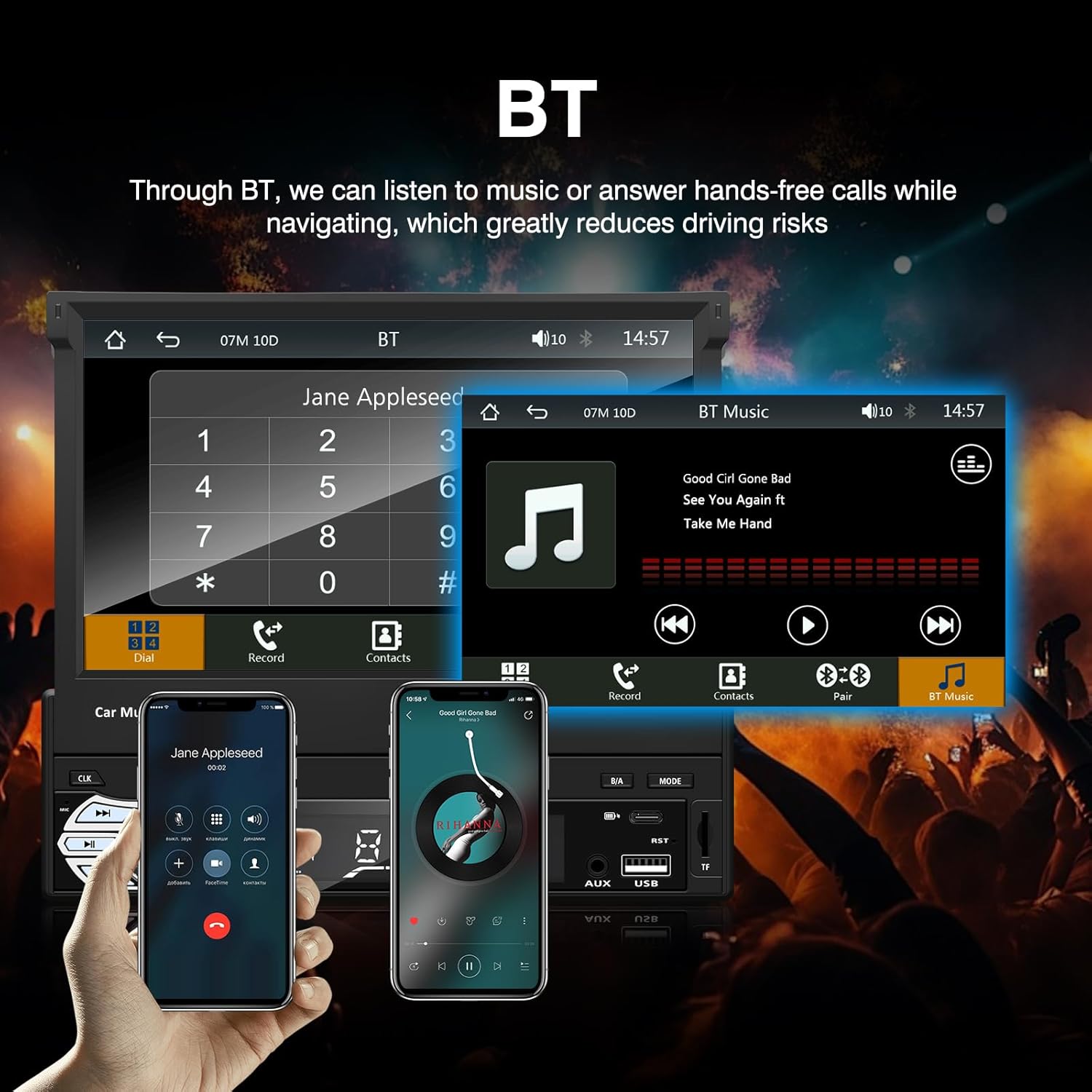
รูปที่ 3: Bluetooth interface for hands-free calls and music streaming, showing a dial pad and music controls.
- การจับคู่: เปิดใช้งานบลูทูธบนอุปกรณ์เคลื่อนที่ของคุณ ค้นหา available devices and select "Ezonetronics" or similar. Enter PIN "0000" if prompted.
- การโทรแบบแฮนด์ฟรี: Once paired, you can make and receive calls directly through the car stereo. Use the touchscreen or remote to dial, answer, or end calls.
- การสตรีมเสียง (A2DP): Play music from your paired device wirelessly. Control playback (play/pause, skip) from the car stereo or your device.
3. USB/SD Media Playback
Insert a USB drive or SD card into the respective slot. The unit will automatically switch to USB/SD mode and begin playing compatible media files.

รูปที่ 4: Icons indicating support for Bluetooth, Auxiliary input, TF (SD) Card, and USB connections for media playback.
- Supported formats include RM, RMVB, ASF, MKV, DIVX, MPEG4, AVI, VOB for video, and MP3/MP4 for audio.
- นำทางผ่านโฟลเดอร์และ files using the touchscreen interface.
4. วิทยุ FM
Access the FM radio mode to listen to local broadcasts.

รูปที่ 5: FM Radio interface with frequency display and equalizer settings for audio customization.
- สแกนอัตโนมัติ: Automatically search and save strong stations.
- การปรับด้วยตนเอง: Fine-tune frequencies using the touchscreen.
- ค่าที่ตั้งล่วงหน้า: Save your favorite stations for quick access (up to 18 preset stations).
5. Apple CarPlay / Android Auto
Connect your compatible smartphone via USB to access Apple CarPlay or Android Auto features directly on the stereo's display.

รูปที่ 6: Wired Apple CarPlay interface, displaying phone applications like navigation, music, and messages on the car stereo screen.

รูปที่ 7: Wired Android Auto interface, displaying Android applications like Google Maps, Spotify, and phone calls on the car stereo screen.
- Ensure your phone has CarPlay or Android Auto enabled.
- Use a high-quality USB cable for a stable connection.
- Access navigation, music, messages, and other compatible apps safely while driving.
6. ลิงก์มิเรอร์
Mirror Link allows you to display your smartphone's screen content directly onto the car stereo's display via a USB data cable.

รูปที่ 8: Mirror Link function demonstrating a smartphone screen being projected onto the car stereo display.
- เชื่อมต่อสมาร์ทโฟนของคุณเข้ากับพอร์ต USB โดยใช้สายเคเบิลข้อมูล
- Follow the on-screen prompts on both the stereo and your phone to establish the connection.
- Note: Functionality may vary depending on your smartphone model and operating system.
7. ด้านหลังview อินพุตกล้อง
เมื่อด้านหลังview camera is connected and the vehicle is shifted into reverse, the stereo automatically displays the camera feed.

รูปที่ 9: Reversing display showing the view จากด้านหลังview camera with parking assistance lines, providing an intuitive aid for parking.
- รับรองว่าด้านหลัง.view camera is properly installed and connected to the dedicated input.
- หน้าจอจะสลับไปที่ภาพจากกล้องโดยอัตโนมัติ view when the reverse gear is engaged.
8. การควบคุมพวงมาลัย
The unit supports connection to your vehicle's existing steering wheel controls for convenient operation. Refer to your vehicle's manual and the stereo's wiring diagram for proper connection and configuration.
การซ่อมบำรุง
- การทำความสะอาดหน้าจอ: ใช้ผ้านุ่มไม่เป็นขุยเช็ดหน้าจอสัมผัสเบาๆ อย่าใช้น้ำยาทำความสะอาดหรือตัวทำละลายที่มีฤทธิ์กัดกร่อน
- การทำความสะอาดทั่วไป: เช็ดทำความสะอาดภายนอกตัวเครื่องด้วยผ้าแห้งเนื้อนุ่ม
- หลีกเลี่ยงของเหลว: ห้ามฉีดของเหลวลงบนตัวเครื่องโดยตรง
- อุณหภูมิ: Avoid prolonged exposure to extreme heat or cold, which can affect the unit's lifespan.
การแก้ไขปัญหา
| ปัญหา | สาเหตุที่เป็นไปได้ | สารละลาย |
|---|---|---|
| เครื่องไม่เปิด | สายไฟไม่ถูกต้อง ฟิวส์ขาด ปัญหาแบตเตอรี่รถยนต์ | Check power connections (Yellow, Red, Black wires). Inspect vehicle fuses. Ensure battery is charged. |
| ไม่มีเสียง. | ระดับเสียงต่ำเกินไป; เปิดใช้งานโหมดปิดเสียง; ต่อสายลำโพงไม่ถูกต้อง | เพิ่มระดับเสียง ตรวจสอบว่าเปิดใช้งานโหมดปิดเสียงอยู่หรือไม่ ตรวจสอบการเชื่อมต่อลำโพง |
| บลูทูธไม่เชื่อมต่อ | Bluetooth not enabled on phone; Incorrect pairing process. | Ensure phone's Bluetooth is on and discoverable. Re-attempt pairing. |
| USB/SD media not playing. | ไม่ได้รับการสนับสนุน file format; Corrupted media; Drive/card not inserted correctly. | ตรวจสอบ file formats. Try a different USB drive/SD card. Ensure proper insertion. |
| หลังview กล้องไม่แสดงผล | Camera not connected; Reverse trigger wire not connected. | Verify camera video input and reverse trigger wire connection. |
If problems persist, consult a qualified technician or contact customer support.
ข้อมูลจำเพาะ
- ยี่ห้อ: EZoneTronics
- หมายเลขรุ่น: RM-CW9601
- สี: สีดำ
- หน้าจอ: 7-inch Capacitive Touchscreen, Retractable
- เทคโนโลยีการเชื่อมต่อ: Bluetooth, USB, SD, AUX, RCA
- บลูทูธ: Integrated Bluetooth 2.0 with A2DP/Hands-free
- อุปกรณ์ที่รองรับ: สมาร์ทโฟน
- โหมดเอาต์พุตเสียง: สเตอริโอ
- การรองรับการเข้ารหัสวิดีโอ: RM, RMVB, ASF, MKV, DIVX, MPEG4, AVI, VOB
- รองรับยูเอสบี/เอสดี: Up to 32GB max.
- คุณสมบัติพิเศษ: Touchscreen, Steering Wheel Control Support, Rear Camera Input, Apple CarPlay, Android Auto, Mirror Link
- ผู้ผลิต: Rhythm Electronics Limited
การรับประกันและการสนับสนุน
This product comes with a limited manufacturer's warranty.
- การรับประกันตัวเครื่องหลัก: 12 months for defective items (excluding damaged or misused items after receipt).
- อุปกรณ์เสริมการรับประกัน: 3 months for accessories.
สำหรับการเคลมประกันหรือขอรับการสนับสนุนทางเทคนิค โปรดติดต่อผู้ค้าปลีกหรือผู้ผลิตโดยตรง เก็บใบเสร็จรับเงินไว้เป็นหลักฐานการซื้อ


