
1. บทนำ
Thank you for choosing the OSD Audio PRE-1 High Definition Preamplifier. This unit is designed to enhance your audio experience by providing versatile source selection and precise audio control. The PRE-1 acts as a central hub for various audio components, including turntables, CD/DVD players, and tape decks, delivering a clean and powerful signal to your main ampชีวิต.
This manual provides detailed instructions for the proper setup, operation, and maintenance of your PRE-1 preamplifier. Please read this manual thoroughly before operating the unit to ensure optimal performance and longevity.
2. ข้อมูลด้านความปลอดภัยที่สำคัญ
- แหล่งพลังงาน: Connect the unit only to the type of power source indicated on the marking label.
- การระบายอากาศ : Ensure adequate ventilation. Do not block any ventilation openings. Install in accordance with the manufacturer’s instructions.
- น้ำและความชื้น: ห้ามใช้เครื่องมือนี้ใกล้น้ำ หรือวางไว้ในบริเวณที่มีน้ำหยดหรือกระเด็นใส่
- ความร้อน: ห้ามติดตั้งใกล้แหล่งความร้อน เช่น หม้อน้ำ เครื่องทำความร้อน เตา หรืออุปกรณ์อื่น ๆ (รวมถึง ampเครื่องให้ความร้อน) ที่ผลิตความร้อน
- การทำความสะอาด: ทำความสะอาดด้วยผ้าแห้งเท่านั้น
- การบริการ: อย่าพยายามให้บริการผลิตภัณฑ์นี้ด้วยตนเอง ส่งต่อการบริการทั้งหมดไปยังช่างบริการที่ผ่านการรับรอง
- การต่อลงดิน: หน่วยนี้จะต้องต่อลงดินอย่างถูกต้อง
3. เนื้อหาบรรจุภัณฑ์
กรุณาตรวจสอบว่ารายการต่อไปนี้รวมอยู่ในแพ็คเกจของคุณ:
- OSD Audio PRE-1 High Definition Preampชีวิต
- สายไฟ
- คู่มือการใช้งาน (เอกสารนี้)
4. สินค้าหมดview
4.1. แผงด้านหน้า
The front panel provides access to all primary controls and a microphone input for convenient use.

This image displays the front panel of the OSD Audio PRE-1 Preamplifier, including its physical dimensions for installation planning.

รายละเอียด view of the left side of the PRE-1's front panel, highlighting the Microphone Level, Bass, Midrange, and Treble adjustment knobs.

รายละเอียด view of the right side of the PRE-1's front panel, showing the Loudness, Balance, and Volume controls, along with input selection and function buttons.
- ปุ่มเปิด/ปิด: เปิดหรือปิดเครื่อง
- อินพุตไมโครโฟน: แจ็คขนาด 1/4 นิ้ว สำหรับเชื่อมต่อไมโครโฟน
- ระดับไมค์: ปรับระดับเสียงอินพุตไมโครโฟน
- การควบคุมเสียงเบส: ปรับเอาท์พุตความถี่ต่ำ
- การควบคุมระยะกลาง: Adjusts the mid-range frequency output.
- การควบคุมเสียงแหลม: ปรับเอาท์พุตความถี่สูง
- ดัง: Engages or disengages a loudness contour for enhanced bass and treble at low volumes.
- สมดุล: ปรับสมดุลช่องสัญญาณซ้าย/ขวา
- ปริมาณ: Master volume control for all outputs.
- เลือกอินพุต: Rotary knob to choose between Phono, AUX1, AUX2, and CD/DVD inputs.
- Tape Button: Activates the Tape Monitor loop.
- ปุ่มโมโน: Combines stereo signals into a monaural output.
- ตัวกรองต่ำ: Engages a low-frequency cut-off filter.
- ปิดเสียง: Silences all audio output.
4.2. แผงด้านหลัง
The rear panel houses all the necessary input and output connections for your audio system.
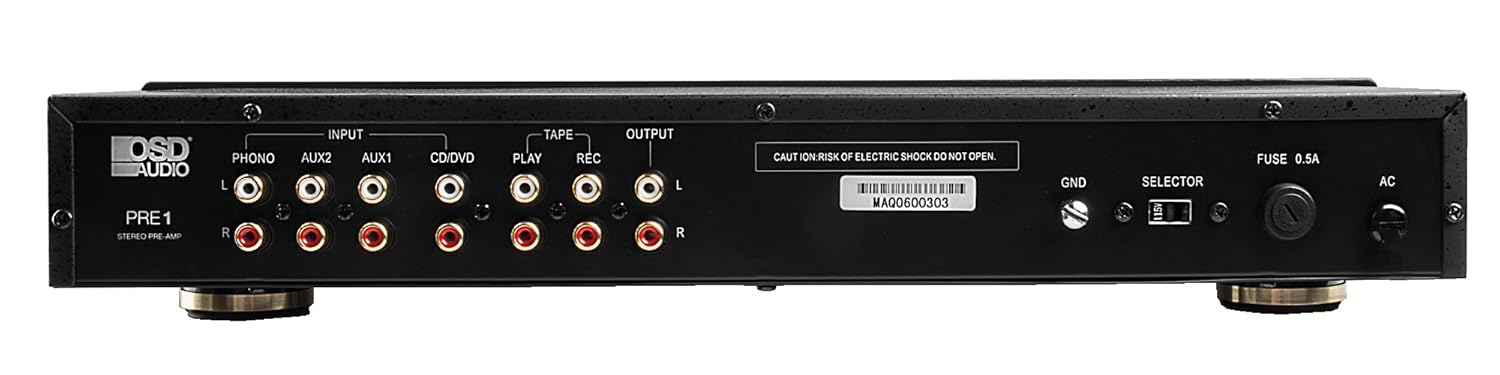
The rear panel of the PRE-1 Preamplifier, showing all input and output connections for various audio devices.
- Phono Input (L/R): RCA inputs for connecting a turntable. Includes a ground terminal.
- AUX1 Input (L/R): RCA inputs for general auxiliary devices.
- AUX2 Input (L/R): RCA inputs for a second auxiliary device.
- CD/DVD Input (L/R): RCA inputs for CD or DVD players.
- Tape Play (L/R): RCA inputs for the playback output of a tape deck or other recording device.
- Tape Rec (L/R): RCA outputs for connecting to the recording input of a tape deck or other recording device.
- เอาต์พุต (ซ้าย/ขวา): RCA outputs to connect to your main power ampชีวิต.
- ขั้วต่อกราวด์ (GND): Connects to the ground wire of your turntable to reduce hum.
- สวิตช์เลือก: For internal configuration (typically left in default position unless specified).
- ฟิวส์: เปลี่ยนเฉพาะฟิวส์ชนิดและพิกัดที่ระบุไว้เท่านั้น
- อินพุตไฟ AC: Connects to the supplied power cable.
5. การตั้งค่าและการเชื่อมต่อ
Follow these steps to properly set up your OSD Audio PRE-1 Preampเครื่องฟอก:
- การจัดวาง: Place the PRE-1 on a stable, flat surface, ensuring adequate ventilation around the unit. Avoid placing it near heat sources or in direct sunlight.
- หมดแรง: Ensure all audio components, including the PRE-1 and your main amplifier, are turned off before making any connections.
- เชื่อมต่อแหล่งที่มา:
- เครื่องเล่นแผ่นเสียง: Connect the RCA cables from your turntable to the Phono Input (L/R) on the PRE-1. Connect the turntable's ground wire to the ก.ย.ด. terminal on the PRE-1.
- เครื่องเล่นซีดี/ดีวีดี: Connect the RCA cables from your CD/DVD player to the CD/DVD Input (L/R).
- Other Devices (e.g., Streamer, Tuner): Connect RCA cables from these devices to the AUX1 Input (L/R) or AUX2 Input (L/R).
- เทปคาสเซ็ท: Connect the playback outputs of your tape deck to the Tape Play (L/R) inputs. Connect the recording inputs of your tape deck to the Tape Rec (L/R) เอาท์พุต
- เชื่อมต่อกับ Ampเครื่องฟอก: เชื่อมต่อ Output (L/R) RCA jacks on the PRE-1 to the input jacks of your main power ampชีวิต.
- การเชื่อมต่อไฟฟ้า: เชื่อมต่อสายไฟที่ให้มาเข้ากับ อินพุตไฟ AC on the rear panel of the PRE-1, then plug it into a suitable wall outlet.
- เปิดเครื่องครั้งแรก: Turn on your main power amplifier first, then turn on the PRE-1. When powering off, turn off the PRE-1 first, then your main ampชีวิต.
6. คู่มือการใช้งาน
Once your PRE-1 is connected, follow these steps for basic operation:
- เลือกอินพุต: ใช้ เลือกอินพุต rotary knob on the front panel to choose the desired audio source (Phono, AUX1, AUX2, CD/DVD).
- ปรับระดับเสียง: เริ่มต้นด้วยการ ปริมาณ knob at its minimum setting. Begin playing your selected audio source and slowly increase the volume to a comfortable listening level.
- การควบคุมโทนเสียง: ใช้ เบส, กลาง, และ เสียงแหลม knobs to adjust the tonal characteristics of your audio. Turn clockwise to increase, counter-clockwise to decrease.
- การควบคุมสมดุล: ปรับแต่ง สมดุล knob to fine-tune the left and right channel output for optimal stereo imaging.
- ดัง: กดปุ่ม ความดัง button to activate a contour that boosts bass and treble frequencies, which can be beneficial at lower listening volumes. Press again to deactivate.
- ตัวกรองต่ำ: กดปุ่ม ตัวกรองต่ำ button to engage a filter that reduces very low frequencies. This can help eliminate rumble from turntables or other unwanted low-frequency noise. Press again to deactivate.
- โมโน: กดปุ่ม โมโน button to combine the left and right stereo channels into a single monaural signal. This is useful for playing mono recordings. Press again for stereo.
- ปิดเสียง: กดปุ่ม ปิดเสียง button to instantly silence the audio output. Press again to restore sound.
- การใช้ไมโครโฟน: Plug a microphone into the อินพุตไมโครโฟน. Adjust the microphone's volume using the ระดับไมค์ ลูกบิด
- Tape Monitoring/Recording: If you have a tape deck connected, select the appropriate input for playback. To record, ensure your tape deck is set to record and the PRE-1 is passing the desired source through the Tape Rec outputs.
7. การบำรุงรักษา
Proper care and maintenance will ensure the longevity and optimal performance of your PRE-1 Preampชีวิต.
- การทำความสะอาด: Use a soft, dry cloth to clean the exterior of the unit. Do not use liquid cleaners, aerosols, or harsh chemicals, as they may damage the finish or internal components.
- การระบายอากาศ : Periodically check that the ventilation openings are free from dust and obstructions.
- การเชื่อมต่อ: Occasionally check all cable connections to ensure they are secure. Loose connections can lead to signal loss or interference.
- พื้นที่จัดเก็บ: หากต้องเก็บรักษาเครื่องไว้เป็นเวลานาน ควรตัดการเชื่อมต่อจากปลั๊กไฟและเก็บไว้ในที่แห้งและเย็น หลีกเลี่ยงแสงแดดโดยตรงและอุณหภูมิที่สูงหรือต่ำเกินไป
8 การแก้ไขปัญหา
If you experience issues with your OSD Audio PRE-1, refer to the following common problems and solutions:
| ปัญหา | สาเหตุที่เป็นไปได้ | สารละลาย |
|---|---|---|
| ไม่มีไฟฟ้า | Power cable not connected; Power outlet not active; Blown fuse | Ensure power cable is securely connected. Test the outlet with another device. Check and replace the fuse if necessary (refer to specifications for fuse type). |
| ไม่มีเสียงออก | Incorrect input selected; Volume too low; Mute engaged; Loose audio cables; Main amplifier off or incorrect input selected | Select the correct input source. Increase the volume. Disengage Mute. Check all RCA cable connections. Ensure your main amplifier is on and set to the correct input. |
| เสียงเพี้ยน | Volume too high (clipping); Incorrect tone control settings; Faulty cables | Reduce the volume. Adjust Bass, Mid, and Treble controls to neutral or desired settings. Try replacing audio cables. |
| เสียงฮัมหรือเสียงหวีด | Ground loop; Loose ground wire (Phono); Interference from other electronics | Ensure turntable ground wire is connected to the PRE-1's GND terminal. Try moving the PRE-1 or other audio components away from power cables or other electronic devices. Use a ground loop isolator if necessary. |
| ไมโครโฟนไม่ทำงาน | Mic not connected; Mic Level too low; Faulty microphone | Ensure microphone is securely plugged into the Mic Input. Increase the Mic Level. Test with another microphone if available. |
9. ข้อมูลจำเพาะ
Below are the technical specifications for the OSD Audio PRE-1 Preampเครื่องฟอก:
| คุณสมบัติ | ข้อมูลจำเพาะ |
|---|---|
| แบบอย่าง | พรี-1 |
| ยี่ห้อ | OSD ออดิโอ |
| จำนวนช่องสัญญาณ | 2 |
| ประเภทการติดตั้ง | การติดตั้งบนพื้นผิว |
| ยูพีซี | 819603012446 |
| ASIN | B01MPYJLPX |
| ผู้ผลิต | OSD ออดิโอ |
10. การรับประกันและการสนับสนุน
OSD Audio products are designed for reliability and performance. For specific warranty details and terms, please refer to the warranty card included with your product or visit the official OSD Audio website. If you require technical assistance or have questions not covered in this manual, please contact OSD Audio customer support.
OSD Audio Customer Support: Please visit the OSD Audio webไซต์สำหรับข้อมูลติดต่อและทรัพยากรการสนับสนุน