
การแนะนำ
The Saramonic SR-TM7 is a professional super-cardioid broadcast shotgun condenser microphone designed to deliver clear, broadcast-quality audio. It is suitable for use with video cameras, audio recorders, and DSLR/mirrorless cameras equipped with XLR adapters. Its long-shotgun design is optimized for capturing sound from a distance. This manual provides detailed instructions for the proper use and maintenance of your SR-TM7 microphone.
ข้อมูลด้านความปลอดภัย
- Do not expose the microphone to water or excessive humidity.
- ควรหลีกเลี่ยงการทำไมโครโฟนตกหรือกระแทกอย่างรุนแรง
- ห้ามถอดประกอบหรือดัดแปลงไมโครโฟน
- เก็บไมโครโฟนให้ห่างจากสนามแม่เหล็กแรงสูง
- Use only the specified charging cable for the built-in battery.
เนื้อหาแพ็คเกจ
ตรวจสอบว่ามีรายการทั้งหมดอยู่ในแพ็คเกจของคุณ:
- Saramonic SR-TM7 Microphone
- สายไมโคร USB
- Mic Clip with Camera Shoe Mount
- โฟมกระจกบังลม
- สายเคเบิล XLR
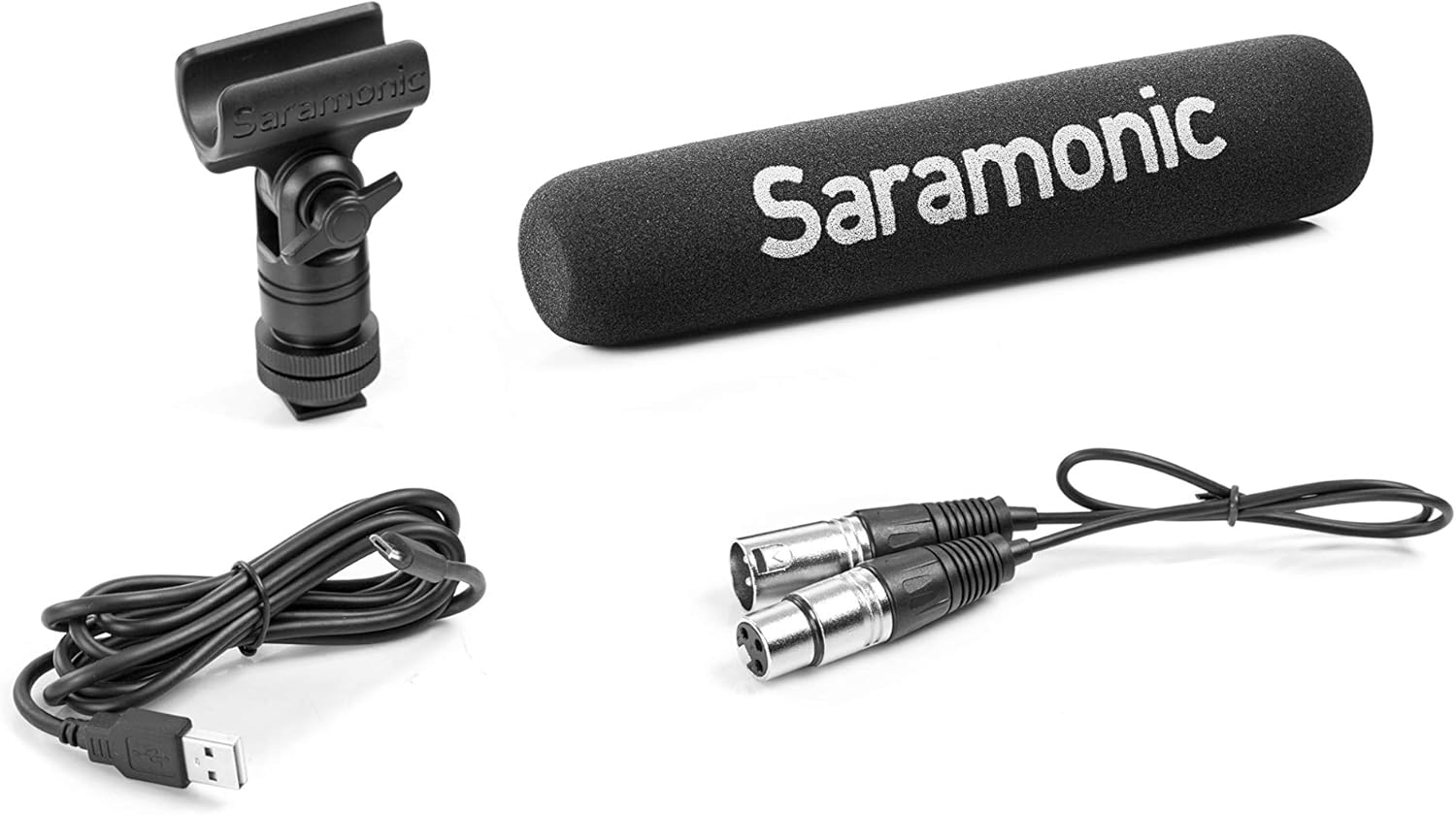
Image: Saramonic SR-TM7 microphone with its accessories, including an XLR cable, a Micro USB charging cable, a mic clip, and a foam windscreen.
สินค้าเกินview
The SR-TM7 features several controls and indicators for optimal audio capture.

Image: Saramonic SR-TM7 microphone with foam windscreen. The image highlights the control panel with buttons for high-pass filter, PAD, high frequency boost, and power.
- แคปซูลไมโครโฟน: The primary sound capture component.
- Digital High-Pass Filter (75Hz/150Hz): Reduces low-frequency noise.
- -10dB PAD Switch: Attenuates input signal for loud sound sources.
- +6dB High Frequency Boost Switch: Enhances clarity and sharpness of audio.
- ปุ่มเปิด/ปิด: เปิดและปิดใช้งานไมโครโฟน
- เอาต์พุต XLR: Standard 3-pin XLR connector for audio output.
- พอร์ตชาร์จ Micro-USB: สำหรับชาร์จแบตเตอรี่ภายใน
การตั้งค่า
- ติดตั้งคลิปหนีบไมโครโฟน: Secure the SR-TM7 microphone into the provided mic clip. The mic clip can then be mounted onto a camera shoe mount or other compatible stand.
- เชื่อมต่อสาย XLR: Connect one end of the supplied XLR cable to the microphone's XLR output and the other end to your camera, audio recorder, or XLR adapter.
- ใช้โฟมกันลม: For indoor use or light wind conditions, slide the foam windscreen over the microphone capsule to reduce plosives and minor wind noise. For outdoor use in windy conditions, a high-wind furry windscreen (e.g., TM-WS7, sold separately) is recommended.
- เปิดเครื่อง: Press the ON/OFF power button to activate the microphone. The button will illuminate to indicate power status and battery level.

Image: The Saramonic SR-TM7 microphone integrated into a camera setup, demonstrating its typical use for video production.
การใช้งานไมโครโฟน
การจ่ายไฟให้กับไมโครโฟน
The SR-TM7 can be powered by its internal rechargeable lithium battery or by 48V phantom power from your connected device. The power button's illumination indicates the power source and battery life.
- แบตเตอรี่ภายใน: Provides up to 150 hours of operation.
- พลังปีศาจ: If connected to a device supplying 48V phantom power, the microphone will automatically draw power from it.
การใช้ปุ่มควบคุม
The SR-TM7 features five illuminated buttons for easy adjustment, even in low-light conditions. The microphone digitally controls the on-board filters and saves your settings when powered off.
- -10dB แผ่น: Press this button to reduce the input sensitivity by 10dB. This is useful when recording very loud sound sources to prevent distortion.
- +6dB High Frequency Boost: Activate this feature to enhance the sharpness and clarity of the audio, particularly useful for dialogue.
- Low-Cut Filters (75Hz and 150Hz): Two separate buttons allow you to engage a low-cut filter at either 75Hz or 150Hz. These filters help to eliminate distracting low-frequency noises such as rumble from vehicles, air conditioners, or footsteps, making dialogue more intelligible.
แบตเตอรี่และการชาร์จ
The SR-TM7 is equipped with a built-in lithium battery. The Micro-USB charging port is integrated into the XLR connector for convenience.
- การชาร์จ: Connect the supplied Micro-USB cable to the charging port on the microphone and to a standard USB power source (e.g., computer USB port, USB wall adapter).
- ไฟแสดงสถานะการชาร์จ: The power button's color will change to indicate charging status and battery life. Refer to the microphone's specific LED indicators for detailed status.
- อายุการใช้งานแบตเตอรี่: การชาร์จเต็มหนึ่งครั้งสามารถใช้งานได้ต่อเนื่องประมาณ 150 ชั่วโมง
การซ่อมบำรุง
- การทำความสะอาด: ใช้ผ้านุ่มและแห้งเช็ดทำความสะอาดตัวไมโครโฟน ห้ามใช้น้ำยาทำความสะอาดหรือตัวทำละลาย
- พื้นที่จัดเก็บ: เมื่อไม่ใช้งาน ควรเก็บไมโครโฟนไว้ในที่แห้งและปราศจากฝุ่น โดยควรเก็บไว้ในบรรจุภัณฑ์เดิมหรือกล่องป้องกัน
- การดูแลแบตเตอรี่ For long-term storage, ensure the battery is partially charged (around 50%) to prolong its lifespan. Avoid fully discharging the battery for extended periods.
การแก้ไขปัญหา
| ปัญหา | สาเหตุที่เป็นไปได้ | สารละลาย |
|---|---|---|
| ไม่มีเสียงออก | Microphone not powered on; XLR cable not connected properly; Low battery; Phantom power not enabled on recording device. | Ensure microphone is powered on; Check XLR cable connections; Charge the battery; Enable 48V phantom power on your recording device if using. |
| เสียงบิดเบี้ยว | Input signal too high (clipping); Microphone too close to sound source. | Activate the -10dB PAD switch; Increase distance from sound source; Adjust input gain on your recording device. |
| Excessive low-frequency noise | Environmental rumble; Proximity effect. | Engage the 75Hz or 150Hz low-cut filter; Move microphone away from noise sources. |
ข้อมูลจำเพาะ
- ฟอร์มแฟคเตอร์ของไมโครโฟน: ปืนลูกซอง
- รูปแบบขั้ว: ซุปเปอร์คาร์ดิออยด์
- การตอบสนองความถี่: 20 เฮิรตซ์ - 20 กิโลเฮิรตซ์
- อัตราส่วนสัญญาณต่อเสียงรบกวน: 80 เดซิเบล
- ความไวต่อเสียง: 10 เดซิเบล
- แหล่งพลังงาน: Built-in Lithium Ion Battery / 48V Phantom Power
- อายุการใช้งานแบตเตอรี่: Approximately 150 hours (internal battery)
- ประเภทตัวเชื่อมต่อ: XLR, Micro USB (for charging)
- ขนาด (ยาว x กว้าง x สูง): 17.72 x 3.35 x 6.89 นิ้ว (ขนาดสินค้า)
- น้ำหนักสินค้า: 8.1 ออนซ์ (0.23 กิโลกรัม)
- วัสดุ: Durable Metal Construction (body), Foam (windscreen)
- ส่วนประกอบที่รวมอยู่: Micro USB cable, Mic Clip, Foam windshield, XLR cable
การรับประกันและการสนับสนุน
For warranty information and technical support, please refer to the official Saramonic webหรือติดต่อตัวแทนจำหน่ายในพื้นที่ของคุณ เก็บหลักฐานการซื้อไว้เพื่อใช้ในการเคลมประกัน
Saramonic Official Webเว็บไซต์: www.saramonic.com