
1. บทนำ
Thank you for choosing the LANGRIA Ergonomic Gaming Chair. This manual provides essential information for the safe assembly, operation, and maintenance of your new chair. Please read these instructions carefully before assembly and retain them for future reference.
ข้อมูลด้านความปลอดภัย
- Ensure all components are present and undamaged before beginning assembly. Do not use if any parts are missing or damaged.
- ประกอบเก้าอี้บนพื้นผิวที่นุ่มและสะอาดเพื่อป้องกันรอยขีดข่วน
- Do not overtighten screws during assembly, as this may damage the components.
- กันเด็กและสัตว์เลี้ยงออกจากพื้นที่ชุมนุม
- เก้าอี้ตัวนี้รับน้ำหนักได้สูงสุด 120 กิโลกรัม (265 ปอนด์) ห้ามใช้น้ำหนักเกินขีดจำกัดนี้
- โปรดใช้เก้าอี้ตามวัตถุประสงค์ที่กำหนดไว้เท่านั้น
2. เนื้อหาบรรจุภัณฑ์
โปรดตรวจสอบว่าแพ็คเกจของคุณมีส่วนประกอบทั้งหมดดังต่อไปนี้:
- พนักพิง
- ฐานที่นั่ง
- ที่วางแขน (2)
- ฐานดาว
- ลูกล้อ (5)
- กระบอกยกแก๊ส
- ฝาครอบลิฟท์แก๊ส
- แผ่นกลไก
- เบาะรองหลัง
- เบาะรองศีรษะ
- ที่วางเท้าแบบยืดหดได้
- ชุดอุปกรณ์ฮาร์ดแวร์ (สกรู แหวนรอง ประแจหกเหลี่ยม)

ภาพ: เหนือview of the LANGRIA Gaming Chair components.
3. การติดตั้งและการประกอบ
Follow these steps to assemble your LANGRIA Gaming Chair:
- ติดตั้งล้อเลื่อนเข้ากับฐานดาว: Insert each caster into the holes at the end of the star base until they click securely into place.
- ติดตั้งลิฟท์แก๊ส : วางกระบอกไฮดรอลิกสำหรับยกแก๊สลงในรูตรงกลางของฐานรูปดาว จากนั้นปิดด้วยฝาครอบกระบอกไฮดรอลิก
- ติดแผ่นกลไกเข้ากับที่นั่ง: Align the mechanism plate with the screw holes on the underside of the seat base. Secure it with the provided screws and washers. Ensure the recline lever is on the right side when seated.
- ติดตั้งที่วางแขนเข้ากับที่นั่ง: Secure the armrests to the seat base using the designated screws. Ensure they are firmly attached.
- เชื่อมต่อพนักพิงเข้ากับที่นั่ง: Align the backrest with the brackets on the seat base and armrests. Secure it using the remaining screws.
- ติดตั้งชุดเบาะนั่งเข้ากับระบบยกด้วยแก๊ส: Carefully place the assembled seat onto the gas lift cylinder, ensuring it is centered and stable.
- Attach Lumbar and Headrest Cushions: Secure the lumbar and headrest cushions using their integrated straps.
- ติดตั้งที่วางเท้า: Slide the retractable footrest into its designated slots under the seat.
After assembly, test all functions to ensure proper operation and stability.
4. คู่มือการใช้งาน
Your LANGRIA Gaming Chair offers several adjustable features for personalized comfort:
การปรับความสูง
To adjust the chair's height, pull the lever located on the right side of the seat (when seated) upwards. To raise the chair, lift the lever while taking your weight off the seat. To lower the chair, lift the lever while remaining seated.
Back Angle Adjustment (Recline)
To recline the backrest, pull the lever on the right side of the chair (separate from the height adjustment lever) upwards. Lean back to your desired angle (from 90° to 175°). Release the lever to lock the backrest in position. To return to an upright position, pull the lever and lean forward slightly.

Image: Illustration of the back angle adjustment lever and recline range (90° to 175°).
ปรับที่วางแขน
The armrests are adjustable. Depending on the model, they may feature height adjustment or pivot functionality. Refer to the specific mechanism on your armrests to adjust them to a comfortable position.
ที่วางเท้าแบบยืดหดได้
To use the footrest, pull it out from underneath the seat. You can then flip it over for comfortable leg support when reclining. To store, flip it back and slide it under the seat.
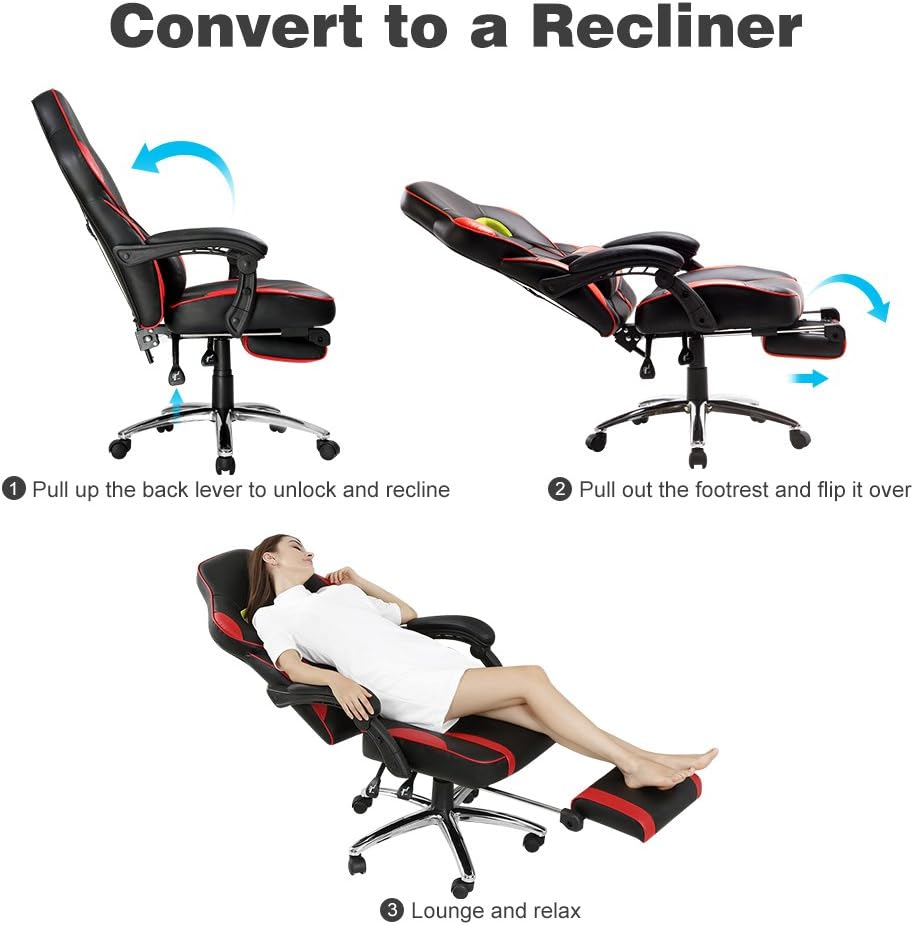
Image: Steps to convert the chair into a recliner by pulling the back lever, extending the footrest, and lounging.
Lumbar and Headrest Cushions
The lumbar and headrest cushions are designed for additional support. Adjust their position along the backrest using their straps to find your optimal comfort and ergonomic alignment.

Image: Details of ergonomic support including soft padded headrest, adjustable armrests, and height-adjustable lumbar support.
5. การบำรุงรักษา
Proper maintenance will extend the life and appearance of your LANGRIA Gaming Chair:
- Cleaning the Synthetic Leather: Wipe the synthetic leather surfaces with a soft, damp cloth. For stubborn stains, use a mild soap solution and then wipe with a clean, damp ผ้า หลีกเลี่ยงสารเคมีรุนแรงหรือน้ำยาทำความสะอาดที่มีฤทธิ์กัดกร่อน
- Checking Fasteners: Periodically check all screws and bolts to ensure they are tight. Retighten if necessary to maintain stability and prevent squeaking.
- การดูแลผู้ฝึกสอน: Clean any dust or debris from the casters regularly to ensure smooth movement.
- หลีกเลี่ยงแสงแดดโดยตรง: Prolonged exposure to direct sunlight can cause the synthetic leather to fade or crack.
6 การแก้ไขปัญหา
หากคุณพบปัญหาใดๆ เกี่ยวกับเก้าอี้ของคุณ โปรดดูปัญหาทั่วไปและวิธีแก้ไขต่อไปนี้:
- เสียงเก้าอี้ดังเอี๊ยดอ๊าด: Check all screws and bolts and tighten them. A small amount of silicone lubricant can be applied to moving parts if the squeaking persists.
- เก้าอี้ปรับความสูงไม่ได้: ตรวจสอบให้แน่ใจว่าคันโยกยกแก๊สเข้าที่จนสุดแล้ว หากระบบยกแก๊สมีปัญหา อาจจำเป็นต้องเปลี่ยนใหม่
- เก้าอี้รู้สึกไม่มั่นคง: Verify that all casters are securely inserted into the star base and all screws are tightened. Ensure the chair is on a flat, even surface.
- Footrest Does Not Slide Smoothly: Check for any obstructions in the footrest rails. Clean the rails if necessary.
หากวิธีการเหล่านี้ไม่สามารถแก้ไขปัญหาได้ โปรดติดต่อฝ่ายบริการลูกค้า
7. ข้อมูลจำเพาะ
| คุณสมบัติ | รายละเอียด |
|---|---|
| แบบอย่าง | FUAINLOR-YKUK-F4 |
| วัสดุ | Synthetic Leather (PU), Plastic Frame |
| สี | สีแดงและสีดำ |
| ขนาดรวม (ลึก x กว้าง x สูง) | 68 ซม. x 56 ซม. x 114-123.5 ซม. (26.8 นิ้ว x 22 นิ้ว x 44.9-48.6 นิ้ว) |
| ความกว้างที่นั่ง | 56 ซม. (22 นิ้ว) |
| ความจุน้ำหนัก | 120 กก. (265 ปอนด์) |
| น้ำหนักผลิตภัณฑ์ | 19.5 กก. (42.99 ปอนด์) |
| มุมเอน | 90° ถึง 175° |
| คุณสมบัติพิเศษ | Adjustable Height, Recline, Armrests, Lumbar Support, Retractable Footrest |
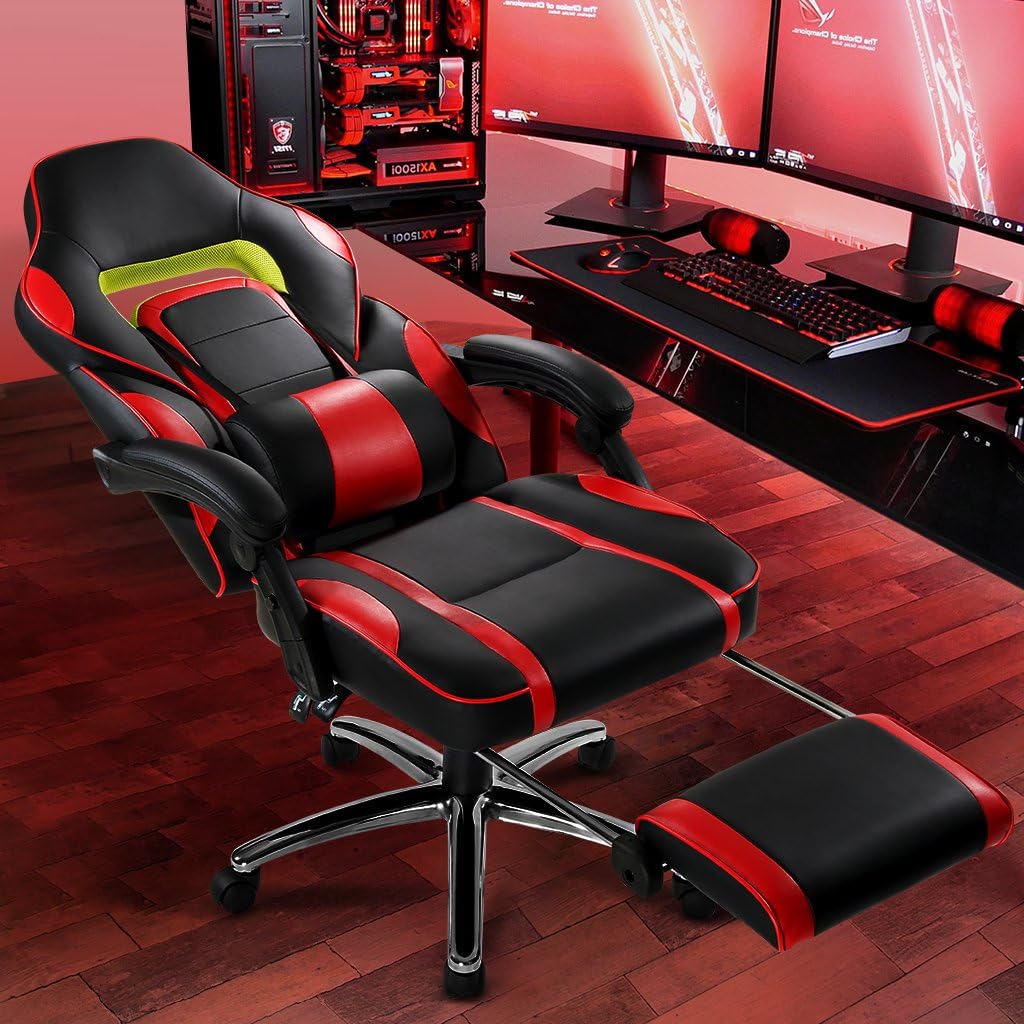
Image: Detailed product dimensions including height, width, and depth.
8. การรับประกันและการสนับสนุน
LANGRIA products are manufactured to high-quality standards. For information regarding warranty coverage, please refer to the warranty card included with your purchase or visit the official LANGRIA website. If you require technical assistance, replacement parts, or have any questions not covered in this manual, please contact LANGRIA customer support.
Please have your model number (FUAINLOR-YKUK-F4) and purchase date available when contacting support.