
การแนะนำ
This manual provides essential instructions for setting up, operating, and maintaining your Coolpad Note 3 smartphone. Please read this guide thoroughly to ensure proper use and to maximize the features of your device.
ข้อมูลด้านความปลอดภัย
Warning: Keep away from children.
Always handle your device with care. Avoid exposure to extreme temperatures, direct sunlight, and liquids. Do not attempt to disassemble or repair the device yourself, as this will void the warranty and may cause damage or injury.
เนื้อหาแพ็คเกจ
ตรวจสอบว่าแพ็คเกจของคุณมีรายการต่อไปนี้:
- Coolpad Note 3 Handset
- ชุดหูฟัง
- เครื่องชาร์จ
- สาย USB
- ฟิล์มกันรอย
- คู่มือการใช้งาน (เอกสารนี้)
- บัตรรับประกัน
การตั้งค่า
1. การใส่ซิมการ์ดและการ์ด MicroSD
The Coolpad Note 3 supports dual SIM cards (4G+2G) and a MicroSD card for expandable storage up to 64GB. Ensure the device is powered off before inserting or removing cards.
- หาช่องใส่ซิมการ์ด/ไมโครการ์ดที่ด้านข้างของอุปกรณ์
- ใช้เครื่องมือถอดซิมที่ให้มาเพื่อเปิดถาด
- Place your SIM cards into the designated slots. Ensure the gold contacts face downwards.
- Insert your MicroSD card into its slot. For 64GB cards, ensure it is formatted to FAT32 for compatibility.
- ดันถาดกลับเข้าไปในอุปกรณ์อย่างระมัดระวังจนกระทั่งคลิกเข้าที่
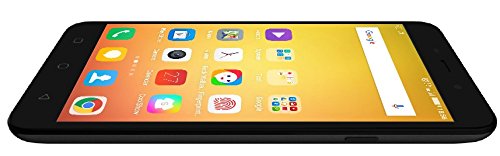
ภาพ: ด้านข้าง view of the Coolpad Note 3, illustrating the location of the SIM/MicroSD card tray and physical buttons.
2. ตัวช่วยเปิดเครื่องและการตั้งค่าเบื้องต้น
- Press and hold the Power button until the Coolpad logo appears.
- ปฏิบัติตามคำแนะนำบนหน้าจอเพื่อเลือกภาษา เชื่อมต่อกับ Wi-Fi และตั้งค่าบัญชี Google ของคุณ
3. การตั้งค่าเซ็นเซอร์ลายนิ้วมือ
The Coolpad Note 3 features a fingerprint sensor for enhanced security and quick access.
- นำทางไปที่ การตั้งค่า > ความปลอดภัย > ลายนิ้วมือ.
- Follow the prompts to register your fingerprints. You can register multiple fingers.
- Optionally, customize fingerprints to launch specific applications directly.
คำแนะนำการใช้งาน
1. การนำทางพื้นฐาน
Your Coolpad Note 3 runs on Android v5.1 Lollipop with the COOLUI 6.0 interface. Use the touchscreen for navigation, tapping icons to open apps, swiping to scroll, and pinching to zoom.

ภาพ: ด้านหน้า view of the Coolpad Note 3, showing the vibrant home screen with various application icons.
2. การใช้กล้อง
อุปกรณ์นี้มีกล้องหลังความละเอียด 13 ล้านพิกเซล และกล้องหน้าความละเอียด 5 ล้านพิกเซล
- เปิด กล้อง แอปพลิเคชัน.
- แตะที่หน้าจอเพื่อโฟกัส
- Press the shutter button to take a photo or start/stop video recording.
- สลับระหว่างกล้องด้านหน้าและด้านหลังโดยใช้ไอคอนสลับกล้อง
- Explore various shooting modes available in the camera app.
3. Fingerprint Sensor for Unlocking
To unlock your phone, simply place your registered finger on the fingerprint sensor. The device unlocks in approximately 0.5 seconds. The sensor is designed to detect both dry and wet fingers accurately.
4. การเชื่อมต่อ
- ไวไฟ : ไปที่ การตั้งค่า > ไวไฟ เพื่อเชื่อมต่อกับเครือข่ายที่มีอยู่
- ข้อมูลมือถือ: ตรวจสอบให้แน่ใจว่าซิมการ์ดของคุณเปิดใช้งานอยู่และเปิดใช้งานข้อมูลมือถือแล้ว การตั้งค่า > การใช้งานข้อมูล.
- บลูทูธ: เชื่อมต่อกับอุปกรณ์อื่นๆ ผ่านทาง การตั้งค่า > บลูทูธ.
- ยูเอสบี ออโตจี: The Micro USB port supports On-The-Go (OTG) functionality for connecting external USB devices (e.g., flash drives) with an adapter.
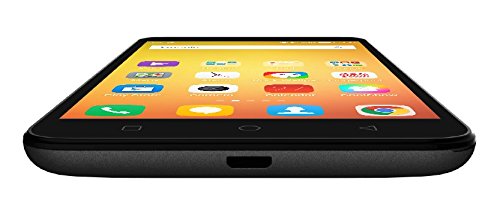
ภาพ: ด้านล่าง view of the Coolpad Note 3, highlighting the Micro USB port for charging and data transfer.
การซ่อมบำรุง
1. การชาร์จแบตเตอรี่
Use the provided charger and USB cable to charge your Coolpad Note 3. Connect the USB cable to the phone's Micro USB port and the charger to a power outlet. A full charge typically takes approximately 2 hours.
2. การอัปเดตซอฟต์แวร์
Regularly check for software updates to ensure optimal performance and access to the latest features and security patches. Go to การตั้งค่า > เกี่ยวกับโทรศัพท์ > การอัพเดทระบบ.
3. การทำความสะอาดอุปกรณ์ของคุณ
ใช้ผ้านุ่มไม่เป็นขุยทำความสะอาดหน้าจอและตัวเครื่องโทรศัพท์ หลีกเลี่ยงการใช้สารเคมีรุนแรงหรือวัสดุที่มีฤทธิ์กัดกร่อน
4. การป้องกันหน้าจอ
While the device features a durable display, it is recommended to use a tempered glass screen protector and a protective case to prevent scratches and damage from accidental drops.
การแก้ไขปัญหา
- Device is heating: It is normal for smartphones to generate some heat during intensive use (e.g., gaming, prolonged video playback). If excessive heating occurs, close background applications and allow the device to cool. Software updates often address heating optimizations.
- คุณภาพกล้องไม่ดี: Ensure good lighting conditions. For potentially improved results, consider using third-party camera applications available on the Google Play Store.
- Network connectivity issues (international travel): The Coolpad Note 3's 3G/4G bands may not be compatible with all international carriers. Verify network compatibility with your service provider before traveling.
- ประสิทธิภาพการทำงานช้า/มีอาการกระตุก: Close unused applications, clear cache, and restart the device. Ensure sufficient free storage space.
ข้อมูลจำเพาะ
| ยี่ห้อ | คูลแพด |
| แบบอย่าง | หมายเหตุ 3 |
| ระบบปฏิบัติการ | Android v5.1 Lollipop |
| โปรเซสเซอร์ | 1.3GHz Cortex-A53 MT6753 Mediatek Octacore |
| แรม | 3GB |
| การจัดเก็บข้อมูลภายใน | 16GB (expandable up to 64GB via MicroSD) |
| ขนาดจอแสดงผล | 5.5นิ้ว (13.97ซม.) |
| ความละเอียดการแสดงผล | 1280 x 720 พิกเซล (HD) |
| กล้องหลัง | 13MP |
| กล้องหน้า | 5MP |
| ความจุของแบตเตอรี่ | ลิเธียมไอออน 3000mAh |
| เวลาสนทนา | นานถึง 15 ชั่วโมง |
| เวลาสแตนด์บาย | นานถึง 400 ชั่วโมง |
| การรองรับซิม | Dual SIM (4G+2G) |
| การรักษาความปลอดภัยด้วยไบโอเมตริกซ์ | การจดจำลายนิ้วมือ |
| เซ็นเซอร์ | G sensor, Proximity sensor, Light sensor, Gyro sensor, eCompass, Fingerprint sensor |
| ขนาด (กว้าง x ยาว x สูง) | 15.2 x 7.7 x 0.9 ซม. |
| น้ำหนัก | 150 กรัม |
ข้อมูลการรับประกัน
Your Coolpad Note 3 comes with a manufacturer's warranty:
- อุปกรณ์: การรับประกันจากผู้ผลิต 1 ปีนับจากวันที่ซื้อ
- In-box Accessories: 6 months manufacturer warranty for accessories including batteries, from the date of purchase.
Please retain your purchase receipt and warranty card for future reference.
สนับสนุน
For further assistance, technical support, or service inquiries, please refer to the official Coolpad support channels. Coolpad has partnered with HCL for service in some regions.
Visit the official Coolpad webเว็บไซต์นี้มีข้อมูลการสนับสนุนล่าสุดและรายละเอียดการติดต่อ