
1. บทนำ
This manual provides essential instructions for the proper setup, operation, and maintenance of your SentrySafe Executive Security Safe, Model PLX510487. This safe is designed to protect your valuables with an electronic lock and pry-resistant steel construction. Please read this manual thoroughly before using your safe to ensure optimal performance and security.
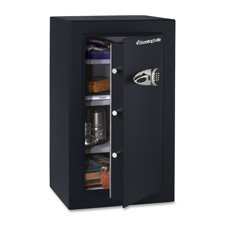
Figure 1: SentrySafe Executive Security Safe (Model PLX510487)
2. ข้อมูลด้านความปลอดภัย
- Do not store safe keys inside the safe. Always keep override keys in a secure location away from the safe.
- ตรวจสอบให้แน่ใจว่าได้ติดตั้งตู้เซฟอย่างแน่นหนาเพื่อป้องกันการถอดออกโดยไม่ได้รับอนุญาต
- Keep the electronic keypad dry and clean.
- This safe is not water resistant. Do not expose it to water or high humidity.
- Keep children away from the safe and do not allow them to operate the electronic lock.
3. เนื้อหาบรรจุภัณฑ์
ตรวจสอบว่ามีส่วนประกอบทั้งหมดอยู่ในแพ็คเกจ:
- SentrySafe Executive Security Safe (PLX510487)
- ปุ่มแทนที่ (2)
- Mounting Bolts (for wall mounting)
- คู่มือการใช้งาน (เอกสารนี้)
4. การตั้งค่า
4.1 การแกะกล่อง
- นำตู้เซฟออกจากบรรจุภัณฑ์อย่างระมัดระวัง
- Inspect the safe for any signs of damage. If damaged, contact customer support.
- เก็บวัสดุบรรจุภัณฑ์ไว้สำหรับการขนส่งในอนาคตหากจำเป็น
4.2 การติดตั้งแบตเตอรี่
The electronic lock requires four (4) AA alkaline batteries (not included).
- หาช่องใส่แบตเตอรี่ที่อยู่ด้านในประตูตู้เซฟ
- เปิดฝาช่องใส่แบตเตอรี่
- Insert four new AA alkaline batteries, ensuring correct polarity (+/-).
- ปิดฝาช่องใส่แบตเตอรี่ให้แน่น
4.3 การติดตั้งตู้เซฟ
For enhanced security, it is recommended to wall mount the safe.
- เลือกตำแหน่งการติดตั้งที่เหมาะสม โดยให้แน่ใจว่าเป็นพื้นผิวที่มั่นคงและสามารถรองรับน้ำหนักของตู้เซฟได้
- Open the safe door and locate the pre-drilled mounting holes on the back panel.
- Position the safe against the wall and mark the drilling points through the mounting holes.
- Drill pilot holes into the wall at the marked locations.
- Align the safe with the drilled holes and secure it using the provided mounting bolts. Tighten all bolts firmly.
4.4 การตั้งค่าโค้ดเบื้องต้น
Upon first use, you will need to set your personal electronic access code.
- เมื่อเปิดประตูตู้นิรภัยแล้ว ให้กดปุ่มรีเซ็ตสีแดงที่อยู่ด้านในประตู ใกล้กับบานพับ ไฟแสดงสถานะสีเหลืองบนแป้นพิมพ์จะสว่างขึ้น
- ภายใน 5 วินาที ป้อนรหัส 3-8 หลักที่คุณต้องการลงบนแป้นพิมพ์
- Press the 'A' or 'B' button to confirm your new code. The yellow light will turn off, and a beep will confirm the code is set.
- ทดสอบโค้ดใหม่ด้วยการเปิดประตูก่อนจะปิด
5. การใช้งานตู้เซฟ
5.1 Opening the Safe with Electronic Code
- ป้อนรหัสส่วนตัว 3-8 หลักของคุณบนแป้นพิมพ์
- Press the 'A' or 'B' button. The green indicator light will illuminate, and you will hear a beep.
- ภายใน 5 วินาที ให้หมุนที่จับตามเข็มนาฬิกาเพื่อเปิดประตูตู้นิรภัย
5.2 การเปิดตู้นิรภัยด้วยกุญแจสำรอง
In case of forgotten code or battery failure, use the override key.
- ค้นหาฝาครอบรูกุญแจบนแผงแป้นพิมพ์
- ถอดฝาครอบออก
- Insert the override key and turn it counter-clockwise.
- While holding the key turned, turn the handle clockwise to open the safe door.
- Remove the key and replace the keyhole cover after use.
5.3 การปิดและล็อคตู้นิรภัย
- ปิดประตูตู้เซฟให้แน่น
- Turn the handle counter-clockwise until it is fully engaged and the door is secured.
- The safe will automatically lock.
5.4 การเปลี่ยนรหัสผู้ใช้
- Open the safe door using your current code or override key.
- Press the red reset button on the inside of the door. The yellow indicator light will illuminate.
- ป้อนรหัสใหม่ของคุณ (3-8 หลัก) ภายใน 5 วินาที
- Press the 'A' or 'B' button to confirm. The yellow light will turn off, and a beep will confirm the new code.
- Test the new code with the door open before closing.
6. การบำรุงรักษา
6.1 การเปลี่ยนแบตเตอรี่
When the batteries are low, the red indicator light will flash when you enter your code. Replace batteries promptly to avoid lock-out.
- เปิดประตูตู้นิรภัย
- Replace all four AA alkaline batteries as described in Section 4.2.
- Your electronic code will be retained during battery replacement.
6.2 การทำความสะอาด
ทำความสะอาดภายนอกตู้เซฟด้วยผ้านุ่มๆamp ใช้ผ้าเช็ดทำความสะอาดเท่านั้น ห้ามใช้สารทำความสะอาดที่มีฤทธิ์กัดกร่อนหรือตัวทำละลาย เพราะอาจทำให้พื้นผิวหรือชิ้นส่วนอิเล็กทรอนิกส์เสียหายได้
7 การแก้ไขปัญหา
- ตู้เซฟไม่สามารถเปิดได้ด้วยรหัส:
- Ensure batteries are fresh and installed correctly. Replace if necessary.
- Re-enter the code carefully. Ensure no buttons are stuck.
- Try using the override key to open the safe. - Keypad does not respond:
- Check battery installation and replace batteries.
- Ensure no debris is obstructing the buttons. - Forgotten code:
- Use the override key to open the safe.
- Once open, follow the steps in Section 5.4 to set a new user code. - Door does not close/lock properly:
- Ensure no items are obstructing the door or locking bolts.
- Check that the handle is fully turned counter-clockwise to engage the locking mechanism.
8. ข้อมูลจำเพาะ
| ยี่ห้อ | เซนทรี่เซฟ |
| หมายเลขรุ่น | พีแอลเอ็กซ์510487 |
| ประเภทล็อค | อิเล็คทรอนิกส์, คีย์ |
| ความจุ | 6 ลูกบาศก์ฟุต |
| วัสดุ | เหล็กอัลลอยด์ |
| ประเภทการติดตั้ง | ติดผนัง |
| ส่วนประกอบที่รวมอยู่ | น็อต, กุญแจ |
| น้ำหนักสินค้า | 241 ปอนด์ |
| ระดับความต้านทานต่อน้ำ | ไม่ทนน้ำ |
| ขนาดสินค้า | 23.8 x 21.5 x 38.3 นิ้ว |
| ยูพีซี | 635665104871 |
9. การรับประกันและการสนับสนุน
SentrySafe products are manufactured to high-quality standards. For specific warranty information, please refer to the warranty card included with your purchase or visit the official SentrySafe website. For technical support, replacement parts, or further assistance, please contact SentrySafe customer service directly.
SentrySafe Official Webเว็บไซต์: www.sentrysafe.com