
1. บทนำ
This manual provides essential instructions for the setup, operation, and maintenance of your Cisco Remanufactured IP Conference Phone 8831. This device is designed to deliver high-quality audio conferencing for medium to large conference rooms.
คุณสมบัติที่สำคัญ ได้แก่:
- ครอบคลุม 360 องศา: Optimized for rooms up to 1140 square feet.
- Full-Duplex Wideband Audio (G.722): Ensures superior high-definition audio performance for clear two-way communication.
- แผงควบคุมแบบถอดได้: Allows for flexible placement and viewing of the display independently from the speaker unit.
- การรักษาความปลอดภัยที่เพิ่มขึ้น: Utilizes 128K Advanced Encryption Standard (AES) for private and secure business-grade audio communications.
2. ข้อมูลด้านความปลอดภัยที่สำคัญ
Please read and follow these safety guidelines to prevent damage to the device and ensure user safety:
- อย่าให้โทรศัพท์โดนน้ำหรือความชื้น
- หลีกเลี่ยงการวางโทรศัพท์ใกล้แหล่งความร้อนหรือแสงแดดโดยตรง
- Use only the power adapter and cables supplied with the device.
- อย่าพยายามเปิดหรือซ่อมแซมโทรศัพท์ด้วยตนเอง แนะนำให้ส่งช่างผู้ชำนาญเข้ารับบริการทั้งหมด
- ตรวจสอบให้แน่ใจว่ามีการระบายอากาศที่เหมาะสมรอบๆ อุปกรณ์
3. เนื้อหาบรรจุภัณฑ์
ตรวจสอบว่าแพ็คเกจของคุณมีรายการต่อไปนี้:
- Cisco IP Conference Phone 8831 main unit (CP-8831-K9-RF)
- แผงควบคุมที่ถอดออกได้
- สายเชื่อมต่อ
- Power Adapter (if applicable, or designed for Power over Ethernet)
4. ส่วนประกอบผลิตภัณฑ์
The Cisco IP Conference Phone 8831 consists of a main speaker unit and a detachable control panel.
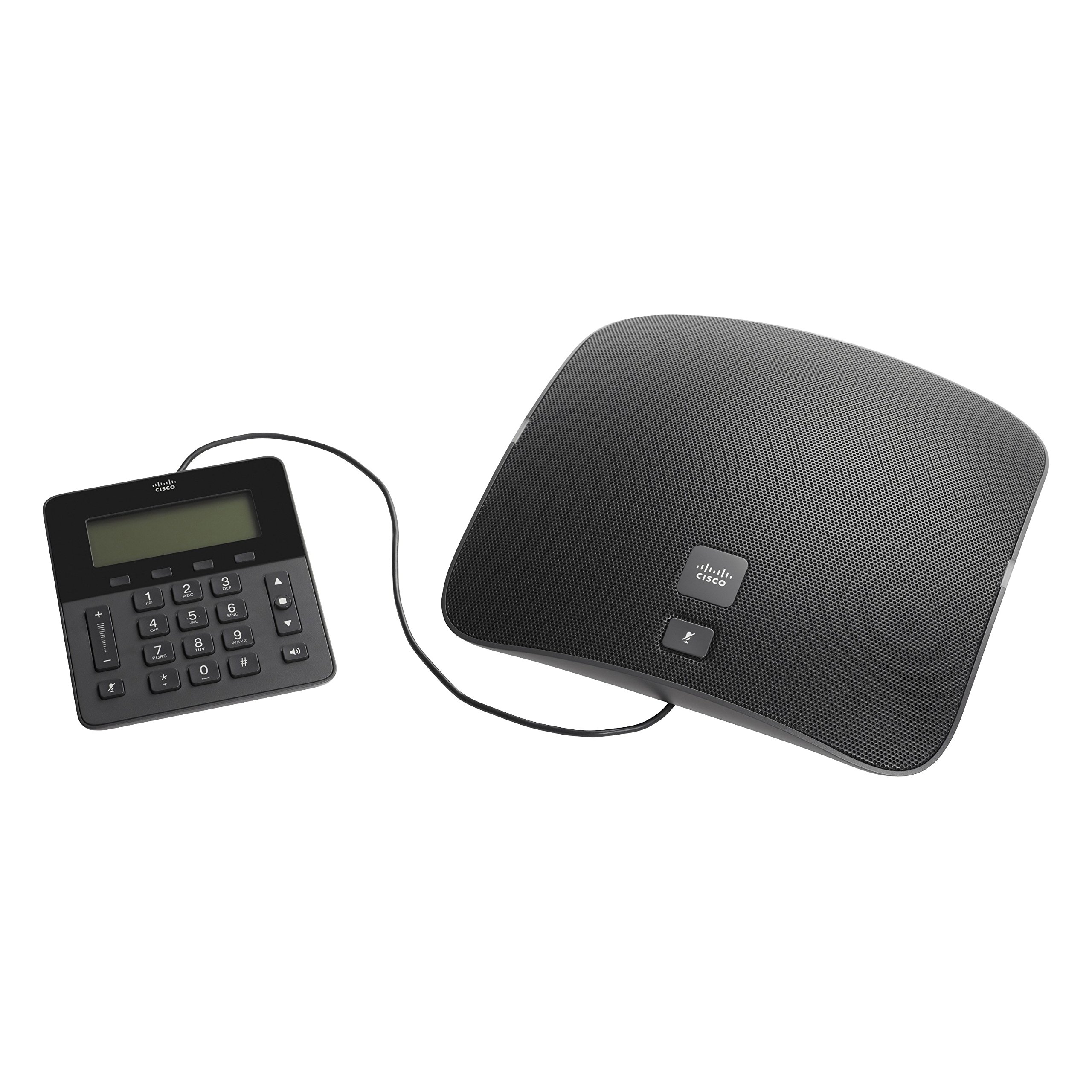
Figure 1: Cisco IP Conference Phone 8831 Overview
This image displays the Cisco IP Conference Phone 8831, consisting of two main parts: the large, oval-shaped speaker unit on the right and the smaller, rectangular control panel on the left. Both components are black and connected by a cable. The speaker unit features a perforated grille for audio output and a Cisco logo with a mute button. The control panel includes a digital display, a numeric keypad, navigation buttons, volume controls, and a mute button.
4.1. Main Speaker Unit
The main speaker unit houses the primary microphone and speaker components, providing 360-degree audio coverage. It typically includes a mute button and the Cisco branding.
4.2. แผงควบคุม
The detachable control panel features a display screen, a numeric keypad for dialing, navigation buttons, and dedicated buttons for call control (e.g., volume up/down, mute, speakerphone). This panel connects to the main unit via a cable, allowing for flexible placement.
5. การตั้งค่าและการติดตั้ง
Follow these steps to set up your Cisco IP Conference Phone 8831:
- แกะ: นำส่วนประกอบทั้งหมดออกจากบรรจุภัณฑ์อย่างระมัดระวัง
- เชื่อมต่อแผงควบคุม: Connect the control panel to the main speaker unit using the provided cable.
- การเชื่อมต่อไฟฟ้า:
- If using Power over Ethernet (PoE), connect an Ethernet cable from a PoE-enabled switch or injector to the Ethernet port on the main unit.
- If using an AC power adapter, connect the adapter to the main unit and then plug it into a power outlet.
- การเชื่อมต่อเครือข่าย: Connect an Ethernet cable from your network to the Ethernet port on the main unit.
- การบูตครั้งแรก: The phone will power on and begin its boot-up sequence. This may take a few minutes as it connects to your network and registers with your Cisco Unified Communications Manager or SIP-based VoIP service.
- การกำหนดค่า: Once registered, the phone is ready for use. Additional configuration may be required by your system administrator.
6. การทำงานพื้นฐาน
6.1. การโทรออก
- Lift the control panel (if applicable) or ensure the speakerphone is active.
- กดหมายเลขที่ต้องการโดยใช้แป้นตัวเลข
- กดปุ่ม เรียก button (or equivalent on-screen prompt).
6.2. รับสาย
เมื่อโทรศัพท์ดัง ให้กดปุ่ม คำตอบ button (or equivalent on-screen prompt) to accept the call.
6.3. ปรับระดับเสียง
ใช้ เพิ่มระดับเสียง (+) และ ลดเสียงลง (-) buttons on the control panel to adjust the speaker volume during a call or the ringer volume when idle.
6.4. การปิดเสียงไมโครโฟน
กดปุ่ม ปิดเสียง button (microphone icon) on either the main speaker unit or the control panel to mute your microphone. Press it again to unmute.
6.5. การวางสาย
กดปุ่ม วางสาย button (or equivalent on-screen prompt) to terminate an active call.
7. การดูแลรักษา
To ensure the longevity and optimal performance of your conference phone:
- การทำความสะอาด: Use a soft, dry, lint-free cloth to clean the exterior surfaces. Do not use liquid cleaners, aerosols, or solvents.
- พื้นที่จัดเก็บ: เก็บโทรศัพท์ไว้ในที่แห้งและเย็น หลีกเลี่ยงแสงแดดโดยตรงและอุณหภูมิที่สูงหรือต่ำเกินไป
- การจัดการ: โปรดใช้งานอุปกรณ์ด้วยความระมัดระวังเพื่อหลีกเลี่ยงการตกหล่นหรือความเสียหายทางกายภาพ
8 การแก้ไขปัญหา
If you encounter issues with your Cisco IP Conference Phone 8831, refer to the following common solutions:
| ปัญหา | วิธีแก้ปัญหาที่เป็นไปได้ |
|---|---|
| โทรศัพท์ไม่สามารถเปิดเครื่องได้ |
|
| ไม่มีสัญญาณโทรศัพท์หรือไม่สามารถโทรออกได้ |
|
| คุณภาพเสียงไม่ดี |
|
| Control panel display is blank. |
|
9. ข้อมูลจำเพาะทางเทคนิค
| คุณสมบัติ | รายละเอียด |
|---|---|
| หมายเลขรุ่น | CP-8831-K9-RF |
| ยี่ห้อ | ซิสโก้ |
| น้ำหนักสินค้า | 5.05 ปอนด์ (ประมาณ 2.29 กก.) |
| ขนาดสินค้า | 0.39 x 0.39 x 0.39 นิ้ว (ประมาณ 1 x 1 x 1 ซม.) - Note: These dimensions appear to be placeholder values and may not reflect the actual product size. |
| สี | สีดำ |
| ประเภทโทรศัพท์ | Corded IP Conference Phone |
| แหล่งพลังงาน | Corded Electric (PoE or AC Adapter) |
| อุปกรณ์ที่รองรับ | Cisco Unified Communications Manager, Business Edition, SIP-based VoIP services |
| ความสามารถในการประชุมทางโทรศัพท์ | พื้นฐาน |
| คุณสมบัติด้านเสียง | Full-Duplex Two-Way Wideband (G.722) Hands-Free Speaker |
| พื้นที่ให้บริการ | Up to 1140 square feet (360-degree) |
| ความปลอดภัย | 128K Advanced Encryption Standard (AES) |
| ประเทศต้นกำเนิด | จีน |
| วันที่พร้อมใช้งานครั้งแรก | 22 ตุลาคม 2014 |
10. การรับประกันและการสนับสนุน
10.1. การรับประกันฮาร์ดแวร์แบบจำกัด
This Cisco Remanufactured IP Conference Phone 8831 typically comes with a การรับประกันฮาร์ดแวร์จำกัด 1 ปี. Please refer to your purchase documentation for specific terms and conditions regarding warranty coverage.
10.2. การสนับสนุนด้านเทคนิค
For technical assistance, troubleshooting beyond this manual, or warranty claims, please contact Cisco support or your authorized reseller. You can find more information and support resources on the official Cisco webเว็บไซต์: